
低对比度图像的目标提取
低对比度图像的目标提取
提问于 2015-03-16 07:07:12
我有一个非常低对比度的图像,我想从中提取一个文本对象。由于它的对比度低,我尝试了几种方法,但没有一种方法给我一个令人满意的结果。我使用watershed提取文本对象,但由于对比度差,提取不成功。
我的watershed程序是:
I_cropped=imread(strcat('C:\Id\',currentfilename));
I_cropped = rgb2gray(I_cropped);
I_eq = histeq(I_cropped);
figure,imshow(I_eq);
bw = im2bw(I_eq, graythresh(I_eq));
bw2 = imfill(bw,'holes');
bw3 = imopen(bw2, ones(5,5));
bw4 = bwareaopen(bw3, 40);
bw = im2bw(I_eq, graythresh(I_eq));
figure,imshow(bw);
mask_em = imextendedmax(I_eq, 30);
mask_em = imclose(mask_em, ones(5,5));
mask_em = imfill(mask_em, 'holes');
mask_em = bwareaopen(mask_em, 40);
figure,imshow(mask_em);
I_eq_c = imcomplement(I_eq);
figure,imshow(I_eq_c);
I_mod = imimposemin(I_eq_c, ~bw4 | mask_em);
figure,imshow(I_mod);
L = watershed(I_mod);
figure,imshow(label2rgb(L));我使用laplacian滤波和增强边缘,但它是无效的。
我的目标是提取文本对象。对于这样低对比度的图像,我应该尝试什么方法呢?
附图如下:

回答 1
Stack Overflow用户
回答已采纳
发布于 2015-03-16 12:10:44
这是一种方法。
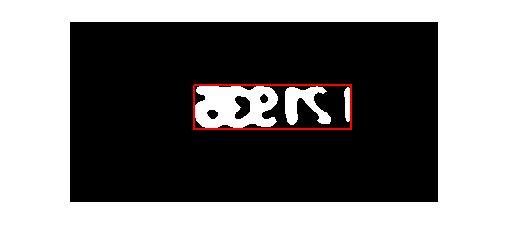
首先在图像上应用一个具有大内核的中值滤波器来去除异常值,然后应用一个阈值来转换为二值图像。注意,使用过滤器的内核大小会改变您需要使用的阈值级别。使用它来查看输出的变化。
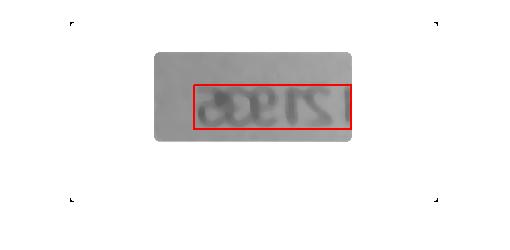
然后倒置图像,应用regionprops检测图像中的对象。然后通过一些数学推导出x和y的原点(定义左上角)以及包围图像中所有字母的大边框的宽度和长度。
以下是代码:
clear
clc

close all

Im = rgb2gray(imread('Imtext.png'));

%// Apply median filter to remove outliers
Im = medfilt2(Im,[9 9]);

%// Clear borders and apply threshold, then invert image
ImBW = imclearborder(~(im2bw(Im,.55)));

%// Find bounding boxes to delineate text regions.
S = regionprops(ImBW,'BoundingBox');

%// Concatenate all bounding boxes and obtain x,y, width and length of big
%// bounding box enclosing everything
bb = cat(1,S.BoundingBox);

LargeBB_x = min(bb(:,1));
LargeBB_y = min(bb(:,2));

LargeBB_height = max(bb(:,4));

%// Find last column in which pixel value is 1; that's the end
%// of the bounding box.
[~,ic] = find(ImBW==1);
MaxCol = max(ic(:));

LargeBB_width = MaxCol-LargeBB_x;

%// Display boxes
imshow(ImBW)
hold on
    rectangle('Position',[LargeBB_x LargeBB_y LargeBB_width LargeBB_height],'EdgeColor','r','LineWidth',2)

hold off
以及产出:
或者使用原始图像:
页面原文内容由Stack Overflow提供。腾讯云小微IT领域专用引擎提供翻译支持
原文链接:
https://stackoverflow.com/questions/29071288
复制相关文章
相似问题
腾讯云开发者

Copyright © 2013 - 2026 Tencent Cloud. All Rights Reserved. 腾讯云 版权所有
深圳市腾讯计算机系统有限公司 ICP备案/许可证号:粤B2-20090059  粤公网安备44030502008569号
腾讯云计算(北京)有限责任公司 京ICP证150476号 | 京ICP备11018762号