
ListView,它显示底部有一个总数的数字
我有一个ListView,我在其中显示一些细节,包括价格。我需要在ListView底部显示总金额。到目前为止,我尝试用一个ListView来显示细节,用一个单行的表布局来显示总数,问题是我无法让它们对齐。
你知道我能得到像这样的结果吗:
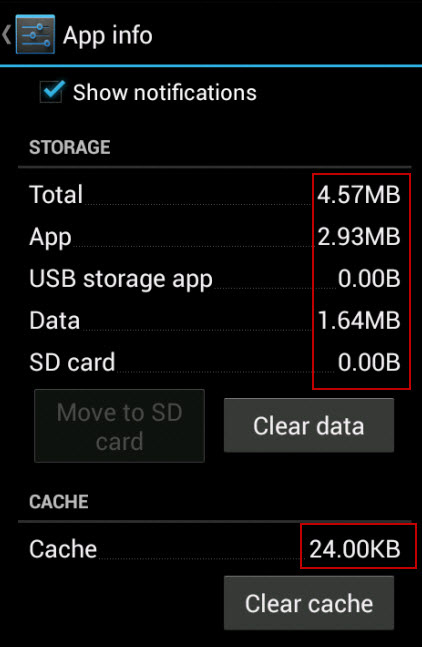
我知道"Cache“的金额不是,但想法是一样的。所有这些行显示它们的数量正确地对齐,标签和数量之间的空间是充满了点,这是我想要达到的结果,所以如果你能帮忙,我将非常感激。
这是我目前在活动中使用的布局
<?xml version="1.0" encoding="utf-8"?>
<LinearLayout xmlns:android="http://schemas.android.com/apk/res/android"
    android:layout_width="match_parent"
    android:layout_height="match_parent"
    android:orientation="vertical" >

    <LinearLayout
        android:layout_width="fill_parent"
        android:layout_height="0dp"
        android:layout_weight="1"
        android:orientation="vertical" >

        <ListView
            android:id="@+id/detailsListView"
            android:layout_width="match_parent"
            android:layout_height="fill_parent"
            android:dividerHeight="1dp" >
        </ListView>
    </LinearLayout>

    <TableLayout
        android:layout_width="match_parent"
        android:layout_height="wrap_content"
        android:orientation="vertical"
        android:stretchColumns="0,1" >
        <TableRow android:padding="1dp" >

            <TextView
                style="@style/Control.Label.Large.Stretched"
                android:layout_weight="1"
                android:text="@string/total" />

            <TextView
                android:id="@+id/totalSumTextView"
                style="@style/Control.TextView.Large.Stretched"
                android:layout_weight="1"/>
        </TableRow>

        <TableRow android:id="@+id/tableRow3" />
    </TableLayout>
</LinearLayout>
A这是ListView中每个项的布局:
<?xml version="1.0" encoding="utf-8"?>
<LinearLayout xmlns:android="http://schemas.android.com/apk/res/android"
    android:layout_width="match_parent"
    android:layout_height="match_parent"
    android:orientation="vertical" >

    <TableLayout
        android:layout_width="match_parent"
        android:layout_height="wrap_content"
        android:orientation="vertical"
        android:stretchColumns="0,1" >

        <TableRow android:padding="1dp" >

            <TextView
                style="@style/Control.Label.Small.Stretched"
                android:layout_weight="1"
                android:text="@string/item_quantity" />

            <TextView
                android:id="@+id/itemQuantityTextView"
                style="@style/Control.TextView.Small.Stretched"
                android:layout_weight="1" />
        </TableRow>

        <TableRow android:padding="1dp" >

            <TextView
                style="@style/Control.Label.Small.Stretched"
                android:layout_weight="1"
                android:text="@string/item_unit_price" />

            <TextView
                android:id="@+id/itemUnitPriceTextView"
                style="@style/Control.TextView.Small.Stretched"
                android:layout_weight="1" />
        </TableRow>

        <TableRow android:padding="1dp" >

            <TextView
                style="@style/Control.Label.Small.Stretched"
                android:layout_weight="1"
                android:text="@string/item_total" />

            <TextView
                android:id="@+id/itemTotalTextView"
                style="@style/Control.TextView.Small.Stretched"
                android:layout_weight="1" />
        </TableRow>
    </TableLayout>

</LinearLayout>
每一项都应如下所示:
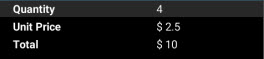
应该显示在ListView下面的这些总数之和
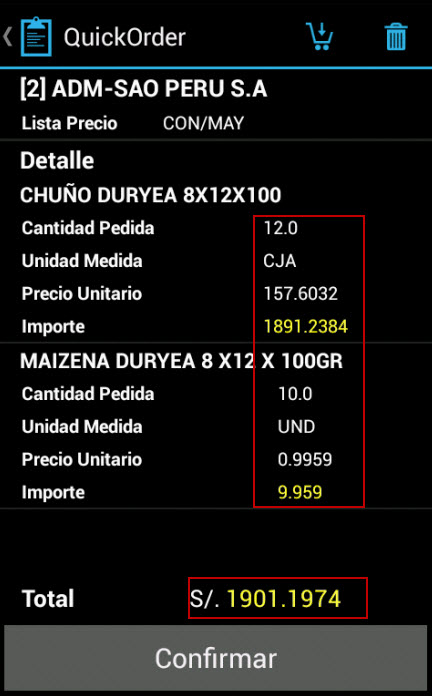
这张照片是我想要做的。这是西班牙语的,但它能让你更清楚地了解我的意思。如您所见,ListView下面的行与上面的值不对齐。
回答 3
Stack Overflow用户
发布于 2014-10-07 18:44:24
我在你的截图中看到了这些问题:
- 列本身的对齐方式不同。
- 列中的文本对齐以中心对齐,而不是右对齐。
- 您可能希望在数字输出中使用固定的小数点数。
- 一行圆点
1)柱对齐
我认为这与使用TableLayout有关。正如您在前面的示例中所看到的,我更喜欢使用RelativeLayout。当你掌握了它的诀窍,你就会发现它是非常强大的。
我将使用下面的示例作为单个行的起点,并在使用layout_below标记将它们定位到上面的行之后再生成两个类似的行。
像这样(长)的例子:
<?xml version="1.0" encoding="utf-8"?>
<RelativeLayout xmlns:android="http://schemas.android.com/apk/res/android"
    xmlns:tools="http://schemas.android.com/tools"
    android:layout_width="match_parent"
    android:layout_height="wrap_content"
    android:padding="16dp" >

    <!-- ROW 1 -->

    <TextView
        android:id="@+id/tvLabel1"
        android:layout_width="wrap_content"
        android:layout_height="wrap_content"
        android:layout_alignParentLeft="true"
        android:layout_alignParentTop="true"
        android:text="Cantidad Pedida" />

    <TextView
        android:id="@+id/tvSizeMb1"
        android:layout_width="wrap_content"
        android:layout_height="wrap_content"
        android:layout_alignBaseline="@+id/tvLabel1"
        android:layout_alignParentRight="true"
        android:text="12.0" />

    <!-- ROW 2 -->

    <TextView
        android:id="@+id/tvLabel2"
        android:layout_width="wrap_content"
        android:layout_height="wrap_content"
        android:layout_alignParentLeft="true"
        android:layout_below="@+id/tvLabel1"
        android:text="Unidad Medida" />

    <TextView
        android:id="@+id/tvSizeMb2"
        android:layout_width="wrap_content"
        android:layout_height="wrap_content"
        android:layout_alignBaseline="@+id/tvLabel2"
        android:layout_alignParentRight="true"
        android:text="CJA" />

    <!-- ROW 3 -->

    <TextView
        android:id="@+id/tvLabel3"
        android:layout_width="wrap_content"
        android:layout_height="wrap_content"
        android:layout_alignParentLeft="true"
        android:layout_below="@+id/tvLabel2"
        android:text="Precio Unitario" />

    <TextView
        android:id="@+id/tvSizeMb3"
        android:layout_width="wrap_content"
        android:layout_height="wrap_content"
        android:layout_alignBaseline="@+id/tvLabel3"
        android:layout_alignParentRight="true"
        android:text="157.6036" />

</RelativeLayout>
2)右对齐列中的文本。
由于使用了TextView标记,您的layout_weight="1"项正集中在列中。如果您像上面所描述的那样使用RelativeLayout,文本视图本身将被设置为右侧。
3)十进制数的固定格式
要正确地对齐数字,使用固定的小数点数是很有帮助的。在您的例子中,您可能需要4位小数点。
在设置值时,可能会执行以下操作:
myTextView.setText(String.valueOf(myNumber);相反,使用String.format()方法设置小数位数:
myTextView.setText(String.format("%.4f", myNumber);有关这方面的更多信息,请查看这篇文章:
4)文本字段之间的圆点行
我希望能够使用使用stroke风格的XML绘图,但遇到了一些奇怪的问题。你可能想玩一下这个概念。
然而,我过去多次做的事情与ArianJM所建议的类似。
<View
    android:layout_width="0dp"
    android:layout_height="1px"
    android:layout_alignBaseline="@+id/tvLabel1"
    android:layout_toLeftOf="@+id/tvSizeMb1"
    android:layout_toRightOf="@+id/tvLabel1"
    android:background="#333"
tools:ignore="PxUsage" />注意高度属性使用px而不是dp。这会创建一个更清晰的图像,并且通过使用1px值,这条线不是很强。您可以通过对线条使用稍微透明的颜色来改进这一点。
先前的回答
您可以使用基本的ListView来显示您的项目。list视图可以对每个项使用自定义XML布局,以您希望的方式对齐文本。
例如,下面是一个RelativeLayout,它以您希望对齐的方式对两个文本字段:
<?xml version="1.0" encoding="utf-8"?>
<RelativeLayout xmlns:android="http://schemas.android.com/apk/res/android"
    xmlns:tools="http://schemas.android.com/tools"
    android:layout_width="match_parent"
    android:layout_height="wrap_content"
    android:padding="16dp" >

    <TextView
        android:id="@+id/tvLabel"
        android:layout_width="wrap_content"
        android:layout_height="wrap_content"
        android:layout_alignParentLeft="true"
        android:layout_centerVertical="true"
        android:text="Total" />

    <TextView
        android:id="@+id/tvSizeMb"
        android:layout_width="wrap_content"
        android:layout_height="wrap_content"
        android:layout_alignParentRight="true"
        android:layout_centerVertical="true"
        android:text="4.57MB" />

</RelativeLayout>
然后在列表视图下面,您将希望显示您的“缓存”行。对此使用相同的布局,项目将正确对齐。
Stack Overflow用户
发布于 2014-10-07 18:36:01
我认为,为了您想要做的事情,您应该为您的ListView定制一个布局,并且在这个布局中使一个TextView元素对齐到右边。
您的XML将包含如下内容:
<RelativeLayout xmlns:android="http://schemas.android.com/apk/res/android"
    android:layout_width="match_parent" android:layout_height="match_parent">
    <TextView
        android:id="@+id/price"
        android:layout_width="wrap_content"
        android:layout_height="wrap_content"
        android:layout_alignParentRight="true"
        android:text="14.99$" />
</RelativeLayout>将TextView对齐到右边,添加您想要的任何内容,然后对ListView中的每个元素使用布局,然后所有的TextViews都应该对齐。
android:layout_alignParentRight="true"属性使TextView (或任何带有该属性的视图)对齐(在其父属性内)。
编辑
对于点,您可以使用类似于这个答案的东西:https://stackoverflow.com/a/10282253/3290971
完整的布局文件应该如下所示:
<?xml version="1.0" encoding="utf-8"?>

<RelativeLayout xmlns:android="http://schemas.android.com/apk/res/android"
    android:layout_width="match_parent" android:layout_height="wrap_content">

    <TextView
        android:id="@+id/item"
        android:layout_width="wrap_content"
        android:layout_height="wrap_content"
        android:text="Item"
        android:textSize="20dp" />

    <View
        android:layout_width="fill_parent"
        android:layout_height="1dp"
        android:layout_toRightOf="@id/item"
        android:layout_toLeftOf="@+id/price"
        android:layout_alignBaseline="@+id/price"
        android:background="@android:color/darker_gray" />

    <TextView
        android:id="@+id/price"
        android:layout_width="wrap_content"
        android:layout_height="wrap_content"
        android:layout_alignParentRight="true"
        android:text="14.99$"
        android:textSize="20dp" />
</RelativeLayout>
其结果将是:
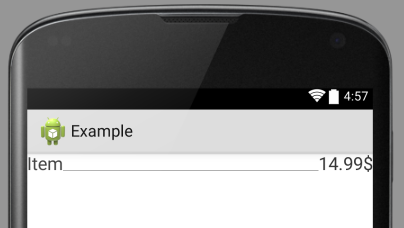
不是真正的点,但这是一个开始,希望这会有所帮助。
Stack Overflow用户
发布于 2014-10-11 14:32:27
@axel这是我为了得到虚线所做的事情:
在可绘制文件夹中创建一个xml文件并命名为dotted.xml。复制并粘贴以下代码:
<?xml version="1.0" encoding="utf-8"?>
<shape xmlns:android="http://schemas.android.com/apk/res/android"
    android:shape="line" >
    <stroke
        android:dashGap="3dp"
        android:dashWidth="3dp"
        android:color="@android:color/darker_gray" />
</shape>在布局中使用background属性调用形状
 <View
        android:layout_width="fill_parent"
        android:layout_height="1dp"
        android:layout_toRightOf="@id/item"
        android:layout_toLeftOf="@+id/price"
        android:layout_alignBaseline="@+id/price"
android:background="@drawable/dotted" />如果上面的代码没有显示虚线,请将其添加到View中:
android:layerType="software"希望它能帮上忙
https://stackoverflow.com/questions/26242337
复制相似问题
腾讯云开发者

Copyright © 2013 - 2026 Tencent Cloud. All Rights Reserved. 腾讯云 版权所有
深圳市腾讯计算机系统有限公司 ICP备案/许可证号:粤B2-20090059  粤公网安备44030502008569号
腾讯云计算(北京)有限责任公司 京ICP证150476号 | 京ICP备11018762号