
如何在HeaderDoc中添加多行注释
如何在HeaderDoc中添加多行注释
提问于 2014-07-27 08:16:15
这是我的密码
/**
 *    In touchesBegan: it is considered if it was succesfull click. Automatically changes on/off images
 */
@interface WOC_OnOffImageButton : SKSpriteNode当我在弹出的WOC_OnOffImageButton中点击Description时,我得到的都是In touchesBegan: it is considered if it was succesfull click. Automatically changes on/off images。
我希望在... click. Automatically...之间有新的行,因为它更容易阅读。
问题
这是可行的吗?如果是的话,怎么做呢?
回答 1
Stack Overflow用户
回答已采纳
发布于 2014-07-27 08:51:05
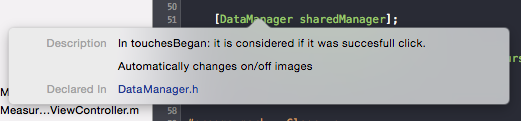
是的,AppleDoc支持多行注释。下面是你如何使用它们的方法:
 /**
 *    In touchesBegan: it is considered if it was succesfull click.
 *
 *    Automatically changes on/off images
*/关键是在新的行上加上星号。您可能需要保存(Cmd+S)和/或清理(Cmd+Shift+K)您的项目才能在弹出窗口中看到结果。
页面原文内容由Stack Overflow提供。腾讯云小微IT领域专用引擎提供翻译支持
原文链接:
https://stackoverflow.com/questions/24979166
复制相关文章
相似问题
腾讯云开发者

Copyright © 2013 - 2026 Tencent Cloud. All Rights Reserved. 腾讯云 版权所有
深圳市腾讯计算机系统有限公司 ICP备案/许可证号:粤B2-20090059  粤公网安备44030502008569号
腾讯云计算(北京)有限责任公司 京ICP证150476号 | 京ICP备11018762号