
梯度背景在iOS 8中工作,而iOS 7不工作。
梯度背景在iOS 8中工作,而iOS 7不工作。
提问于 2014-06-29 17:28:32
因此,我正在构建一个以表视图为中心的应用程序,并试图为每个表视图单元格包括一个梯度背景,使用以下代码:
CAGradientLayer *gradient = [CAGradientLayer layer];
gradient.frame = cell.bounds;
gradient.colors = [NSArray arrayWithObjects:(id)[[UIColor colorWithRed:0.94 green:0.84 blue:0.49 alpha:1.0]CGColor], (id)[[UIColor colorWithRed:0.93 green:0.86 blue:0.61 alpha:1.0]CGColor], nil];
[cell.layer insertSublayer:gradient atIndex:0];
cell.textLabel.backgroundColor = [UIColor clearColor];
cell.textLabel.textColor = [UIColor colorWithRed:0.25 green:0.51 blue:0.00 alpha:1.0];
现在,在运行iOS 8(使用Xcode 6 Beta 2)的模拟器中,我得到了以下结果:
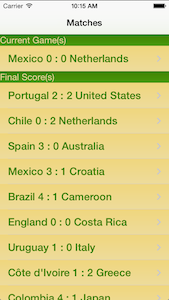
但是在我的设备上(很抱歉,我的锁按钮坏了……),运行iOS 7,它看起来如下:
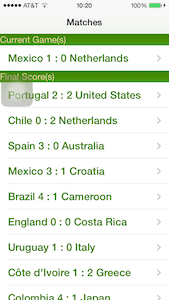
在主视图背景中,我在整个应用程序中的渐变都是工作的,只是表格单元格视图中的渐变不起作用。正如您在这些屏幕截图中所看到的,节标题视图也有渐变,但是在这两个版本中都是这样的。在iOS 7中,我需要寻找一个特定的标志来实现这个功能吗?
编辑:这是在cellForRowAtIndexPath中调用的。
- (UITableViewCell *)tableView:(UITableView *)tableView cellForRowAtIndexPath:(NSIndexPath *)indexPath
{
UITableViewCell *cell = [tableView dequeueReusableCellWithIdentifier:@"Cell" forIndexPath:indexPath];

CAGradientLayer *gradient = [CAGradientLayer layer];
gradient.frame = cell.bounds;
gradient.colors = [NSArray arrayWithObjects:(id)[[UIColor colorWithRed:0.94 green:0.84 blue:0.49 alpha:1.0]CGColor], (id)[[UIColor colorWithRed:0.93 green:0.86 blue:0.61 alpha:1.0]CGColor], nil];
[cell.layer insertSublayer:gradient atIndex:0];
cell.textLabel.backgroundColor = [UIColor clearColor];
cell.textLabel.textColor = [UIColor colorWithRed:0.25 green:0.51 blue:0.00 alpha:1.0];

NSDictionary *match;
if(indexPath.section == 0) {
    match = [_inprogressMatches objectAtIndex:indexPath.row];
} else if(indexPath.section == 1) {
    match = [_finalMatches objectAtIndex:indexPath.row];
} else {
    match = [_pregameMatches objectAtIndex:indexPath.row];
}

NSDictionary *homeTeam = [match objectForKey:@"homeTeamId"];
NSDictionary *awayTeam = [match objectForKey:@"awayTeamId"];
cell.textLabel.text = [NSString stringWithFormat:@"%@ %@ : %@ %@",[awayTeam objectForKey:@"name"] , [match objectForKey:@"awayScore"], [match objectForKey:@"homeScore"], [homeTeam objectForKey:@"name"]];

return cell;
}回答 1
Stack Overflow用户
回答已采纳
发布于 2014-06-29 17:36:10
若要在单元格的背景中放置渐变,请不要扰乱其层(在任何情况下都是错误的,因为您没有检查重用单元格中是否存在该层)。
给单元一个backgroundView,它的层是梯度,或者有梯度作为子层。这就是backgroundView的作用所在。
页面原文内容由Stack Overflow提供。腾讯云小微IT领域专用引擎提供翻译支持
原文链接:
https://stackoverflow.com/questions/24478509
复制相关文章
相似问题
腾讯云开发者

Copyright © 2013 - 2026 Tencent Cloud. All Rights Reserved. 腾讯云 版权所有
深圳市腾讯计算机系统有限公司 ICP备案/许可证号:粤B2-20090059  粤公网安备44030502008569号
腾讯云计算(北京)有限责任公司 京ICP证150476号 | 京ICP备11018762号