
Android:缩放几个按钮以显示屏幕大小
Android:缩放几个按钮以显示屏幕大小
提问于 2014-06-12 07:49:13
我有麻烦了。在我的应用程序中,我有一些(3-4)按钮,它们希望自动缩放到全屏幕大小。(不只是一个按钮,而是所有的一起)。目前我正在使用LinearLayout作为我的应用程序。能用它来做这个吗?对不起我的英语不好。
问候尼尔斯
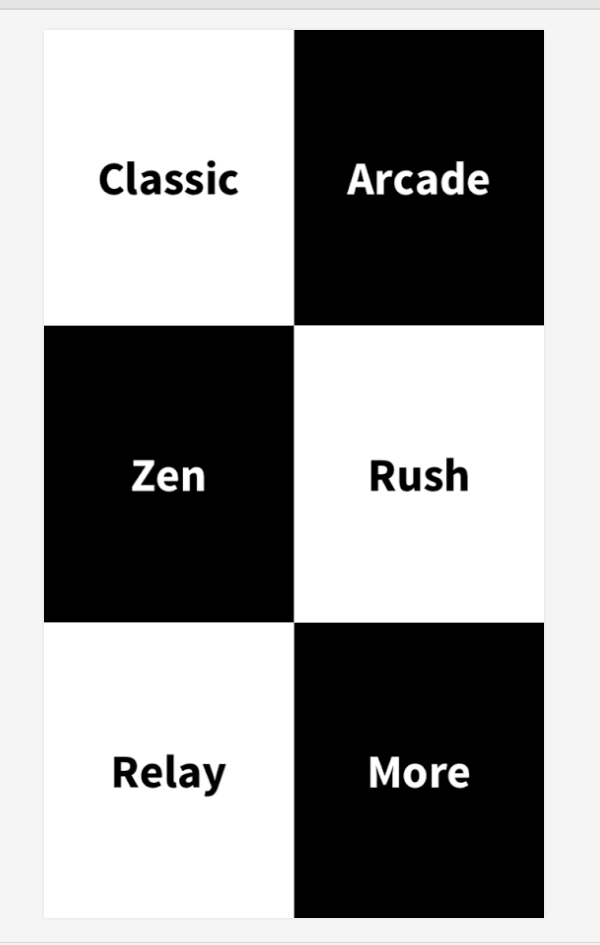
游戏“不要点击白色”的屏幕就像我喜欢的那样:
回答 5
Stack Overflow用户
回答已采纳
发布于 2014-06-12 07:53:52
你可以使用重量的概念。你的按钮在所有屏幕上都是一样的。
首先,将屏幕分成两个水平部分,宽度、重量各50,高度匹配。然后在每个重量为33.33的部件上添加3个按钮如下:
<?xml version="1.0" encoding="utf-8"?>
<LinearLayout xmlns:android="http://schemas.android.com/apk/res/android"
    android:layout_width="match_parent"
    android:layout_height="match_parent"
    android:orientation="horizontal" >

    <LinearLayout
        android:layout_width="0dp"
        android:layout_weight="50"
        android:layout_height="match_parent"
        android:orientation="vertical" >

        <Button
            android:id="@+id/button1"
            android:layout_width="match_parent"
            android:layout_height="0dp"
            android:layout_weight="33.33"
            android:text="Button" />

        <Button
            android:id="@+id/button2"
             android:layout_width="match_parent"
            android:layout_height="0dp"
            android:layout_weight="33.33"
            android:text="Button" />

        <Button
            android:id="@+id/button3"
             android:layout_width="match_parent"
            android:layout_height="0dp"
            android:layout_weight="33.33"
            android:text="Button" />

    </LinearLayout>

    <LinearLayout
        android:layout_width="0dp"
        android:layout_weight="50"
        android:layout_height="match_parent"
        android:orientation="vertical" >

        <Button
            android:id="@+id/button4"
             android:layout_width="match_parent"
            android:layout_height="0dp"
            android:layout_weight="33.33"
            android:text="Button" />

        <Button
            android:id="@+id/button5"
             android:layout_width="match_parent"
            android:layout_height="0dp"
            android:layout_weight="33.33"
            android:text="Button" />

        <Button
            android:id="@+id/button6"
             android:layout_width="match_parent"
            android:layout_height="0dp"
            android:layout_weight="33.33"
            android:text="Button" />

    </LinearLayout>

</LinearLayout>Stack Overflow用户
发布于 2014-06-12 07:54:36
丑陋的解决方案将是使用3加权LinearLayouts (相同的权重)垂直,而使用加权水平LinearLayout实现相同的效果水平。
或者您可以使用GridView以更优雅的方式实现类似的效果:http://developer.android.com/guide/topics/ui/layout/gridview.html
Stack Overflow用户
发布于 2014-06-12 07:56:13
将按钮的宽度设置为match_parent。然后,它将规模,以适应父母。
页面原文内容由Stack Overflow提供。腾讯云小微IT领域专用引擎提供翻译支持
原文链接:
https://stackoverflow.com/questions/24179088
复制相关文章
相似问题
腾讯云开发者

Copyright © 2013 - 2026 Tencent Cloud. All Rights Reserved. 腾讯云 版权所有
深圳市腾讯计算机系统有限公司 ICP备案/许可证号:粤B2-20090059  粤公网安备44030502008569号
腾讯云计算(北京)有限责任公司 京ICP证150476号 | 京ICP备11018762号