
如何使用SwipeRefreshLayout?
背景
谷歌最近发布了对其支持库的更新,它现在有了一个新的"SwipeRefreshLayout“视图。
该视图允许包装另一个视图,同时支持向下滑动以执行刷新操作。
截图:
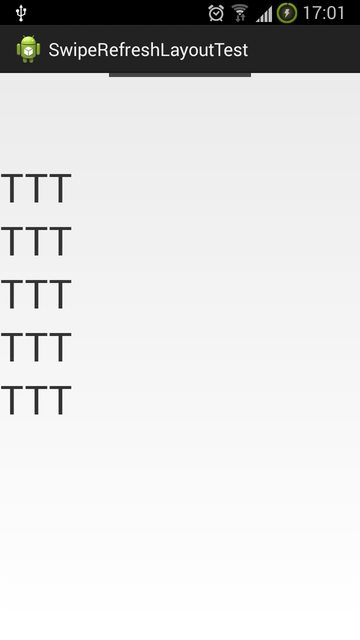
问题所在
Google还没有提供一个示例(至少还没有我能找到的),所以我自己尝试使用它。
一开始,我每次刷卡都会崩溃,但后来我发现这是因为我没有为它提供"OnRefreshListener“。
但我仍然不知道如何使用它,更不用说定制它了
下面是布局文件的XML:
<android.support.v4.widget.SwipeRefreshLayout xmlns:android="http://schemas.android.com/apk/res/android"
    xmlns:tools="http://schemas.android.com/tools"
    android:id="@+id/container"
    android:layout_width="match_parent"
    android:layout_height="match_parent"
    tools:context="com.example.swiperefreshlayouttest.MainActivity"
    tools:ignore="MergeRootFrame" >

    <ScrollView
        android:layout_width="match_parent"
        android:layout_height="wrap_content" >

        <LinearLayout
            android:layout_width="match_parent"
            android:layout_height="wrap_content"
            android:orientation="vertical" >

            <TextView
                android:layout_width="match_parent"
                android:layout_height="wrap_content"
                android:text="TTT"
                android:textSize="40sp" />

            <TextView
                android:layout_width="match_parent"
                android:layout_height="wrap_content"
                android:text="TTT"
                android:textSize="40sp" />

            <TextView
                android:layout_width="match_parent"
                android:layout_height="wrap_content"
                android:text="TTT"
                android:textSize="40sp" />

            <TextView
                android:layout_width="match_parent"
                android:layout_height="wrap_content"
                android:text="TTT"
                android:textSize="40sp" />

            <TextView
                android:layout_width="match_parent"
                android:layout_height="wrap_content"
                android:text="TTT"
                android:textSize="40sp" />
        </LinearLayout>
    </ScrollView>

</android.support.v4.widget.SwipeRefreshLayout>
代码,尽管它根本不做任何特别的事情:
public class MainActivity extends ActionBarActivity
  {
  @Override
  protected void onCreate(final Bundle savedInstanceState)
    {
    super.onCreate(savedInstanceState);
    setContentView(R.layout.activity_main);
    final SwipeRefreshLayout swipeRefreshLayout=(SwipeRefreshLayout)findViewById(R.id.container);
    swipeRefreshLayout.setOnRefreshListener(new OnRefreshListener()
      {
        @Override
        public void onRefresh()
          {
          // do nothing
          }
      });
    }
  }
问题是
使用这个视图的正确方法是什么?
我如何定制它?目前只是一条黑线..。
回答 4
Stack Overflow用户
发布于 2014-04-12 06:15:25
MainActivity.java
public class MainActivity extends ActionBarActivity {
    TextView textView;
    private SwipeRefreshLayout mSwipeRefreshLayout;
    static int count = 0;

@Override
protected void onCreate(Bundle savedInstanceState) {
    super.onCreate(savedInstanceState);
    setContentView(R.layout.activity_main);
    textView = (TextView) findViewById(R.id.scrollTextView);

    // /You will setup the action bar with pull to refresh layout
    mSwipeRefreshLayout = (SwipeRefreshLayout) findViewById(R.id.container);

     mSwipeRefreshLayout.setColorScheme(R.color.blue,
     R.color.green, R.color.orange, R.color.purple);
    mSwipeRefreshLayout.setOnRefreshListener(new OnRefreshListener() {
        @Override
        public void onRefresh() {
            Log.e(getClass().getSimpleName(), "refresh");
            new GetLinks().execute();
        }
    });
}

@Override
public boolean onCreateOptionsMenu(Menu menu) {

    // Inflate the menu; this adds items to the action bar if it is present.
    getMenuInflater().inflate(R.menu.main, menu);
    return true;
}

@Override
public boolean onOptionsItemSelected(MenuItem item) {
    // Handle action bar item clicks here. The action bar will
    // automatically handle clicks on the Home/Up button, so long
    // as you specify a parent activity in AndroidManifest.xml.
    int id = item.getItemId();
    if (id == R.id.action_settings) {
        return true;
    }
    return super.onOptionsItemSelected(item);
}

public class GetLinks extends AsyncTask<Void, Void, Void> {
    @Override
    protected void onPreExecute() {
        super.onPreExecute();

    }

    @Override
    protected Void doInBackground(Void... params) {

        try {
            Thread.sleep(5000);
        } catch (InterruptedException e) {

            e.printStackTrace();

        }
        return null;
    }

    @Override
    protected void onPostExecute(Void result) {
        super.onPostExecute(result);
         //Here you can update the view
        textView.setText(textView.getText().toString()+"--New Content Added" + ++count);

        // Notify swipeRefreshLayout that the refresh has finished
        mSwipeRefreshLayout.setRefreshing(false);
    }

}

}
activity_main.xml
<android.support.v4.widget.SwipeRefreshLayout xmlns:android="http://schemas.android.com/apk/res/android"
    xmlns:tools="http://schemas.android.com/tools"
    android:id="@+id/container"
    android:layout_width="match_parent"
    android:layout_height="match_parent" >

    <ScrollView
        android:layout_width="match_parent"
        android:layout_height="wrap_content" >
            <TextView
                android:layout_width="match_parent"
                android:layout_height="wrap_content"
                android:id="@+id/scrollTextView"
                android:text="TTT"
                android:textSize="40sp" />
    </ScrollView>

</android.support.v4.widget.SwipeRefreshLayout>
colors.xml
<?xml version="1.0" encoding="utf-8"?>
<resources>

    <item name="blue" type="color">#FF33B5E5</item>
    <item name="purple" type="color">#FFAA66CC</item>
    <item name="green" type="color">#FF99CC00</item>
    <item name="orange" type="color">#FFFFBB33</item>

</resources>Stack Overflow用户
发布于 2019-08-17 15:52:36
SwipeRefreshLayout与Kotlin
Xml文件代码
 <androidx.swiperefreshlayout.widget.SwipeRefreshLayout
        android:layout_width="0dp"
        android:layout_height="0dp" app:layout_constraintTop_toTopOf="parent"
        android:layout_marginTop="90dp" app:layout_constraintStart_toStartOf="parent"
        app:layout_constraintBottom_toBottomOf="parent"
        android:layout_marginBottom="93dp" app:layout_constraintEnd_toEndOf="parent"
        android:id="@+id/swipe_refresh_layout"
>
    <androidx.recyclerview.widget.RecyclerView
            android:layout_width="0dp"
            android:layout_height="0dp" app:layout_constraintTop_toTopOf="parent"
            android:layout_marginTop="90dp" app:layout_constraintStart_toStartOf="parent"
            app:layout_constraintBottom_toBottomOf="parent"
            android:layout_marginBottom="93dp" app:layout_constraintEnd_toEndOf="parent"
            android:id="@+id/recyclerView"
    />
</androidx.swiperefreshlayout.widget.SwipeRefreshLayout>
活动代码
在oncreate方法上面声明以下代码
var mSwipeRefreshLayout: SwipeRefreshLayout? = null在setContentView行之后,在oncreate方法中声明以下代码
mSwipeRefreshLayout= findViewById<SwipeRefreshLayout>(R.id.swipe_refresh_layout)
mSwipeRefreshLayout!!.setOnRefreshListener {
   //API Calls
}
关于成功的API调用或失败API调用
mSwipeRefreshLayout!!.isRefreshing = falseStack Overflow用户
发布于 2014-10-16 04:18:38
您可以简单地遵循以下方法(我正在使用可扩展列表上的旋转输出) Test.xml
  <android.support.v4.widget.SwipeRefreshLayout
        android:id="@+id/swipe2"
        android:layout_width="fill_parent"
        android:layout_height="fill_parent"
        android:layout_below="@id/RelativeTop"
        android:background="@drawable/listbg" >

        <ExpandableListView
            android:id="@+id/lvExp"
            android:layout_width="fill_parent"
            android:layout_height="fill_parent"
            android:cacheColorHint="@android:color/transparent"
            android:groupIndicator="@null"
            android:listSelector="@android:color/white" />
    </android.support.v4.widget.SwipeRefreshLayout>
ListHeader.xml
    <?xml version="1.0" encoding="utf-8"?>
    <LinearLayout xmlns:android="http://schemas.android.com/apk/res/android"
         android:layout_width="fill_parent"
         android:layout_height="wrap_content"
         android:background="@drawable/sectionbg"
         android:orientation="horizontal"
         android:padding="8dp" >

<ImageView
    android:id="@+id/imageView1"
    android:layout_width="wrap_content"
    android:layout_height="wrap_content"
    android:layout_gravity="center_vertical"
    android:contentDescription="@string/contentdescription"
    android:src="@drawable/expandbtn" />

<TextView
    android:id="@+id/lblListHeader"
    android:layout_width="fill_parent"
    android:layout_height="wrap_content"
    android:layout_gravity="center_vertical"
    android:layout_marginLeft="3dp"
    android:text="this is test"
    android:textColor="@android:color/white"
    android:textSize="17sp" />
ChildItem.xml
<?xml version="1.0" encoding="utf-8"?>
<RelativeLayout xmlns:android="http://schemas.android.com/apk/res/android"
android:layout_width="fill_parent"
android:layout_height="55dp"
android:background="@color/GrayProductBackground" >

<TextView
    android:id="@+id/lblListItem"
    android:layout_width="match_parent"
    android:layout_height="50dp"
    android:layout_marginLeft="35dp"
    android:layout_marginRight="20dp"
    android:gravity="center_vertical"
    android:paddingBottom="5dp"
    android:textColor="@color/GrayTextProduct"
    android:textSize="17sp" />

<ImageView
    android:layout_width="wrap_content"
    android:layout_height="wrap_content"
    android:layout_alignParentRight="true"
    android:layout_alignRight="@+id/lblListItem"
    android:layout_centerVertical="true"
    android:layout_marginLeft="10dp"
    android:layout_marginRight="10dp"
    android:contentDescription="@string/arrowdescription"
    android:gravity="center"
    android:src="@drawable/navigationarrow" />

<RelativeLayout
    android:layout_width="fill_parent"
    android:layout_height="1dp"
    android:layout_alignParentBottom="true"
    android:background="@android:color/white" >
</RelativeLayout>
所用颜色
<color name="pDarkGreen">#8ec549</color>
<color name="pDarskSlowGreen">#c1f57f</color>
<color name="pLightGreen">#f7ffed</color>
<color name="pFullLightGreen">#d6d4d4</color>
Mainactivity.java
        swipeView = (SwipeRefreshLayout) findViewById(R.id.swipe2);
        swipeView.setColorSchemeResources(R.color.pDarkGreen, R.color.Gray, R.color.Yellow, R.color.pFullLightGreen);

swipeView.setOnRefreshListener(new SwipeRefreshLayout.OnRefreshListener() {
                @Override
                public void onRefresh() {

                        swipeView.setRefreshing(false);

                    }
                    (new Handler()).postDelayed(new Runnable() {
                        @Override
                        public void run() {

                            Log.d("Swipe", "Refreshing Number");

                        }
                    }, 0);
                }
});您可以根据您的要求将swipeView.setRefreshing(false);设置为false或true,这种滑动机制将在android的所有API级别上工作。
https://stackoverflow.com/questions/23014846
复制相似问题
腾讯云开发者

Copyright © 2013 - 2026 Tencent Cloud. All Rights Reserved. 腾讯云 版权所有
深圳市腾讯计算机系统有限公司 ICP备案/许可证号:粤B2-20090059  粤公网安备44030502008569号
腾讯云计算(北京)有限责任公司 京ICP证150476号 | 京ICP备11018762号