
根据图像制作自定义可伸缩按钮模板
根据图像制作自定义可伸缩按钮模板
提问于 2013-12-24 07:51:22
我试图从4张图片中制作一个WPF按钮模板:"btnNormal,btnHover,btnPressed和btnDisabled“。
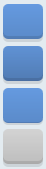
问题是,我不知道如何使我的按钮看起来像这样与WPF风格。所以现在我试着用这些图像来制作它。问题是,我希望我的按钮是可伸缩的,在任何尺寸上都是一样的。为此,我需要为每个按钮状态图像制作3片:“顶部、底部、左、右、中心”。

我现在有这个XAML:
<Application.Resources>
    <ControlTemplate x:Key="StylishBlueButton" TargetType="{x:Type Button}">
            <Grid>
                <VisualStateManager.VisualStateGroups>
                    <VisualStateGroup x:Name="CommonStates">
                        <VisualState x:Name="MouseOver"/>
                        <VisualState x:Name="Pressed"/>
                        <VisualState x:Name="Disabled"/>
                    </VisualStateGroup>
                    <VisualStateGroup x:Name="FocusStates">
                        <VisualState x:Name="Focused"/>
                    </VisualStateGroup>
                    <VisualStateGroup x:Name="ValidationStates">
                        <VisualState x:Name="InvalidFocused"/>
                        <VisualState x:Name="InvalidUnfocused"/>
                    </VisualStateGroup>
                </VisualStateManager.VisualStateGroups>
            </Grid>
        </ControlTemplate>

    </Application.Resources>
</Application>
有人能帮我吗,我怎么做这个按钮模板?
回答 2
Stack Overflow用户
发布于 2013-12-24 08:56:34
您希望在VisualState中指定一些内容,例如。
<ControlTemplate TargetType="Button">
            <Grid>
              <VisualStateManager.VisualStateGroups>
                <VisualStateGroup x:Name="CommonStates">

                <VisualStateGroup.Transitions>
                    <!--Take one half second to transition to the MouseOver state.-->
                    <VisualTransition To="MouseOver" GeneratedDuration="0:0:0.5" />
                  </VisualStateGroup.Transitions>

                  <VisualState x:Name="Normal"/>
                  <VisualState x:Name="MouseOver">
                    <Storyboard>
                      <ColorAnimation Duration="0" Storyboard.TargetName="borderColor" Storyboard.TargetProperty="Color" To="Cyan"/>
                    </Storyboard>
                  </VisualState>
                  <VisualState x:Name="Pressed">
                    <Storyboard>
                      <ColorAnimation Duration="0" Storyboard.TargetName="borderColor" Storyboard.TargetProperty="Color" To="Red"/>
                    </Storyboard>
                  </VisualState>
                </VisualStateGroup>
              </VisualStateManager.VisualStateGroups>
              <Ellipse>
                <Ellipse.Fill>
                  <SolidColorBrush x:Name="borderColor" Color="Black"/>
                </Ellipse.Fill>
              </Ellipse>
              <Ellipse x:Name="ButtonShape" Margin="5" Fill="{TemplateBinding Background}"/>
              <ContentPresenter HorizontalAlignment="Center"
                        VerticalAlignment="Center"/>
            </Grid>
</ControlTemplate>Stack Overflow用户
发布于 2013-12-24 09:04:48
 <Border Background="DodgerBlue">
     <Rectangle Fill="Transparent" Stroke="White" Margin="3" />
 </Border>
根据您需要的样式而不是矩形放置路径。
页面原文内容由Stack Overflow提供。腾讯云小微IT领域专用引擎提供翻译支持
原文链接:
https://stackoverflow.com/questions/20757012
复制相关文章
相似问题
腾讯云开发者

Copyright © 2013 - 2026 Tencent Cloud. All Rights Reserved. 腾讯云 版权所有
深圳市腾讯计算机系统有限公司 ICP备案/许可证号:粤B2-20090059  粤公网安备44030502008569号
腾讯云计算(北京)有限责任公司 京ICP证150476号 | 京ICP备11018762号