
.NET日期到字符串在Vista伪区域性中给出无效字符串。
我的计算机配置了一个区域性,即en-US。
当使用本机Win32 GetDateFormat函数时,我得到了正确的格式化日期:
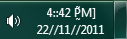
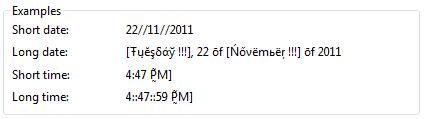
- 22/11/2011 4::42::53 P̰̃M]
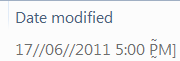
这是正确的;也是Windows呈现它的方式:
- 任务栏
- 区域和语言设置
- Windows资源管理器
- 展望

当我试图使用当前区域设置将日期转换为.NET中的字符串时,例如:
DateTime.Now.ToString();
DateTime.Now.ToString(CultureInfo.CurrentCulture);
我得到一个不正确的日期:
- 22/11/2011:42:53 P̰̃M]
在.NET中,使用bug的.NET代码在任何地方都是显而易见的:
- Windows事件查看器:

- 任务计划程序:
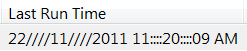
- :

我怎样才能使.NET不出问题呢?
如何使用当前区域性(正确)将日期和时间转换为字符串?
备注:允许用户将其Windows设置为他们想要的任何地区首选项。现在,我的程序将无法正确处理有效的设置。告诉用户,“不要那样做”是相当刻薄的精神。 一个类似的例子来自Delphi,它假设日期分隔符不能超过一个字符。当Windows配置了使用多个字符作为日期分隔符的区域设置时,例如:
- SK(斯洛伐克-斯洛伐克):
.
其中的日期应格式化为:
- 2011年 代码库无法接受超过一个字符的日期分隔符,并返回到: 2011年11月22日 在过去,有些人可能是建议你不要费心于这种边缘的情况。这样的建议对我没什么意义。 我将避免与那些想通过改变标题来改变我问题的意思的人进行一场激烈的比赛。但这个问题并不局限于伪语言环境,它专门为在应用程序中发现bug而设计。
奖金喋喋不休
以下是来自世界各地的唯一日期格式列表:
- 11.11.25
- 11.25.2011
- 2011年11月25日
- 2011.11.25
- 2011.11.25
- 2011/11/25
- 2011-11-25
-
-
- 2011年
-
- 25.11.11
- 25.11.2011
- 2011年11月25日г。
- 2011年11月25日。
- 25/11/2011
- 2011年11月25日
- 2011年11月25日
- 25/11/2554
- 25-11-11
- 25-11-2011
- 29/12/32
特别令人感兴趣的最后一个例子是不使用公历
- 阿拉伯语(沙特阿拉伯)
ar-SA:29/12/32 02:03:07م - Divehi (马尔代夫)
dv-MV:29/12/32 14:03:07 - 达里/普什图(阿富汗)
prf-AF / ps-AF:29/12/32 2:03:07غ.و
尽管这些都是你不必担心的边缘案件。
更新14/12/2011:
这个错误的另一个演示是Datetime.Parse不能解析DateTime.ToString。
String s = DateTime.Today.ToString("d");   //returns "14////12////2011"
DateTime d = DateTime.Parse(s); //expects "dd//MM//yyyy".Parse抛出一个异常。
更新02/8,2012年09:56‘12:
除不正确外,日期分隔符的任何使用都将被取消。来自MSDN:
斯达 Windows及更高版本:这个常量被废弃了。使用
LOCALE_SSHORTDATE代替。自定义区域设置可能没有单一的统一分隔符。例如,“2006年12月31日”这样的格式是有效的。 斯泰姆 Windows及更高版本:这个常量被废弃了。使用LOCALE_STIMEFORMAT代替。自定义区域设置可能没有单一的统一分隔符。例如,"03:56'23“这样的格式是有效的。
回答 2
Stack Overflow用户
发布于 2011-11-30 13:59:01
这个特定的错误是由于转换了一些特殊的字符,而这些字符在模式(如ShortDatePattern )中没有转义。
ShortDatePattern = "d//MM//yyyy";模式中的/意味着“插入日期分隔符”,但是在这里,当字符串从系统复制到DateTimeFormat结构时(至少在我的系统上),扩展已经完成。遗憾的是,它缺少了转义(显然,在任何语言中都看不到,没有使用特殊字符作为分隔符,在英语中不可见,因为它被替换为自己)。
唯一的解决方案似乎是在DateTimeFormat实例的所有模式中转义分隔符:
var c = new System.Globalization.CultureInfo("qps-ploc", true);
c.DateTimeFormat.ShortDatePattern =
        c.DateTimeFormat.ShortDatePattern.Replace("/", "'/'");
c.DateTimeFormat.LongTimePattern =
        c.DateTimeFormat.LongTimePattern.Replace(":", "':'");
Console.WriteLine(DateTime.Now.ToString(c));
以下是所有三种常见情况的完整代码示例
日期到字符串
/// <summary>Convert a date to the short date string in the current locale (e.g. 30//11//2011)</summary>
/// <param name="value">A DateTime to be converted to a short date string</param>
/// <returns>A string containing the localized version of the date</returns>
public static String DateToStr(DateTime value)
{
    String format = CultureInfo.CurrentCulture.DateTimeFormat.ShortDatePattern;

    //The bug in .NET is that it assumes "/" in a date pattern means "the date separator"
    //What .NET doesn't realize is that the locale strings returned by Windows are the Windows format strings.
    //The bug is exposed in locale's that use two slashes as for their date separator:
    //  dd//MM//yyyy
    // Which .NET misinterprets to give:
    //  30////11////2011
    // when really it should be taken literally to be:
    //  dd'//'MM'//'yyyy
    //which is what this fix does
    format = format.Replace("/", "'/'");

    return value.ToString(format);
}
字符串时间
/// <summary>
/// Convert a time to string using the short time format in the current locale(e.g. 7::21 AM)
/// </summary>
/// <param name="value">A DateTime who's time portion will be converted to a localized string</param>
/// <returns>A string containing the localized version of the time</returns>
public static String TimeToStr(DateTime value)
{
    String format = CultureInfo.CurrentCulture.DateTimeFormat.ShortTimePattern;

    //The bug in .NET is that it assumes ":" in a time pattern means "the time separator"
    //What .NET doesn't realize is that the locale strings returned by Windows are the Windows format strings.
    //The bug is exposed in locale's that use two colons as their time separator:
    //  h::mm::ss tt
    // Which .NET misinterprets to give:
    //  11::::39::::17 AM
    // when really it should be taken literally to be:
    //  h'::'mm'::'ss tt
    //which is what this fix does
    format = format.Replace(":", "':'");

    return value.ToString(format);
}
日期时间到字符串
/// <summary>
/// Convert a datetime to a string in the current locale (e.g. 30//11//2001 7::21 AM)
/// </summary>
/// <param name="datetime">A DateTime to be converted to a general string in the current locale</param>
/// <returns>A string containing the localized version of the datetime</returns>
public static String DateTimeToStr(DateTime datetime)
{
    return DateToStr(datetime)+" "+TimeToStr(datetime);
}Stack Overflow用户
发布于 2011-11-30 12:20:43
最好的方法是用MS记录错误,然后创建一个扩展方法来检测这些边缘情况并处理它们。
就像这样(从我的头顶上):
public static class DateTimeFix
{
    public static string FixedToString(this DateTime value)
    {
        if (IsEdgeCase())
            return FixEdgeCase(value);
        else
            return value.ToString();
    }

    // Edge case logic below
}
然后你用:
DateTime.Now.FixedToString()在你的密码里。
https://stackoverflow.com/questions/8234365
复制相似问题
腾讯云开发者

Copyright © 2013 - 2026 Tencent Cloud. All Rights Reserved. 腾讯云 版权所有
深圳市腾讯计算机系统有限公司 ICP备案/许可证号:粤B2-20090059  粤公网安备44030502008569号
腾讯云计算(北京)有限责任公司 京ICP证150476号 | 京ICP备11018762号