
颤振错误:没有名称为‘keyboardType’的命名参数.keyboardType: TextInputType.text
我是新来的,我想建立一个表格。这是我的密码:
const TextField(
              decoration: InputDecoration(
              labelText: 'Nom',
              hintText: 'Entrez votre nom',
              icon: Icon(
                Icons.person,
                color: Colors.blue,
                size: 25,
              ),
              keyboardType: TextInputType.text,
              autocorrect: true,
              autofocus: true,
            )),
            const TextField(
              decoration: InputDecoration(
              labelText: 'Prenom',
              hintText: 'Entrez votre Prenom',
              icon: Icon(
                Icons.person,
                color: Colors.blue,
                size: 25,
              ),
              keyboardType: TextInputType.text,
            )),
            const TextField(
              decoration: InputDecoration(
              labelText: 'Telephome',
              hintText: 'Entrez votre numero de telephone',
              icon: Icon(
                Icons.phone,
                color: Colors.blue,
                size: 25,
              ),
              keyboardType: TextInputType.number,
            )),
            const TextField(decoration: InputDecoration(
              labelText: 'Mot de passe',
              hintText: 'Entrez votre mot de passe',
              icon: Icon(
                Icons.lock,
                color: Colors.red,
                size: 25,
              ),
              keyboardType: TextInputType.visiblePassword,
              ObscureText: true,
            )),
当我运行时,我会看到以下错误:
lib/main.dart:48:15: Error:没有名称为'keyboardType‘的命名参数。../../flutter/packages/flutter/lib/src/material/input_decorator.dart:2522:9::keyboardType: TextInputType.text,^keyboardType上下文:找到此候选项,但参数不匹配。const InputDecoration({ ^ lib/main.dart:61:15: Error:无名称为'keyboardType‘的命名参数。../../flutter/packages/flutter/lib/src/material/input_decorator.dart:2522:9::keyboardType: TextInputType.text,^keyboardType上下文:找到此候选项,但参数不匹配。const InputDecoration({ ^ lib/main.dart:72:15: Error:无名称为'keyboardType‘的命名参数。../../flutter/packages/flutter/lib/src/material/input_decorator.dart:2522:9::keyboardType: TextInputType.number,^keyboardType上下文:找到此候选项,但参数不匹配。const InputDecoration({ ^ lib/main.dart:82:15: Error:无名称为'keyboardType‘的命名参数。../../flutter/packages/flutter/lib/src/material/input_decorator.dart:2522:9::keyboardType: TextInputType.visiblePassword,^keyboardType上下文:找到此候选项,但参数不匹配。const InputDecoration({ ^ ../../flutter/.pub-cache/hosted/pub.dartlang.org/pull_to_refresh-1.6.3/lib/src/smart_refresher.dart:273:21:错误:未为类“BuildContext”定义方法“ancestorWidgetOfExactType”。
- 'BuildContext‘来自于’package:BuildContext/src/widgets/Frawork.dart‘尝试将名称更正为现有方法的名称,或定义一个名为“祖先ancestorWidgetOfExactType”的方法。返回context?.ancestorWidgetOfExactType(SmartRefresher);^ ../../flutter/.pub-cache/hosted/pub.dartlang.org/pull_to_refresh-1.6.3/lib/src/smart_refresher.dart:277:41:错误:方法未找到:“类型匹配”返回context?.ancestorStateOfType(TypeMatcher());^context?.ancestorStateOfType错误:未为类“BuildContext”定义方法“ancestorStateOfType”。
- 'BuildContext‘来自于’package:BuildContext/src/widgets/Frawork.dart‘尝试将名称更正为现有方法的名称,或定义一个名为“祖先状态of”的方法。返回context?.ancestorStateOfType(TypeMatcher());^context?.ancestorStateOfType错误:未为类“BuildContext”定义方法“inheritFromWidgetOfExactType”。
- 'BuildContext‘来自于’package:BuildContext/src/widgets/Frawork.dart‘尝试将名称更正为现有方法的名称,或定义名为“inheritFromWidgetOfExactType”的方法。返回context.inheritFromWidgetOfExactType(RefreshConfiguration);^ ../../flutter/.pub-cache/hosted/pub.dartlang.org/pull_to_refresh-1.6.3/lib/src/internals/indicator_wrap.dart:631:9:错误:类型“ValueNotifier”的值不能分配给类型为“ValueNotifier”的变量。
- 'ValueNotifier‘是来自'package:flutter/src/foundation/change_notifier.dart’('../../flutter/packages/flutter/lib/src/foundation/change_notifier.dart').的?refresher.controller.headerMode
请帮帮我
回答 3
Stack Overflow用户
发布于 2021-10-06 09:51:17
试试下面的代码,我认为你的问题已经解决了。参考Textfield 这里
 TextField(
          keyboardType: TextInputType.text,
          autocorrect: true,
          autofocus: true,
          decoration: InputDecoration(
            labelText: 'Nom',
            hintText: 'Entrez votre nom',
            icon: Icon(
              Icons.person,
              color: Colors.blue,
              size: 25,
            ),
          ),
        ),
        TextField(
          keyboardType: TextInputType.text,
          decoration: InputDecoration(
            labelText: 'Prenom',
            hintText: 'Entrez votre Prenom',
            icon: Icon(
              Icons.person,
              color: Colors.blue,
              size: 25,
            ),
          ),
        ),
        TextField(
          keyboardType: TextInputType.number,
          decoration: InputDecoration(
            labelText: 'Telephome',
            hintText: 'Entrez votre numero de telephone',
            icon: Icon(
              Icons.phone,
              color: Colors.blue,
              size: 25,
            ),
          ),
        ),
        TextField(
          keyboardType: TextInputType.visiblePassword,
          obscureText: true,
          decoration: InputDecoration(
            labelText: 'Mot de passe',
            hintText: 'Entrez votre mot de passe',
            icon: Icon(
              Icons.lock,
              color: Colors.red,
              size: 25,
            ),
          ),
        ),
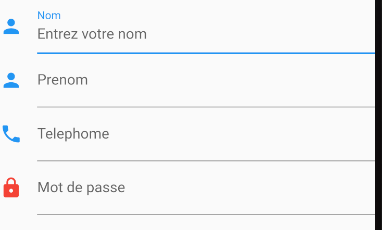
您的结果屏幕类似->
Stack Overflow用户
发布于 2021-10-06 09:52:20
TextFormField(
                          keyboardType: TextInputType.number,
                          controller: stepcontroller,
                          focusNode: _focusNodes[0],
                          decoration: InputDecoration(
                            labelText: "Enter Step",
                            labelStyle: TextStyle(
                              color: _focusNodes[0].hasFocus
                                  ? appcolor
                                  : Colors.grey,
                              // fontSize: 24.0
                            ),
                            focusedBorder: OutlineInputBorder(
                              borderSide: const BorderSide(
                                  color: appcolor, width: 2.0),
                              // borderRadius: BorderRadius.circular(25.0),
                            ),
                            // prefixIcon: Icon(
                            //   Icons.person,
                            //   color: _focusNodes[0].hasFocus
                            //       ? Colors.teal
                            //       : Colors.grey,
                            // ),
                          ),
                          validator: (value) {
                            if (value.isEmpty) {
                              return "   Step  cant be empty";
                            } else if (value.length > contactlist.length) {
                              return "step out of range";
                            }
                          },
                        ),
你可以试试这个,它会打开数字键盘。
Stack Overflow用户
发布于 2021-10-06 09:57:44
请参阅此链接,以清楚了解颤振中的textfiled属性。
https://api.flutter.dev/flutter/material/TextField-class.html
https://stackoverflow.com/questions/69463211
复制相似问题
腾讯云开发者

Copyright © 2013 - 2026 Tencent Cloud. All Rights Reserved. 腾讯云 版权所有
深圳市腾讯计算机系统有限公司 ICP备案/许可证号:粤B2-20090059  粤公网安备44030502008569号
腾讯云计算(北京)有限责任公司 京ICP证150476号 | 京ICP备11018762号