
为什么会出现invalid_grant错误,即使我成功地登录了AWS扩容?
我目前正在使用AWS扩容和SAML(Microsoft )作为联邦身份提供者。我使用amplify import auth将现有的认知池导入到我的create-react-app项目中。但是,当我成功登录(它重定向到我的主页)时,它显示了这个invalid_grant错误,尽管我正确地登录了。然后,如果我刷新我的页面,那么错误就消失了,我可以看到我登录的用户的认知信息已经成功登录。
是什么原因导致这个“第一次”登录不能立即工作,并有一个错误?我已经检查了我的aws-exports.js文件,内部的配置应该都是正确的,因为我能够登录,只是在登录后需要页面刷新。
此外,偶尔也会出现这样的问题,需要在中登录两次或大约3-4次,因为第一个登录会导致此错误:
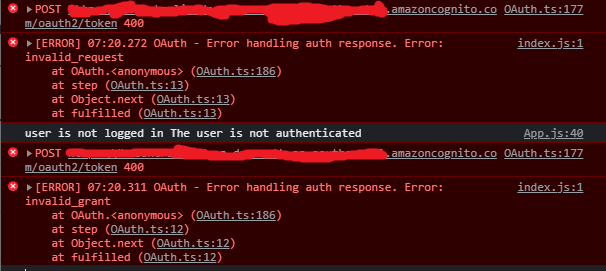
是否有任何方法来覆盖这一点,比如在登录等之后在主页上进行自动刷新,或者修复这个问题?
index.js
import React from 'react';
import ReactDOM from 'react-dom';
import './index.scss';
import App from './App';
import reportWebVitals from './reportWebVitals';
import Amplify from 'aws-amplify';
import awsconfig from './aws-exports';

Amplify.configure(awsconfig)

ReactDOM.render(
  <React.StrictMode>
    <App />
  </React.StrictMode>,
  document.getElementById('root')
);

// If you want to start measuring performance in your app, pass a function
// to log results (for example: reportWebVitals(console.log))
// or send to an analytics endpoint. Learn more:
reportWebVitals();
App.js
useEffect(() => {
    checkUser()
  }, [])

  async function checkUser() {
    try {
      const cognitoUser = await Auth.currentAuthenticatedUser();
      console.log('user info: ', cognitoUser)
  }

return (
    <AmplifyAuthenticator>
      <div className="App" slot="sign-in" style={{
        display: 'flex',
        justifyContent: 'center',
        alignItems: 'center',
        height: '100vh',
        backgroundImage: `url(${Background})`,
        backgroundSize: 'cover',
        width: '100%'
      }}>
        <AmplifySignIn
          headerText="Welcome"
          slot="sign-in"
          hideSignUp
        ></AmplifySignIn>
      </div>
      <BrowserRouter>
        <Sidebar AmplifySignOut={AmplifySignOut} username={userName} />
        <Switch>
          <Route path='/' component={Home} exact />
          <Route path='/bulletinboard' component={BulletinBoard} exact />
          <Route path='/bulletinboard/create' component={AddBulletin} exact />
          <Route path='/bulletinboard/edit/:id' component={EditBulletin} exact />
          <Route path='/infohub' component={InfoHub} exact />sec
          <Route path='/infohub/folder' component={InfoHubCategory} exact />
          <Route path='/settings' component={Settings} exact />
          <Route component={NotFound} />
        </Switch>
      </BrowserRouter>
    </AmplifyAuthenticator>
  )
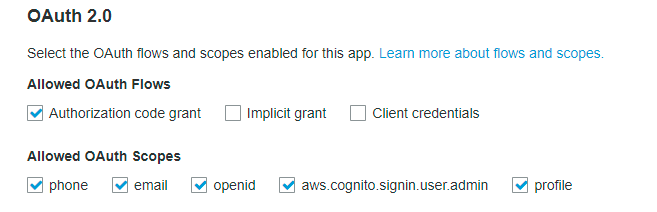
认知应用程序客户端设置
aws-exports.js
/* eslint-disable */
// WARNING: DO NOT EDIT. This file is automatically generated by AWS Amplify. It will be overwritten.

const awsmobile = {
    "aws_project_region": "****",
    "aws_cognito_identity_pool_id": "****",
    "aws_cognito_region": "****",
    "aws_user_pools_id": "****",
    "aws_user_pools_web_client_id": "****",
    "oauth": {
        "domain": "****",
        "scope": [
            "aws.cognito.signin.user.admin",
            "email",
            "openid",
            "phone",
            "profile"
        ],
        "redirectSignIn": "****",
        "redirectSignOut": "****",
        "responseType": "code"
    },
    "federationTarget": "COGNITO_USER_POOLS",
    "aws_user_files_s3_bucket": "****",
    "aws_user_files_s3_bucket_region": "****"
};


export default awsmobile;
首次登录错误
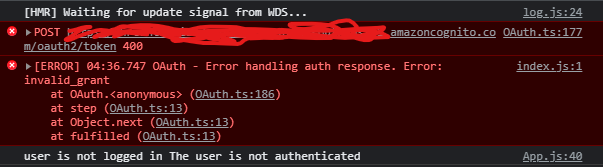
刷新页面后,认知用户信息显示为登录到中

回答 1
Stack Overflow用户
发布于 2021-08-25 00:58:33
在通过AWS支持通过他们的支持中心进行了几天的故障排除之后,不幸的是,我仍然没有找到问题。
然而,经过今天的一些修补,我终于找到了这个问题的解决方案。
最初,当我使用amplify import auth导入用户池和标识池时,oauth配置实际上是一起导入的,并且位于aws-exports.js中。
基本上,我所做的是删除oauth的配置,使其为空,在aws-exports.js:"oauth": {}中如下所示。然后,我复制了相同的配置,并将其粘贴到aws-exports.js中,并使用Auth.configure配置oauth。因此,index.js中的最终结果如下所示:
Amplify.configure(awsconfig);

const oauth = {
    domain: '****',
    scope: [
        'aws.cognito.signin.user.admin',
        'email',
        'openid',
        'phone',
        'profile',
    ],
    redirectSignIn: '****',
    redirectSignOut: '****',
    responseType: 'code',
};

Auth.configure({
    oauth: oauth,
});这就是我如何为我的项目解决这个问题的方法,如果有人在使用amplify import auth时遇到了同样的问题,并且oauth设置也被导入到aws-exports.js文件中,这只是为了将来的参考。
这有点奇怪,因为如果oauth不适合与Amplify.configure一起使用,那么为什么AWS在使用amplify import auth时将它包含在aws-exports.js中
https://stackoverflow.com/questions/68869377
复制相似问题
腾讯云开发者

Copyright © 2013 - 2026 Tencent Cloud. All Rights Reserved. 腾讯云 版权所有
深圳市腾讯计算机系统有限公司 ICP备案/许可证号:粤B2-20090059  粤公网安备44030502008569号
腾讯云计算(北京)有限责任公司 京ICP证150476号 | 京ICP备11018762号