
使用云格式启用S3库存
我可以使用控制台启用库存,如下图所示。有办法用boto做同样的事吗?
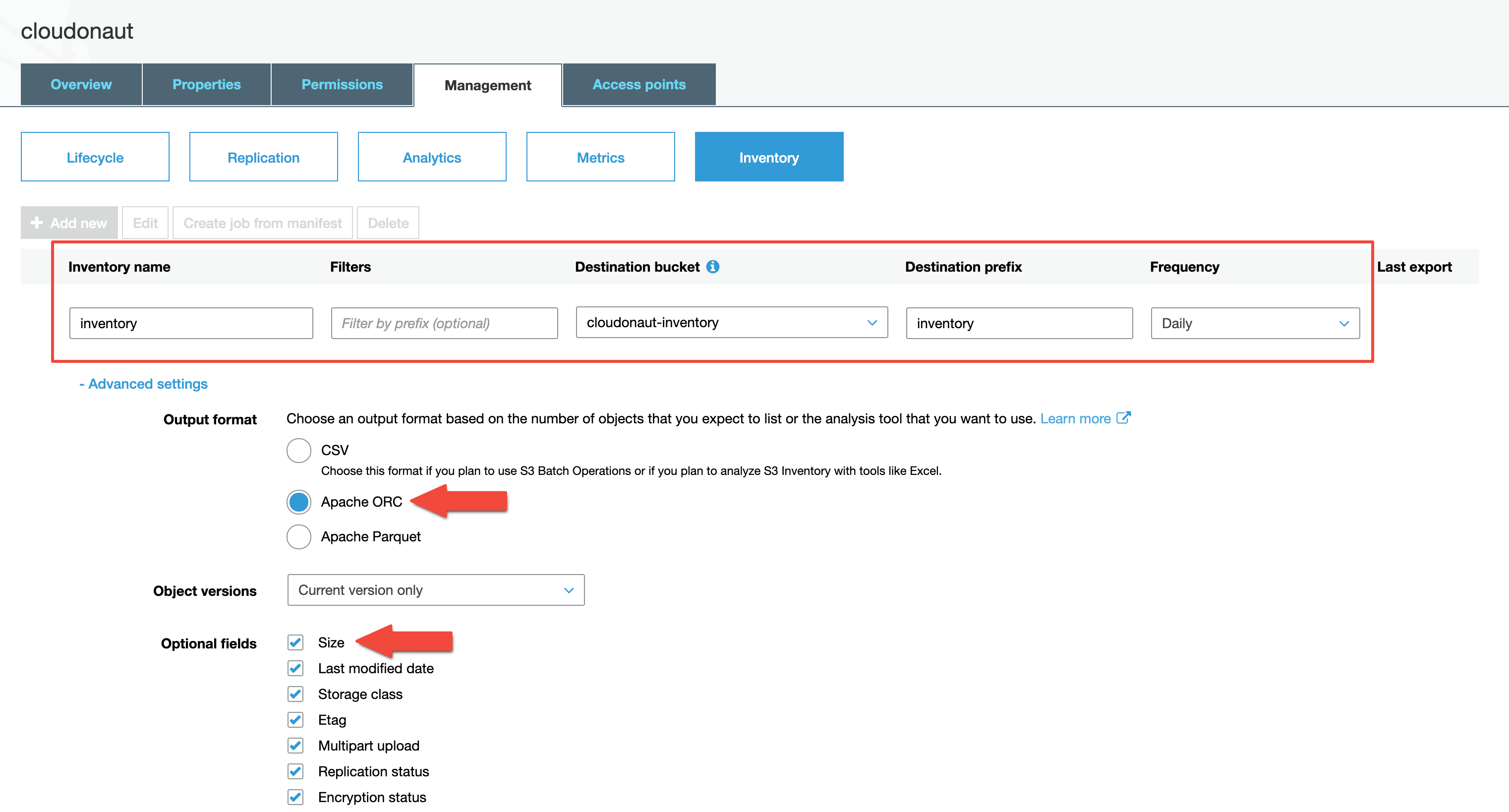
更新:
这是完整的脚本,工作!
import boto3

s3_client = boto3.client(
    "s3",
    aws_access_key_id="XXX",
    aws_secret_access_key="XXX",
    region_name="us-east-1",
)

response = s3_client.put_bucket_inventory_configuration(
    Bucket="athenadata16",
    Id="myinventory",
    InventoryConfiguration={
        "Destination": {
            "S3BucketDestination": {
                "AccountId": "1234567890",
                "Bucket": "arn:aws:s3:::athenadata16",
                "Format": "ORC",
                "Prefix": "mypre",
            }
        },
        "IsEnabled": True,
        "Filter": {"Prefix": "myprefilter"},
        "Id": "myinventory",
        "IncludedObjectVersions": "Current",
        "OptionalFields": [
            "Size",
            "LastModifiedDate",
            "StorageClass",
            "ETag",
            "IsMultipartUploaded",
            "ReplicationStatus",
            "EncryptionStatus",
            "ObjectLockRetainUntilDate",
            "ObjectLockMode",
            "ObjectLockLegalHoldStatus",
            "IntelligentTieringAccessTier",
        ],
        "Schedule": {"Frequency": "Daily"},
    },
)
根据文档,可以使用cloudformation添加库存。
有人能举个例子吗?
更新2:
执行以下模板后,创建了一个名为"athenadata162a-bucketwithinventory-1snf1yx82si5c“的新桶。这是意料之中的。由于athenadata162设置,库存目的地桶指向“BucketArn”。我需要把它指向当前的桶名。有可能吗?
Resources:
    BucketWithInventory:
      Type: "AWS::S3::Bucket"
      Properties:
        InventoryConfigurations:
          -
            Destination:
              BucketAccountId: !Sub '${AWS::AccountId}'
              BucketArn: !Sub 'arn:aws:s3:::athenadata16'
              Format: CSV
              Prefix: mypre
            Enabled: true
            Id: myinventory
            IncludedObjectVersions: Current
            OptionalFields:
              - Size
              - LastModifiedDate
              - StorageClass
              - ETag
              - IsMultipartUploaded
              - ReplicationStatus
              - ObjectLockRetainUntilDate
              - ObjectLockMode
              - ObjectLockLegalHoldStatus
              - IntelligentTieringAccessTier
            Prefix: myprefilter
            ScheduleFrequency: Daily
如果我把它改为这个,就会得到循环参考错误。
BucketArn:!Sub‘arn:aws:s3:${BucketWithInventory}’
感谢franklinsijo的回答,下面是完整的代码来创建一个存储在同一个桶中的csv文件的存储库。
Resources:
    BucketWithInventory:
      Type: "AWS::S3::Bucket"
      Properties:
        BucketName: !Sub 'athenadata162-${AWS::AccountId}'
        InventoryConfigurations:
          -
            Destination:
              BucketAccountId: !Sub '${AWS::AccountId}'
              BucketArn: !Sub 'arn:aws:s3:::athenadata162-${AWS::AccountId}'
              Format: CSV
              Prefix: mypre
            Enabled: true
            Id: myinventory
            IncludedObjectVersions: Current
            OptionalFields:
              - Size
              - LastModifiedDate
              - StorageClass
              - ETag
              - IsMultipartUploaded
              - ReplicationStatus
              - ObjectLockRetainUntilDate
              - ObjectLockMode
              - ObjectLockLegalHoldStatus
              - IntelligentTieringAccessTier
            Prefix: myprefilter
            ScheduleFrequency: Daily
更新4:
当我手动添加库存配置时,将自动添加以下桶策略。上面提到的cloudformation模板不包括这个步骤,因此会得到“拒绝访问”错误。如何将此内容包含在模板中?
{
    "Id": "S3-Console-Auto-Gen-Policy-1585038423058",
    "Version": "2012-10-17",
    "Statement": [
        {
            "Sid": "S3PolicyStmt-DO-NOT-MODIFY-1585038422770",
            "Effect": "Allow",
            "Principal": {
                "Service": "s3.amazonaws.com"
            },
            "Action": [
                "s3:PutObject"
            ],
            "Resource": [
                "arn:aws:s3:::athenadata162-1234567890/*"
            ],
            "Condition": {
                "ArnLike": {
                    "aws:SourceArn": [
                        "arn:aws:s3:::athenadata162-1234567890"
                    ]
                },
                "StringEquals": {
                    "aws:SourceAccount": [
                        "1234567890"
                    ],
                    "s3:x-amz-acl": "bucket-owner-full-control"
                }
            }
        }
    ]
}
更新5
模板的最终版本会是这样的.
Resources:
    BucketWithInventory:
      Type: "AWS::S3::Bucket"
      Properties:
        BucketName: !Sub '${AWS::StackName}-${AWS::AccountId}'
        InventoryConfigurations:
          -
            Destination:
              BucketAccountId: !Sub '${AWS::AccountId}'
              BucketArn: !Sub 'arn:aws:s3:::${AWS::StackName}-${AWS::AccountId}'
              Format: CSV
              Prefix: mypre
            Enabled: true
            Id: myinventory
            IncludedObjectVersions: Current
            OptionalFields:
              - Size
              - LastModifiedDate
              - StorageClass
              - ETag
              - IsMultipartUploaded
              - ReplicationStatus
              - ObjectLockRetainUntilDate
              - ObjectLockMode
              - ObjectLockLegalHoldStatus
              - IntelligentTieringAccessTier
            Prefix: myprefilter
            ScheduleFrequency: Daily

    BucketPolicyForInventoryBucket:
       Type: AWS::S3::BucketPolicy
       Properties:
         Bucket: !Ref BucketWithInventory
         PolicyDocument:
            Statement:
            -
                Effect: Allow
                Principal:
                    Service: s3.amazonaws.com
                Action:
                - s3:PutObject
                Resource:
                - !Join ["", ["arn:aws:s3:::", !Ref BucketWithInventory, "/*"]]
                Condition:
                    ArnLike:
                        aws:SourceArn:
                        - !Join ["", ["arn:aws:s3:::", !Ref BucketWithInventory, "/*"]]
                    StringEquals:
                        aws:SourceAccount:
                        - !Sub '${AWS::AccountId}'
s3:x-amz-acl: bucket-owner-full-control 回答 2
Stack Overflow用户
发布于 2020-03-20 08:32:52
用于将库存配置放置到类似于S3片段中提供的配置的boto3桶中的Cloudformation资源,
BucketWithInventory:
  Type: "AWS::S3::Bucket"
  Properties:
    BucketName: athenadata16
    InventoryConfigurations:
      -
        Destination:
          BucketAccountId: 1234567890
          BucketArn: "arn:aws:s3:::athenadata16"
          Format: CSV
          Prefix: mypre
        Enabled: true
        Id: myinventory
        IncludedObjectVersions: Current
        OptionalFields:
          - Size
          - LastModifiedDate
          - StorageClass
          - ETag
          - IsMultipartUploaded
          - ReplicationStatus
          - ObjectLockRetainUntilDate
          - ObjectLockMode
          - ObjectLockLegalHoldStatus
          - IntelligentTieringAccessTier
        Prefix: myprefilter
        ScheduleFrequency: Daily
BucketPolicyForInventoryBucket:
   Type: AWS::S3::BucketPolicy
   Properties:
     Bucket: !Ref BucketWithInventory
     PolicyDocument:
        Statement:
        -
            Effect: Allow
            Principal:
                Service: s3.amazonaws.com
            Action:
            - s3:PutObject
            Resource:
            - !Join ["", ["arn:aws:s3:::", !Ref BucketWithInventory, "/*"]]
            Condition:
                ArnLike:
                    aws:SourceArn:
                    - !Join ["", ["arn:aws:s3:::", !Ref BucketWithInventory, "/*"]]
                StringEquals:
                    aws:SourceAccount:
                    - '1234567890'
s3:x-amz-acl: bucket-owner-full-control 根据云格式文档,唯一受支持的文件格式似乎是CSV。
Stack Overflow用户
发布于 2020-03-10 11:17:46
Boto3参考列出了许多使用库存配置的方法,特别是:
如果您曾经问自己“boto3可以这样做吗?”,请转到boto3文档,查找相应的服务引用(https://boto3.amazonaws.com/v1/documentation/api/latest/reference/services/index.html),并在该页面上快速执行Ctrl+F。最有可能的是,boto3 --实际上是--可以做到这一点。
https://stackoverflow.com/questions/60615911
复制相似问题
腾讯云开发者

Copyright © 2013 - 2026 Tencent Cloud. All Rights Reserved. 腾讯云 版权所有
深圳市腾讯计算机系统有限公司 ICP备案/许可证号:粤B2-20090059  粤公网安备44030502008569号
腾讯云计算(北京)有限责任公司 京ICP证150476号 | 京ICP备11018762号