
ListView显示颤振中的空白屏幕
ListView显示颤振中的空白屏幕
提问于 2019-09-17 11:42:17
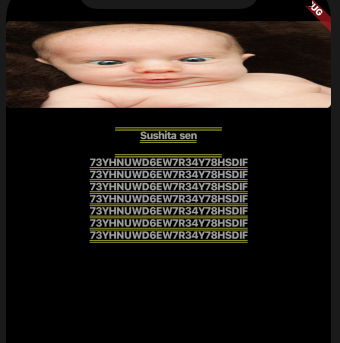
我想要一个背景图像和上面的图像,一些内容将在那里,应该是垂直滚动,以使它不应该在图像之外。
THe代码如下所示
我使用的是卫星,其中一个是图像,另一个是列表视图,但仍然无法找到正确的解决方案。
 ListView(
    children: <Widget>[
               new Stack(
                  children: <Widget>[
                    Container(
                        child: background.Row3
                    ),

                      Stack(
                        children: <Widget>[
                          Center(child: SvgPicture.asset('assets/Receipt.svg',height: 350,width: 200,),),/*************this is the main background image****************/

                          Padding(padding: EdgeInsets.only(top:100),
                          child: Column(
                            mainAxisAlignment:MainAxisAlignment.spaceAround,
                            children: <Widget>[
                              ListView(
                                padding: const EdgeInsets.all(8),
                                children: <Widget>[  /********text above background image *******************/

                                  Center(
                                      child:Text('Beneficiary Details',style: TextStyle(fontSize: 14,color: Colors.black),)
                                  ),


                                  Center(
                                      child:Text('Sushita sen',style: TextStyle(fontSize: 12,color: Colors.grey),)
                                  ),
                                  Center(
                                      child:Text('Reference Number',style: TextStyle(fontSize: 14,color: Colors.black),)
                                  ),

                                  Center(
                                    child:Text('73YHNUWD6EW7R34Y78HSDIF',style: TextStyle(fontSize: 12,color: Colors.grey),)
                                    ),

                                  Center(
                                    child:Text('73YHNUWD6EW7R34Y78HSDIF',style: TextStyle(fontSize: 12,color: Colors.grey),)
                                    ,),

                                  Center(
                                    child:Text('73YHNUWD6EW7R34Y78HSDIF',style: TextStyle(fontSize: 12,color: Colors.grey),)
                                    ,),

                                  Center(
                                    child:Text('73YHNUWD6EW7R34Y78HSDIF',style: TextStyle(fontSize: 12,color: Colors.grey),)
                                    ,),

                                  Center(
                                    child:Text('73YHNUWD6EW7R34Y78HSDIF',style: TextStyle(fontSize: 12,color: Colors.grey),)
                                    ,),

                                  Center(
                                    child:Text('73YHNUWD6EW7R34Y78HSDIF',style: TextStyle(fontSize: 12,color: Colors.grey),)
                                    ,),

                                  Center(
                                    child:Text('73YHNUWD6EW7R34Y78HSDIF',style: TextStyle(fontSize: 12,color: Colors.grey),)
                                    ,),
                                ],
                              )


                            ],
                          )

                            ,)


                        ],
                      )

                    ],
                  )

              ]
          ),
        ),
      ),
    ],
  ),
   );
  }
}回答 3
Stack Overflow用户
回答已采纳
发布于 2019-09-18 09:26:23
我通过将ListView放在容器中来纠正它
 home: ListView(children: <Widget>[
  new Stack(
    children: <Widget>[
      Container(child: Text("Hello")),
      Stack(
        children: <Widget>[
          Container(
            height: 100,
            decoration: BoxDecoration(
                borderRadius: BorderRadius.circular(5),
                color: Colors.blue,
                image: DecorationImage(
                    image: new NetworkImage(
                        "https://thumbs.dreamstime.com/b/funny-face-baby-27701492.jpg"),
                    fit: BoxFit.fill)),
          ),
          /*************this is the main background image****************/

          Padding(
            padding: EdgeInsets.only(top: 100),
            child: Column(
              mainAxisAlignment: MainAxisAlignment.spaceAround,
              children: <Widget>[
               Conatiner( /************This container will wrap the listview and will make it scrollable also *******/
                height:200,
                child: ListView(
                  scrollDirection: Axis.vertical,
                  shrinkWrap: true,
                  padding: const EdgeInsets.all(8),
                  children: <Widget>[
                    Center(
                        child: Text(
                      'Beneficiary Details',
                      style:
                          TextStyle(fontSize: 14, color: Colors.black),
                    )),
                    Center(
                        child: Text(
                      'Sushita sen',
                      style:
                          TextStyle(fontSize: 12, color: Colors.grey),
                    )),
                    Center(
                        child: Text(
                      'Reference Number',
                      style:
                          TextStyle(fontSize: 14, color: Colors.black),
                    )),
                    Center(
                        child: Text(
                      '73YHNUWD6EW7R34Y78HSDIF',
                      style:
                          TextStyle(fontSize: 12, color: Colors.grey),
                    )),
                    Center(
                      child: Text(
                        '73YHNUWD6EW7R34Y78HSDIF',
                        style:
                            TextStyle(fontSize: 12, color: Colors.grey),
                      ),
                    ),
                    Center(
                      child: Text(
                        '73YHNUWD6EW7R34Y78HSDIF',
                        style:
                            TextStyle(fontSize: 12, color: Colors.grey),
                      ),
                    ),
                    Center(
                      child: Text(
                        '73YHNUWD6EW7R34Y78HSDIF',
                        style:
                            TextStyle(fontSize: 12, color: Colors.grey),
                      ),
                    ),
                    Center(
                      child: Text(
                        '73YHNUWD6EW7R34Y78HSDIF',
                        style:
                            TextStyle(fontSize: 12, color: Colors.grey),
                      ),
                    ),
                    Center(
                      child: Text(
                        '73YHNUWD6EW7R34Y78HSDIF',
                        style:
                            TextStyle(fontSize: 12, color: Colors.grey),
                      ),
                    ),
                    Center(
                      child: Text(
                        '73YHNUWD6EW7R34Y78HSDIF',
                        style:
                            TextStyle(fontSize: 12, color: Colors.grey),
                      ),
                    ),
                  ],
                )
                )
              ],
            ),
          )
        ],
      )
    ],
  )
]),
); Stack Overflow用户
发布于 2019-09-17 11:52:05
@kriti作为Stack小部件中的背景图像,请在Stack小部件的顶部使用正位小部件。
例子:-
    children: <Widget>[
      Positioned(
        top: 0,
        right: 0,
        child: Image.asset(
          "assets/icons/categories/map.jpg",
          width: MediaQuery.of(context).size.width,
          height: MediaQuery.of(context).size.height,
        ),
      ),
      // _buildGoogleMap(context),
      // _zoomminusfunction(),
      // _zoomplusfunction(),
      // _buildContainer(),
    ],
),Stack Overflow用户
发布于 2019-09-17 11:57:55
实际上它不是黑屏,
呈现库捕获的异常--在performResize()期间抛出以下断言: 垂直视图被赋予无限的高度。
我只是在你的列表中添加了scrollDirection和shrinkWrap。
                ListView(
                      scrollDirection: Axis.vertical,
                      shrinkWrap: true,
你的全部代码
home: ListView(children: <Widget>[
      new Stack(
        children: <Widget>[
          Container(child: Text("Hello")),
          Stack(
            children: <Widget>[
              Container(
                height: 100,
                decoration: BoxDecoration(
                    borderRadius: BorderRadius.circular(5),
                    color: Colors.blue,
                    image: DecorationImage(
                        image: new NetworkImage(
                            "https://thumbs.dreamstime.com/b/funny-face-baby-27701492.jpg"),
                        fit: BoxFit.fill)),
              ),
              /*************this is the main background image****************/

              Padding(
                padding: EdgeInsets.only(top: 100),
                child: Column(
                  mainAxisAlignment: MainAxisAlignment.spaceAround,
                  children: <Widget>[
                    ListView(
                      scrollDirection: Axis.vertical,
                      shrinkWrap: true,
                      padding: const EdgeInsets.all(8),
                      children: <Widget>[
                        Center(
                            child: Text(
                          'Beneficiary Details',
                          style:
                              TextStyle(fontSize: 14, color: Colors.black),
                        )),
                        Center(
                            child: Text(
                          'Sushita sen',
                          style:
                              TextStyle(fontSize: 12, color: Colors.grey),
                        )),
                        Center(
                            child: Text(
                          'Reference Number',
                          style:
                              TextStyle(fontSize: 14, color: Colors.black),
                        )),
                        Center(
                            child: Text(
                          '73YHNUWD6EW7R34Y78HSDIF',
                          style:
                              TextStyle(fontSize: 12, color: Colors.grey),
                        )),
                        Center(
                          child: Text(
                            '73YHNUWD6EW7R34Y78HSDIF',
                            style:
                                TextStyle(fontSize: 12, color: Colors.grey),
                          ),
                        ),
                        Center(
                          child: Text(
                            '73YHNUWD6EW7R34Y78HSDIF',
                            style:
                                TextStyle(fontSize: 12, color: Colors.grey),
                          ),
                        ),
                        Center(
                          child: Text(
                            '73YHNUWD6EW7R34Y78HSDIF',
                            style:
                                TextStyle(fontSize: 12, color: Colors.grey),
                          ),
                        ),
                        Center(
                          child: Text(
                            '73YHNUWD6EW7R34Y78HSDIF',
                            style:
                                TextStyle(fontSize: 12, color: Colors.grey),
                          ),
                        ),
                        Center(
                          child: Text(
                            '73YHNUWD6EW7R34Y78HSDIF',
                            style:
                                TextStyle(fontSize: 12, color: Colors.grey),
                          ),
                        ),
                        Center(
                          child: Text(
                            '73YHNUWD6EW7R34Y78HSDIF',
                            style:
                                TextStyle(fontSize: 12, color: Colors.grey),
                          ),
                        ),
                      ],
                    )
                  ],
                ),
              )
            ],
          )
        ],
      )
    ]),
  );
页面原文内容由Stack Overflow提供。腾讯云小微IT领域专用引擎提供翻译支持
原文链接:
https://stackoverflow.com/questions/57973491
复制相关文章
相似问题
腾讯云开发者

Copyright © 2013 - 2026 Tencent Cloud. All Rights Reserved. 腾讯云 版权所有
深圳市腾讯计算机系统有限公司 ICP备案/许可证号:粤B2-20090059  粤公网安备44030502008569号
腾讯云计算(北京)有限责任公司 京ICP证150476号 | 京ICP备11018762号