
IdHTTP还是TFileStream文件锁?
我的应用程序向用户提供了一个文件列表(pdf文件)。他们可以点击下载(通过TidHTTP)并在TWebBrowser中显示pdf。如果文件已经存在,它将跳过下载。这段代码是我上次使用这个项目(2019年秋季)时使用的,但是现在当我在iPhone上运行它时,我遇到了问题。
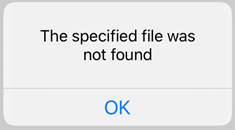
症状:点击的第一张纸将下载,然后在TWebBrowser中显示良好。任何后续的文件点击都会被下载(我可以告诉你,因为我可以在我的应用程序文档文件夹中做一个*.pdf文件列表),但是不能显示。我捕获了当我用TWebBrowser指向Form1->WebBrowser1->URL = "file://" + LFileName;文件时发生的错误。错误是,“未找到指定的文件”。它就在那里,因为我可以在上面列出我的目录。
如果我关闭了应用程序并重新启动它,然后返回并单击以前单击的文件之一(没有显示),它会很好地打开并显示在TWebBrowser中。这确实让我觉得这是某种类型的文件锁定问题,因为文件是存在的。
以下是代码:
void showPaper()
{
   // paperName (e.g. 22.pdf)

   UnicodeString LFileName = System::Ioutils::TPath::Combine(System::Ioutils::TPath::GetDocumentsPath(), paperNAME);
   if (!FileExists(LFileName)) { // file is not present so download it
    UnicodeString URL = pdfURLv4 + paperNAME;
    TFileStream* fs = new TFileStream(LFileName, fmCreate);
    Form1->Download->ConnectTimeout = 15000;  // give it 15 seconds
    Form1->Download->ReadTimeout = 15000;
    Form1->Download->Request->BasicAuthentication = true;
    Form1->Download->Request->Username = "XXXXXX";
    Form1->Download->Request->Password = "YYYYYY";
    Form1->Download->Request->UserAgent = "Mozilla/5.0 (Android 4.4; Mobile; rv:41.0) Gecko/41.0 Firefox/41.0";
    try
    {
        Form1->Download->Get(URL, fs);
        Form1->Download->Disconnect();  // make sure socket is closed
    }
    catch(const System::Sysutils::Exception &)
    {
        try
        {
         UnicodeString URL = pdfURLv6 + paperNAME;  // the v6 url has brackets [] around host
         Form1->Download->Get(URL, fs);
         Form1->Download->Disconnect();
        }
        catch(const System::Sysutils::Exception &)
        {
            ShowMessage(L"No/poor internet connection.");
            Form1->Download->Disconnect();
            delete fs;
            return;
        }
    }
    delete fs;
   } // end of download if block


  if (FileExists(LFileName))    // have the file so open it
   {
   try
   {
    Form1->WebBrowser1->URL = "file://" + LFileName;
   }
   catch ( const Exception& e )
   {
    ShowMessage(e.Message);
   }
    ShowMessage(Form1->WebBrowser1->URL);
  }
} // end of showPaper()
当错误发生时,捕获的消息是(在运行13.3的iPhone上):
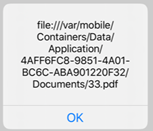
显示ShowMessage的Form1->TWebBrowser1->URL给出的结果是正确的:
我是不是没有正确地关闭TFileStream?事实上,我可以关闭应用程序,重新启动和查看文件让我知道文件正在正确下载。另外,第一次通过代码可以完全工作(下载,然后在TWebBrowser中显示)。只有在需要在显示前下载的后续尝试中,才会出现“文件未找到”的问题。
编辑:现在我创建了一个TWebBrowser WebBrowser1的克隆,我称之为myW。它可以显示pdf,但我想不出如何正确删除它。
下面是我创建它和显示pdf的代码:
  if (FileExists(LFileName))    // have the file so open it
   {
   try
   {
   TWebBrowser *myW;
   myW = new TWebBrowser(Form1->Panel3);
   myW->Parent = Form1->Panel3;
   myW->Align = TAlignLayout::Client;
   myW->URL = "file://" + LFileName;
   myW->Visible = true;
   }
   catch ( const Exception& e )
   {
    ShowMessage(e.Message);
   }
  }
以下是我删除它的尝试:
TComponent *T;
T = Form1->Panel3->Components[0];  // myW is only thing on Panel3
T->Free();  // not working
// T->DisposeOf(); // did not workEDIT2:尝试处理临时TWebBrowser
我创建了这样的TWebBrowser (它可以很好地显示pdf):
   TWebBrowser *myW;
   myW = new TWebBrowser(Form1->Panel3);
   myW->Parent = Form1->Panel3;
   myW->Align = TAlignLayout::Client;
   myW->URL = "file://" + LFileName;  // displays the pdf
   myW->Visible = true;
然后我试着像这样处理它,但不起作用:
TComponent *T;
for (int i = 0; i < (Form1->Panel3->ComponentCount); i++) {
   T = Form1->Panel3->Components[i];
    if (TWebBrowser* TB = dynamic_cast<TWebBrowser*>(T))  {
        Form1->Panel3->RemoveComponent(TB);
        TB->Parent = nullptr;
        TB = nullptr;
        break;
      }
    }
}
我没有任何错误,我只是不能加载第二个pdf (得到的文件还没有找到错误)。我使用cast是因为我无法访问T->Parent。
回答 1
Stack Overflow用户
发布于 2020-02-04 15:34:57
void showPaper()
{
// paperName (e.g. 22.pdf)

   UnicodeString LFileName = System::Ioutils::TPath::Combine(System::Ioutils::TPath::GetDocumentsPath(), paperNAME);
   if (!FileExists(LFileName)) { // file is not present so download it
   UnicodeString URL = pdfURLv4 + paperNAME;
   TFileStream* fs = new TFileStream(LFileName, fmCreate);
   Form1->Download->ConnectTimeout = 15000;  // give it 15 seconds
   Form1->Download->ReadTimeout = 15000;
   Form1->Download->Request->BasicAuthentication = true;
   Form1->Download->Request->Username = "XXXXXX";
   Form1->Download->Request->Password = "YYYYYY";
   Form1->Download->Request->UserAgent = "Mozilla/5.0 (Android 4.4; Mobile; rv:41.0) Gecko/41.0 Firefox/41.0";
   try
   {
    Form1->Download->Get(URL, fs);
    Form1->Download->Disconnect();  // make sure socket is closed
   }
   catch(const System::Sysutils::Exception &)
   {
    try
    {
     UnicodeString URL = pdfURLv6 + paperNAME;  // the v6 url has brackets [] around host
     Form1->Download->Get(URL, fs);
     Form1->Download->Disconnect();
    }
    catch(const System::Sysutils::Exception &)
    {
        ShowMessage(L"No/poor internet connection.");
        Form1->Download->Disconnect();
        delete fs;
        return;
    }
}
delete fs;
} // end of download if block


//////// this gets around the wierd file lock issue with TWebBrowser
 UnicodeString TFileName = System::Ioutils::TPath::Combine(System::Ioutils::TPath::GetDocumentsPath(), "dummy.pdf");
 if (FileExists(TFileName)) {
  TFile::Delete(TFileName); // delete it if present
 }
 TFile::Copy(LFileName, TFileName);
//--------------------------------------


if (FileExists(LFileName))    // have the file so open it
 {
 try
 {
   TWebBrowser *myW;
   myW = new TWebBrowser(Form1->Panel3);
   myW->Parent = Form1->Panel3;
   myW->Align = TAlignLayout::Client;
   myW->URL = "file://" + TFileName;
   myW->Visible = true;
 }
 catch ( const Exception& e )
 {
  ShowMessage(e.Message);
 }
  ShowMessage(Form1->WebBrowser1->URL);
 }
} // end of showPaper()在显示文件和用户点击“关闭”按钮后,我这样做是为了摆脱临时的TWebBrowser
TComponent *T;
for (int i = 0; i < (Form1->Panel3->ComponentCount); i++) {
   T = Form1->Panel3->Components[i];
    //if (T->ClassName() == "TWebBrowser") {
    if (TWebBrowser* TB = dynamic_cast<TWebBrowser*>(T))  {
        Form1->Panel3->RemoveComponent(TB);
        TB->Parent = nullptr;
        TB = nullptr;
        break;
      }
}https://stackoverflow.com/questions/60046380
复制相似问题
腾讯云开发者

Copyright © 2013 - 2026 Tencent Cloud. All Rights Reserved. 腾讯云 版权所有
深圳市腾讯计算机系统有限公司 ICP备案/许可证号:粤B2-20090059  粤公网安备44030502008569号
腾讯云计算(北京)有限责任公司 京ICP证150476号 | 京ICP备11018762号