
引导4工具提示文本格式
引导4工具提示文本格式
提问于 2020-03-25 11:14:04
我一直在努力使我的站点上的工具提示看起来很漂亮,最近我在Godaddy.com上遇到了工具提示,我希望能够复制在以下内容上形成的文本:
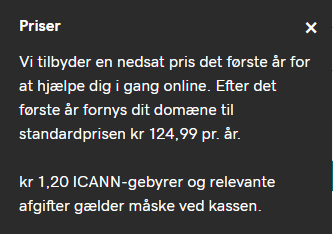
目前,我自己的工具提示如下:
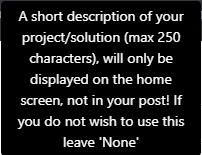
这是我当前的代码,当在图像上盘旋时,工具提示出现是非常重要的(我知道这看起来很混乱,但请忽略它):
<img src="image URL here" width="20" data-toggle="tooltip" data-placement="top" title="A short description of your project/solution (max 250 characters), will only be displayed on the home screen, not in your post! If you do not wish to use this leave 'None'">我主要要做的是能够在工具提示中创建新的行。
任何建议都是见仁见智的!
回答 2
Stack Overflow用户
回答已采纳
发布于 2020-03-25 17:43:22
通过添加固定
data-html="true"这允许我在标题文本中使用<br/>。
最后的代码片段:
<img src="image URL here" width="20" data-html="true" data-toggle="tooltip" data-placement="top" title="A short description of your project/solution (max 250 characters), will only be displayed on the home screen, not in your post! <br/> If you do not wish to use this leave 'None'">Stack Overflow用户
发布于 2020-03-25 11:21:17
你可以这样做:
您可以通过在内容之间添加<br />来添加新行,这对您来说是可行的。
.tooltip {
  position: relative;
  display: inline-block;
  border-bottom: 1px dotted black;
}

.tooltip .tooltiptext {
  visibility: hidden;
  width: 220px;
  background-color: black;
  color: #fff;
  text-align: center;
  border-radius: 6px;
  padding: 5px 0;
  text-align: justify;
  /* This is what you need */
  /* Position the tooltip */
  position: absolute;
  z-index: 1;
}

.tooltip:hover .tooltiptext {
  visibility: visible;
} <div class="tooltip">Hover me
<span class="tooltiptext">A short description of your project/solution (max 250 characters), will only be displayed on the home screen. <br /> <br /> Second para not in your post! If you do not wish to use this leave 'None</span>
</div>
页面原文内容由Stack Overflow提供。腾讯云小微IT领域专用引擎提供翻译支持
原文链接:
https://stackoverflow.com/questions/60847671
复制相关文章
相似问题
腾讯云开发者

Copyright © 2013 - 2026 Tencent Cloud. All Rights Reserved. 腾讯云 版权所有
深圳市腾讯计算机系统有限公司 ICP备案/许可证号:粤B2-20090059  粤公网安备44030502008569号
腾讯云计算(北京)有限责任公司 京ICP证150476号 | 京ICP备11018762号