
三星S10+可访问性视图与TalkBack的焦点问题
我有一个视图,用户输入目标、完成目标的日期和确认复选框。用户必须输入所有这些才能向前移动。因此,我要检查是否有任何字段是空的。这是密码。这个密码起作用了。
          private fun toggleInputRequiredError(
             isErrorVisible: Boolean,
             view: TextInputLayout,
             errorText: String
            ) {
              when (isErrorVisible) {
                  true -> {
                     view.error = errorText
                    }
                 else -> view.error = null
              }
           }

           toggleInputRequiredError(
                !state.isGoalChecked,
                goalAffirmationCheckBoxErrorContainer,
                getString(R.string.required_field)
            ).run {
                if (!state.isGoalChecked) {
                    goalAffirmationCheckBox.isFocusable = true
                    goalAffirmationCheckBox.requestFocus()
                    goalAffirmationCheckBox.sendAccessibilityEvent(AccessibilityEvent.TYPE_VIEW_FOCUSED)
                }
            }

            toggleInputRequiredError(
                !state.isValidDateInput,
                goalDateInputLayout,
                getString(R.string.required_field)
            ).run {
                if (!state.isValidDateInput) {
                    goalCompletionDateInput.isFocusable = true
                    goalCompletionDateInput.requestFocus()
                    goalCompletionDateInput.sendAccessibilityEvent(AccessibilityEvent.TYPE_VIEW_FOCUSED)
                }
            }

            toggleInputRequiredError(
                !state.isValidDescriptionInput,
                goalDescriptionInputLayout,
                getString(R.string.required_field)
            ).run {
                if( !state.isValidDescriptionInput) {
                    goalDescriptionInput.isFocusable = true
                    goalDescriptionInput.requestFocus()
                    goalDescriptionInput.sendAccessibilityEvent(AccessibilityEvent.TYPE_VIEW_FOCUSED)
                }
            }
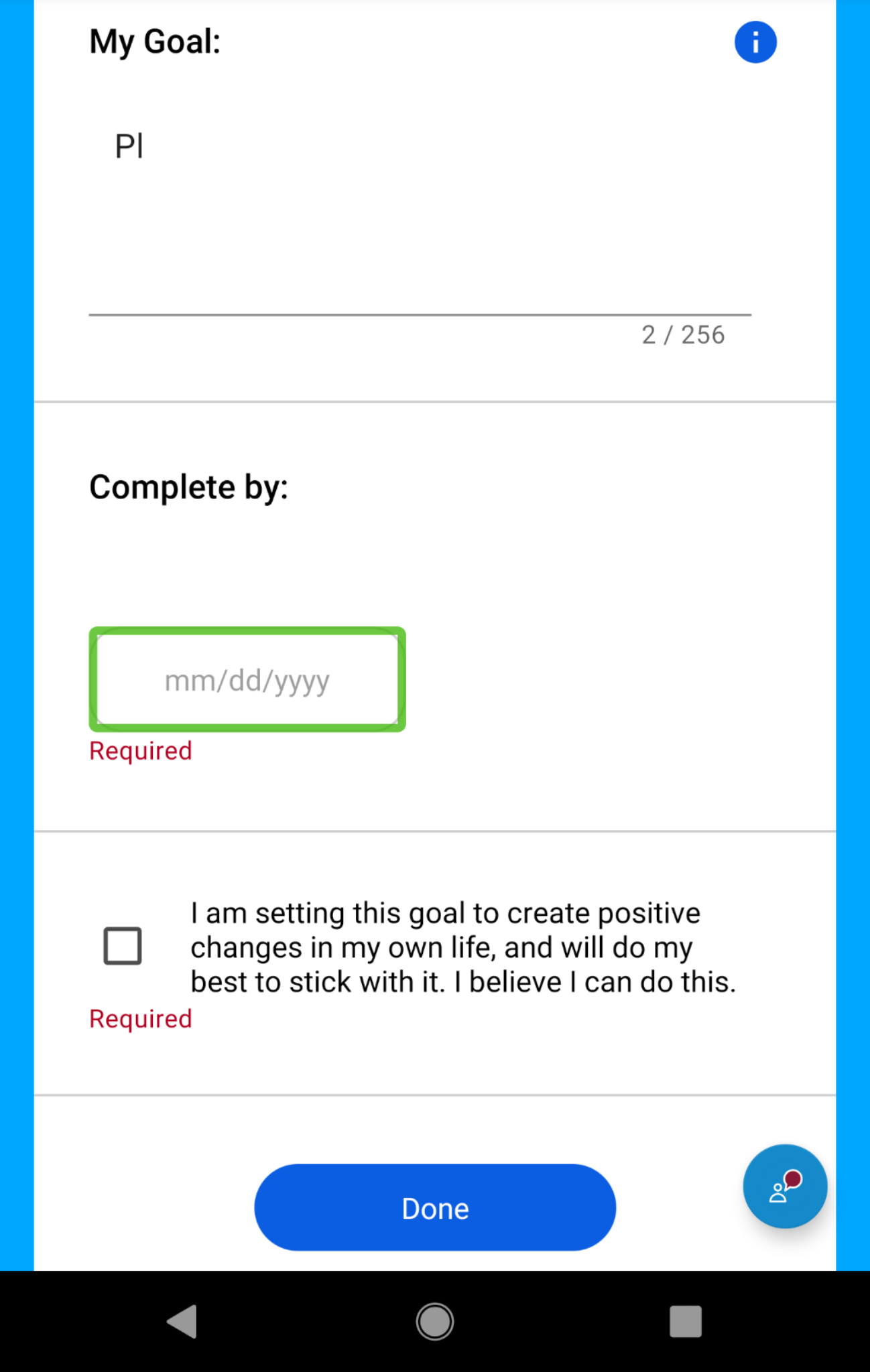
现在,我必须为这个视图提供可访问性,这也是可行的,在大多数手机上,除了最新的三星手机之外。所期望的行为体现在像素XL和三星S8。这里有一张图片来展示这个
在较新的Samsungs上,sendAccessibilityEvent似乎并没有真正关注需要解决的视图。这是一张在三星S10+和三星Note 9上显示这种行为的图片。
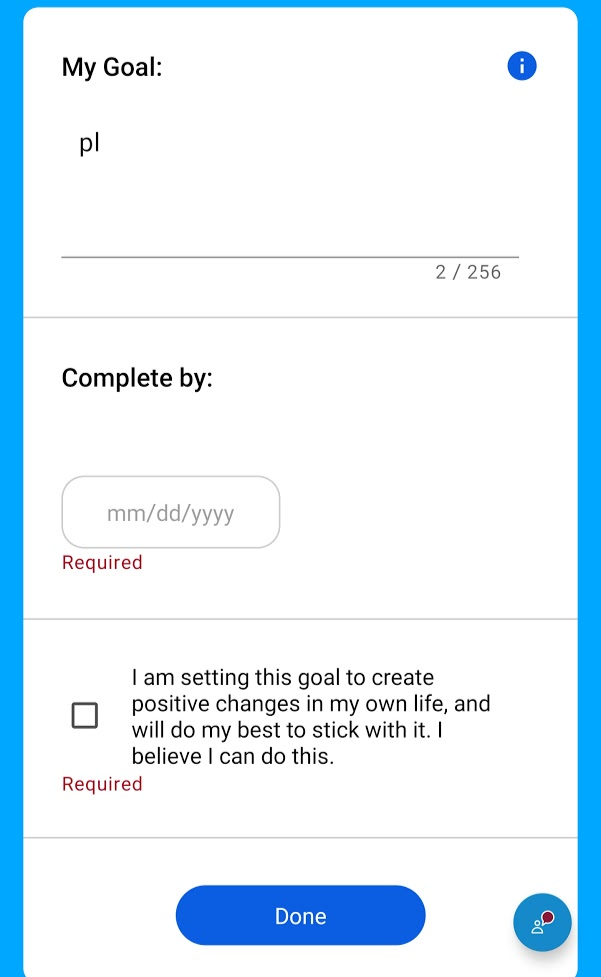
我在XML中设置了这些视图的内容描述。我注意到较新的三星手机会读取屏幕上的“必需”文本,但不会关注它。这意味着它忽略了XML中的内容描述。最后一件事是,需要聚焦的视图似乎没有体验到sendAccessibilityEvent(AccessibilityEvent.TYPE_VIEW_FOCUSED)事件。
如果你对如何解决这个问题有什么想法,或者你有什么建议,我可以试试。
回答 2
Stack Overflow用户
发布于 2020-07-08 07:01:48
在三星S10设备中,我无法将可访问性焦点设置为自定义视图。然后,我已经实现了基于以下代码,所以可以尝试这一点与您的后续,也许这将是有帮助的。
val task = Runnable {
        val mA11yManager = context.getSystemService(Context.ACCESSIBILITY_SERVICE) as AccessibilityManager
        if (mA11yManager.isEnabled) {
            // Equivalent to ACTION_ACCESSIBILITY_FOCUS
            plus_chip_text?.performAccessibilityAction(AccessibilityNodeInfo.ACTION_ACCESSIBILITY_FOCUS, null);
            // we fire selection events here not in View
            plus_chip_text?.sendAccessibilityEvent(AccessibilityEvent.TYPE_VIEW_SELECTED)
        }
    }
    val worker: ScheduledExecutorService = newSingleThreadScheduledExecutor()
worker.schedule(task, 1, TimeUnit.SECONDS)Stack Overflow用户
发布于 2021-03-02 13:54:23
很抱歉,我知道这是一年后的事了,但我们在运行Android 10的三星Talkback上发现了一个类似的问题。
我们发现创建以下kotlin扩展功能似乎适用于所有版本的Android,并且对三星语音助手和Talkback都很有效。
希望这能帮助其他面临类似问题的人。
fun View?.requestAccessibilityFocus(): View? {
   this?.performAccessibilityAction(ACTION_ACCESSIBILITY_FOCUS, null)
   this?.sendAccessibilityEvent(TYPE_VIEW_SELECTED)
   return this
}https://stackoverflow.com/questions/61626024
复制相似问题
腾讯云开发者

Copyright © 2013 - 2026 Tencent Cloud. All Rights Reserved. 腾讯云 版权所有
深圳市腾讯计算机系统有限公司 ICP备案/许可证号:粤B2-20090059  粤公网安备44030502008569号
腾讯云计算(北京)有限责任公司 京ICP证150476号 | 京ICP备11018762号