
Golang + cgo - AppDelegate实现不起作用
Golang + cgo - AppDelegate实现不起作用
提问于 2020-08-14 09:54:04
我想在go中编写一个能够在MacOS上打开自定义文件类型(MacOS)的应用程序。我创建了一个空白的xcode项目来获取所有必要的代码,并通过cgo将其实现到我的应用程序中。当我双击一个文件时,应用程序会打开,但会抱怨它不能以这种格式打开文件:
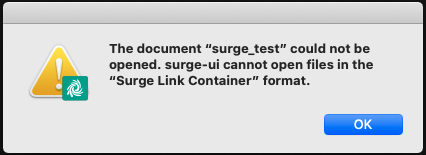
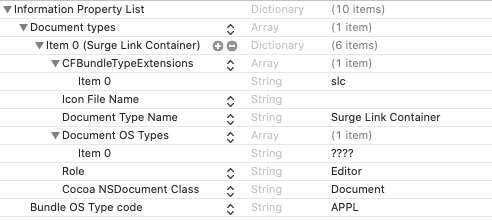
这是我的Info.plist:
执行情况如下:
/surge/appDelegate_darwin.go
package surge

//#cgo CFLAGS: -x objective-c
//#cgo LDFLAGS: -framework Cocoa
//#include "appDelegate_darwin.h"
import "C"
/surge/appDelegate_darwin.h
#import <Cocoa/Cocoa.h>

@interface AppDelegate : NSObject <NSApplicationDelegate>


@end
/surge/appDelegate_darwin.m
#include "appDelegate_darwin.h"

@interface AppDelegate ()

@end

@implementation AppDelegate

-(BOOL)application:(NSApplication *)sender openFile:(NSString *)filename
{
   NSLog(@"%@", filename);
   YES;
}

-(void)application:(NSApplication *)sender openFiles:(NSArray *)filenames
{
   NSLog(@"%@", filenames);
}

- (void)applicationDidFinishLaunching:(NSNotification *)aNotification {
    // Insert code here to initialize your application
}

- (void)applicationWillTerminate:(NSNotification *)aNotification {
    // Insert code here to tear down your application
}

@end附加信息:我使用wails框架(https://wails.app)向应用程序添加了一个很好的vue.js前端,并使用内置的wails build命令。
cgo和objective(如自定义协议处理程序)中的其他实现也可以工作。
回答 1
Stack Overflow用户
回答已采纳
发布于 2020-08-16 18:40:55
经过几个不眠之夜,我找到了自己的解决方案,通过调查和学习如何构建一个普通的mac应用程序。
此外,要实现AppDelegate,还需要实现Document和一些额外的函数以使其运行。这是我的
/surge/appDelegate_darwin.h
#import <Cocoa/Cocoa.h>

extern void HandleFile(char *);

@interface AppDelegate : NSObject <NSApplicationDelegate>

@end

@interface Document : NSDocument

@end
/surge/appDelegate_darwin.m
#include "appDelegate_darwin.h"

@interface AppDelegate ()

@end

@implementation AppDelegate

-(BOOL)application:(NSApplication *)sender openFile:(NSString *)filename
{
   YES;
}

-(void)application:(NSApplication *)sender openFiles:(NSArray *)filenames
{
   NSLog(@"%@", filenames);
}

- (void)applicationDidFinishLaunching:(NSNotification *)aNotification {
    // Insert code here to initialize your application
}


- (void)applicationWillTerminate:(NSNotification *)aNotification {
    // Insert code here to tear down your application
}


@end

@interface Document ()

@end

@implementation Document

- (instancetype)init {
    self = [super init];
    if (self) {
        // Add your subclass-specific initialization here.
    }
    return self;
}

+ (BOOL)autosavesInPlace {
    return YES;
}


- (NSString *)windowNibName {
    // Override returning the nib file name of the document
    // If you need to use a subclass of NSWindowController or if your document supports multiple NSWindowControllers, you should remove this method and override -makeWindowControllers instead.
    return @"Document";
}


- (NSData *)dataOfType:(NSString *)typeName error:(NSError **)outError {
    // Insert code here to write your document to data of the specified type. If outError != NULL, ensure that you create and set an appropriate error if you return nil.
    // Alternatively, you could remove this method and override -fileWrapperOfType:error:, -writeToURL:ofType:error:, or -writeToURL:ofType:forSaveOperation:originalContentsURL:error: instead.
    [NSException raise:@"UnimplementedMethod" format:@"%@ is unimplemented", NSStringFromSelector(_cmd)];
    return nil;
}


- (BOOL)readFromData:(NSData *)data ofType:(NSString *)typeName error:(NSError **)outError {
    NSData *dataFromFile = [data retain];
    NSString *myString = [[NSString alloc] initWithData:dataFromFile encoding:NSUTF8StringEncoding];

    // This is the place where the magic happens. In my case I just call the HandleFile-function to process the file contents in my main go app
    NSLog(@"Data received: %@", myString);
    HandleFile([myString UTF8String]);
    return YES;
}


@end
我希望有人发现这有用!
页面原文内容由Stack Overflow提供。腾讯云小微IT领域专用引擎提供翻译支持
原文链接:
https://stackoverflow.com/questions/63410554
复制相关文章
相似问题
腾讯云开发者

Copyright © 2013 - 2026 Tencent Cloud. All Rights Reserved. 腾讯云 版权所有
深圳市腾讯计算机系统有限公司 ICP备案/许可证号:粤B2-20090059  粤公网安备44030502008569号
腾讯云计算(北京)有限责任公司 京ICP证150476号 | 京ICP备11018762号