
迭代DataFrame电子邮件报告
迭代DataFrame电子邮件报告
提问于 2021-01-20 21:03:08
当前情况:从源下载电子表格/CSV。此表格包括:捐赠者,姓名,日期,金额,项目不同的员工通过电子邮件收到不同的项目报告。
步骤:
- 下载报告
- 筛选报告项目
- 电子邮件报告给负责员工
这是一个耗费时间的手工过程。
我已经玩过Python/Pandas了,我已经开始弄清楚了,但是我不知道如何循环/迭代数据来准备报告。然后我需要把它发电子邮件给负责人。
样本数据:
ed = {'code': ['1000-1', '2000-3', '3000-1', '2500-2', '3500-1'], 'project': ['building fund', 'special projects', 'operational', 'travel', 'groups'], 'email': ['emailfake@fake.net', 'notme@emailfake.com', 'emailfake@fake.net', 'notme@emailfake.com', 'fake@email3@gmail.com']}
email = pd.DataFrame(ed)

d = {'donor': [111309, 111309, 110926, 110184, 1942, 1942, 110580, 110580, 110905, 110905, 110361, 110451, 110451, 111270, 106261, 109949], 'name': ['Johnny Appleseed', 'Johnny Appleseed', 'Davey Crockett', 'Daniel Boone', 'Harriet Tubman', 'Harriet Tubman', 'George Washington', 'George Washington', 'Abe Lincoln', 'Abe Lincoln', 'William Faulkner', 'Claude Debussy', 'Claude Debussy', 'Antonio Vivaldi', 'Keith Green', 'Samuel Adams'], 'date': ['1/1/21', '1/1/21', '1/1/21', '1/1/21', '1/1/21', '1/1/21', '1/1/21', '1/1/21', '1/1/21', '1/1/21', '1/1/21', '1/1/21', '1/1/21', '1/1/21', '1/1/21', '1/1/21'], 'amount': [50, 150, 150, 100, 100, 300, 750, 250, 100, 300, 250, 100, 300, 200, 100, 100], 'project': ['building fund', 'special projects', 'building fund', 'operational', 'operational', 'travel', 'groups', 'travel', 'building fund', 'building fund', 'special projects', 'operational', 'travel', 'groups', 'building fund', 'travel']}
data = pd.DataFrame(d)
接近我想要的电子邮件(减去索引/行数):
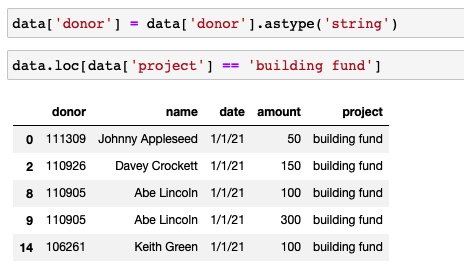
我认为我需要合并这两个DFs,这样电子邮件就可以连接到数据中了--所以我做了以下工作:
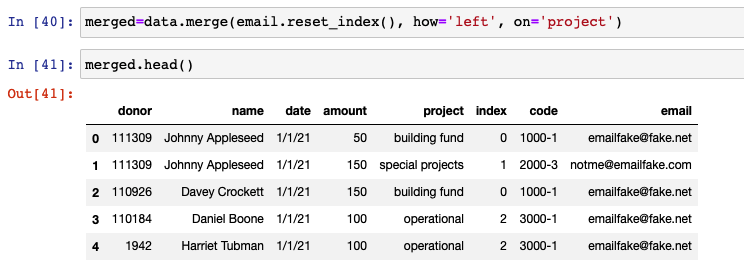
我最终需要运行这个,并让它电子邮件过滤报告给个人负责人。
我不想要电子邮件的所有答案(我正在努力学习这一点),所以也许是一个正确的方向(图书馆使用,基本步骤等)。
谢谢!
约翰
回答 1
Stack Overflow用户
发布于 2021-01-20 22:08:46
更容易显示一个示例,然后您就可以决定是否像我将要展示的那样使用组要比编写函数和使用.apply()或groupby().apply()内联注释更好。
merged = data.merge(email.reset_index(), how='left', on='project')

#group on project
df_grouped = merged.groupby(['project'])

#iterate through groups
for gkey in list(df_grouped.groups.keys()):
    # print(df_grouped.get_group(gkey))
    dft = df_grouped.get_group(gkey)
    recips = dft.email.unique().tolist() # list of recipients if there is more than one email per project
    # if only one recipient, can use
    recip = dft.email.iloc[0]
    print(recips, recip) # note one is list the other is a single value
    # do something with dataframe to prepare for sending via email
    # example:
    # this puts the df in csv format or you can just write csv to file and email file
    csv_buffer = io.StringIO()
    dft.to_csv(csv_buffer)
    txt = csv_buffer.getvalue()
print(txt)页面原文内容由Stack Overflow提供。腾讯云小微IT领域专用引擎提供翻译支持
原文链接:
https://stackoverflow.com/questions/65817622
复制相关文章
相似问题
腾讯云开发者

Copyright © 2013 - 2026 Tencent Cloud. All Rights Reserved. 腾讯云 版权所有
深圳市腾讯计算机系统有限公司 ICP备案/许可证号:粤B2-20090059  粤公网安备44030502008569号
腾讯云计算(北京)有限责任公司 京ICP证150476号 | 京ICP备11018762号