
使用自定义按钮单击AzureAD
你好,我正在尝试开发带有azure活动目录的演示程序(Blazor服务器应用程序)。
My requirement:
->点击按钮,它应该重定向在https://login.microsoftonline.com/上,它应该对用户进行身份验证,然后它应该再次重定向到我当前的blazor应用程序索引url。
但是在运行blazor应用程序之后,它将直接重定向到https://login.microsoftonline.com/,在身份验证页面之后将重定向到我的应用程序。
我的代码如下所示:
appSettings.json
{
   "AzureAd": {
   "Instance": "https://login.microsoftonline.com/",
   "Domain": "jpda.onmicrosoft.com",
   "TenantId": "aacd4f65-xxxx",
   "ClientId": "93134054-xxxx",
   "CallbackPath": "/signin-oidc",
   "ClientSecret": "I~Uoq5yxxxx"
},
  "Logging": {
  "LogLevel": {
  "Default": "Information",
  "Microsoft": "Warning",
  "Microsoft.Hosting.Lifetime": "Information"
 }
  },
 "AllowedHosts": "*"
}
LoginDisplay.razor
<AuthorizeView>
<Authorized>
    Hello, @context.User.Identity.Name!
    <a href="MicrosoftIdentity/Account/SignOut">Log out</a>
</Authorized>
<NotAuthorized>
    <a href="MicrosoftIdentity/Account/SignIn">Log in</a>
</NotAuthorized>
Index.razor
@page "/"

<div class="top-row px-4 auth">
 @if (IsButtonClicked == true)
 {
    <LoginDisplay />
 }
 <a href="https://learn.microsoft.com/aspnet/" target="_blank">About</a>
 </div>
<h1>Hello, world!</h1>

Welcome to your new app.

<SurveyPrompt Title="How is Blazor working for you?" />

<button class="btn btn-primary" @onclick="(() => IsButtonClicked = true)">Login</button>

@code{
     [Parameter]
     public EventCallback<bool> OnButtonClicked { get; set; }
     public bool IsButtonClicked { get; set; }
  }
我从index.razor组件中有条件地调用组件,如果单击按钮,那么它应该在身份验证页面上调用和重定向。
如果有人有主意,请帮帮我!!提前感谢!
回答 1
Stack Overflow用户
发布于 2021-07-07 16:37:16
- 在蔚蓝中,当你去 应用程序注册->新应用程序注册
在提供了一些有效的名称并选择了有效的租户选项之后,您可以看到重定向URI选项。在那里放置uri很重要,因为一旦注册,您就必须返回应用程序。url取决于您的应用程序是什么以及它在本地居住的位置。
- After that when you go to authentication you can see the urls that you gave and you can add more.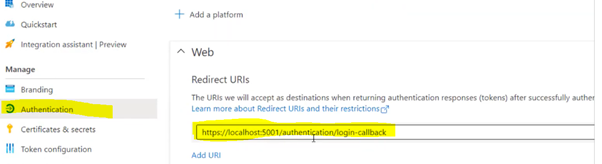
2. Open startup.cs .必须有如下所示(下面显示的注释行)
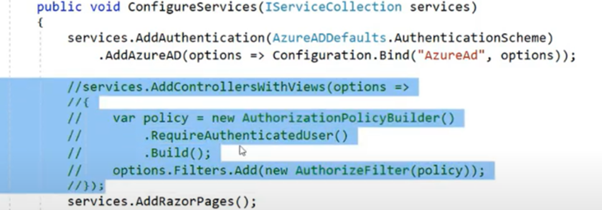
- 用以下代码代替services.AddControllersWithViews(.)下面的代码被重定向到login.microsoftonline.com,点击签名按钮。
public void ConfigureServices(IServiceCollection services)
{
   //

   //
   services.AddAuthentication(AzureADDefaults.AuthenticationScheme)
                .AddAzureAD(options => Configuration.Bind("AzureAd", options));

    services.AddControllersWithViews()
        .AddMicrosoftIdentityUI();

    services.AddRazorPages();


    //


}
3.在blazor中,您可以打开index.razor、打开终端窗口并添加以下库=>Microsoft.AspNetCore.Authorization
代码:
> dotnet add package Microsoft.AspNetCore.Authorization
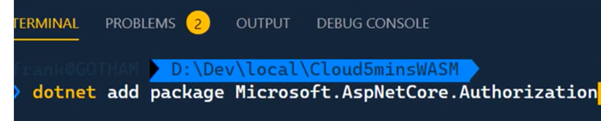
4.您可以打开index.razor并添加如下所示的引用。(您可以这样做,因为您喜欢在需要身份验证的地方进行验证)

(如果应用程序有控制器,您也可以在控制器中的索引操作中添加授权属性,而不是在视图中授予授权)
参考资料:
https://stackoverflow.com/questions/68265655
复制相似问题
腾讯云开发者

Copyright © 2013 - 2026 Tencent Cloud. All Rights Reserved. 腾讯云 版权所有
深圳市腾讯计算机系统有限公司 ICP备案/许可证号:粤B2-20090059  粤公网安备44030502008569号
腾讯云计算(北京)有限责任公司 京ICP证150476号 | 京ICP备11018762号