
猎猎虫(?)用浮动的元素?
我用我正在处理的布局跟踪了一个奇怪的问题,这个紧凑的代码示例错误地呈现在桌面Safari中。显然,div#shim是触发浏览器错误呈现文本的原因。有人以前见过这个或者知道解决办法吗?
<div id=shim style="float: left; height: 3px; outline: thin solid blue;"></div>
<div style="float: left; clear: left; width:50%; height: 50px; outline: thin solid red;">50%</div>
<div style="float: right; clear: right; width:10%; height: 50px; outline: thin solid red;">10%</div>

Here is some text to show the bug.
Here is some text to show the bug.
Here is some text to show the bug.
Here is some text to show the bug.
Here is some text to show the bug.
Here is some text to show the bug.

回答 2
Stack Overflow用户
发布于 2021-07-10 18:54:59
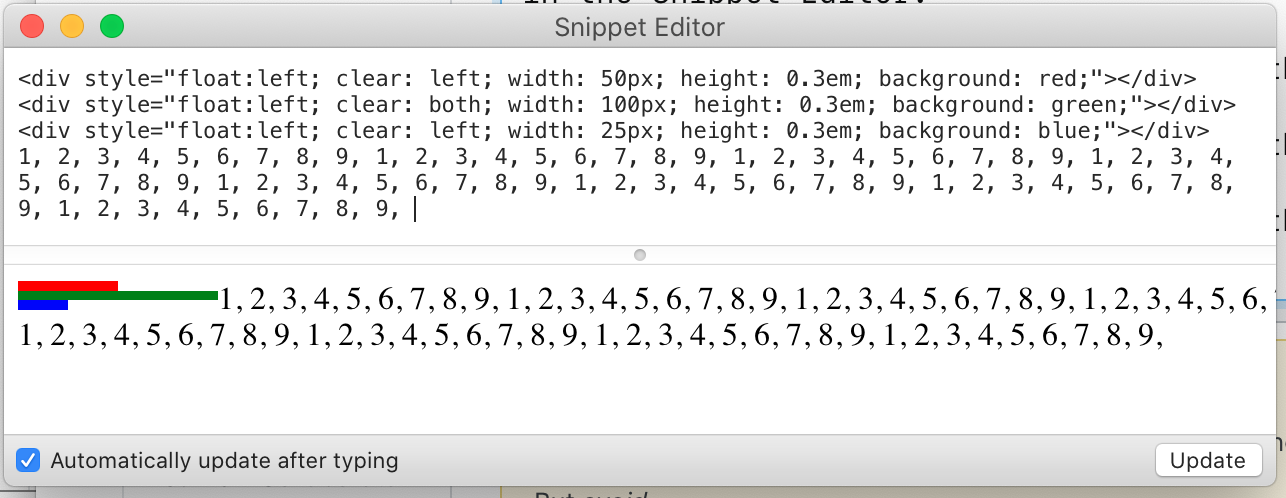
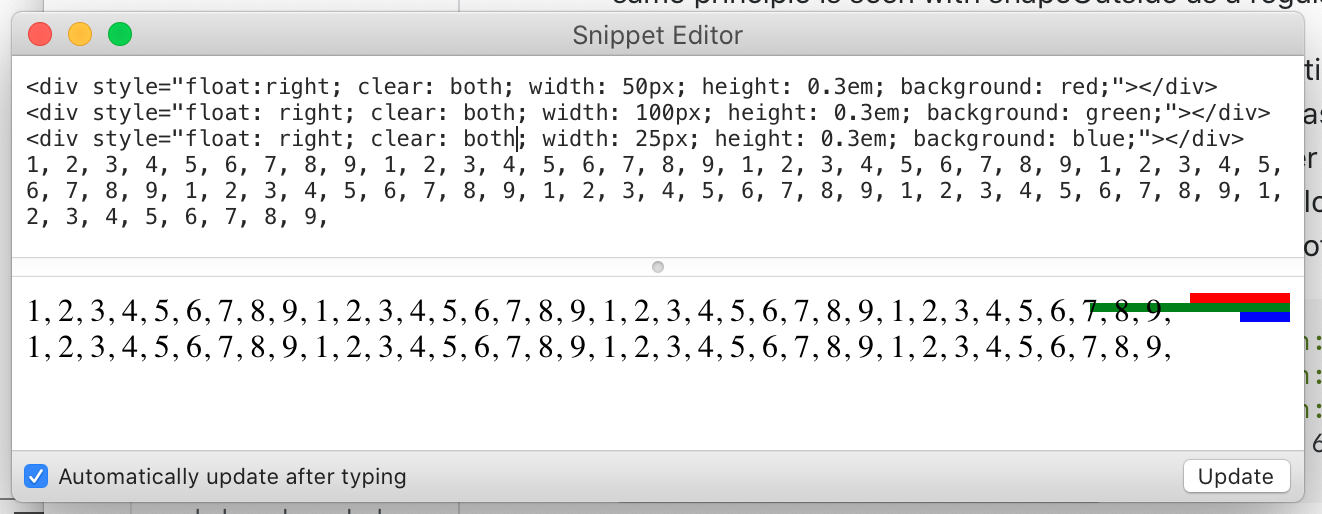
我用了几种不同的方法(单词中断、添加div等等),看起来Safari在浮动旁边放置一行时的行为是首先检查文本行顶部的左浮点数,以计算行的宽度。这与行底部的更大范围的浮动相冲突。如果它将其绘制到计算它的位置,您将看到文本的底部绘制在较低的浮点数上。但是当它画它的时候,它确实把最右边的边缘正确地放在了线上,它把它推到了屏幕的右边,有时它甚至从那里开始。shapeOutside也被看作是一个常规的盒子。
Chrome、Firefox和Edge都显示了正确的计算,它们都考虑到了浮动线的高度。所以我要把它解释为Safari中的文本计算中的一个bug,它没有任何设计或者CSS解决方案--不管你在做什么,如果正文文本恰好跨越两个浮动之间的边界,在两个较低的浮标之间,线会太长,甚至,如果下一个浮点数是100%宽的话,从滚动条开始。
<div style="float:left; clear: left; width: 50px; height: 0.3em; background: red;"></div>
<div style="float:left; clear: both; width: 100px; height: 0.3em; background: green;"></div>
<div style="float:left; clear: left; width: 25px; height: 0.3em; background: blue;"></div>
1, 2, 3, 4, 5, 6, 7, 8, 9, 1, 2, 3, 4, 5, 6, 7, 8, 9, 1, 2, 3, 4, 5, 6, 7, 8, 9, 1, 2, 3, 4, 5, 6, 7, 8, 9, 1, 2, 3, 4, 5, 6, 7, 8, 9, 1, 2, 3, 4, 5, 6, 7, 8, 9, 1, 2, 3, 4, 5, 6, 7, 8, 9, 1, 2, 3, 4, 5, 6, 7, 8, 9,
Stack Overflow用户
发布于 2021-07-10 07:09:51
令人困惑的是,在两个浮动的div中有明确的设置。
奇怪的是,它们似乎产生了一种违反直觉的效果。在Safari中,文本的第一行流到右浮动的div中(并以等于总宽度的数量继续进行)。
清除这些清除物似乎可以解决问题。
假设您实际上希望在显示任何其他内容之前清除所有内容,则这个片段会在文本之后(然后显示更多的文本,以证明它确实已被清除)提供一个清晰的内容。
在iPad IOS14 Safari上进行了测试,在这里,无论文本太短而不能在浮动的div下流动,还是文本太长以至于在填充它们之间的空格后在它们下面流动,它似乎都能工作。
<div id=shim style="float: left; height: 3px; outline: thin solid blue;"></div>
<div style="float: left; width:50%; height: 50px; outline: thin solid red;">50%</div>
<div style="float: right; width:10%; height: 50px; outline: thin solid red;">10%</div>

Here is some text to show the bug.
Here is some text to show the bug.
Here is some text to show the bug.
Here is some text to show the bug.
Here is some text to show the bug.
Here is some text to show the bug.
<div style="clear: both;"></div>
This is some stuff coming afterwards to show that it clears both the text and the red bordered divs no matter what the length of the text between those divs is.
https://stackoverflow.com/questions/68324840
复制相似问题
腾讯云开发者

Copyright © 2013 - 2026 Tencent Cloud. All Rights Reserved. 腾讯云 版权所有
深圳市腾讯计算机系统有限公司 ICP备案/许可证号:粤B2-20090059  粤公网安备44030502008569号
腾讯云计算(北京)有限责任公司 京ICP证150476号 | 京ICP备11018762号