
Heroku未能加载用于扩展的配置"google“。引用: /app/.eslintrc.json
Heroku未能加载用于扩展的配置"google“。引用: /app/.eslintrc.json
提问于 2021-07-31 19:04:56
在本地,我的项目工作没有错误,但是在我将项目部署到Heroku上之后,发生了以下错误:
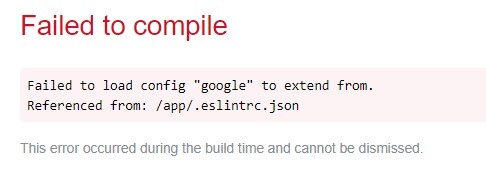
再说一遍,当地一切都很好。以下是eslintrc.json:
{
  "env": {
    "browser": true,
    "es2021": true
  },
  "extends": ["eslint:recommended", "google"],
  "parser": "@typescript-eslint/parser",
  "parserOptions": {
    "ecmaFeatures": {
      "jsx": true
    },
    "ecmaVersion": 12,
    "sourceType": "module"
  },
  "plugins": ["react", "@typescript-eslint"],
  "rules": {
    "camelcase": "off",
    "object-curly-spacing": "off",
    "linebreak-style": 0,
    "isolatedModules": 0,
    "indent": "off",
    "require-jsdoc": "off",
    "max-len": "off",
    "no-unused-vars": "off",
    "no-invalid-this": "warn",
    "operator-linebreak": "off"
  },
  "globals": {
    "google": "readonly",
    "process": "readonly",
    "arrow-parens": "off"
  }
}回答 1
Stack Overflow用户
回答已采纳
发布于 2022-03-26 11:35:36
生产中通常不需要ESlint。在开发模式下使用linter验证代码是一个很好的实践。关于生产,在几乎所有的情况下,禁用它是有意义的。
这就是为什么即使是ESlint的官方文档也建议使用--dev标志(https://eslint.org/docs/user-guide/getting-started)安装它:
yarn add eslint --dev在这种情况下,ESlint将被添加到package.json的"devDependencies"中。
现在,让我们回到错误。我想,你通过以下方式部署你的应用程序:
yarn install --production
yarn build(或这些命令的npm类推)
它是在主机上运行还是在码头容器中运行并不重要。关键是在运行这些命令之前,需要将环境变量DISABLE_ESLINT_PLUGIN设置为true。
试一试
export DISABLE_ESLINT_PLUGIN=true
yarn install --production
yarn build
如果你在主机上部署你的应用程序。
或者这样做:
ENV DISABLE_ESLINT_PLUGIN true
RUN ["yarn", "install", "--production"]
RUN ["yarn", "build"]
如果你的应用程序被篡改了。
页面原文内容由Stack Overflow提供。腾讯云小微IT领域专用引擎提供翻译支持
原文链接:
https://stackoverflow.com/questions/68605078
复制相关文章
相似问题
腾讯云开发者

Copyright © 2013 - 2026 Tencent Cloud. All Rights Reserved. 腾讯云 版权所有
深圳市腾讯计算机系统有限公司 ICP备案/许可证号:粤B2-20090059  粤公网安备44030502008569号
腾讯云计算(北京)有限责任公司 京ICP证150476号 | 京ICP备11018762号