
如何在qml中选择三维彩色立方体中的颜色?
如何在qml中选择三维彩色立方体中的颜色?
提问于 2021-08-16 09:58:31
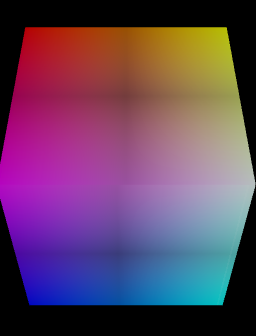
我正在开发一个三维颜色选择立方体在QML,我已经开发立方体纹理,但我不知道如何编码的颜色选择。
我想当我点击一个立方体的表面有我所点击的颜色,它是否有可能在qml?
以下是我的多维数据集代码:
Entity {
    id: root

    Camera {
        id: mainCamera
        projectionType: CameraLens.PerspectiveProjection
        fieldOfView: 45
        aspectRatio: 16/9
        nearPlane : 0.1
        farPlane : 1000.0
        position: Qt.vector3d(0.0, 4.49373, -3.78577)
        upVector: Qt.vector3d( 0.0, 1.0, 0.0 )
        viewCenter: cubeTransform.translation
    }

    CustomCameraController {
        id: mainCameraController
        camera: mainCamera
    }

    components: [

        DirectionalLight{
            color: "#e0eef0"
            intensity: 0.4
            enabled: true
            worldDirection: Qt.vector3d(1, 0, 0)

        },

        DirectionalLight{
            color: "#e0eef0"
            intensity: 0.4
            enabled: true
            worldDirection: Qt.vector3d(0, 1, 0)

        },

        DirectionalLight{
            color: "#e0eef0"
            intensity: 0.4
            enabled: true
            worldDirection: Qt.vector3d(-1, 0, 0)

        },

        DirectionalLight{
            color: "#e0eef0"
            intensity: 0.4
            enabled: true
            worldDirection: Qt.vector3d(0, -1, 0)

        },

        DirectionalLight{
            color: "#e0eef0"
            intensity: 0.4
            enabled: true
            worldDirection: Qt.vector3d(0, 0, 1)

        },

        DirectionalLight{
            color: "#e0eef0"
            intensity: 0.4
            enabled: true
            worldDirection: Qt.vector3d(0, 0, -1)

        },


        RenderSettings {

            Viewport {
                normalizedRect: Qt.rect(0.0, 0.0, 1.0, 1.0)

                RenderSurfaceSelector {
                    CameraSelector {
                        id: cameraSelector
                        camera: mainCamera

                        FrustumCulling {

                            ClearBuffers {
                                buffers: ClearBuffers.AllBuffers
                                clearColor: "black"
                                NoDraw {}
                            }

                            LayerFilter {
                                filterMode: LayerFilter.DiscardAnyMatchingLayers
                                layers: [topLayer]
                            }

                            LayerFilter {
                                filterMode: LayerFilter.AcceptAnyMatchingLayers
                                layers: [topLayer]

                                ClearBuffers {
                                    buffers: ClearBuffers.DepthBuffer
                                }
                            }
                        }
                    }

                }

            }
        },

        InputSettings {}
    ]

    Layer {
        id: topLayer
        recursive: true
    }

    Entity {
            id: cubeEntity


            Texture2D {
                id: cubeTexture

                TextureImage {
                    source: "qrc:/texture.png"
                }
            }

            Mesh {
                id: cubeMesh

                source: "qrc:/cube.obj"
            }

            Transform {
                id: cubeTransform
            }

            ObjectPicker {
                id: cubePicker

                onClicked: {

                    console.log("x : " + pick.localIntersection.normalized().x)
                    console.log("y : " + pick.localIntersection.normalized().y)
                    console.log("z : " + pick.localIntersection.normalized().z)

                }
            }

            NormalDiffuseMapMaterial{
                id: cubeMaterial
                diffuse: cubeTexture
                normal: cubeTexture
                specular: "black"
                shininess: 50
            }

            components: [cubeMesh, cubeTransform, cubeMaterial, cubePicker]

    }

}
我补充说,如果有人能帮我的话,我的真实立方体的照片会很棒。
回答 1
Stack Overflow用户
回答已采纳
发布于 2021-08-20 12:32:51
以下是使用qml、opengl和c++进行颜色选择的答案:
C++类
pixelvaluereader.h
#pragma once

#include <QObject>
#include <Qt3DRender/QRenderCaptureReply>

class PixelValueReader : public QObject
{
  Q_OBJECT
public:
  explicit PixelValueReader(QObject *parent = nullptr);


  Q_INVOKABLE QColor getColor(Qt3DRender::QRenderCaptureReply *reply, int x, int y);

signals:

  void newColor(QColor color);

};
pixelvaluereader.cpp
#include "pixelvaluereader.h"
#include <QDebug>


PixelValueReader::PixelValueReader(QObject* parent)
    : QObject(parent)
{

}


QColor PixelValueReader::getColor(Qt3DRender::QRenderCaptureReply* reply, int x, int y)
{

    QRgb pixel = reply->image().pixel(x, y);

    int red = qRed(pixel);
    int blue = qBlue(pixel);
    int green = qGreen(pixel);
    int alpha = qAlpha(pixel);

    qDebug() << red * 0xFF000000 + green * 0xFF0000 + blue * 0xFF00 + alpha;

    if (red * 0xFF000000 + green * 0xFF0000 + blue * 0xFF00 + alpha > 0) {
      emit newColor(QColor(pixel));
      qDebug() << "color : " << QColor(pixel).name(); // here is the color of the pixel

    }
    // RGBA captures the ID but since we masked and right shifted the respective values in the shader
    // (e.g. (red & 0xFF000000) >> 24 for red) to prevent overflow in the color values we have to
    // undo the shift here again.
    return QColor(pixel);
}
main.cpp
#include <Qt3DRender/QAbstractTextureImage>
#include <Qt3DQuickExtras/qt3dquickwindow.h>
#include <Qt3DQuick/QQmlAspectEngine>
#include <QGuiApplication>
#include <QQmlContext>
#include <QQmlEngine>


#include "pixelvaluereader.h"

//Q_DECLARE_METATYPE(Qt3DRender::QAbstractTextureImage)

    int main(int argc, char* argv[])
    {
      QGuiApplication app(argc, argv);

      QVector<QVector3D> pos;
      pos << QVector3D(1, 1, 0);
      pos << QVector3D(-1, 2, 8);
      pos << QVector3D(1, 1, 7);
      pos << QVector3D(0, 0, 4);
      pos << QVector3D(1, 5, 1);
      pos << QVector3D(-3, 3, 0);
      pos << QVector3D(2, 2, -2);


      PixelValueReader *valueReader = new PixelValueReader();
      qmlRegisterType<PixelValueReader>("PixelValueReader", 1, 0, "PixelValueReader");


      Qt3DExtras::Quick::Qt3DQuickWindow view;
      view.setTitle("Instanced Rendering");
      view.resize(1600, 800);
      view.engine()->qmlEngine()->rootContext()->setContextProperty("_window", &view);
      view.engine()->qmlEngine()->rootContext()->setContextProperty("pixelValueReader", valueReader);
      view.setSource(QUrl("qrc:/main.qml"));
      view.show();

      return app.exec();
    }
Opengl
对于opengl代码,您可以在Florian项目中找到它:这里
QML
main.qml
import QtQuick 2.1 as QQ2
import Qt3D.Core 2.0
import Qt3D.Render 2.10
import Qt3D.Input 2.0
import Qt3D.Extras 2.0

Entity {

    components: [
        rendSettings,
        inputSettings,
        light1,
        light2,
        light3,
        light4,
        light5,
        light6
    ]

    DirectionalLight{
        id: light1
        color: "#e0eef0"
        intensity: 0.4
        enabled: true
        worldDirection: Qt.vector3d(1, 0, 0)

    }

    DirectionalLight{
        id: light2
        color: "#e0eef0"
        intensity: 0.4
        enabled: true
        worldDirection: Qt.vector3d(0, 1, 0)

    }

    DirectionalLight{
        id: light3
        color: "#e0eef0"
        intensity: 0.4
        enabled: true
        worldDirection: Qt.vector3d(-1, 0, 0)

    }

    DirectionalLight{
        id: light4
        color: "#e0eef0"
        intensity: 0.4
        enabled: true
        worldDirection: Qt.vector3d(0, -1, 0)

    }

    DirectionalLight{
        id: light5
        color: "#e0eef0"
        intensity: 0.4
        enabled: true
        worldDirection: Qt.vector3d(0, 0, 1)

    }

    DirectionalLight{
        id: light6
        color: "#e0eef0"
        intensity: 0.4
        enabled: true
        worldDirection: Qt.vector3d(0, 0, -1)

    }

    InputSettings { id: inputSettings }

    RenderSettings {
        id: rendSettings
        activeFrameGraph: RenderSurfaceSelector {
            id: surfaceSelector
            Viewport {
                normalizedRect: Qt.rect(0, 0, 1, 1)
                CameraSelector {
                    camera: camera
                    ClearBuffers {
                        buffers: ClearBuffers.ColorDepthBuffer
                        clearColor: "transparent"
                        FrustumCulling {
                            DepthTest {
                                depthFunction: DepthTest.LessOrEqual

                                RenderPassFilter {
                                    matchAny: []
                                }
                                RenderPassFilter {
                                    matchAny: []
                                    RenderTargetSelector {
                                        target: rt
                                        TextureRenderTarget {
                                            id: rt
                                            width: surfaceSelector.surface ? surfaceSelector.surface.width : 512
                                            height: surfaceSelector.surface ? surfaceSelector.surface.height : 256
                                        }
                                        RenderCapture {
                                            id: renderCapture
                                        }
                                    }
                                }
                            }

                        }
                    }
                }
            }
        }

    }

    MouseDevice {
        id: mouseDevice
    }

    MouseHandler {
        sourceDevice: mouseDevice

        property var reply
        property bool isHold: false
        property var x
        property var y

        onReleased: {
            if (!isHold) {
                x = mouse.x
                y = mouse.y
                doRenderCapture()
            }

            isHold = false;
        }


        onPositionChanged: {
            if (mouse.buttons === 1){
                isHold = true
            }

        }

        function doRenderCapture() {
            reply = renderCapture.requestCapture()
            reply.completeChanged.connect(onRenderCaptureCompleted)
        }

        function onRenderCaptureCompleted() {
            var color = pixelValueReader.getColor(reply, x, y)
        }

    }

    Camera {
        id: camera
        projectionType: CameraLens.PerspectiveProjection
        fieldOfView: 45
        aspectRatio: 16/9
        nearPlane : 0.1
        farPlane : 1000.0
        position: Qt.vector3d(0.0, 4.49373, -3.78577)
        upVector: Qt.vector3d( 0.0, 1.0, 0.0 )
        viewCenter: cubeTransform.translation
    }

    CustomCameraController {camera: camera}

    Entity {
            id: cubeEntity


            Texture2D {
                id: cubeTexture

                TextureImage {
                    source: "qrc:/texture.png"
                }
            }

            Mesh {
                id: cubeMesh

                source: "qrc:/cube.obj"
            }

            Transform {
                id: cubeTransform
            }

            NormalDiffuseMapMaterial{
                id: cubeMaterial
                diffuse: cubeTexture
                normal: cubeTexture
                specular: "black"
                shininess: 50
            }

            components: [cubeMesh, cubeTransform, cubeMaterial]

    }

}
TextureRenderTarget.qml
import Qt3D.Core 2.0
import Qt3D.Render 2.0

RenderTarget {
    id: rt

    property real width: 512
    property real height: 512

    property alias colorTexture: colorTexture
    property variant depthTexture

    attachments : [
        RenderTargetOutput {
            attachmentPoint: RenderTargetOutput.Color0
            texture: Texture2D {
                id: colorTexture
                width: rt.width
                height: rt.height
                format: Texture.RGBA8_UNorm
                minificationFilter: Texture.Linear
                magnificationFilter: Texture.Linear
            }
        },
        RenderTargetOutput {
            attachmentPoint: RenderTargetOutput.Depth
            texture : Texture2D {
                id: depthTexture
                width: rt.width
                height: rt.height
                format: Texture.D32
                minificationFilter: Texture.Linear
                magnificationFilter: Texture.Linear
                comparisonFunction: Texture.CompareLessEqual
                comparisonMode: Texture.CompareRefToTexture
            }
        }
    ]
}
我的CustomCameraController不会变
页面原文内容由Stack Overflow提供。腾讯云小微IT领域专用引擎提供翻译支持
原文链接:
https://stackoverflow.com/questions/68800847
复制相关文章
相似问题
腾讯云开发者

Copyright © 2013 - 2026 Tencent Cloud. All Rights Reserved. 腾讯云 版权所有
深圳市腾讯计算机系统有限公司 ICP备案/许可证号:粤B2-20090059  粤公网安备44030502008569号
腾讯云计算(北京)有限责任公司 京ICP证150476号 | 京ICP备11018762号