
如何在实体框架核心cli工具中使用dotnet 6最小API中的配置
我正在尝试构建一个以EF作为数据库访问的API,现在在DotNet6 RC1上。我想使用dotnet工具来管理迁移(创建、更新数据库等),但是这些工具与模板中的最小API不合作。
这是我的Program.cs:
void ConfigureApp(WebApplication webApplication)
{
    // Configure the HTTP request pipeline.
    if (webApplication.Environment.IsDevelopment())
    {
        webApplication.UseSwagger();
        webApplication.UseSwaggerUI(c => c.SwaggerEndpoint("/swagger/v1/swagger.json", "Eyespert.Server v1"));
    }

    webApplication.UseHttpsRedirection();

    webApplication.UseAuthentication();
    webApplication.UseAuthorization();

    webApplication.MapControllers();
}

void RegisterServices(WebApplicationBuilder builder)
{
    builder.Services.AddControllers();
    builder.Services.AddSwaggerGen(c =>
    {
        c.SwaggerDoc("v1", new() { Title = "App", Version = "v1" });
    });

    builder.Services.AddDbContext<MyContext>(opt =>
    {
        string connectionString = builder.Configuration.GetConnectionString("MyConnectionString");
        opt.UseNpgsql(connectionString);
    });
}

WebApplicationBuilder builder = WebApplication.CreateBuilder(args);

RegisterServices(builder);

WebApplication app = builder.Build();

ConfigureApp(app);

app.Run();如果该代码使用的是程序/启动类组合体和旧构建器,我可以输入控制台dotnet ef migrations add InitialCreate,工具将读取appsettings.development.json (尽管它与上下文不同),并在适当的数据库上运行迁移。使用最小的API风格,情况就不是这样了。
作为解决方案,我创建了一个设计时上下文工厂:
public class DesignTimeDbContextFactory : IDesignTimeDbContextFactory<MyContext>
    {
        public MyContextCreateDbContext(string[] args)
        {
            DbContextOptionsBuilder<MyContext> dbContextOptionsBuilder =
                new();

            dbContextOptionsBuilder.UseNpgsql(@"myconnectionstring");

            Console.WriteLine("Creating default MyContext");

            return new MyContext(dbContextOptionsBuilder.Options);
        }
}如您所见,我硬编码了连接字符串。我知道我可以构造ConfigurationBuilder并使用相对路径来找到正确的json文件,并使用它查找连接字符串,但感觉就像一个肮脏的黑客。
用dotnet 6做这件事的方法是什么?
回答 1
Stack Overflow用户
发布于 2021-10-01 15:35:01
我使用MinimalAPI上下文创建了一个EFCore项目,它运行良好,除了更新ef工具cli等之外,没有遇到任何主要问题,请参阅完整的项目:
MinimalApi.csproj
<Project Sdk="Microsoft.NET.Sdk.Web">

  <PropertyGroup>
    <TargetFramework>net6.0</TargetFramework>
    <Nullable>enable</Nullable>
    <ImplicitUsings>enable</ImplicitUsings>
    <LangVersion>Preview</LangVersion>
  </PropertyGroup>

  <ItemGroup>
    <PackageReference Include="Microsoft.EntityFrameworkCore.Design" Version="6.0.0-rc.1.21452.10">
      <PrivateAssets>all</PrivateAssets>
      <IncludeAssets>runtime; build; native; contentfiles; analyzers; buildtransitive</IncludeAssets>
    </PackageReference>
    <PackageReference Include="Microsoft.EntityFrameworkCore.Tools" Version="6.0.0-rc.1.21452.10">
      <PrivateAssets>all</PrivateAssets>
      <IncludeAssets>runtime; build; native; contentfiles; analyzers; buildtransitive</IncludeAssets>
    </PackageReference>
    <PackageReference Include="Swashbuckle.AspNetCore" Version="6.1.5" />
  </ItemGroup>

  <ItemGroup>
    <ProjectReference Include="..\Infra\Infra.csproj" />
  </ItemGroup>

</Project>
Program.cs
using Infra;
using Microsoft.EntityFrameworkCore;

var builder = WebApplication.CreateBuilder(args);

builder.Services.AddDbContext<Context>(opts =>
{
    var connString = builder.Configuration.GetConnectionString("MyConnectionString");
    opts.UseSqlServer(connString, options =>
    {
        options.MigrationsAssembly(typeof(Context).Assembly.FullName.Split(',')[0]);
    });
});

await using var app = builder.Build();

if (app.Environment.IsDevelopment())
{
    app.UseDeveloperExceptionPage();
}

app.MapGet("/", (Func<string>)(() => "Hello World!"));

await app.RunAsync();
Infra.csproj
<Project Sdk="Microsoft.NET.Sdk">

  <PropertyGroup>
    <TargetFramework>net6.0</TargetFramework>
    <ImplicitUsings>enable</ImplicitUsings>
    <Nullable>enable</Nullable>
    <LangVersion>Preview</LangVersion>
  </PropertyGroup>

  <ItemGroup>
    <PackageReference Include="Microsoft.EntityFrameworkCore" Version="6.0.0-rc.1.21452.10" />
    <PackageReference Include="Microsoft.EntityFrameworkCore.Design" Version="6.0.0-rc.1.21452.10">
      <PrivateAssets>all</PrivateAssets>
      <IncludeAssets>runtime; build; native; contentfiles; analyzers; buildtransitive</IncludeAssets>
    </PackageReference>
    <PackageReference Include="Microsoft.EntityFrameworkCore.SqlServer" Version="6.0.0-rc.1.21452.10" />
    <PackageReference Include="Microsoft.EntityFrameworkCore.Tools" Version="6.0.0-rc.1.21452.10">
      <PrivateAssets>all</PrivateAssets>
      <IncludeAssets>runtime; build; native; contentfiles; analyzers; buildtransitive</IncludeAssets>
    </PackageReference>
  </ItemGroup>

  <ItemGroup>
    <ProjectReference Include="..\Domain\Domain.csproj" />
  </ItemGroup>

</Project>
Infra.Context.cs
using Domain;
using Microsoft.EntityFrameworkCore;

namespace Infra
{
    public class Context : DbContext
    {

        public Context(DbContextOptions options) : base(options)
        {
        }

        protected override void OnConfiguring(DbContextOptionsBuilder optionsBuilder)
        {
        }

        protected override void OnModelCreating(ModelBuilder modelBuilder)
        {
        }

        public DbSet<MyEntity> MyEntities { get; set; }
    }
}
Domain.csproj
<Project Sdk="Microsoft.NET.Sdk">

  <PropertyGroup>
    <TargetFramework>net6.0</TargetFramework>
    <ImplicitUsings>enable</ImplicitUsings>
    <Nullable>enable</Nullable>
    <LangVersion>Preview</LangVersion>
  </PropertyGroup>

</Project>
实体示例(MyEntity.cs)
using System.ComponentModel.DataAnnotations;
using System.ComponentModel.DataAnnotations.Schema;

namespace Domain
{
    public class MyEntity
    {
        [Key]
        [DatabaseGenerated(DatabaseGeneratedOption.Identity)]
        public Guid Id { get; set; }
        public string Name { get; set; }
        public string Value { get; set; }
    }
}在nuget包管理器上创建迁移
PM> Add-Migration InitialMigration
Build started...
Build succeeded.
Microsoft.EntityFrameworkCore.Infrastructure[10403]
Entity Framework Core 6.0.0-rc.1.21452.10 initialized 'Context' using provider 'Microsoft.EntityFrameworkCore.SqlServer:6.0.0-rc.1.21452.10' with options: MigrationsAssembly=Infra 基于nuget包管理器的数据库更新
PM> Update-Database
Build started...
Build succeeded.
Microsoft.EntityFrameworkCore.Infrastructure[10403]
      Entity Framework Core 6.0.0-rc.1.21452.10 initialized 'Context' using provider 'Microsoft.EntityFrameworkCore.SqlServer:6.0.0-rc.1.21452.10' with options: MigrationsAssembly=Infra
Microsoft.EntityFrameworkCore.Database.Command[20101]
      Executed DbCommand (2,338ms) [Parameters=[], CommandType='Text', CommandTimeout='60']
      CREATE DATABASE [MinimalApiDb];
Microsoft.EntityFrameworkCore.Database.Command[20101]
      Executed DbCommand (933ms) [Parameters=[], CommandType='Text', CommandTimeout='60']
      IF SERVERPROPERTY('EngineEdition') <> 5
      BEGIN
          ALTER DATABASE [MinimalApiDb] SET READ_COMMITTED_SNAPSHOT ON;
      END;
Microsoft.EntityFrameworkCore.Database.Command[20101]
      Executed DbCommand (29ms) [Parameters=[], CommandType='Text', CommandTimeout='30']
      SELECT 1
Microsoft.EntityFrameworkCore.Database.Command[20101]
      Executed DbCommand (18ms) [Parameters=[], CommandType='Text', CommandTimeout='30']
      CREATE TABLE [__EFMigrationsHistory] (
          [MigrationId] nvarchar(150) NOT NULL,
          [ProductVersion] nvarchar(32) NOT NULL,
          CONSTRAINT [PK___EFMigrationsHistory] PRIMARY KEY ([MigrationId])
      );
Microsoft.EntityFrameworkCore.Database.Command[20101]
      Executed DbCommand (3ms) [Parameters=[], CommandType='Text', CommandTimeout='30']
      SELECT 1
Microsoft.EntityFrameworkCore.Database.Command[20101]
      Executed DbCommand (17ms) [Parameters=[], CommandType='Text', CommandTimeout='30']
      SELECT OBJECT_ID(N'[__EFMigrationsHistory]');
Microsoft.EntityFrameworkCore.Database.Command[20101]
      Executed DbCommand (5ms) [Parameters=[], CommandType='Text', CommandTimeout='30']
      SELECT [MigrationId], [ProductVersion]
      FROM [__EFMigrationsHistory]
      ORDER BY [MigrationId];
Microsoft.EntityFrameworkCore.Migrations[20402]
      Applying migration '20211001150743_InitialMigration'.
Applying migration '20211001150743_InitialMigration'.
Microsoft.EntityFrameworkCore.Database.Command[20101]
      Executed DbCommand (176ms) [Parameters=[], CommandType='Text', CommandTimeout='30']
      CREATE TABLE [MyEntities] (
          [Id] uniqueidentifier NOT NULL,
          [Name] nvarchar(max) NOT NULL,
          [Value] nvarchar(max) NOT NULL,
          CONSTRAINT [PK_MyEntities] PRIMARY KEY ([Id])
      );
Microsoft.EntityFrameworkCore.Database.Command[20101]
      Executed DbCommand (23ms) [Parameters=[], CommandType='Text', CommandTimeout='30']
      INSERT INTO [__EFMigrationsHistory] ([MigrationId], [ProductVersion])
      VALUES (N'20211001150743_InitialMigration', N'6.0.0-rc.1.21452.10');
Done.
PM>
要使用dotnet工具,需要更新到最新的rc,以匹配projetc设计器/工具。
dotnet tool update --global dotnet-ef --version 6.0.0-rc.1.21452.10- 备注,这是您在项目包
中使用的包的相同版本。
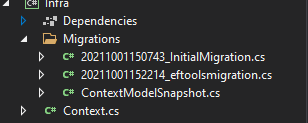
通过ef工具cli创建迁移
PS D:\Repositorios\MinimalApi\MinimalApi> dotnet ef migrations add eftoolsmigration -s "D:\Repositorios\MinimalApi\MinimalApi\MinimalApi.csproj" -p "D:\Repositorios\MinimalApi\Infra\Infra.csproj"Build started...
Build succeeded.
info: Microsoft.EntityFrameworkCore.Infrastructure[10403]
Entity Framework Core 6.0.0-rc.1.21452.10 initialized 'Context' using provider 'Microsoft.EntityFrameworkCore.SqlServer:6.0.0-rc.1.21452.10' with options: MigrationsAssembly=Infra
Done. To undo this action, use 'ef migrations remove'
PS D:\Repositorios\MinimalApi\MinimalApi>利用ef工具cli更新数据库
dotnet ef database update -s "D:\Repositorios\MinimalApi\MinimalApi\MinimalApi.csproj" -p "D:\Repositorios\MinimalApi\Infra\Infra.csproj"- 注意:-s是您的启动项目路径;
- 注意到-p是您的目标项目路径(其中上下文为
- )
自动创建移动文件夹
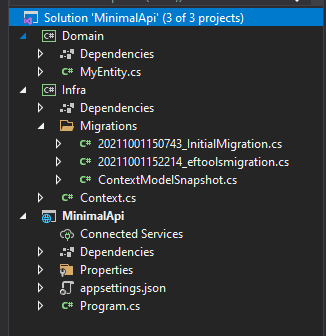
最终项目结构
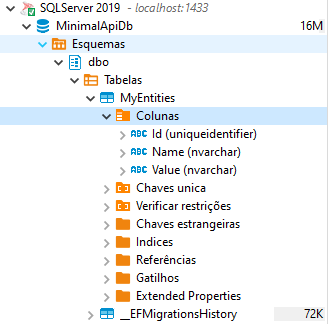
创建了数据库
- 注意:您必须在包管理器上设置“包含预释放”,以获得与.Net 6
兼容的版本。
- 注:您正在使用Postgree DB,它必须有一个与EF 6.xxx
兼容的客户端
运行时和SDK (.NET 6只为清晰起见)
PS C:\Users\Daniel> dotnet --list-runtimes
Microsoft.NETCore.App 6.0.0-rc.1.21451.13 [C:\Program Files\dotnet\shared\Microsoft.NETCore.App]
Microsoft.WindowsDesktop.App 6.0.0-rc.1.21451.3 [C:\Program Files\dotnet\shared\Microsoft.WindowsDesktop.App]

PS C:\Users\Daniel> dotnet --list-sdks
6.0.100-rc.1.21463.6 [C:\Program Files\dotnet\sdk]https://stackoverflow.com/questions/69275805
复制相似问题
腾讯云开发者

Copyright © 2013 - 2026 Tencent Cloud. All Rights Reserved. 腾讯云 版权所有
深圳市腾讯计算机系统有限公司 ICP备案/许可证号:粤B2-20090059  粤公网安备44030502008569号
腾讯云计算(北京)有限责任公司 京ICP证150476号 | 京ICP备11018762号