
停止q线程PyQt5
停止q线程PyQt5
提问于 2022-11-18 02:58:21
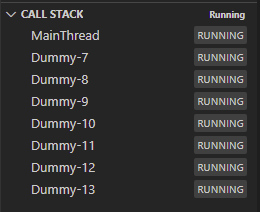
我尝试过几种方法来阻止一个Q线程,但似乎没有一种方法起作用。当我查看调用堆栈时,线程尚未结束,当再次单击时,另一个线程启动,从而获得无限活动线程,并消耗更多不必要的内存。我试着把terminate()和put ()放在一起,但是没有什么能阻止线程。所以我也尝试了所有的方法,但没有结果。
from PyQt5.QtWidgets import QMainWindow, QApplication
from PyQt5.QtCore import QThread
from PyQt5 import QtWidgets
from PyQt5 import QtCore
import time
import sys

class MyThread(QThread):
    def run(self):
        x=0
        print("Starting...")
        while x<5:
            time.sleep(1.5)
            print("Running...")
            x=x+1

    def close(self):
        self.isRunning=False
        self.terminate()
        self.wait()
        self.quit()
        self.wait()
        print("Done")

class Ui_MainWindow(QMainWindow):
     def __init__(self):
         super(Ui_MainWindow, self).__init__()
         self.btn = QtWidgets.QPushButton(self)
         self.btn.setGeometry(QtCore.QRect(77, 30, 50, 30))
         self.btn.setText("CLICK")
         self.btn.clicked.connect(self.doSomething)


     def doSomething(self,event):
         self.worker=MyThread()
         self.worker.setTerminationEnabled(True)
         self.worker.finished.connect(self.worker.close)
         self.worker.start()

if __name__ == "__main__":
    app = QApplication([])
    ui = Ui_MainWindow()
    ui.show()
    sys.exit(app.exec_())
回答 1
Stack Overflow用户
回答已采纳
发布于 2022-11-19 19:54:13
我设法使用线程本机库和pyqtSignal解决了我的问题。单击按钮时,它将失去连接并启动线程。在线程中的循环结束后,发出一个信号,从而返回到按钮的连接。这样,它可以防止用户多次单击按钮。
from PyQt5.QtWidgets import QMainWindow, QApplication
from PyQt5.QtCore import pyqtSignal
from PyQt5 import QtWidgets
from PyQt5 import QtCore
import time
import sys
import threading

class Ui_MainWindow(QMainWindow):
     signal=pyqtSignal(str)
     def __init__(self):
         super(Ui_MainWindow, self).__init__()
         self.btn = QtWidgets.QPushButton(self)
         self.btn.setGeometry(QtCore.QRect(77, 30, 50, 30))
         self.btn.setText("CLICK")
         self.signal.connect(self.signalResponse)
         self.btn.clicked.connect(self.doSomething)

     def doSomething(self,event):
         print("Starting...")
         self.btn.disconnect()
         worker=threading.Thread(target=self.worker)
         worker.start()

     def signalResponse(self,response):
         if response=="Finished":
            self.btn.clicked.connect(self.doSomething)
            print(response)

     def worker(self):
        x=0
        while x<5:
            time.sleep(0.5)
            print("Running...")
            x=x+1
        self.signal.emit("Finished")

if __name__ == "__main__":
    app = QApplication([])
    ui = Ui_MainWindow()
    ui.show()
sys.exit(app.exec_())页面原文内容由Stack Overflow提供。腾讯云小微IT领域专用引擎提供翻译支持
原文链接:
https://stackoverflow.com/questions/74484434
复制相关文章
相似问题
腾讯云开发者

Copyright © 2013 - 2026 Tencent Cloud. All Rights Reserved. 腾讯云 版权所有
深圳市腾讯计算机系统有限公司 ICP备案/许可证号:粤B2-20090059  粤公网安备44030502008569号
腾讯云计算(北京)有限责任公司 京ICP证150476号 | 京ICP备11018762号