
JavaFX ScrollPane和FlowPane属性,如果列填充了ScrollPane宽度,则调整FlowPane的大小
我有一个FlowPane包在一个ScrollPane里。FlowPane方向是Vertical,因此它将包装控件。但是,如果列的大小大于FlowPane的宽度,我希望将ScrollPane设置为垂直调整大小。我在ScrollPane和FlowPane上都尝试过很多设置,但是它们都没有帮助我实现我的愿望。我想要做的事情是这样的:(红色的contur是ScrollPane,绿色的是FlowPane)
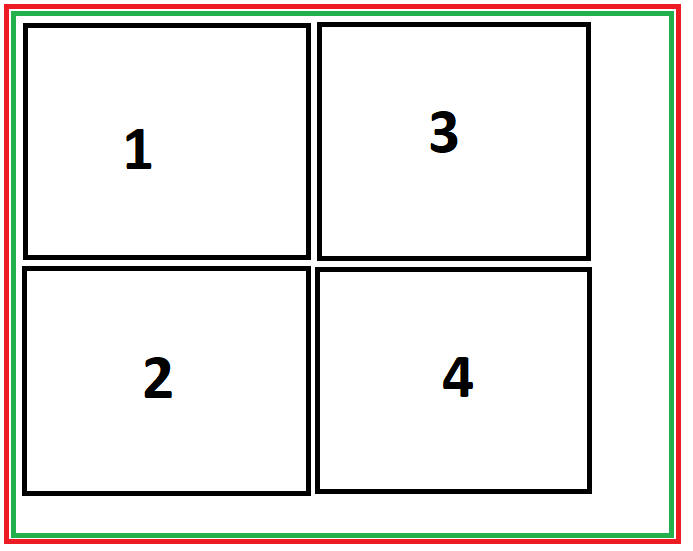
在填充流窗格之后,容器中的ScrollPane宽度超过两列控件:
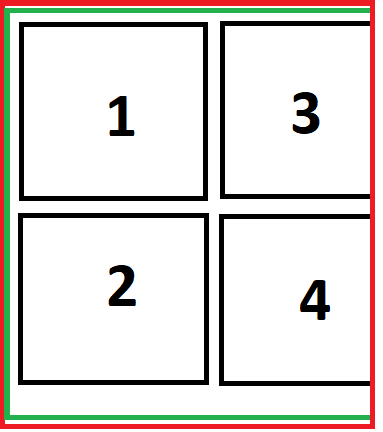
在调整大小之后,它现在是如何工作的:
在调整ScrollPane大小之后我想做什么
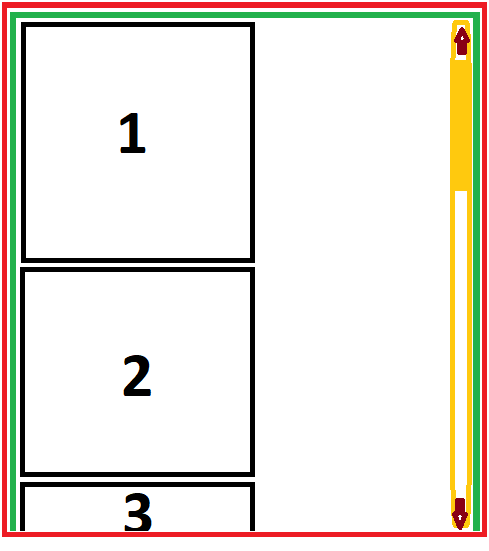
能否做到这一点?我必须对ScrollPane和FlowPane做什么设置?
编辑:
最小复制代码:
hello-view.fxml:
<?xml version="1.0" encoding="UTF-8"?>

<?import javafx.geometry.Insets?>
<?import javafx.scene.control.Button?>
<?import javafx.scene.control.ScrollPane?>
<?import javafx.scene.layout.AnchorPane?>
<?import javafx.scene.layout.FlowPane?>
<?import javafx.scene.text.Font?>

<AnchorPane prefHeight="424.0" prefWidth="457.0" xmlns="http://javafx.com/javafx/19" xmlns:fx="http://javafx.com/fxml/1" fx:controller="com.example.demo.HelloController">
   <children>
      <AnchorPane layoutX="14.0" layoutY="14.0" prefHeight="399.0" prefWidth="430.0" style="-fx-border-color: #555555;" AnchorPane.bottomAnchor="14.0" AnchorPane.leftAnchor="14.0" AnchorPane.rightAnchor="14.0" AnchorPane.topAnchor="14.0">
         <children>
            <ScrollPane fitToHeight="true" fitToWidth="true" focusTraversable="false" hbarPolicy="NEVER" layoutX="14.0" layoutY="13.0" maxWidth="1.7976931348623157E308" prefHeight="377.0" prefWidth="404.0" style="-fx-border-color: red; -fx-border-width: 2;" AnchorPane.bottomAnchor="7.0" AnchorPane.leftAnchor="13.0" AnchorPane.rightAnchor="12.0" AnchorPane.topAnchor="12.0">
               <content>
                  <FlowPane maxWidth="1.7976931348623157E308" orientation="VERTICAL" prefHeight="363.0" prefWidth="397.0" rowValignment="TOP" style="-fx-border-color: green; -fx-border-width: 2;">
                     <children>
                        <Button mnemonicParsing="false" prefHeight="121.0" prefWidth="140.0" text="1">
                           <FlowPane.margin>
                              <Insets bottom="2.0" left="2.0" right="2.0" top="2.0" />
                           </FlowPane.margin>
                           <font>
                              <Font name="System Bold" size="24.0" />
                           </font>
                        </Button>
                        <Button layoutX="12.0" layoutY="12.0" mnemonicParsing="false" prefHeight="121.0" prefWidth="140.0" text="2">
                           <FlowPane.margin>
                              <Insets bottom="2.0" left="2.0" right="2.0" top="2.0" />
                           </FlowPane.margin>
                           <font>
                              <Font name="System Bold" size="24.0" />
                           </font>
                        </Button>
                        <Button layoutX="10.0" layoutY="135.0" mnemonicParsing="false" prefHeight="121.0" prefWidth="140.0" text="3">
                           <FlowPane.margin>
                              <Insets bottom="2.0" left="2.0" right="2.0" top="2.0" />
                           </FlowPane.margin>
                           <font>
                              <Font name="System Bold" size="24.0" />
                           </font>
                        </Button>
                        <Button layoutX="154.0" layoutY="10.0" mnemonicParsing="false" prefHeight="121.0" prefWidth="140.0" text="4">
                           <FlowPane.margin>
                              <Insets bottom="2.0" left="2.0" right="2.0" top="2.0" />
                           </FlowPane.margin>
                           <font>
                              <Font name="System Bold" size="24.0" />
                           </font>
                        </Button>
                     </children>
                  </FlowPane>
               </content>
            </ScrollPane>
         </children>
      </AnchorPane>
   </children>
</AnchorPane>
HelloController.java:
package com.example.demo;

import javafx.fxml.FXML;
import javafx.scene.control.Label;

public class HelloController {
    @FXML
    private Label welcomeText;

    @FXML
    protected void onHelloButtonClick() {
        welcomeText.setText("Welcome to JavaFX Application!");
    }
}
HelloApplication.java
package com.example.demo;

import javafx.application.Application;
import javafx.fxml.FXMLLoader;
import javafx.scene.Scene;
import javafx.stage.Stage;

import java.io.IOException;

public class HelloApplication extends Application {
    @Override
    public void start(Stage stage) throws IOException {
        FXMLLoader fxmlLoader = new FXMLLoader(HelloApplication.class.getResource("hello-view.fxml"));
        Scene scene = new Scene(fxmlLoader.load(), 320, 240);
        stage.setTitle("Hello!");
        stage.setScene(scene);
        stage.show();
    }

    public static void main(String[] args) {
        launch();
    }
}HelloApplication.java和HelloController.java是JavaFX中启动项目的默认演示文件。
结论:当ScrollPane和FlowPane尝试移动以创建一个新列时(当ScrollPane垂直调整大小时),是否有多种属性可以使FlowPane垂直调整大小,并停止在右边调整大小?我不想在右边创建那些不可见的列,而是垂直生长FlowPane!提到:这种情况可能以两种方式发生
当调整窗体的大小时,
- 从底部调整窗体,而
FlowPane底部的控件将移动到顶部,FlowPane将自动调整控件的右边,并在调整窗体的水平大小时将控件放置在FlowPane的隐藏区域,(和) - ,并且没有更多的空间将控件从右列移动到下一行,这样
FlowPane就不会停留在右边,并尝试创建“不可见的”行(或向下移动所需的控件的数量)。
G 237
我希望我能说清楚。
回答 1
Stack Overflow用户
发布于 2022-11-12 10:48:05
这个答案是我自己找到的,它只适用于包含相同大小控件的FlowPane。
用途:允许用户按Vertical方向填充FlowPane,父ScrollPane的滚动条仅设置为垂直滚动条(必要时),FlowPane宽度始终适合ScrollPane的宽度。
从JavaFX中的一个演示项目开始,这是fxml文件,它包含主视图的定义(在本例中是hello-view.fxml)。
hello-view.fxml文件:
<?xml version="1.0" encoding="UTF-8"?>

<?import javafx.geometry.Insets?>
<?import javafx.scene.control.Button?>
<?import javafx.scene.control.ScrollPane?>
<?import javafx.scene.layout.AnchorPane?>
<?import javafx.scene.layout.FlowPane?>
<?import javafx.scene.text.Font?>

<AnchorPane prefHeight="424.0" prefWidth="457.0" xmlns="http://javafx.com/javafx/19" xmlns:fx="http://javafx.com/fxml/1" fx:controller="com.example.demo.HelloController">
   <children>
      <AnchorPane layoutX="14.0" layoutY="14.0" prefHeight="399.0" prefWidth="430.0" style="-fx-border-color: #555555;" AnchorPane.bottomAnchor="14.0" AnchorPane.leftAnchor="14.0" AnchorPane.rightAnchor="14.0" AnchorPane.topAnchor="14.0">
         <children>
            <ScrollPane fx:id="scrollPane" fitToWidth="true" focusTraversable="false" hbarPolicy="NEVER" layoutX="14.0" layoutY="13.0" maxHeight="1.7976931348623157E308" maxWidth="-Infinity" prefHeight="377.0" prefWidth="404.0" style="-fx-border-color: red; -fx-border-width: 0;" AnchorPane.bottomAnchor="7.0" AnchorPane.leftAnchor="13.0" AnchorPane.rightAnchor="12.0" AnchorPane.topAnchor="12.0">
               <content>
                  <AnchorPane fx:id="ancFlow">
                     <children>
                        <FlowPane fx:id="flowPane" orientation="VERTICAL" prefHeight="368.0" prefWidth="396.0" prefWrapLength="10.0" rowValignment="TOP" style="-fx-border-color: green; -fx-border-width: 0;" AnchorPane.bottomAnchor="0.0" AnchorPane.leftAnchor="0.0" AnchorPane.rightAnchor="0.0" AnchorPane.topAnchor="0.0">
                           <children>
                              <Button maxHeight="-Infinity" maxWidth="-Infinity" minHeight="-Infinity" minWidth="-Infinity" mnemonicParsing="false" prefHeight="121.0" prefWidth="140.0" text="1">
                                 <FlowPane.margin>
                                    <Insets bottom="2.0" left="2.0" right="2.0" top="2.0" />
                                 </FlowPane.margin>
                                 <font>
                                    <Font name="System Bold" size="24.0" />
                                 </font>
                              </Button>
                              <Button layoutX="12.0" layoutY="12.0" maxHeight="-Infinity" maxWidth="-Infinity" minHeight="-Infinity" minWidth="-Infinity" mnemonicParsing="false" prefHeight="121.0" prefWidth="140.0" text="2">
                                 <FlowPane.margin>
                                    <Insets bottom="2.0" left="2.0" right="2.0" top="2.0" />
                                 </FlowPane.margin>
                                 <font>
                                    <Font name="System Bold" size="24.0" />
                                 </font>
                              </Button>
                              <Button layoutX="10.0" layoutY="135.0" maxHeight="-Infinity" maxWidth="-Infinity" minHeight="-Infinity" minWidth="-Infinity" mnemonicParsing="false" prefHeight="121.0" prefWidth="140.0" text="3">
                                 <FlowPane.margin>
                                    <Insets bottom="2.0" left="2.0" right="2.0" top="2.0" />
                                 </FlowPane.margin>
                                 <font>
                                    <Font name="System Bold" size="24.0" />
                                 </font>
                              </Button>
                              <Button layoutX="154.0" layoutY="10.0" maxHeight="-Infinity" maxWidth="-Infinity" minHeight="-Infinity" minWidth="-Infinity" mnemonicParsing="false" prefHeight="121.0" prefWidth="140.0" text="4">
                                 <FlowPane.margin>
                                    <Insets bottom="2.0" left="2.0" right="2.0" top="2.0" />
                                 </FlowPane.margin>
                                 <font>
                                    <Font name="System Bold" size="24.0" />
                                 </font>
                              </Button>
                           </children>
                        </FlowPane>
                     </children>
                  </AnchorPane>
               </content>
            </ScrollPane>
         </children>
      </AnchorPane>
   </children>
</AnchorPane>HelloController.java文件:
package com.example.demo;

import javafx.beans.value.ChangeListener;
import javafx.beans.value.ObservableValue;
import javafx.fxml.FXML;
import javafx.fxml.Initializable;
import javafx.scene.control.ScrollPane;
import javafx.scene.layout.AnchorPane;
import javafx.scene.layout.FlowPane;

import java.net.URL;
import java.util.ResourceBundle;

public class HelloController implements Initializable {
    private final long buttonWidth = 144;
    private final long buttonHeight = 125;
    private double columns;
    private double rows;
    @FXML
    private AnchorPane ancFlow;

    @FXML
    private ScrollPane scrollPane;

    @FXML
    private FlowPane flowPane;

    @Override
    public void initialize(URL url, ResourceBundle resourceBundle) {
        // next line was used to see how ancPane is resizing
        //ancFlow.setBackground(new Background(new BackgroundFill(Color.rgb(220, 120, 120), new CornerRadii(0), new Insets(0))));
    }

    public void resizeFlowPaneParent(){
        scrollPane.heightProperty().addListener(new ChangeListener<Number>() {
            @Override
            public void changed(ObservableValue<? extends Number> observableValue, Number oldValue, Number newValue) {
                if(scrollPane.getHeight() < buttonHeight) return;
                double verticalPadding = scrollPane.getPadding().getTop() + scrollPane.getPadding().getTop();
                ancFlow.setPrefWidth(scrollPane.getWidth() - (scrollPane.getWidth() - scrollPane.getViewportBounds().getWidth()));
                int controls = flowPane.getChildren().size();
                rows = Math.floorDiv(newValue.longValue() , buttonHeight + (long)verticalPadding);
                if((long)rows == 0) return;
                columns = Math.ceilDiv(controls, (long)(rows));
                double matchColumns = Math.floorDiv((long)(scrollPane.getWidth()- (scrollPane.getWidth() - scrollPane.getViewportBounds().getWidth())), buttonWidth);
                if (columns <= matchColumns) {
                    if(rows * buttonHeight - (long)verticalPadding <= scrollPane.getHeight() - verticalPadding || (rows * columns * buttonHeight ) > controls * buttonHeight )
                    {
                        ancFlow.setPrefHeight(scrollPane.getHeight()-verticalPadding);
                    }
                    else
                    {
                        ancFlow.setPrefHeight(rows * buttonHeight);
                    }
                }
                else
                {
                    double matchRows = Math.ceilDiv(controls, (long)matchColumns);
                    ancFlow.setPrefHeight(matchRows * buttonHeight);
                }
            }
        });
        scrollPane.widthProperty().addListener(new ChangeListener<Number>() {
            @Override
            public void changed(ObservableValue<? extends Number> observableValue, Number oldValue, Number newValue) {
                if(newValue.longValue() - (newValue.longValue() - scrollPane.getViewportBounds().getWidth()) < buttonWidth) return;
                double verticalPadding = scrollPane.getPadding().getTop() + scrollPane.getPadding().getTop();
                ancFlow.setPrefWidth(newValue.longValue() - (newValue.longValue() - scrollPane.getViewportBounds().getWidth()));
                int controls = flowPane.getChildren().size();
                columns = Math.floorDiv(newValue.longValue() - (long)(newValue.longValue() - scrollPane.getViewportBounds().getWidth()), buttonWidth);
                rows = Math.ceilDiv(controls, (long)columns);
                if(rows * buttonHeight < scrollPane.getHeight())
                {
                    ancFlow.setPrefHeight(scrollPane.getHeight()-verticalPadding);
                }
                else
                {
                    ancFlow.setPrefHeight(rows * buttonHeight);
                }
            }
        });
    }
}HelloApplication.java文件:
package com.example.demo;

import javafx.application.Application;
import javafx.fxml.FXMLLoader;
import javafx.scene.Scene;
import javafx.stage.Stage;

import java.io.IOException;

public class HelloApplication extends Application {
    @Override
    public void start(Stage stage) throws IOException {
        FXMLLoader fxmlLoader = new FXMLLoader(HelloApplication.class.getResource("hello-view.fxml"));
        Scene scene = new Scene(fxmlLoader.load(), 320, 240);
        stage.setTitle("Hello!");
        stage.setScene(scene);
        stage.show();
        ((HelloController)fxmlLoader.getController()).resizeFlowPaneParent();
        stage.setWidth(stage.getWidth() + 1);
        stage.setHeight(stage.getHeight() + 1);
    }

    public static void main(String[] args) {
        launch();
    }
}方法是将FlowPane封装在AnchorPane中。FlowPane在AnchorPane中被锚定到所有边界。AnchorPane被包装在ScrollPane中。
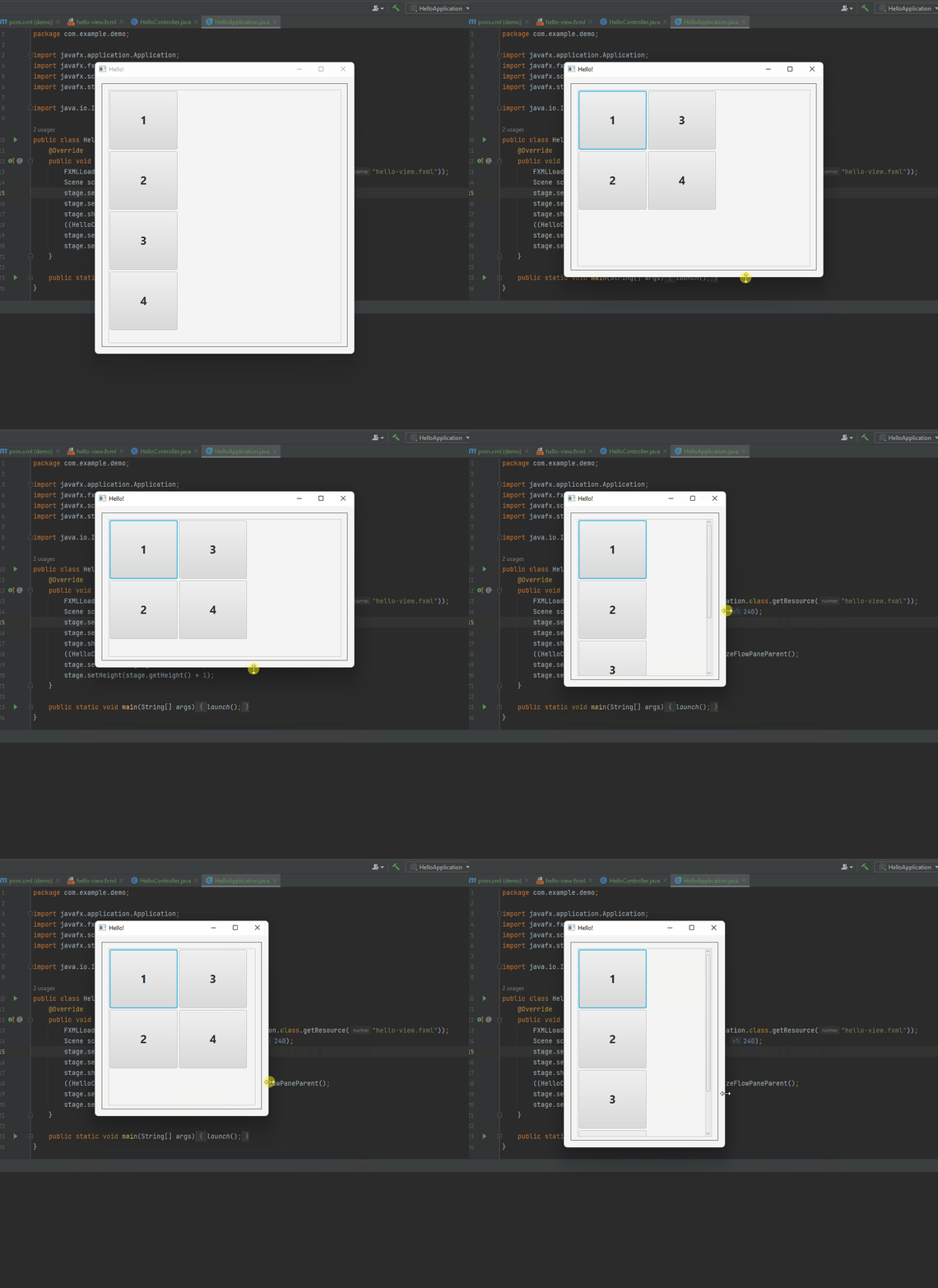
在控制器中,我创建了一个公共方法,在widthProperty()和heightProperty() of ScrollPane中添加列表,以便根据FlowPane中有多少项以及可以使用ScrollPane的宽度创建多少列来计算调整AnchorPane大小所需的行。添加此方法是因为必须在场景显示后读取控件的大小,这是我在HelloApplication.java主类中完成的。通过这种方式,在显示所有项目之后添加列表,并将其正确计算。
演示:
https://stackoverflow.com/questions/74403849
复制相似问题
腾讯云开发者

Copyright © 2013 - 2026 Tencent Cloud. All Rights Reserved. 腾讯云 版权所有
深圳市腾讯计算机系统有限公司 ICP备案/许可证号:粤B2-20090059  粤公网安备44030502008569号
腾讯云计算(北京)有限责任公司 京ICP证150476号 | 京ICP备11018762号