
如何绘制气泡并将它们变成圆圈
如何绘制气泡并将它们变成圆圈
提问于 2022-07-20 17:16:49
我正在尝试制作一个python程序来绘制一条线,然后用吡游动画把它变成一个圆圈,但是我甚至还没有完成绘制的代码。我注意到python正在更改列表中的错误项或两个项,当用户按下左键(存储为第一项,而用户的鼠标的当前点作为第二项)时,列表中包含起始点。
这通常是我希望它做的:https://youtu.be/vlqZ0LubXCA
下面是有和没有更新第二项内容的结果:
通过以下方式:
没有:
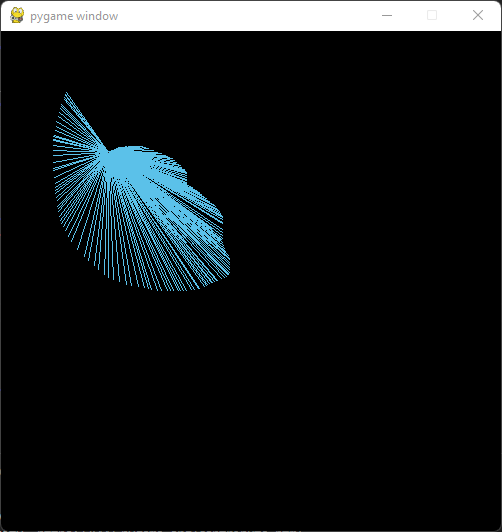
正如您所看到的,或者在描述中看到的,这一行是覆盖前一帧所必需的。
我用箭头标记了改变结果的线条:
import pygame, PIL, random
print('\n')

#data
bubbles = []
color_options = [[87, 184, 222]]

pressed = False
released = False
bubline_start = []

background = [50, 25, 25]
size = [500, 500]

#pygame
display = pygame.display.set_mode(size)
pygame.init()

#functions
def new_bub_color():
    color_index = random.randint(0, len(color_options)-1)
    lvl = random.randrange(85, 115)

    bub_color = []
    for val in color_options[color_index]:
        bub_color.append(val*(lvl/100))
    return bub_color


def bubble_line():
    global display, pressed, bubline_start, released, bubbles, color_options

    if len(bubbles) > 0:
        if not bubbles[-1][0] == 0:
            #first frame of click
            bub_color = new_bub_color()

            bubbles.append([0, bub_color, [bubline_start, list(pygame.mouse.get_pos())]])
            pygame.draw.line(display, bub_color, bubline_start, pygame.mouse.get_pos())
        else:
            #draw after drags
            pygame.draw.line(display, bubbles[-1][1], bubbles[-1][2][0], list(pygame.mouse.get_pos()))
            bubbles[-1][2][1] = list(pygame.mouse.get_pos())# <-- HERE
    else:
        #first bubble
        bub_color = new_bub_color()

        bubbles.append([0, bub_color, [bubline_start, list(pygame.mouse.get_pos())]])
        pygame.draw.line(display, bub_color, bubline_start, pygame.mouse.get_pos())

    if released:
        bubbles[-1][0] = 1
        bubbles[-1][2][1] = list(pygame.mouse.get_pos())# <-- HERE
        released = False


def cover_prev_frame():
    global bubbles, background, size
    min_pos = []
    max_pos = []

    for bubble in bubbles:
        min_pos = bubble[2][0]
        max_pos = bubble[2][0]

        for point in bubble[2]:
            #x min and max
            if point[0] < min_pos[0]:
                min_pos[0] = point[0]
            elif point[0] > max_pos[0]:
                max_pos[0] = point[0]

            #y min and max
            if point[1] < min_pos[1]:
                min_pos[1] = point[1]
            elif point[1] > max_pos[1]:
                max_pos[1] = point[1]
        max_pos = [max_pos[0]-min_pos[0]+1, max_pos[1]-min_pos[1]+1]

        if type(background) == str:
            #image background
            later = True

        elif type(background) == list:
            #solid color background
            pygame.draw.rect(display, background, pygame.Rect(min_pos, max_pos))


while True:
    pygame.event.pump()
    events = pygame.event.get()

    for event in events:
        if event.type == pygame.QUIT:
            pygame.quit()

        elif event.type == pygame.MOUSEBUTTONDOWN and not pressed:
            bubline_start = list(pygame.mouse.get_pos())
            pressed = True

        elif event.type == pygame.MOUSEBUTTONUP and pressed:
            pressed = False
            released = True

    cover_prev_frame()
    if pressed or released:
        bubble_line()

    try:
        pygame.display.update()
    except:
break回答 1
Stack Overflow用户
回答已采纳
发布于 2022-07-26 18:40:53
if not bubbles[-1][0] == 0:是False,只要鼠标不释放。因此,添加许多线段,每个线段从bubline_start开始,以当前鼠标位置结束。
你必须在每一帧中重新绘制场景。bubbles是一个气泡列表,每个气泡都有一个点列表。当鼠标按住时,在列表中的最后一个气泡中添加一个新的点。当鼠标被按下时启动一个新的气泡,当它被释放时结束一个泡泡。这大大简化了您的代码。
极小例子

import pygame, random

size = [500, 500]
pygame.init()
display = pygame.display.set_mode(size)
clock = pygame.time.Clock()

pressed = False
bubbles = []
background = [50, 25, 25]

run = True
while run:
    clock.tick(100)
    events = pygame.event.get()
    for event in events:
        if event.type == pygame.QUIT:
            run = False

        elif event.type == pygame.MOUSEBUTTONDOWN:
            start_pos = list(event.pos)
            bubble_color = pygame.Color(0)
            bubble_color.hsla = (random.randrange(0, 360), 100, 50, 100)
            bubbles.append((bubble_color, [start_pos]))
            pressed = True

        elif event.type == pygame.MOUSEMOTION and pressed:
            new_pos = list(event.pos)
            if len(bubbles[-1][1]) > 0 and bubbles[-1][1] != new_pos:
                bubbles[-1][1].append(new_pos)

        elif event.type == pygame.MOUSEBUTTONUP:
            pressed = False
            end_pos = list(event.pos)
            if len(bubbles[-1][1]) > 0 and bubbles[-1][1] != end_pos:
                bubbles[-1][1].append(list(event.pos))

    display.fill(background)
    for i, bubble in enumerate(bubbles):
        if len(bubble[1]) > 1:
            closed = not pressed or i < len(bubbles) - 1
            pygame.draw.lines(display, bubble[0], closed, bubble[1], 3)
    pygame.display.update()

pygame.quit()对于动画,我建议创建一个表示气泡的类和一个方法animate,它慢慢地将多边形转化为一个圆。
极小例子

import pygame, random

size = [500, 500]
pygame.init()
display = pygame.display.set_mode(size)
clock = pygame.time.Clock()

class Bubble:
    def __init__(self, start):
        self.color = pygame.Color(0)
        self.color.hsla = (random.randrange(0, 360), 100, 50, 100)
        self.points = [list(start)]
        self.closed = False
        self.finished = False
    def add_point(self, point, close):
        self.points.append(list(point))
        self.closed = close
        if self.closed:
            x_, y_ = list(zip(*self.points))
            x0, y0, x1, y1 = min(x_), min(y_), max(x_), max(y_)
            rect = pygame.Rect(x0, y0, x1-x0, y1-y0)
            self.center = rect.center
            self.radius = max(*rect.size) // 2
    def animate(self):
        if self.closed and not self.finished:
            cpt = pygame.math.Vector2(self.center) + (0.5, 0.5)
            self.finished = True
            for i, p in enumerate(self.points):
                pt = pygame.math.Vector2(p)
                v = pt - cpt
                l = v.magnitude()
                if l + 0.5 < self.radius:
                    self.finished = False
                v.scale_to_length(min(self.radius, l+0.5))
                pt = cpt + v
                self.points[i] = [pt.x, pt.y]

    def draw(self, surf):
        if self.finished:
            pygame.draw.circle(surf, self.color, self.center, self.radius, 3)
        elif len(self.points) > 1:
            pygame.draw.lines(surf, self.color, self.closed, self.points, 3)

bubbles = []
pressed = False
background = [50, 25, 25]

run = True
while run:
    clock.tick(100)
    events = pygame.event.get()
    for event in events:
        if event.type == pygame.QUIT:
            run = False

        elif event.type == pygame.MOUSEBUTTONDOWN:
            bubbles.append(Bubble(event.pos))
            pressed = True

        elif event.type == pygame.MOUSEMOTION and pressed:
            bubbles[-1].add_point(event.pos, False)

        elif event.type == pygame.MOUSEBUTTONUP:
            bubbles[-1].add_point(event.pos, True)
            pressed = False

    for bubble in bubbles:
        bubble.animate()

    display.fill(background)
    for bubble in bubbles:
        bubble.draw(display)
    pygame.display.update()

pygame.quit()页面原文内容由Stack Overflow提供。腾讯云小微IT领域专用引擎提供翻译支持
原文链接:
https://stackoverflow.com/questions/73055748
复制相关文章
相似问题
腾讯云开发者

Copyright © 2013 - 2026 Tencent Cloud. All Rights Reserved. 腾讯云 版权所有
深圳市腾讯计算机系统有限公司 ICP备案/许可证号:粤B2-20090059  粤公网安备44030502008569号
腾讯云计算(北京)有限责任公司 京ICP证150476号 | 京ICP备11018762号