
自定义InputView键盘高度
自定义InputView键盘高度
提问于 2022-07-06 16:49:13
我使用.xib和.swift文件制作了一个自定义键盘。通过执行以下操作,我将其设置为文本字段:
let customNumberPad = CustomNumberPad()
length.inputView = customNumberPad.inputView
然而,键盘的面积很大,就像使用旧键盘一样。
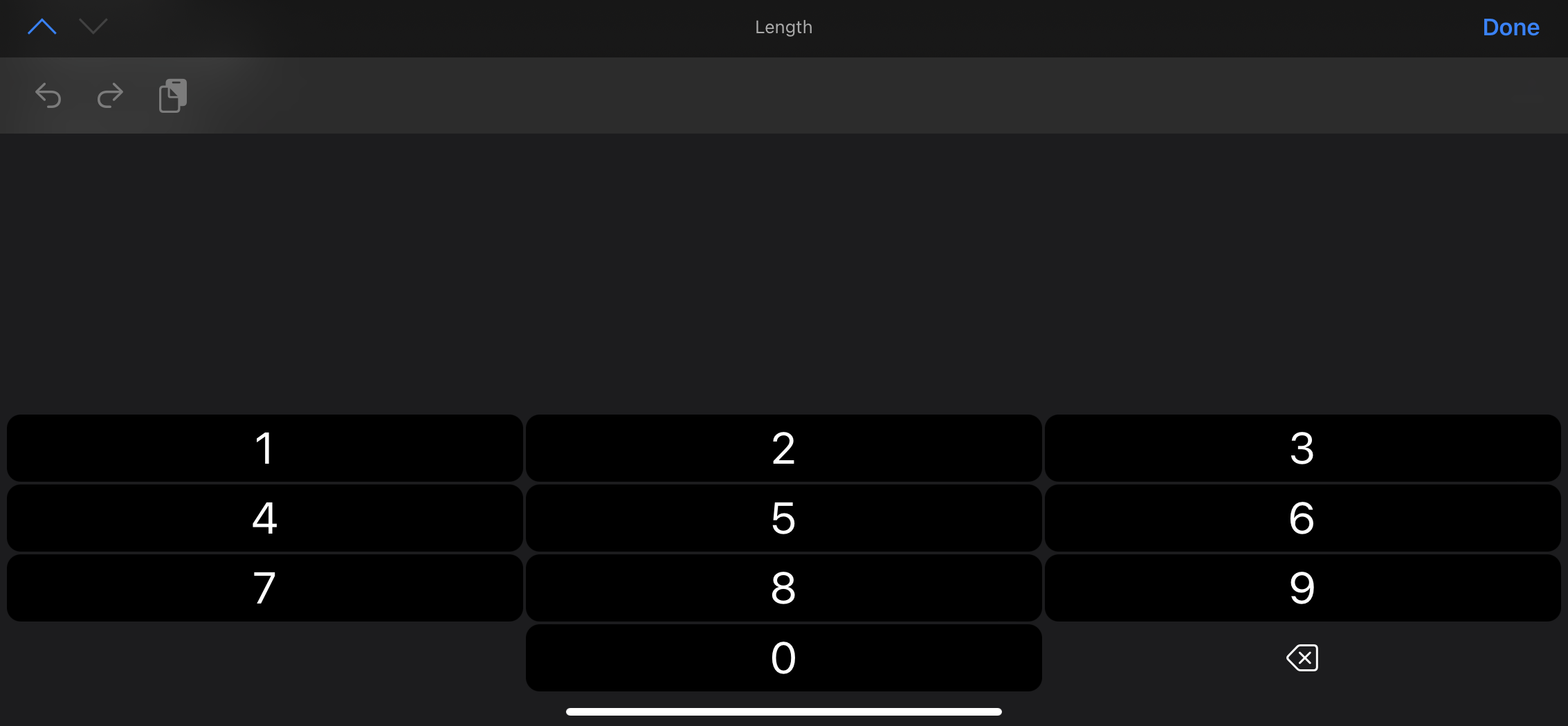
我已经尝试通过约束将.xib中的高度设置为200。
我试过:
length.inputView!.autoresizingMask = []
let heightAnch = length.inputView!.heightAnchor.constraint(equalToConstant: 200)
heightAnch.isActive = true
length.reloadInputViews()
完整的CustomNumberPad代码:
import UIKit
import AudioToolbox

class CustomNumberPadSmall: UIInputViewController {

  @IBOutlet var numberPad: UIView!

  @IBAction func insertText(_ sender: UIButton) {
    if let text = sender.currentTitle {
        AudioServicesPlaySystemSound (1104)
        self.textDocumentProxy.insertText(text)
    }
  }

  @IBAction func backSpace(_ sender: UIButton) {
    self.textDocumentProxy.deleteBackward()
  }

  override func viewDidLoad() {
    super.viewDidLoad()
    overrideUserInterfaceStyle = USERINFO.darkModeValue

    Bundle.main.loadNibNamed("CustomNumberPadSmall", owner: self)
    numberPad.translatesAutoresizingMaskIntoConstraints = false

    let inputView = self.inputView!
    inputView.translatesAutoresizingMaskIntoConstraints = false
    inputView.addSubview(numberPad)

    NSLayoutConstraint.activate([
        numberPad.topAnchor.constraint(equalTo: inputView.topAnchor),
        numberPad.bottomAnchor.constraint(equalTo: inputView.bottomAnchor),
        numberPad.leadingAnchor.constraint(equalTo: inputView.leadingAnchor),
        numberPad.trailingAnchor.constraint(equalTo: inputView.trailingAnchor),
        numberPad.heightAnchor.constraint(equalToConstant: 200)
    ])
  }
}回答 1
Stack Overflow用户
发布于 2022-07-07 05:04:44
如果您只需要一个数字垫,最好使用keyboardType属性的UITextField。
yourTextField.keyboardType = .numberPad在另一种情况下,您需要自定义键盘本身,重写intrinsicContentSize属性的UIInputView
class CustomNumberPad: UIInputView {

    // your calculated input view height
    var intrinsicHeight: CGFloat = 200 {
        didSet {
            self.invalidateIntrinsicContentSize()
        }
    }

    init() {
        super.init(frame: CGRect(), inputViewStyle: .keyboard)
        self.translatesAutoresizingMaskIntoConstraints = false
    }

    required init?(coder: NSCoder) {
        super.init(coder: coder)
        self.translatesAutoresizingMaskIntoConstraints = false
    }

    override var intrinsicContentSize: CGSize {
        return CGSize(width: UIView.noIntrinsicMetric, height: self.intrinsicHeight)
    }
}
如何使用:
let customNumberPad = CustomNumberPad()
yourTextField.inputView = customNumberPad页面原文内容由Stack Overflow提供。腾讯云小微IT领域专用引擎提供翻译支持
原文链接:
https://stackoverflow.com/questions/72887233
复制相关文章
相似问题
腾讯云开发者

Copyright © 2013 - 2026 Tencent Cloud. All Rights Reserved. 腾讯云 版权所有
深圳市腾讯计算机系统有限公司 ICP备案/许可证号:粤B2-20090059  粤公网安备44030502008569号
腾讯云计算(北京)有限责任公司 京ICP证150476号 | 京ICP备11018762号