
VSCode F8函数问题
VSCode F8函数问题
提问于 2022-06-28 19:01:10
最近,我更新了最新版本的PowerShell (7.2.5)和我的VSCode版本如下:
Version: 1.68.1 (user setup)
Commit: 30d9c6cd9483b2cc586687151bcbcd635f373630
Date: 2022-06-14T12:48:58.283Z
Electron: 17.4.7
Chromium: 98.0.4758.141
Node.js: 16.13.0
V8: 9.8.177.13-electron.0
OS: Windows_NT x64 10.0.18363
在这些更新之后,当我的PowerShell 7.2.5集成终端打开,并使用f8突出显示并运行编辑器中的代码时,代码将按预期运行。但是,一旦代码运行完毕,所有代码就会粘贴到终端中,就好像我要再次运行它一样。如果我不为PowerShell 7.2.5使用vscodes集成终端,则不会发生此问题。
下面的例子说明了这个问题。
- I高亮显示代码。
- i按下了预期的运行。
- ,但随后被复制到终端
。
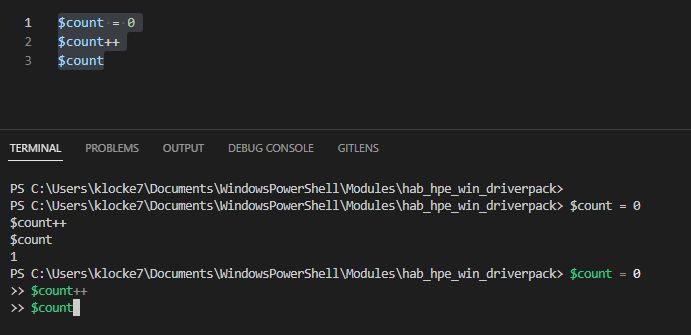
我唯一能想到的问题是,在VSCode版本之间更改一些键绑定可能会带来问题。我已经附加了默认的键绑定,因为我没有覆盖键绑定。
下面是我仅有的与f8相关的键绑定
{ "key": "alt+f8",                "command": "editor.action.marker.next",
                                     "when": "editorFocus" },
{ "key": "f8",                    "command": "editor.action.marker.nextInFiles",
                                     "when": "editorFocus" },
{ "key": "shift+alt+f8",          "command": "editor.action.marker.prev",
                                     "when": "editorFocus" },
{ "key": "shift+f8",              "command": "editor.action.marker.prevInFiles",
                                     "when": "editorFocus" },
{ "key": "alt+f8",                "command": "testing.goToNextMessage",
                                     "when": "editorFocus && testing.isPeekVisible" },
{ "key": "shift+alt+f8",          "command": "testing.goToPreviousMessage",
                                     "when": "editorFocus && testing.isPeekVisible" },
{ "key": "f8",                    "command": "PowerShell.RunSelection",
"when": "editorTextFocus && editorLangId == 'powershell'" },回答 1
Stack Overflow用户
回答已采纳
发布于 2022-06-29 18:48:29
这是Powershell插件版本2022.6.1中的一个bug --您可以通过安装五月版本在扩展编辑器中回滚。
打开扩展选项卡,在Unisntall上搜索Powershell
- Click向下箭头,并在提示时选择安装另一个版本
- Select2022.5.1
- Reload。
这将在powershell插件的GitHub通道中进行讨论。https://github.com/PowerShell/vscode-powershell/issues/4041
页面原文内容由Stack Overflow提供。腾讯云小微IT领域专用引擎提供翻译支持
原文链接:
https://stackoverflow.com/questions/72791876
复制相关文章
相似问题
腾讯云开发者

Copyright © 2013 - 2026 Tencent Cloud. All Rights Reserved. 腾讯云 版权所有
深圳市腾讯计算机系统有限公司 ICP备案/许可证号:粤B2-20090059  粤公网安备44030502008569号
腾讯云计算(北京)有限责任公司 京ICP证150476号 | 京ICP备11018762号