
为什么不在multiThreads应用程序中显示通知
为什么不在multiThreads应用程序中显示通知
提问于 2022-06-06 03:06:05
我的问题是在我的应用程序中没有显示通知。
我的应用程序在每次按下按钮时都会创建新的线程,并使用线程正在运行或等待的信息显示通知(这很好)。然后,如果线程正在运行,它将随机休眠5-10秒,并从rest获取数据,并且应该显示线程已完成的通知(此通知未显示)。
细化通知显示后,我再按下按钮。就像你在图像中看到的。
图片:
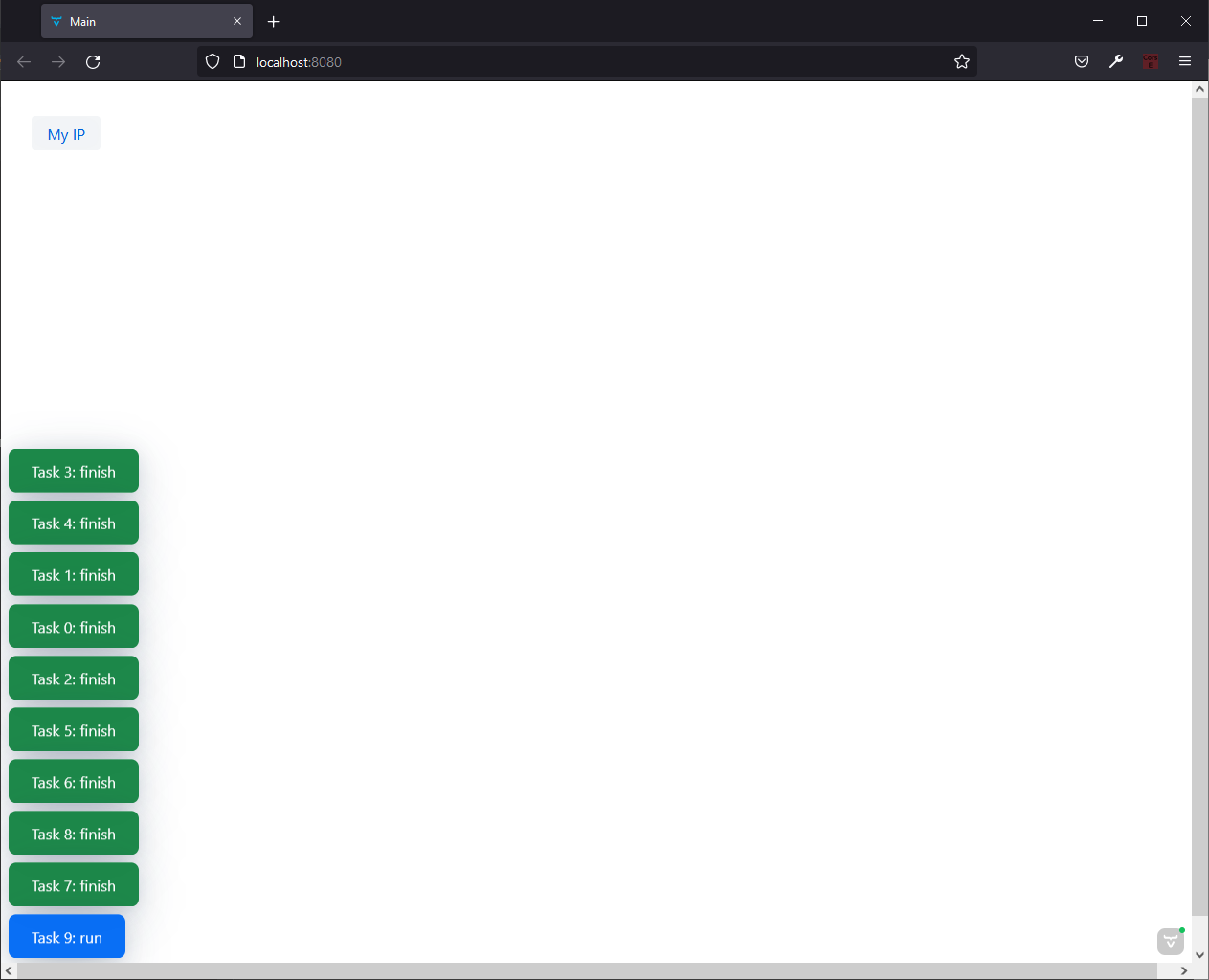
构造函数视图:
public MainView() {
    Button ipButton = getIpButton();

    setMargin(true);
    setHorizontalComponentAlignment(Alignment.START, ipButton);

    add(ipButton);
}
按钮:
private Button getIpButton() {
        final UI ui = UI.getCurrent();
        final VaadinSession session = VaadinSession.getCurrent();

        Button ipButton = new Button("My IP");

        AtomicInteger orderIndex = new AtomicInteger();

        ipButton.addClickListener(_e -> {
            int orderThread = orderIndex.getAndIncrement();
            openBeginNotification(orderThread);

            executor.submit(() -> {
                try {
                    UI.setCurrent(ui);
                    VaadinSession.setCurrent(session);

                    long sleepTime = (long) (Math.random() * (10 - 5) + 5);
                    System.out.printf("%d: %ds\n", orderThread, sleepTime);

                    Thread.sleep(sleepTime * 1000);

                    IpDTO ip = restTemplate.getForObject("http://ip.jsontest.com/", IpDTO.class);
                    System.out.printf("%d: %s\n", orderThread, ip);

                    try {
                        VaadinSession.getCurrent().lock();
                        getFinishNotification(orderThread).open(); // here not show notification
                        VaadinSession.getCurrent().unlock();
                    } catch (Exception e) {
                        e.printStackTrace();
                    }
                } catch (InterruptedException e) {
                    throw new RuntimeException(e);
                }
            });
        });

    return ipButton;
}
通知方法:
private void openBeginNotification(int orderThread) {
    Notification notification;
    if (executor.getActiveCount() == MAX_THREADS) {
        // thread is in front
        notification = getWaitNotification(orderThread);
    }  else {
        // thread run
        notification = getRunNotification(orderThread);
    }
    notification.open();
}

private Notification getRunNotification(int orderThread) {
    return getNotification("Task " + orderThread + ": run", NotificationVariant.LUMO_PRIMARY);
}

private Notification getWaitNotification(int orderThread) {
    return getNotification("Task " + orderThread + ": wait", NotificationVariant.LUMO_CONTRAST);
}

private Notification getFinishNotification(int orderThread) {
    return getNotification("Task " + orderThread + ": finish", NotificationVariant.LUMO_SUCCESS);
}

private Notification getNotification(String notificationText, NotificationVariant variant) {
    Notification notification = new Notification(notificationText, 1000);
    notification.addThemeVariants(variant);

    return notification;
}回答 1
Stack Overflow用户
回答已采纳
发布于 2022-06-06 04:37:44
首先,您需要启用@Push使Vaadin打开一个websocket连接,使服务器能够直接向浏览器发送消息,而无需等待浏览器发送请求更改的消息(单击按钮时就会发生这种情况)。@Push注释应该在不同的位置,这取决于您使用的Vaadin版本,因此请参考文档找到正确的位置。
其次,请使用UI::access,而不是手动执行setCurrent和锁定。虽然我没有在你的例子中发现任何能打破愉快情况的东西,但是仍然有很多边缘情况需要你去考虑。例如,您没有在setCurrent之后进行清理,这可能会导致内存泄漏,而且您也不会解除锁定,以防与通知相关的东西抛出异常。
页面原文内容由Stack Overflow提供。腾讯云小微IT领域专用引擎提供翻译支持
原文链接:
https://stackoverflow.com/questions/72512653
复制相关文章
相似问题
腾讯云开发者

Copyright © 2013 - 2026 Tencent Cloud. All Rights Reserved. 腾讯云 版权所有
深圳市腾讯计算机系统有限公司 ICP备案/许可证号:粤B2-20090059  粤公网安备44030502008569号
腾讯云计算(北京)有限责任公司 京ICP证150476号 | 京ICP备11018762号