
我想改进*输入系统键盘*战斗机游戏2玩家
你有更好的主意来改进输入系统吗?
我对事件做了这样的输入系统,但我认为有很多输入系统,这不是个好主意:
public class InputSystemKeyboard : MonoBehaviour
{
    public event Action Left_P1 = delegate { };
    public event Action Right_P1 = delegate { };
    public event Action Jump_P1 = delegate { };

    public event Action Left_P2 = delegate { };
    public event Action Right_P2 = delegate { };
    public event Action Jump_P2 = delegate { };

    public event Action Stop_P = delegate { };


    void Update()
    {
        if (Input.GetKeyDown(KeyCode.A))
        {
            Left_P1();
        }
        if (Input.GetKeyDown(KeyCode.D))
        {
            Right_P1();
        }
        if (Input.GetKeyDown(KeyCode.W))
        {
            Jump_P1();
        }

        if (Input.GetKeyDown(KeyCode.LeftArrow))
        {
            Left_P2();
        }
        if (Input.GetKeyDown(KeyCode.RightArrow))
        {
            Right_P2();
        }
        if (Input.GetKeyDown(KeyCode.UpArrow))
        {
            Jump_P2();
        }

        if (!Input.anyKey)
        {
            Stop_P();
        }
    }
}
然后,在运动系统中,你要做的是:
public class MoveSystem : MonoBehaviour
{
    [SerializeField] private Rigidbody2D rb;
    [SerializeField] private float speed, jumpForce;

    private InputSystemKeyboard inputSystem;

    private bool moveLeft, moveRight;

     private void OnEnable()
     {
        inputSystem = GetComponent<InputSystemKeyboard>();

        inputSystem.Left_P1 += MoveLeft;
        inputSystem.Right_P1 += MoveRight;
        inputSystem.Jump_P1 += Jump;
        inputSystem.Stop_P += StopMoving;
    }
    private void OnDisable()
    {
        inputSystem.Left_P1 -= MoveLeft;
        inputSystem.Right_P1 -= MoveRight;
        inputSystem.Jump_P1 -= Jump;
        inputSystem.Stop_P -= StopMoving;
    }

    void Start()
    {
        rb = GetComponent<Rigidbody2D>();
        moveLeft = false;
        moveRight = false;
    }

    public void MoveLeft()
    {
        moveLeft = true;
    }
    public void MoveRight()
    {
        moveRight = true;
    }
    public void Jump()
    {
        if (rb.velocity.y == 0)
        {
            rb.AddForce(Vector2.up * jumpForce);
        }
    }
    public void StopMoving()
    {
        moveLeft = false;
        moveRight = false;
        rb.velocity = Vector2.zero;
    }
    private void Update()
    {
        if (moveLeft )
        {
            rb.velocity = new Vector2(-speed, 0f);
        }
        if (moveRight)
        {
            rb.velocity = new Vector2(speed, 0f);
        }
    }
}
我想简化InputSystem并尝试改变这个结构。如果您有任何改进的想法,将不胜感激。
回答 1
Stack Overflow用户
发布于 2022-05-12 17:40:02
对于水平和垂直移动,不需要检查每个键,如WASD和箭头键。如果转到编辑< Project < Input 并展开axes,您可以看到水平和垂直的输入默认设置为WASD和箭头键,如下图所示。
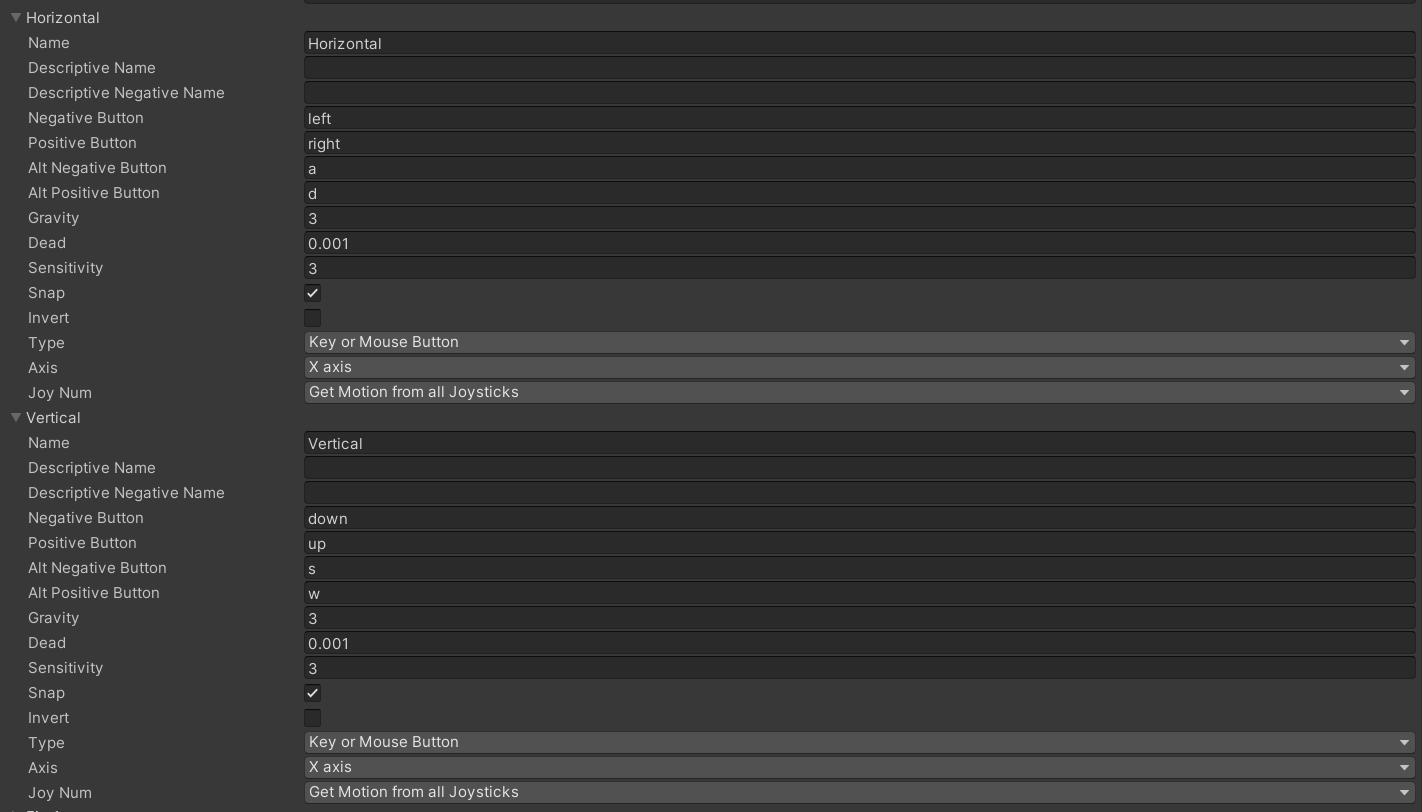
当W和up arrow用于跳转时,清除垂直部分中的负数按钮。
同时,在创建本地多人游戏时,右键单击它们并复制水平和垂直部分,并分别将它们命名为Horizontal1和Vertical1。如果水平被复制,则从其中删除AD键,并从重复的Horizontal1中移除箭头键,反之亦然。垂直部分也是如此。
现在,使用WASD和箭头键的播放器的所有操作都简化为Input.GetAxis("Horizontal")和Input.GetAxis("Vertical")。
对于left和right运动,您只需写:
rb.velocity = new Vector2(speed * Input.GetAxis("Horizontal"));Input.GetAxis("Horizontal")在按正按钮时返回1,在按负按钮时返回-1。
对于跳转命令,只需编写:
if(rb.velocity.y == 0) {
    rb.AddForce(Vector2.up * jumpForce * Input.GetAxis("Vertical"));
}https://stackoverflow.com/questions/72219580
复制相似问题
腾讯云开发者

Copyright © 2013 - 2026 Tencent Cloud. All Rights Reserved. 腾讯云 版权所有
深圳市腾讯计算机系统有限公司 ICP备案/许可证号:粤B2-20090059  粤公网安备44030502008569号
腾讯云计算(北京)有限责任公司 京ICP证150476号 | 京ICP备11018762号