
从低延迟IP摄像机获取帧
我目前正在使用此命令从RTSP流中获取帧,并从stdout读取帧:
ffmpeg -nostdin -rtsp_transport tcp -i <rtsp_stream> -pix_fmt bgr24 -an -vcodec rawvideo -f rawvideo -但是,当我通过ffplay看到它时,我想获得与它相同的延迟:
ffplay -fflags nobuffer -flags low_delay -tune zerolatency -framedrop -rtsp_transport tcp <rtsp_stream>或者当我通过VLC媒体>开放网络流与:network_caching=300ms播放它。
我想知道我的ffmpeg命令可以使用哪些其他参数来获得与ffplay命令相当(或更好)的结果。
我参考了:如何将原始RTSP流转储到文件中?,开式CV RTSP相机缓冲器滞后,如何使用python从ffmpeg输出管道?,与ffplay和VLC相比,糟糕的ffmpeg性能,如何最大限度地减少使用ffmpeg的实时流的延迟
我目前的默许:
FFMPEG_CMD = "ffmpeg -nostdin -rtsp_transport tcp -i <rtsp_stream> -pix_fmt bgr24 -an -vcodec rawvideo -f rawvideo -".split(" ")
WIDTH = 2560
HEIGHT = 1440

process = subprocess.Popen(FFMPEG_CMD, stdout=subprocess.PIPE, stderr=subprocess.DEVNULL)

while True:
    raw_frame = process.stdout.read(WIDTH*HEIGHT*3)
    frame = np.frombuffer(raw_frame, np.uint8)
    frame = frame.reshape((HEIGHT, WIDTH, 3))

    <do stuff with frame/ show frame etc.>
感谢您的阅读。
我现在使用的ffmpeg命令用于< 1s延迟。
ffmpeg -nostdin -flags low_delay -rtsp_transport tcp -i <rtsp_stream> -pix_fmt bgr24 -an -vcodec rawvideo -f rawvideo -根据答复提出建议的执行情况:
import subprocess
import numpy as np

FFMPEG_CMD = "ffmpeg -nostdin -flags low_delay -rtsp_transport tcp -i <rtsp_stream> -pix_fmt bgr24 -an -vcodec rawvideo -f rawvideo -".split(" ")
WIDTH = 2560
HEIGHT = 1440

process = subprocess.Popen(FFMPEG_CMD, stdout=subprocess.PIPE, stderr=subprocess.DEVNULL)

raw_frame = np.empty((HEIGHT, WIDTH, 3), np.uint8)
frame_bytes = memoryview(raw_frame).cast("B")

while process.poll() is None:
    process.stdout.readinto(frame_bytes)
    frame = raw_frame.reshape((HEIGHT, WIDTH, 3))

<do stuff with frame/ show frame etc.>回答 2
Stack Overflow用户
发布于 2022-04-05 21:42:29
我做了一些关于减少视频延迟的研究。
我的以下答案演示了相关的FFmpeg标志是-probesize 32和-flags low_delay。
上述标志与视频解码器侧(接收机侧)相关。
视频编码参数“发射机/编码器侧”对于确定端到端延迟更为重要。
添加参数-tune zerolatency可将编码器延迟降到最小,但所需带宽要高得多(而且可能与因特网上的流无关)。
我将限制我的答案解码延迟,因为它似乎更相关的主题,您的问题。
关于“知道别人如何获得低延迟的视频帧”的主题是另一个问题的主题(我不知道答案)。
为了比较FFplay和FFmpeg (译码器)之间的延迟差异,我创建了一个“自包含”测试样本。
主要“原则”:
- 并行执行两个RTSP输出流的FFmpeg子进程.
所述流视频是以帧计数器作为视频文本的合成模式。
这两个输出流应用相同的编码参数(只有端口不同)。
RTSP地址是
127.0.0.1(本地主机)。 (注意:我们可以使用三通切割机代替两次编码,但我从未尝试过)。 - 执行FFplay子进程来解码和显示一个视频流.
- 执行FFmpeg子进程来解码另一个视频流.
OpenCV
imshow用于显示视频。 - 具有较大计数器的显示视频是具有较低延迟的视频。
代码示例(更新):
import cv2
import numpy as np
import subprocess as sp
import shlex


rtsp_stream0 = 'rtsp://127.0.0.1:21415/live.stream'  # Use localhost for testing
rtsp_stream1 = 'rtsp://127.0.0.1:31415/live.stream'
width = 256  # Use low resolution (for testing).
height = 144
fps = 30

# https://stackoverflow.com/questions/60462840/ffmpeg-delay-in-decoding-h264
ffmpeg_cmd = shlex.split(f'ffmpeg -nostdin -probesize 32 -flags low_delay -fflags nobuffer -rtsp_flags listen -rtsp_transport tcp -stimeout 1000000 -an -i {rtsp_stream0} -pix_fmt bgr24 -an -vcodec rawvideo -f rawvideo pipe:')


# FFplay command before updating the code (latency is still too high):
# ffplay_cmd = shlex.split(f'ffplay -probesize 32 -analyzeduration 0 -sync ext -fflags nobuffer -flags low_delay -avioflags direct -rtsp_flags listen -strict experimental -framedrop -rtsp_transport tcp -listen_timeout 1000000 {rtsp_stream1}')

# Updated FFplay command - adding "-vf setpts=0" (fixing the latency issue):
# https://stackoverflow.com/questions/16658873/how-to-minimize-the-delay-in-a-live-streaming-with-ffmpeg
ffplay_cmd = shlex.split(f'ffplay -probesize 32 -analyzeduration 0 -sync ext -fflags nobuffer -flags low_delay -avioflags direct -rtsp_flags listen -strict experimental -framedrop -vf setpts=0 -rtsp_transport tcp -listen_timeout 1000000 {rtsp_stream1}')

# Execute FFplay to used as reference
ffplay_process = sp.Popen(ffplay_cmd)

# Open sub-process that gets in_stream as input and uses stdout as an output PIPE.
process = sp.Popen(ffmpeg_cmd, stdout=sp.PIPE) #,stderr=sp.DEVNULL


# The following FFmpeg sub-process stream RTSP video.
# The video is synthetic video with frame counter (that counts every frame) at 30fps.
# The arguments of the encoder are almost default arguments - not tuned for low latency.
# drawtext filter with the n or frame_num function https://stackoverflow.com/questions/15364861/frame-number-overlay-with-ffmpeg
rtsp_streaming_process = sp.Popen(shlex.split(f'ffmpeg -re -f lavfi -i testsrc=size={width}x{height}:rate={fps} '
                                               '-filter_complex "drawtext=fontfile=Arial.ttf: text=''%{frame_num}'': start_number=1: x=(w-tw)/2: y=h-(2*lh): fontcolor=black: fontsize=72: box=1: boxcolor=white: boxborderw=5",'
                                               'split[v0][v1] '  # Split the input into [v0] and [v1]
                                               '-vcodec libx264 -pix_fmt yuv420p -g 30 -rtsp_transport tcp -f rtsp -muxdelay 0.1 -bsf:v dump_extra '
                                              f'-map "[v0]" -an {rtsp_stream0} '
                                               '-vcodec libx264 -pix_fmt yuv420p -g 30 -rtsp_transport tcp -f rtsp -muxdelay 0.1 -bsf:v dump_extra '
                                              f'-map "[v1]" -an {rtsp_stream1}'))


while True:
    raw_frame = process.stdout.read(width*height*3)

    if len(raw_frame) != (width*height*3):
        print('Error reading frame!!!')  # Break the loop in case of an error (too few bytes were read).
        break

    # Transform the byte read into a numpy array, and reshape it to video frame dimensions
    frame = np.frombuffer(raw_frame, np.uint8)
    frame = frame.reshape((height, width, 3))

    # Show frame for testing
    cv2.imshow('frame', frame)
    key = cv2.waitKey(1)

    if key == 27:
        break

process.stdout.close()
process.wait()
ffplay_process.kill()
rtsp_streaming_process.kill()
cv2.destroyAllWindows()添加-vf setpts=0之前的示例输出
示例输出(左侧为OpenCV,右侧为FFplay):
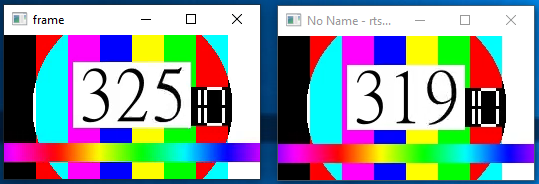
看起来,6帧在向FFplay命令中添加-vf setpts=0之前,FFmpeg-OpenCV延迟较低。
注意:我花了一些时间才找到解决方案,我决定保留原来文章的结果,以显示添加setpts过滤器的重要性。
更新:
添加-vf setpts=0解决了延迟问题。
来自以下职位的最新答案建议添加setpts视频过滤器,将所有视频时间戳重置为零。
这可能不是一个好主意,现在的音频流,但当要求最低的视频延迟,这是我能找到的最好的解决方案。
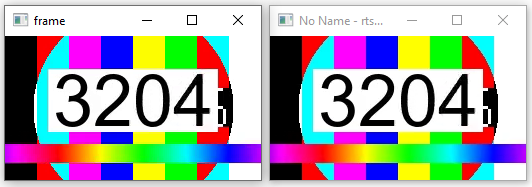
添加-vf setpts=0后,FFplay和OpenCV的延迟大致相同:
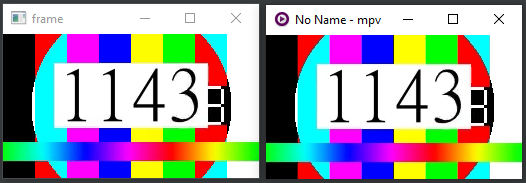
使用mpv媒体播放器重复测试
(注:在我找到FFplay解决方案之前,它似乎更有意义)。
当应用来自此页的所有mpv“延迟攻击”时,mpv和OpenCV的延迟大致相同:
FFplay肯定有解决办法,但我找不到.
代码示例(使用mpv而不是FFplay):
import cv2
import numpy as np
import subprocess as sp
import shlex

rtsp_stream0 = 'rtsp://127.0.0.1:21415/live.stream'  # Use localhost for testing
rtsp_stream1 = 'rtsp://127.0.0.1:31415/live.stream'
width = 256  # Use low resolution (for testing).
height = 144
fps = 30

# https://stackoverflow.com/questions/60462840/ffmpeg-delay-in-decoding-h264
ffmpeg_cmd = shlex.split(f'ffmpeg -nostdin -probesize 32 -flags low_delay -fflags nobuffer -rtsp_flags listen -rtsp_transport tcp -stimeout 1000000 -an -i {rtsp_stream0} -pix_fmt bgr24 -an -vcodec rawvideo -f rawvideo pipe:')

# https://stackoverflow.com/questions/16658873/how-to-minimize-the-delay-in-a-live-streaming-with-ffmpeg
#ffplay_cmd = shlex.split(f'ffplay -probesize 32 -analyzeduration 0 -sync ext -fflags nobuffer -flags low_delay -avioflags direct -rtsp_flags listen -strict experimental -framedrop -rtsp_transport tcp -listen_timeout 1000000 {rtsp_stream1}')

# https://github.com/mpv-player/mpv/issues/4213
mpv_cmd = shlex.split(f'mpv --demuxer-lavf-o=rtsp_flags=listen --rtsp-transport=tcp --profile=low-latency --no-cache --untimed --no-demuxer-thread --vd-lavc-threads=1 {rtsp_stream1}')

# Execute FFplay to used as reference
#ffplay_process = sp.Popen(ffplay_cmd)

# Execute mpv media player (as reference)
mpv_process = sp.Popen(mpv_cmd)

# Open sub-process that gets in_stream as input and uses stdout as an output PIPE.
process = sp.Popen(ffmpeg_cmd, stdout=sp.PIPE) #,stderr=sp.DEVNULL


# The following FFmpeg sub-process stream RTSP video.
# The video is synthetic video with frame counter (that counts every frame) at 30fps.
# The arguments of the encoder are almost default arguments - not tuned for low latency.
# drawtext filter with the n or frame_num function https://stackoverflow.com/questions/15364861/frame-number-overlay-with-ffmpeg
rtsp_streaming_process = sp.Popen(shlex.split(f'ffmpeg -re -f lavfi -i testsrc=size={width}x{height}:rate={fps} '
                                               '-filter_complex "drawtext=fontfile=Arial.ttf: text=''%{frame_num}'': start_number=1: x=(w-tw)/2: y=h-(2*lh): fontcolor=black: fontsize=72: box=1: boxcolor=white: boxborderw=5",'
                                               'split[v0][v1] '  # Split the input into [v0] and [v1]
                                               '-vcodec libx264 -pix_fmt yuv420p -g 30 -rtsp_transport tcp -f rtsp -muxdelay 0.1 -bsf:v dump_extra '
                                              f'-map "[v0]" -an {rtsp_stream0} '
                                               '-vcodec libx264 -pix_fmt yuv420p -g 30 -rtsp_transport tcp -f rtsp -muxdelay 0.1 -bsf:v dump_extra '
                                              f'-map "[v1]" -an {rtsp_stream1}'))


while True:
    raw_frame = process.stdout.read(width*height*3)

    if len(raw_frame) != (width*height*3):
        print('Error reading frame!!!')  # Break the loop in case of an error (too few bytes were read).
        break

    # Transform the byte read into a numpy array, and reshape it to video frame dimensions
    frame = np.frombuffer(raw_frame, np.uint8)
    frame = frame.reshape((height, width, 3))

    # Show frame for testing
    cv2.imshow('frame', frame)
    key = cv2.waitKey(1)

    if key == 27:
        break

process.stdout.close()
process.wait()
#ffplay_process.kill()
mpv_process.kill()
rtsp_streaming_process.kill()
cv2.destroyAllWindows()Stack Overflow用户
发布于 2022-04-05 19:08:34
假设瓶颈确实在示例代码的某个位置(而不是在<do stuff with frame/ show frame etc.>中),您可以尝试更新numpy数组,而不是每次创建一个:
frame = np.empty((HEIGHT, WIDTH, 3), np.uint8)
frame_bytes = memoryview(frame).cast("b")
while True:
    process.stdout.readinto(frame_bytes) # fills the buffer of frame
...https://stackoverflow.com/questions/71746326
复制相似问题
腾讯云开发者

Copyright © 2013 - 2026 Tencent Cloud. All Rights Reserved. 腾讯云 版权所有
深圳市腾讯计算机系统有限公司 ICP备案/许可证号:粤B2-20090059  粤公网安备44030502008569号
腾讯云计算(北京)有限责任公司 京ICP证150476号 | 京ICP备11018762号