
Excel插件在安装时不加载任务窗格
Excel插件在安装时不加载任务窗格
提问于 2022-03-31 13:30:24
当用户打开excel文件时,我试图打开任务窗格。下面我详细解释了我是如何处理这个问题的。这是很好的工作在excel桌面,但不是在excel网站。
我试图在打开excel文件时打开任务窗格。我使用open创建了Excel,并将属性'Office.AutoShowTaskpaneWithDocument‘设置为true,并将AddIn路径设置为本地共享驱动器。当我用excel桌面打开文件时,这很好。当我在Excel上尝试同样的方法时,它是行不通的。在开发人员控制台中,我发现下面的error.Can有人帮助我如何调试这个问题,或者这个AddIn的问题是什么?
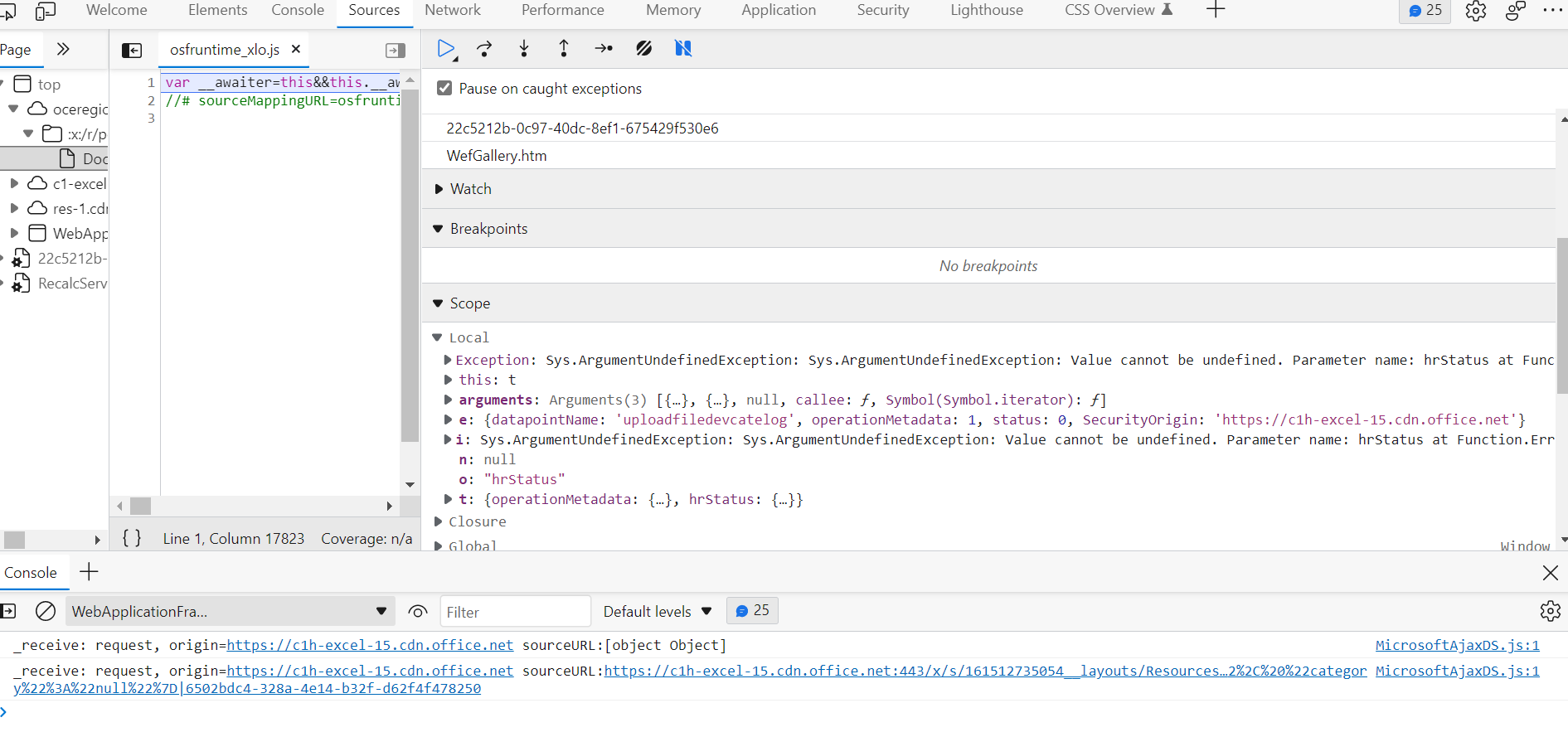
Manifest.xml:
<?xml version="1.0" encoding="UTF-8"?>
<OfficeApp xmlns="http://schemas.microsoft.com/office/appforoffice/1.1" xmlns:xsi="http://www.w3.org/2001/XMLSchema-instance" xmlns:bt="http://schemas.microsoft.com/office/officeappbasictypes/1.0" xmlns:ov="http://schemas.microsoft.com/office/taskpaneappversionoverrides" xsi:type="TaskPaneApp">
    <Id>1234c63f-b860-4280-8280-3e4fb5ea7726</Id>
    <Version>1.0.0.0</Version>
    <ProviderName>Microsoft</ProviderName>
    <DefaultLocale>en-US</DefaultLocale>
    <DisplayName DefaultValue="test" />
    <Description DefaultValue="test" />
    <IconUrl DefaultValue="https://localhost:3000/manifestimages/appLogo_64px.png" />
    <HighResolutionIconUrl DefaultValue="https://localhost:3000/manifestimages/appLogo_128px.png" />
    <SupportUrl DefaultValue="https://localhost:3000/help" />
    <AppDomains>
        <AppDomain>https://localhost:3000</AppDomain>
    </AppDomains>
    <Hosts>
        <Host Name="Workbook"></Host>
    </Hosts>
    <Requirements>
        <Sets DefaultMinVersion="1.1">
            <Set Name="SharedRuntime" MinVersion="1.1" />
        </Sets>
    </Requirements>
    <DefaultSettings>
        <SourceLocation DefaultValue="https://localhost:3000/commands.html" />
    </DefaultSettings>
    <Permissions>ReadWriteDocument</Permissions>
    <VersionOverrides xmlns="http://schemas.microsoft.com/office/taskpaneappversionoverrides" xsi:type="VersionOverridesV1_0">
        <Hosts>
            <Host xsi:type="Workbook">
                <Runtimes>
                    <Runtime resid="Taskpane.Url" lifetime="long" />
                    <Runtime resid="Commands.Url" lifetime="long" />
                </Runtimes>
                <DesktopFormFactor>
                    <FunctionFile resid="Commands.Url" />
                    <ExtensionPoint xsi:type="PrimaryCommandSurface">
                        <OfficeTab id="TabHome1">
                            <Group id="OfficeTab1.Group">
                                <Label resid="OfficeTab1.Group.Label" />
                                <Icon>
                                    <bt:Image size="16" resid="Refresh-16" />
                                    <bt:Image size="32" resid="Refresh-32" />
                                    <bt:Image size="80" resid="Refresh-80" />
                                </Icon>
                                <Control xsi:type="Button" id="InitSheet">
                                    <Label resid="InitSheet.Button.Label" />
                                    <Supertip>
                                        <Title resid="InitSheet.Button.Label" />
                                        <Description resid="InitSheet.Button.Tooltip" />
                                    </Supertip>
                                    <Icon>
                                        <bt:Image size="16" resid="Refresh-16" />
                                        <bt:Image size="32" resid="Refresh-32" />
                                        <bt:Image size="80" resid="Refresh-80" />
                                    </Icon>
                                    <Action xsi:type="ShowTaskpane">
                                        <TaskpaneId>Office.AutoShowTaskpaneWithDocument</TaskpaneId>
                                        <SourceLocation resid="Taskpane.Url" />
                                        <Title resid="FRE.Taskpane.Title" />
                                    </Action>
                                </Control>
                            </Group>
</OfficeTab>回答 1
Stack Overflow用户
发布于 2022-04-01 06:07:49
这个文档中包含了一些示例,如果您之前没有看到它,它们可能会很有用:https://learn.microsoft.com/en-us/office/dev/add-ins/develop/automatically-open-a-task-pane-with-a-document。
确保您的代码包含:
Office.context.document.settings.set("Office.AutoShowTaskpaneWithDocument", true);
Office.context.document.settings.saveAsync();
为了更好地定位您的问题,请共享一个代码片段用于repro。
页面原文内容由Stack Overflow提供。腾讯云小微IT领域专用引擎提供翻译支持
原文链接:
https://stackoverflow.com/questions/71693374
复制相关文章
相似问题
腾讯云开发者

Copyright © 2013 - 2026 Tencent Cloud. All Rights Reserved. 腾讯云 版权所有
深圳市腾讯计算机系统有限公司 ICP备案/许可证号:粤B2-20090059  粤公网安备44030502008569号
腾讯云计算(北京)有限责任公司 京ICP证150476号 | 京ICP备11018762号