
对象不需要“产卵”- tkinter。
我有一个游戏,你必须“弹出”泡泡(泡泡),但他们不会产卵。有人知道为什么吗?Bubs应该在spawn_bub()中产生,它们应该在屏幕的左侧产生。大小和未来的速度以及确切的位置应该是随机的。这个动作稍后会被编码。
from typing import Any

from tkinter import *
from time import sleep, time
from random import randint

SPEED = 10

bub_id=list()
bub_rad=list()
bub_speed=list()
MIN_BUB_RAD = 10
MAX_BUB_RAD = 30
MAX_BUB_SPEED = 10
GAP = 100

def create_window(color, title, height, width):
    global c, window, HEIGHT, WIDTH, ship_id1, ship_id2
    HEIGHT = height
    WIDTH  = width
    window = Tk()
    window.title(title)
    c = Canvas (window, width=WIDTH, height=HEIGHT, bg=color)
    c.pack()

def create_ship(color1, color2):
    global c, window, HEIGHT, WIDTH, ship_id1, ship_id2
    ship_id1 = c.create_oval(0,0,30, 30, outline=color1)
    ship_id2 = c.create_polygon(5,5,5,25,30, 15, fill=color2)
    MID_X = WIDTH / 2
    MID_Y = HEIGHT / 2
    c.move (ship_id1, MID_X, MID_Y)
    c.move (ship_id2, MID_X, MID_Y)

def ship_move_right(event):
    global c, window, HEIGHT, WIDTH, ship_id1, ship_id2, SPEED
    c.move (ship_id1, SPEED, 0)
    c.move (ship_id2, SPEED, 0)

def ship_move_left(event):
    global c, window, HEIGHT, WIDTH, ship_id1, ship_id2, SPEED
    c.move(ship_id1, -SPEED, 0)
    c.move(ship_id2, -SPEED, 0)

def ship_move_up(event):
    global c, window, HEIGHT, WIDTH, ship_id1, ship_id2, SPEED
    c.move(ship_id1,0, -SPEED)
    c.move(ship_id2,0, -SPEED)
def ship_move_down(event):
    global c, window, HEIGHT, WIDTH, ship_id1, ship_id2, SPEED
    c.move(ship_id1, 0, SPEED)
    c.move(ship_id2, 0, SPEED)

def ship_move_right_fast(event):
    global c, window, HEIGHT, WIDTH, ship_id1, ship_id2
    c.move (ship_id1, 20, 0)
    c.move (ship_id2, 20, 0)

def ship_move_left_fast(event):
    global c, window, HEIGHT, WIDTH, ship_id1, ship_id2
    c.move(ship_id1, -20, 0)
    c.move(ship_id2, -20, 0)

def ship_move_up_fast(event):
    global c, window, HEIGHT, WIDTH, ship_id1, ship_id2
    c.move(ship_id1,0, -20)
    c.move(ship_id2,0, -20)
def ship_move_down_fast(event):
    global c, window, HEIGHT, WIDTH, ship_id1, ship_id2
    c.move(ship_id1, 0, 20)
    c.move(ship_id2, 0, 20)


def spawn_bub():
    x = WIDTH + GAP
    y = randint(0,HEIGHT)
    rad =randint(MIN_BUB_RAD, MAX_BUB_RAD)
    id1 = c.create_oval(x-rad, y-rad, x+rad, y+rad, outline='white')
    bub_id.append(id1)
    bub_rad.append(rad)
    bub_speed.append(randint(1, MAX_BUB_SPEED))

def move_bub():
    for i in range (len(bub_id)):
        c.move(bub_id[i], -bub_speed[i], 0)

def move_ship():
    c.bind_all('<Right>', ship_move_right)
    c.bind_all('<Left>', ship_move_left)
    c.bind_all('<Up>', ship_move_up)
    c.bind_all('<Down>', ship_move_down)
    c.bind_all('<KeyPress-d>', ship_move_right)
    c.bind_all('<KeyPress-a>', ship_move_left)
    c.bind_all('<KeyPress-w>', ship_move_up)
    c.bind_all('<KeyPress-s>', ship_move_down)
    c.bind_all('<KeyPress-D>', ship_move_right_fast)
    c.bind_all('<KeyPress-A>', ship_move_left_fast)
    c.bind_all('<KeyPress-W>', ship_move_up_fast)
    c.bind_all('<KeyPress-S>', ship_move_down_fast)


create_window('blue', 'Bubble Blaster', 700, 1300)
create_ship('red', 'red')
move_ship()
BUB_CHANCE = 10
while True:
    if randint(1, BUB_CHANCE) == 1:
        spawn_bub()
    move_bub()
    window.update
    sleep(0.1)
mainloop()回答 1
Stack Overflow用户
发布于 2022-02-24 11:50:31
通过删除mainloop()并添加圆括号来完成对window.update()的调用,可以解决问题。
注意:--如果您使用window.update()不断更新tkinter.Tk窗口,那么就不需要使用tkinter.Tk.mainloop()(window.mainloop()),特别是,因为主循环在循环中不断地被调用。
来自effbot档案 -:
更新() 处理所有挂起的事件,调用事件回调,完成任何挂起的几何管理,必要时重新绘制小部件,并调用所有挂起的空闲任务。应该谨慎使用此方法,因为如果从错误的位置调用(例如从事件回调中调用,或从可以从事件回调以任何方式调用的函数,等等),则可能会导致非常恶劣的争用条件。当有疑问时,使用update_idletasks代替。主回路(n=0) 进入Tkinter的主事件循环。若要离开事件循环,请使用“退出”方法。事件循环可以嵌套;可以在事件处理程序中调用call循环。
而且,tkinter.Tk.update (在您的例子中是window.update )是窗口(tkinter.Tk)对象的一个方法,并期望它执行,这意味着必须使用其名称后面的圆括号来调用它。
最后的代码变成-:
from tkinter import *
from time import sleep, time
from random import randint

SPEED = 10

bub_id=list()
bub_rad=list()
bub_speed=list()
MIN_BUB_RAD = 10
MAX_BUB_RAD = 30
MAX_BUB_SPEED = 10
GAP = 100

def create_window(color, title, height, width):
    global c, window, HEIGHT, WIDTH, ship_id1, ship_id2
    HEIGHT = height
    WIDTH  = width
    window = Tk()
    window.title(title)
    c = Canvas (window, width=WIDTH, height=HEIGHT, bg=color)
    c.pack()

def create_ship(color1, color2):
    global c, window, HEIGHT, WIDTH, ship_id1, ship_id2
    ship_id1 = c.create_oval(0,0,30, 30, outline=color1)
    ship_id2 = c.create_polygon(5,5,5,25,30, 15, fill=color2)
    MID_X = WIDTH / 2
    MID_Y = HEIGHT / 2
    c.move (ship_id1, MID_X, MID_Y)
    c.move (ship_id2, MID_X, MID_Y)

def ship_move_right(event):
    global c, window, HEIGHT, WIDTH, ship_id1, ship_id2, SPEED
    c.move (ship_id1, SPEED, 0)
    c.move (ship_id2, SPEED, 0)

def ship_move_left(event):
    global c, window, HEIGHT, WIDTH, ship_id1, ship_id2, SPEED
    c.move(ship_id1, -SPEED, 0)
    c.move(ship_id2, -SPEED, 0)

def ship_move_up(event):
    global c, window, HEIGHT, WIDTH, ship_id1, ship_id2, SPEED
    c.move(ship_id1,0, -SPEED)
    c.move(ship_id2,0, -SPEED)
def ship_move_down(event):
    global c, window, HEIGHT, WIDTH, ship_id1, ship_id2, SPEED
    c.move(ship_id1, 0, SPEED)
    c.move(ship_id2, 0, SPEED)

def ship_move_right_fast(event):
    global c, window, HEIGHT, WIDTH, ship_id1, ship_id2
    c.move (ship_id1, 20, 0)
    c.move (ship_id2, 20, 0)

def ship_move_left_fast(event):
    global c, window, HEIGHT, WIDTH, ship_id1, ship_id2
    c.move(ship_id1, -20, 0)
    c.move(ship_id2, -20, 0)

def ship_move_up_fast(event):
    global c, window, HEIGHT, WIDTH, ship_id1, ship_id2
    c.move(ship_id1,0, -20)
    c.move(ship_id2,0, -20)
def ship_move_down_fast(event):
    global c, window, HEIGHT, WIDTH, ship_id1, ship_id2
    c.move(ship_id1, 0, 20)
    c.move(ship_id2, 0, 20)


def spawn_bub():
    x = WIDTH + GAP
    y = randint(0,HEIGHT)
    rad =randint(MIN_BUB_RAD, MAX_BUB_RAD)
    id1 = c.create_oval(x-rad, y-rad, x+rad, y+rad, outline='white')
    bub_id.append(id1)
    bub_rad.append(rad)
    bub_speed.append(randint(1, MAX_BUB_SPEED))

def move_bub():
    for i in range (len(bub_id)):
        c.move(bub_id[i], -bub_speed[i], 0)

def move_ship():
    c.bind_all('<Right>', ship_move_right)
    c.bind_all('<Left>', ship_move_left)
    c.bind_all('<Up>', ship_move_up)
    c.bind_all('<Down>', ship_move_down)
    c.bind_all('<KeyPress-d>', ship_move_right)
    c.bind_all('<KeyPress-a>', ship_move_left)
    c.bind_all('<KeyPress-w>', ship_move_up)
    c.bind_all('<KeyPress-s>', ship_move_down)
    c.bind_all('<KeyPress-D>', ship_move_right_fast)
    c.bind_all('<KeyPress-A>', ship_move_left_fast)
    c.bind_all('<KeyPress-W>', ship_move_up_fast)
    c.bind_all('<KeyPress-S>', ship_move_down_fast)


create_window('blue', 'Bubble Blaster', 700, 1300)
create_ship('red', 'red')
move_ship()
BUB_CHANCE = 10
while True:
    if randint(1, BUB_CHANCE) == 1:
        spawn_bub()
    move_bub()
    window.update() # Added round brackets
    sleep(0.1)
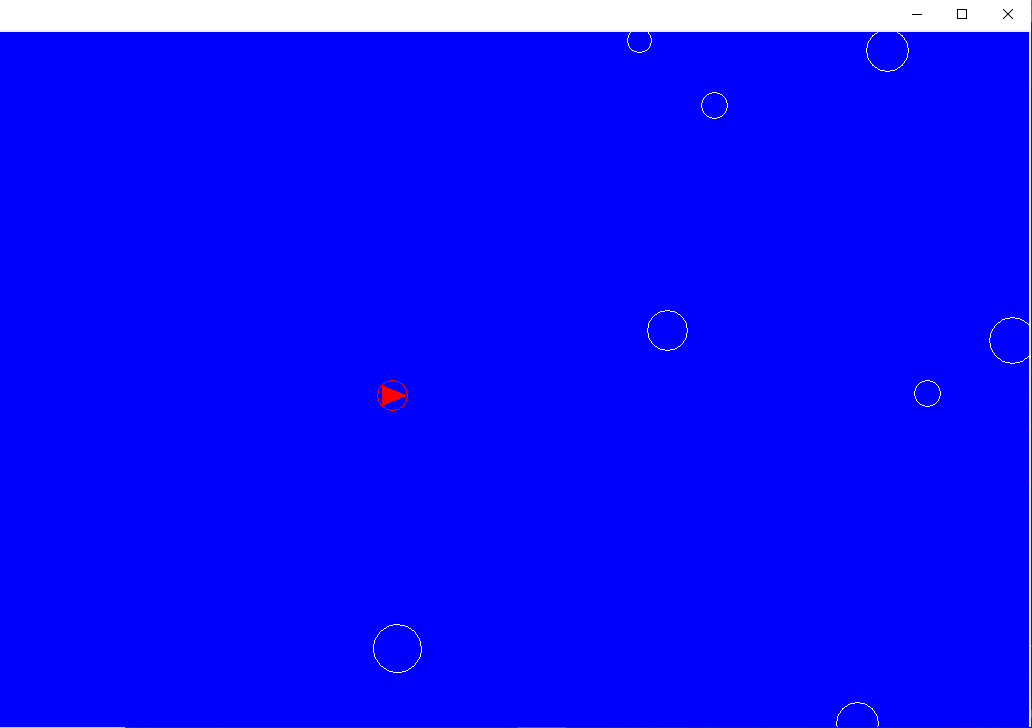
# mainloop() # removed mainloop()建议更改后的输出-:
https://stackoverflow.com/questions/71251434
复制相似问题
腾讯云开发者

Copyright © 2013 - 2026 Tencent Cloud. All Rights Reserved. 腾讯云 版权所有
深圳市腾讯计算机系统有限公司 ICP备案/许可证号:粤B2-20090059  粤公网安备44030502008569号
腾讯云计算(北京)有限责任公司 京ICP证150476号 | 京ICP备11018762号