istio入门系列之TLS安全认证的配置
原创

istio入门系列之TLS安全认证的配置
Istio的自动双向TLS特性,您只需配置认证策略即可使用双向 TLS,而无需关注目标规则。
Istio 跟踪迁移到 sidecar 的服务端工作负载,并将客户端 sidecar 配置为自动向这些工作负载发送双向 TLS 流量, 同时将明文流量发送到没有 sidecar 的工作负载。这使您可以通过最少的配置,逐步在网格中使用双向 TLS。
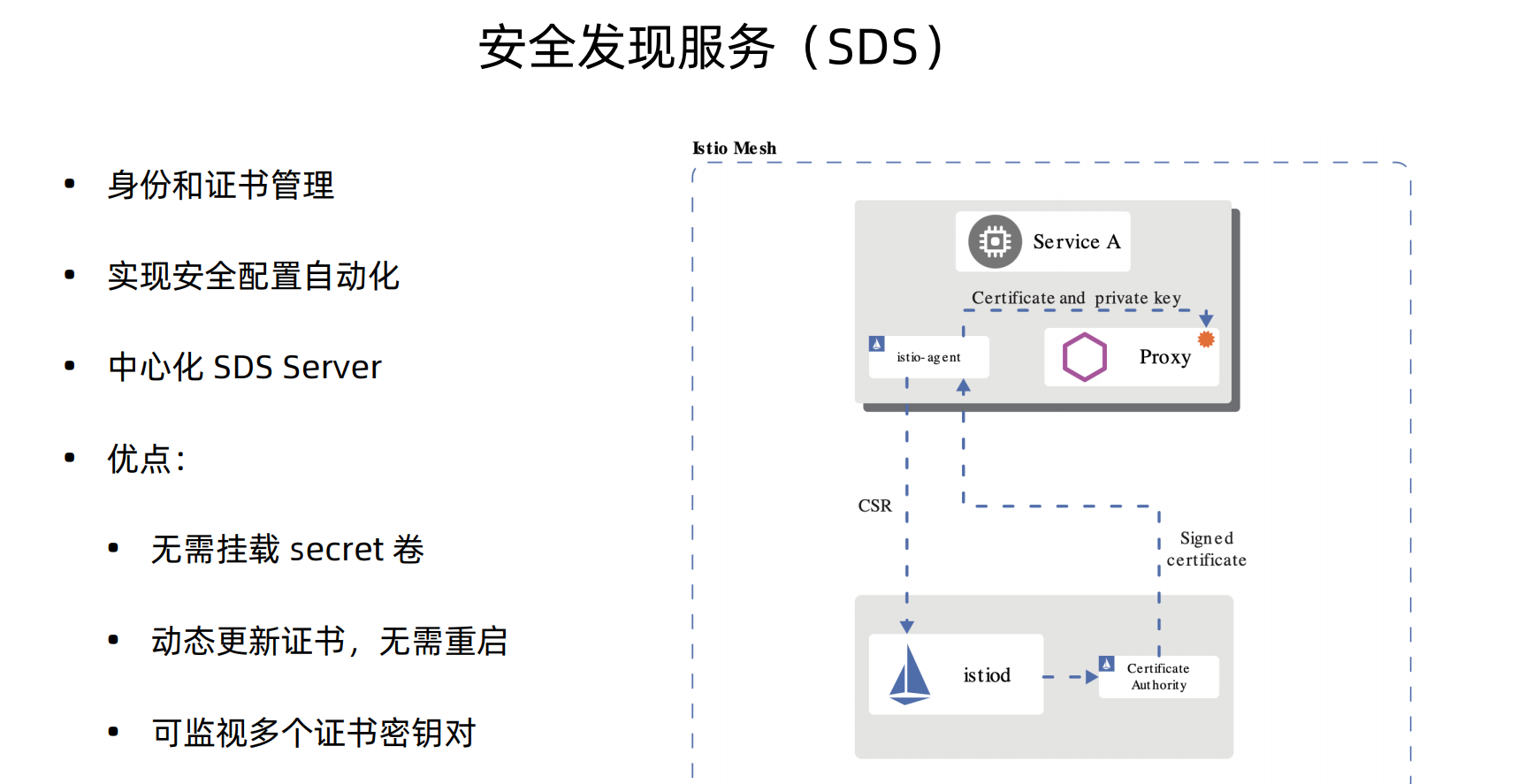
istio1.5版本的安全认证默认是使用的SDS(安全发现服务),并且这个服务趋于稳定、默认开启
单向认证
upload-image
首先我们生成一下所需要证书秘钥
1.为服务创建根证书和私钥:
openssl req -x509 -sha256 -nodes -days 365 -newkey rsa:2048 -subj '/O=example Inc./CN=example.com' -keyout example.com.key -out example.com.crt

2.为httpbin.example.com创建证书和私钥:
openssl req -out httpbin.example.com.csr -newkey rsa:2048 -nodes -keyout httpbin.example.com.key -subj "/CN=httpbin.example.com/O=httpbin organization"
openssl x509 -req -days 365 -CA example.com.crt -CAkey example.com.key -set_serial 0 -in httpbin.example.com.csr -out httpbin.example.com.crt
部署一下httpbin这个服务,之前部署就可以不用部署了
apiVersion: v1
kind: Service
metadata:
  name: httpbin
  labels:
    app: httpbin
spec:
  ports:
  - name: http
    port: 8000
  selector:
    app: httpbin
---
apiVersion: apps/v1
kind: Deployment
metadata:
  name: httpbin
spec:
  replicas: 1
  selector:
    matchLabels:
      app: httpbin
      version: v1
  template:
    metadata:
      labels:
        app: httpbin
        version: v1
    spec:
      containers:
      - image: docker.io/citizenstig/httpbin
        imagePullPolicy: IfNotPresent
        name: httpbin
        ports:
        - containerPort: 8000
接下来给网关配置一个secret来挂载这个证书
kubectl create -n istio-system secret tls httpbin-credential --key=httpbin.example.com.key --cert=httpbin.example.com.crt配置ingress网关
kubectl apply -f - << EOF
apiVersion: networking.istio.io/v1alpha3
kind: Gateway
metadata:
  name: mygateway
spec:
  selector:
    istio: ingressgateway
  servers:
  - port:
      number: 443
      name: https
      protocol: HTTPS
    tls:
      mode: SIMPLE  #单向TLS
      credentialName: httpbin-credential
    hosts:
    - httpbin.example.com
EOF
给httpbin配置一个VirtualService
kubectl apply -f - << EOF
apiVersion: networking.istio.io/v1alpha3
kind: VirtualService
metadata:
  name: httpbin
spec:
  hosts:
  - "httpbin.example.com"
  gateways:
  - mygateway
  http:
  - match:
    - uri:
        prefix: /status
    - uri:
        prefix: /delay
    route:
    - destination:
        port:
          number: 8000
        host: httpbin
EOF
下面我们执行这条命令测试一下
curl -v -HHost:httpbin.example.com --resolve httpbin.example.com:443:127.0.0.1 --cacert example.com.crt "https://httpbin.example.com:443/status/418"双向认证
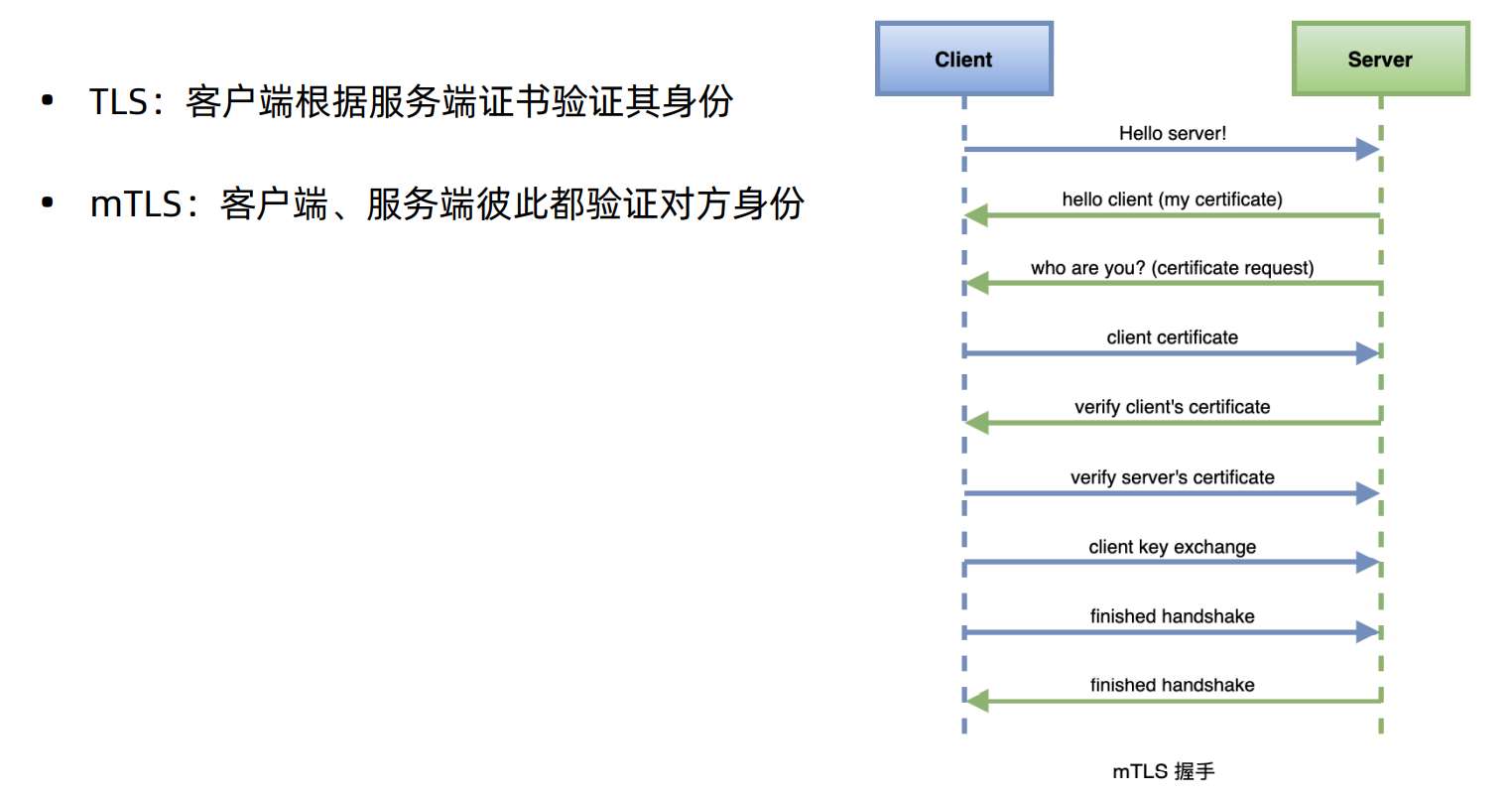
借助 Istio 的自动双向 TLS 特性,您只需配置认证策略即可使用双向 TLS,而无需关注目标规则。
Istio 跟踪迁移到 sidecar 的服务端工作负载,并将客户端 sidecar 配置为自动向这些工作负载发送双向 TLS 流量, 同时将明文流量发送到没有 sidecar 的工作负载。这使您可以通过最少的配置,逐步在网格中使用双向 TLS
upload-image
我们创建一个testauth的ns,在里面部署一下sleep服务,然后去请求default下的httpbin服务。
[root@VM-0-13-centos istio-1.5.1]# kubectl create ns testauth
namespace/testauth created
[root@VM-0-13-centos istio-1.5.1]# kubectl apply -f samples/sleep/sleep.yaml -n testauth
serviceaccount/sleep created
service/sleep created
deployment.apps/sleep created
[root@VM-0-13-centos istio-1.5.1]# k get pod -n testauth
NAME                     READY   STATUS    RESTARTS   AGE
sleep-5b7bf56c54-8gt4q   1/1     Running   0          21s
[root@VM-0-13-centos istio-1.5.1]# kubectl exec -it sleep-5b7bf56c54-8gt4q -n testauth -c sleep -- curl http://httpbin.default:8000/ip
{
  "origin": "127.0.0.1"
}
这里默认是可以访问通的,因为我们还没配置双向tls认证,下面我们来配置下认证策略
kubectl apply -f - <<EOF
apiVersion: "security.istio.io/v1beta1"
kind: "PeerAuthentication"
metadata:
  name: "default"
  namespace: "default" #基于default下的一个对等认证
spec:
  mtls:
    mode: PERMISSIVE  #兼容模式
EOF
兼容模式下默认是可以访问的
[root@VM-0-13-centos istio-1.5.1]# kubectl exec -it sleep-5b7bf56c54-8gt4q -n testauth -c sleep -- curl http://httpbin.default:8000/ip
{
  "origin": "127.0.0.1"
}
下面我们把对等认证模式改成严格模式
kubectl apply -f - <<EOF
apiVersion: "security.istio.io/v1beta1"
kind: "PeerAuthentication"
metadata:
  name: "default"
  namespace: "default"
spec:
  mtls:
    mode: STRICT #严格模式
EOF
再执行访问请求就会被拒绝
[root@VM-0-13-centos istio-1.5.1]# kubectl exec -it sleep-5b7bf56c54-8gt4q -n testauth -c sleep -- curl http://httpbin.default:8000/ip
curl: (56) Recv failure: Connection reset by peer
command terminated with exit code 56
那么如何让sleep去访问到httpbin呢,我们只需要将sleep注入到istio就可以,因为istio会去管理证书和秘钥
[root@VM-0-13-centos istio-1.5.1]# kubectl apply -f <(istioctl kube-inject -f samples/sleep/sleep.yaml) -n testauth
serviceaccount/sleep unchanged
service/sleep unchanged
deployment.apps/sleep configured
[root@VM-0-13-centos istio-1.5.1]# kubectl get pod -n testauth
NAME                     READY   STATUS        RESTARTS   AGE
sleep-5b7bf56c54-8gt4q   1/1     Terminating   0          10m
sleep-68dc95bf4c-fwftq   2/2     Running       0          38s
[root@VM-0-13-centos istio-1.5.1]# kubectl exec -it sleep-68dc95bf4c-fwftq -n testauth -c sleep -- curl http://httpbin.default:8000/ip
{
  "origin": "127.0.0.1"
}
将sleep服务注入到istio中,就可以访问到httpbin的服务了,我们上面是针对ns进行对等认证的策略配置,也可以进行全局的对等认证的配置,只需要将ns去掉就行。
kubectl apply -f - <<EOF
apiVersion: "security.istio.io/v1beta1"
kind: "PeerAuthentication"
metadata:
  name: "default"
spec:
  mtls:
    mode: STRICT
EOF
原创声明:本文系作者授权腾讯云开发者社区发表,未经许可,不得转载。
如有侵权,请联系 cloudcommunity@tencent.com 删除。
目录
腾讯云开发者

Copyright © 2013 - 2026 Tencent Cloud. All Rights Reserved. 腾讯云 版权所有
深圳市腾讯计算机系统有限公司 ICP备案/许可证号:粤B2-20090059  粤公网安备44030502008569号
腾讯云计算(北京)有限责任公司 京ICP证150476号 | 京ICP备11018762号