Kubernetes上实现gitlab的CICD
原创

Kubernetes上实现gitlab的CICD
本次我们来讲解下如何在k8s上搭建gitlab,并且通过gitlab内Pipeline的ci/cd将代码部署到k8s集群内。
本次k8s环境基于tke托管集群1.18进行测试,镜像仓库使用的是腾讯云的ccr仓库。
搭建gitlab
部署gitla需要部署三个服务,分别是redis、postgresql、gitlab这三个服务,下面我们来讲解具体部署及部署yaml文件
我们先创建一个gitlab的命名空间,后续部署的所有服务都在这个命名空间下
kubectl create ns gitlabredis部署
redis服务是提供给Gitlab服务使用,并不需要暴露在集群外部,因此我们在gitlab<->redis之间调用的时候,采用内部通信的方式
apiVersion: apps/v1
kind: Deployment
metadata:
  name: redis
  namespace: gitlab
  labels:
    name: redis
spec:
  selector:
    matchLabels:
      name: redis
  template:
    metadata:
      name: redis
      labels:
        name: redis
    spec:
      containers:
      - name: redis
        image: sameersbn/redis
        imagePullPolicy: IfNotPresent
        ports:
        - name: redis
          containerPort: 6379
        volumeMounts:
        - mountPath: /var/lib/redis
          name: data
        livenessProbe:
          exec:
            command:
            - redis-cli
            - ping
          initialDelaySeconds: 30
          timeoutSeconds: 5
        readinessProbe:
          exec:
            command:
            - redis-cli
            - ping
          initialDelaySeconds: 5
          timeoutSeconds: 1
      volumes:
      - name: data
        emptyDir: {}

---
apiVersion: v1
kind: Service
metadata:
  name: redis
  namespace: gitlab
  labels:
    name: redis
spec:
  ports:
    - name: redis
      port: 6379
      targetPort: redis
  selector:
    name: redis
postgresql部署
postgresql部署主要存储gitlab的数据使用
apiVersion: apps/v1
kind: Deployment
metadata:
  name: postgresql
  namespace: gitlab
  labels:
    name: postgresql
spec:
  selector:
    matchLabels:
      name: postgresql
  template:
    metadata:
      name: postgresql
      labels:
        name: postgresql
    spec:
      containers:
      - name: postgresql
        image: sameersbn/postgresql:10
        imagePullPolicy: IfNotPresent
        env:
        - name: DB_USER
          value: gitlab
        - name: DB_PASS
          value: passw0rd
        - name: DB_NAME
          value: gitlab_production
        - name: DB_EXTENSION
          value: pg_trgm
        ports:
        - name: postgres
          containerPort: 5432
        volumeMounts:
        - mountPath: /var/lib/postgresql
          name: data
        livenessProbe:
          exec:
            command:
            - pg_isready
            - -h
            - localhost
            - -U
            - postgres
          initialDelaySeconds: 30
          timeoutSeconds: 5
        readinessProbe:
          exec:
            command:
            - pg_isready
            - -h
            - localhost
            - -U
            - postgres
          initialDelaySeconds: 5
          timeoutSeconds: 1
      volumes:
      - name: data
        persistentVolumeClaim:
          claimName: gitlab-postgresql

---
apiVersion: v1
kind: Service
metadata:
  name: postgresql
  namespace: gitlab
  labels:
    name: postgresql
spec:
  ports:
    - name: postgres
      port: 5432
      targetPort: postgres
  selector:
    name: postgresql
gitlab部署
gitlab服务的部署就相对复杂一些,要添加正确的redis和postgresql的链接信息,同时为了在集群外部访问gitlab,我们需要用treafik给gitlab配置一个ingress,所以最后的时候我们需要给gitlab的服务分配一个测试域名,我们这里的域名是gitlab.k8s.niewx.cn,treafik的搭建可以参考我之前的文章。
apiVersion: apps/v1
kind: Deployment
metadata:
  name: gitlab
  namespace: gitlab
  labels:
    name: gitlab
spec:
  selector:
    matchLabels:
      name: gitlab
  template:
    metadata:
      name: gitlab
      labels:
        name: gitlab
    spec:
      containers:
      - name: gitlab
        image: sameersbn/gitlab:11.8.1
        imagePullPolicy: IfNotPresent
        env:
        - name: TZ
          value: Asia/Shanghai
        - name: GITLAB_TIMEZONE
          value: Beijing
        - name: GITLAB_SECRETS_DB_KEY_BASE
          value: long-and-random-alpha-numeric-string
        - name: GITLAB_SECRETS_SECRET_KEY_BASE
          value: long-and-random-alpha-numeric-string
        - name: GITLAB_SECRETS_OTP_KEY_BASE
          value: long-and-random-alpha-numeric-string
        - name: GITLAB_ROOT_PASSWORD
          value: admin123456
        - name: GITLAB_ROOT_EMAIL
          value: [email protected]
        - name: GITLAB_HOST
          value: gitlab.k8s.niewx.cn
        - name: GITLAB_PORT
          value: "80"
        - name: GITLAB_SSH_PORT
          value: "30022"
        - name: GITLAB_NOTIFY_ON_BROKEN_BUILDS
          value: "true"
        - name: GITLAB_NOTIFY_PUSHER
          value: "false"
        - name: GITLAB_BACKUP_SCHEDULE
          value: daily
        - name: GITLAB_BACKUP_TIME
          value: 01:00
        - name: DB_TYPE
          value: postgres
        - name: DB_HOST
          value: postgresql
        - name: DB_PORT
          value: "5432"
        - name: DB_USER
          value: gitlab
        - name: DB_PASS
          value: passw0rd
        - name: DB_NAME
          value: gitlab_production
        - name: REDIS_HOST
          value: redis
        - name: REDIS_PORT
          value: "6379"
        ports:
        - name: http
          containerPort: 80
        - name: ssh
          containerPort: 22
        volumeMounts:
        - mountPath: /home/git/data
          name: data
        livenessProbe:
          httpGet:
            path: /
            port: 80
          initialDelaySeconds: 180
          timeoutSeconds: 5
        readinessProbe:
          httpGet:
            path: /
            port: 80
          initialDelaySeconds: 5
          timeoutSeconds: 1
      volumes:
      - name: data
        persistentVolumeClaim:
          claimName: gitlab

---
apiVersion: v1
kind: Service
metadata:
  name: gitlab
  namespace: gitlab
  labels:
    name: gitlab
spec:
  ports:
    - name: http
      port: 80
      targetPort: http
    - name: ssh
      port: 22
      targetPort: ssh
      nodePort: 30022
  type: NodePort
  selector:
    name: gitlab

---
apiVersion: traefik.containo.us/v1alpha1
kind: IngressRoute
metadata:
  name: gitlab-webui
  namespace: gitlab
spec:
  entryPoints:
    - web
  routes:
  - match: Host(`gitlab.k8s.niewx.cn`)
    kind: Rule
    services:
    - name: gitlab
      port: 80
验证登录gitlab
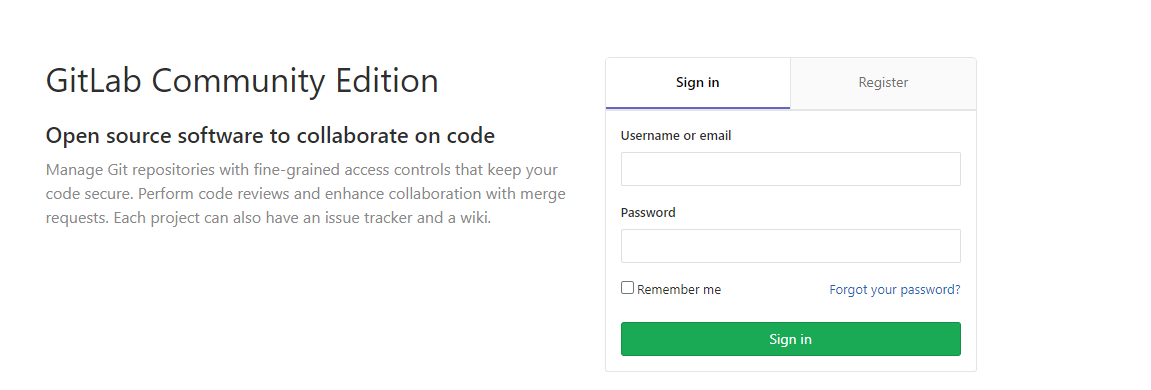
在浏览器输入http://gitlab.k8s.niewx.cn/,然后输入之前在gitlab中配置的账号密码能成功登录即部署成功
upload-image

upload-image
配置gitlab-runner
我们可以部署全局的runner进行使用,也可以单独给某个项目部署runner
部署全局的runner进行使用
首先声明一个Configmap gitlab-runner.configmap.yaml来为Gitlab Runner提供需要的环境变量以及一些资源约束信息
apiVersion: v1
data:
  REGISTER_NON_INTERACTIVE: "true"
  REGISTER_LOCKED: "false"
  METRICS_SERVER: "0.0.0.0:9100"
  CI_SERVER_URL: "http://gitlab.gitlab.svc.cluster.local/ci" # k8s内gitlab服务的通信地址格式:svc.namespace.svc.cluster.local, 同时加上/ci这个prefix,这里也可以使用外网访问地址
  RUNNER_REQUEST_CONCURRENCY: "4"
  RUNNER_EXECUTOR: "kubernetes"
  KUBERNETES_NAMESPACE: "gitlab" # 服务运行的namespace
  KUBERNETES_PRIVILEGED: "true"
  KUBERNETES_CPU_LIMIT: "1"
  KUBERNETES_MEMORY_LIMIT: "1Gi"
  KUBERNETES_SERVICE_CPU_LIMIT: "1"
  KUBERNETES_SERVICE_MEMORY_LIMIT: "1Gi"
  KUBERNETES_HELPER_CPU_LIMIT: "500m"
  KUBERNETES_HELPER_MEMORY_LIMIT: "100Mi"
  KUBERNETES_PULL_POLICY: "if-not-present" # image的拉取策略
  KUBERNETES_TERMINATIONGRACEPERIODSECONDS: "10"
  KUBERNETES_POLL_INTERVAL: "5"
  KUBERNETES_POLL_TIMEOUT: "360"
kind: ConfigMap
metadata:
  labels:
    app: gitlab-ci-runner
  name: gitlab-ci-runner-cm
  namespace: gitlab
同样的,还需要准备一个Configmapgitlab-ci-runner-scripts.configmap.yml存储清理未被正常调度的Gitlab Runner的Pod. 正常来说,Gitlab runner在完成自己的使命之后,Kubernetes就会发送一个TERM signal信号用于正常的注销Gitlab runner, 所以那些被强制终止的Pod是不会自动的被清理的,而这个脚本就是完成这部分Pod的清理工作。
apiVersion: v1
data:
  run.sh: |
    #!/bin/bash
    unregister() {
        kill %1
        echo "Unregistering runner ${RUNNER_NAME} ..."
        /usr/bin/gitlab-ci-multi-runner unregister -t "$(/usr/bin/gitlab-ci-multi-runner list 2>&1 | tail -n1 | awk '{print $4}' | cut -d'=' -f2)" -n ${RUNNER_NAME}
        exit $?
    }
    trap 'unregister' EXIT HUP INT QUIT PIPE TERM
    echo "Registering runner ${RUNNER_NAME} ..."
    /usr/bin/gitlab-ci-multi-runner register -r ${GITLAB_CI_TOKEN}
    sed -i 's/^concurrent.*/concurrent = '"${RUNNER_REQUEST_CONCURRENCY}"'/' /home/gitlab-runner/.gitlab-runner/config.toml
    echo "Starting runner ${RUNNER_NAME} ..."
    /usr/bin/gitlab-ci-multi-runner run -n ${RUNNER_NAME} &
    wait
kind: ConfigMap
metadata:
  labels:
    app: gitlab-ci-runner
  name: gitlab-ci-runner-scripts
  namespace: gitlab
我们需要创建一个Secretgitlab-ci-token-secret.yaml来存储Gitlab Runner的Token.以便上面的脚本能正常的运行,在secret内需要存放base64加密后的字符串。
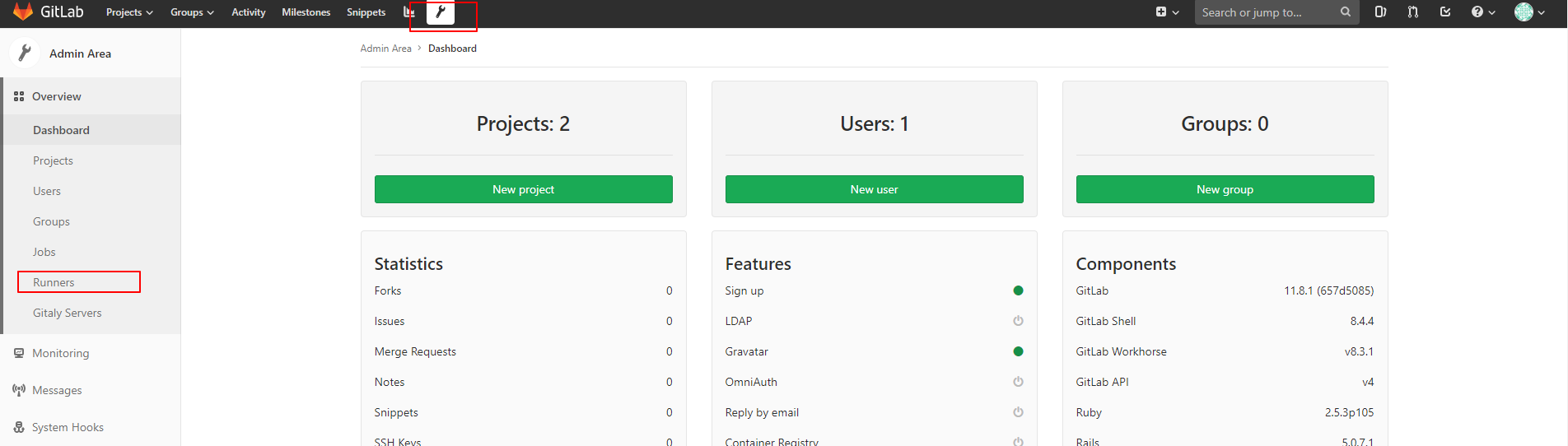
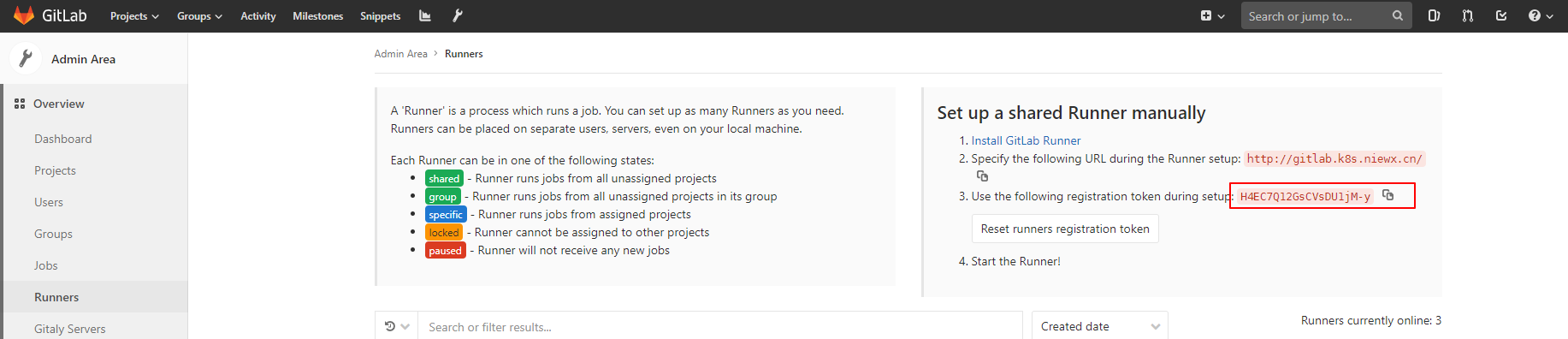
我们还需要获取下全局token,获取方式如下
upload-image
upload-image
获取后对token进行base64编码
echo H4EC7Q12GsCVsDU1jM-y | base64 然后配置到secret中
apiVersion: v1
kind: Secret
metadata:
  name: gitlab-ci-token
  namespace: gitlab # 指定命名空间
  labels:
    app: gitlab-ci-runner
data:
  GITLAB_CI_TOKEN: SDRFQzdRMTJHc0NWc0RVMWpNLXkK # 这是base64加密Gitlab runner token之后的字符串
我们通过sts(statefulset控制器)gitlab-runner-sts.yaml创建Gitlab Runner。在开始运行的时候,尝试取消注册所有的同名 Runner,当节点丢失时(NodeLost事件)尤其有用。然后再尝试重新注册自己并开始运行。在正常停止 Pod 的时候,Runner 将会运行unregister命令来尝试取消自己,所以 Gitlab 就不能再使用这个 Runner 了,这个是通过 Kubernetes Pod 生命周期中的hooks来完成的,在运行Gitlab Runner的时候,我们通过Envfrom调用之前创建的脚本以及Gitlab runner运行需要的环境变量信息.
apiVersion: apps/v1
kind: StatefulSet
metadata:
  name: gitlab-ci-runner
  namespace: gitlab # gitlab运行的命名空间
  labels:
    app: gitlab-ci-runner
spec:
  updateStrategy:
    type: RollingUpdate # Gitlab Runner的更新模式
  replicas: 2
  serviceName: gitlab-ci-runner
  selector:
    matchLabels:
      app: gitlab-ci-runner
  template:
    metadata:
      labels:
        app: gitlab-ci-runner
    spec:
      volumes:
      - name: gitlab-ci-runner-scripts
        projected:
          sources:
          - configMap:
              name: gitlab-ci-runner-scripts
              items:
              - key: run.sh
                path: run.sh
                mode: 0755
      serviceAccountName: gitlab-ci # 创建一个serviceAccount,创建pod
      securityContext:
        runAsNonRoot: true
        runAsUser: 999
        supplementalGroups: [999]
      containers:
      - image: gitlab-runner:latest # 指定镜像的版本
        name: gitlab-ci-runner
        command:
        - /scripts/run.sh
        envFrom:
        - configMapRef:
            name: gitlab-ci-runner-cm
        - secretRef:
            name: gitlab-ci-token
        env:
        - name: RUNNER_NAME
          valueFrom:
            fieldRef:
              fieldPath: metadata.name
        ports:
        - containerPort: 9100
          name: http-metrics
          protocol: TCP
        volumeMounts:
        - name: gitlab-ci-runner-scripts
          mountPath: "/scripts"
          readOnly: true
      restartPolicy: Always
从sts配置清单中看到,我们还需要一个ServiceAccount来有足够的权限做一些事情,因此我们创建一个gitlab-ci的ServiceAccount, 配置清单为:gitlab-runner-rbac.yaml
apiVersion: v1
kind: ServiceAccount
metadata:
  name: gitlab-ci
  namespace: gitlab
---
kind: Role
apiVersion: rbac.authorization.k8s.io/v1
metadata:
  name: gitlab-ci
  namespace: gitlab
rules:
  - apiGroups: [""]
    resources: ["*"]
    verbs: ["*"]
---
kind: RoleBinding
apiVersion: rbac.authorization.k8s.io/v1
metadata:
  name: gitlab-ci
  namespace: gitlab
subjects:
  - kind: ServiceAccount
    name: gitlab-ci
    namespace: gitlab
roleRef:
  kind: Role
  name: gitlab-ci
  apiGroup: rbac.authorization.k8s.io
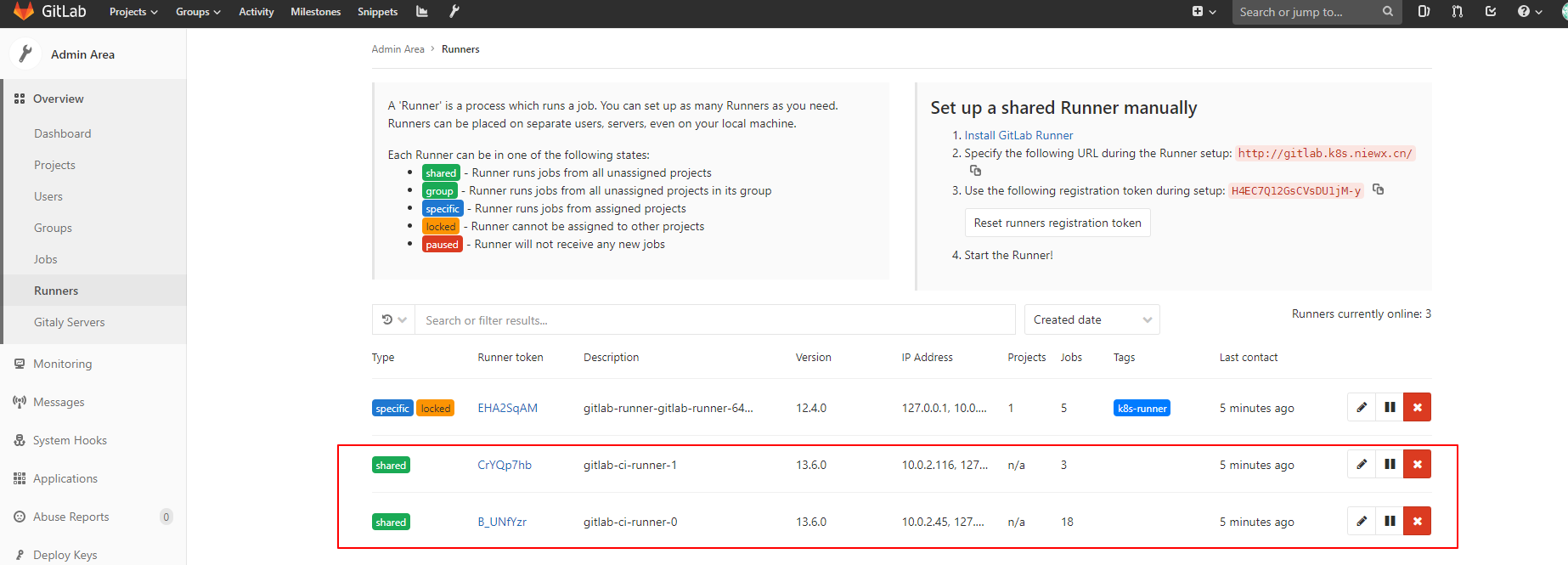
上面都部署之后可以查看下runner是否连上了gitlab,runner状态为shared则表示正常。

upload-image
upload-image
单独给某个项目部署runner
下面我们单独给某个项目配置一个runner,其实主要的区别就是采用token不一样。下面我们部署一下
首先我们将一个测试的项目上传到gitlab上,项目地址git clone https://github.com/haoshuwei/gitlab-ci-k8s-demo.git
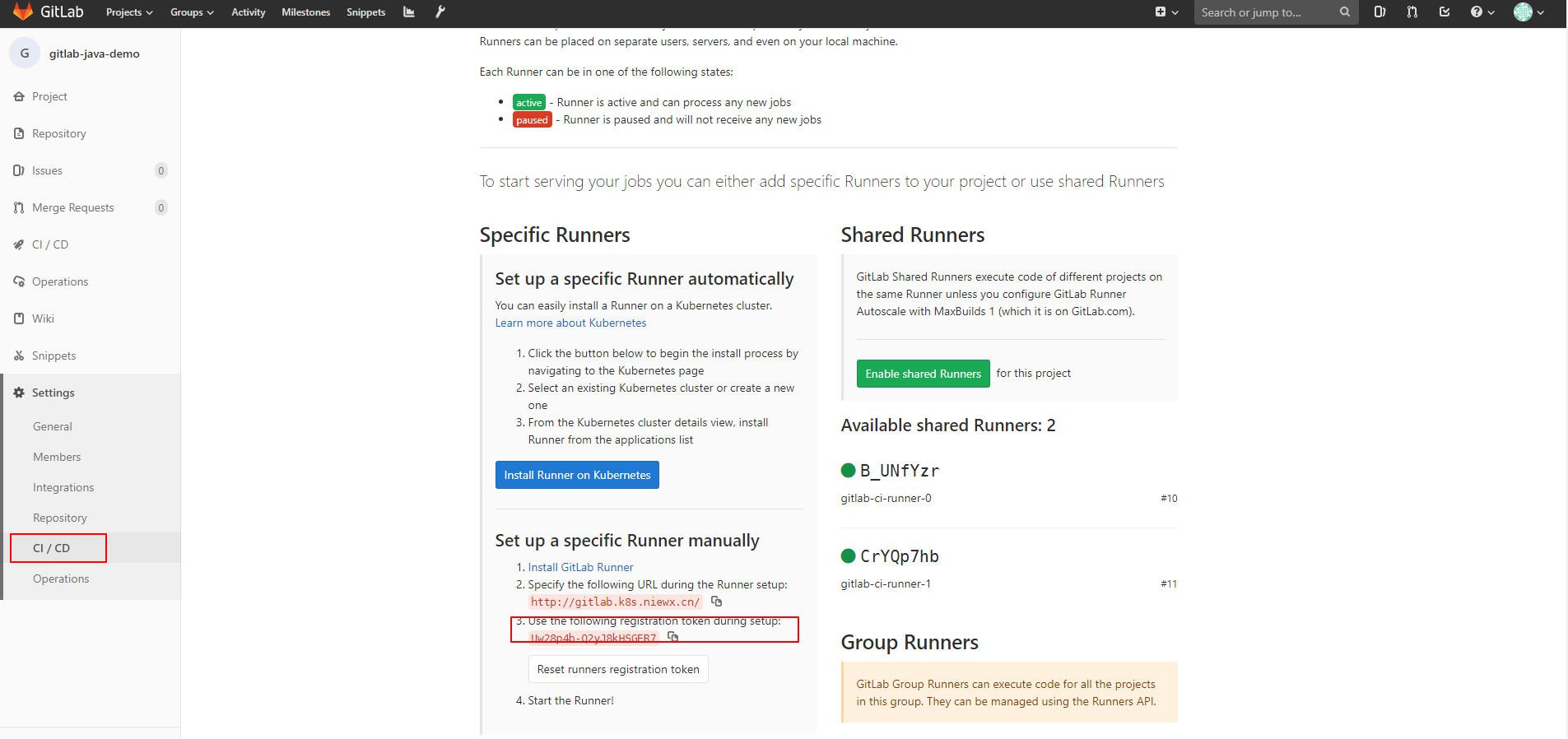
然后我们获取一下项目的token
upload-image
下面我们通过helm方式来部署下runner
git clone https://github.com/haoshuwei/gitlab-runner.git然后修改下value.yaml中的配置,主要是配置url和项目token进去,修改gitlabUrl和runnerRegistrationToken字段
## GitLab Runner Image
## ref: https://hub.docker.com/r/gitlab-runner/tags/
##
image: gitlab-runner:alpine-v11.4.0

## Specify a imagePullPolicy
## 'Always' if imageTag is 'latest', else set to 'IfNotPresent'
## ref: http://kubernetes.io/docs/user-guide/images/#pre-pulling-images
##
imagePullPolicy: IfNotPresent

## Default container image to use for initcontainer
init:
  image: busybox
  tag: latest

## The GitLab Server URL (with protocol) that want to register the runner against
## ref: https://docs.gitlab.com/runner/commands/README.html#gitlab-runner-register
##
gitlabUrl: "http://gitlab.k8s.niewx.cn/"

## The Registration Token for adding new Runners to the GitLab Server. This must
## be retreived from your GitLab Instance.
## ref: https://docs.gitlab.com/ce/ci/runners/README.html#creating-and-registering-a-runner
##
runnerRegistrationToken: "Uw28p4b-Q2yJ8kHSGER7"

## The Runner Token for adding new Runners to the GitLab Server. This must
## be retreived from your GitLab Instance. It is token of already registered runner.
## ref: (we don't yet have docs for that, but we want to use existing token)
##
# runnerToken: ""
#
## Unregister all runners before termination
##
## Updating the runner's chart version or configuration will cause the runner container
## to be terminated and created again. This may cause your Gitlab instance to reference
## non-existant runners. Un-registering the runner before termination mitigates this issue.
## ref: https://docs.gitlab.com/runner/commands/README.html#gitlab-runner-unregister
##
unregisterRunners: true

## Set the certsSecretName in order to pass custom certficates for GitLab Runner to use
## Provide resource name for a Kubernetes Secret Object in the same namespace,
## this is used to populate the /etc/gitlab-runner/certs directory
## ref: https://docs.gitlab.com/runner/configuration/tls-self-signed.html#supported-options-for-self-signed-certificates
##
# certsSecretName:

## Configure the maximum number of concurrent jobs
## ref: https://docs.gitlab.com/runner/configuration/advanced-configuration.html#the-global-section
##
concurrent: 10

## Defines in seconds how often to check GitLab for a new builds
## ref: https://docs.gitlab.com/runner/configuration/advanced-configuration.html#the-global-section
##
checkInterval: 30

## Configure GitLab Runner's logging level. Available values are: debug, info, warn, error, fatal, panic
## ref: https://docs.gitlab.com/runner/configuration/advanced-configuration.html#the-global-section
##
# logLevel:

## For RBAC support:
rbac:
  create: true

  ## Run the gitlab-bastion container with the ability to deploy/manage containers of jobs
  ## cluster-wide or only within namespace
  clusterWideAccess: false

  ## Use the following Kubernetes Service Account name if RBAC is disabled in this Helm chart (see rbac.create)
  ##
  # serviceAccountName: default

## Configure integrated Prometheus metrics exporter
## ref: https://docs.gitlab.com/runner/monitoring/#configuration-of-the-metrics-http-server
metrics:
  enabled: true

## Configuration for the Pods that that the runner launches for each new job
##
runners:
  ## Default container image to use for builds when none is specified
  ##
  image: ubuntu:16.04

  ## Specify one or more imagePullSecrets
  ##
  ## ref: https://kubernetes.io/docs/tasks/configure-pod-container/pull-image-private-registry/
  ##
  # imagePullSecrets: []

  ## Specify the image pull policy: never, if-not-present, always. The cluster default will be used if not set.
  ##
  # imagePullPolicy: ""

  ## Specify whether the runner should be locked to a specific project: true, false. Defaults to true.
  ##
  # locked: true

  ## Specify the tags associated with the runner. Comma-separated list of tags.
  ##
  ## ref: https://docs.gitlab.com/ce/ci/runners/#using-tags
  ##
  tags: "k8s-runner"

  ## Run all containers with the privileged flag enabled
  ## This will allow the docker:dind image to run if you need to run Docker
  ## commands. Please read the docs before turning this on:
  ## ref: https://docs.gitlab.com/runner/executors/kubernetes.html#using-docker-dind
  ##
  privileged: true

  ## The name of the secret containing runnerToken and runnerRegistrationToken
  # secret: gitlab-runner

  ## Namespace to run Kubernetes jobs in (defaults to the same namespace of this release)
  ##
  namespace: gitlab


  cachePath: "/opt/cache"

  ## Distributed runners caching
  ## ref: https://gitlab.com/gitlab-org/gitlab-runner/blob/master/docs/configuration/autoscale.md#distributed-runners-caching
  ##
  ## Create a secret 's3access' containing 'accesskey' & 'secretkey'
  ## ref: https://aws.amazon.com/blogs/security/wheres-my-secret-access-key/
  ##
  ## $ kubectl create secret generic s3access --\
  ##   --from-literal=accesskey="YourAccessKey" \
  ##   --from-literal=secretkey="YourSecretKey"
  ## ref: https://kubernetes.io/docs/concepts/configuration/secret/
  ##
  cache: {}
  # cacheType: s3
    # s3ServerAddress: s3.amazonaws.com
    # s3BucketName:
    # s3BucketLocation:
    # s3CacheInsecure: false
    # s3CachePath: "gitlab_runner"
    # cacheShared: true
    # secretName: s3access
  ## Build Container specific configuration
  ##
  builds: {}
    # cpuLimit: 200m
    # memoryLimit: 256Mi
    # cpuRequests: 100m
    # memoryRequests: 128Mi

  ## Service Container specific configuration
  ##
  services: {}
    # cpuLimit: 200m
    # memoryLimit: 256Mi
    # cpuRequests: 100m
    # memoryRequests: 128Mi

  ## Helper Container specific configuration
  ##
  helpers: {}
    # cpuLimit: 200m
    # memoryLimit: 256Mi
    # cpuRequests: 100m
    # memoryRequests: 128Mi
    # image: gitlab-runner-helper:x86_64-latest

  ## Service Account to be used for runners
  ##
  # serviceAccountName:

  ## If Gitlab is not reachable through $CI_SERVER_URL
  ##
  # cloneUrl:

## Configure resource requests and limits
## ref: http://kubernetes.io/docs/user-guide/compute-resources/
##
resources: {}
  # limits:
  #   memory: 256Mi
  #   cpu: 200m
  # requests:
  #   memory: 128Mi
  #   cpu: 100m

## Configure environment variables that will be present when the registration command runs
## This provides further control over the registration process and the config.toml file
## ref: `gitlab-runner register --help`
## ref: https://docs.gitlab.com/runner/configuration/advanced-configuration.html
##
# envVars:
#   - name: RUNNER_EXECUTOR
#     value: kubernetes
然后执行helm打包和部署命令进行部署
helm package .
helm install --namespace gitlab gitlab-runner *.tgz
GitLab Runner对缓存方案的支持有限,所以您需要使用挂载Volume的方式做缓存。在上面的示例中,安装GitLab Runner时默认使用/opt/cache目录作为缓存空间。您也可以通过修改values.yaml文件中的runners.cachePath字段修改缓存目录。
例如,如需建立Maven缓存,您可以在variables下添加MAVEN_OPTS变量并指定本地缓存目录:
variables:
  KUBECONFIG: /etc/deploy/config
  MAVEN_OPTS: "-Dmaven.repo.local=/opt/cache/.m2/repository"
修改templates/configmap.yaml文件中的以下字段挂载docker.sock和用于cache的volume。
cat >>/home/gitlab-runner/.gitlab-runner/config.toml <<EOF
            [[runners.kubernetes.volumes.pvc]]
              name = "gitlab-runner-cache"
              mount_path = "{{ .Values.runners.cachePath }}"
            [[runners.kubernetes.volumes.host_path]]
              name = "docker"
              mount_path = "/var/run/docker.sock"
              read_only = true
              host_path = "/var/run/docker.sock"
    EOF
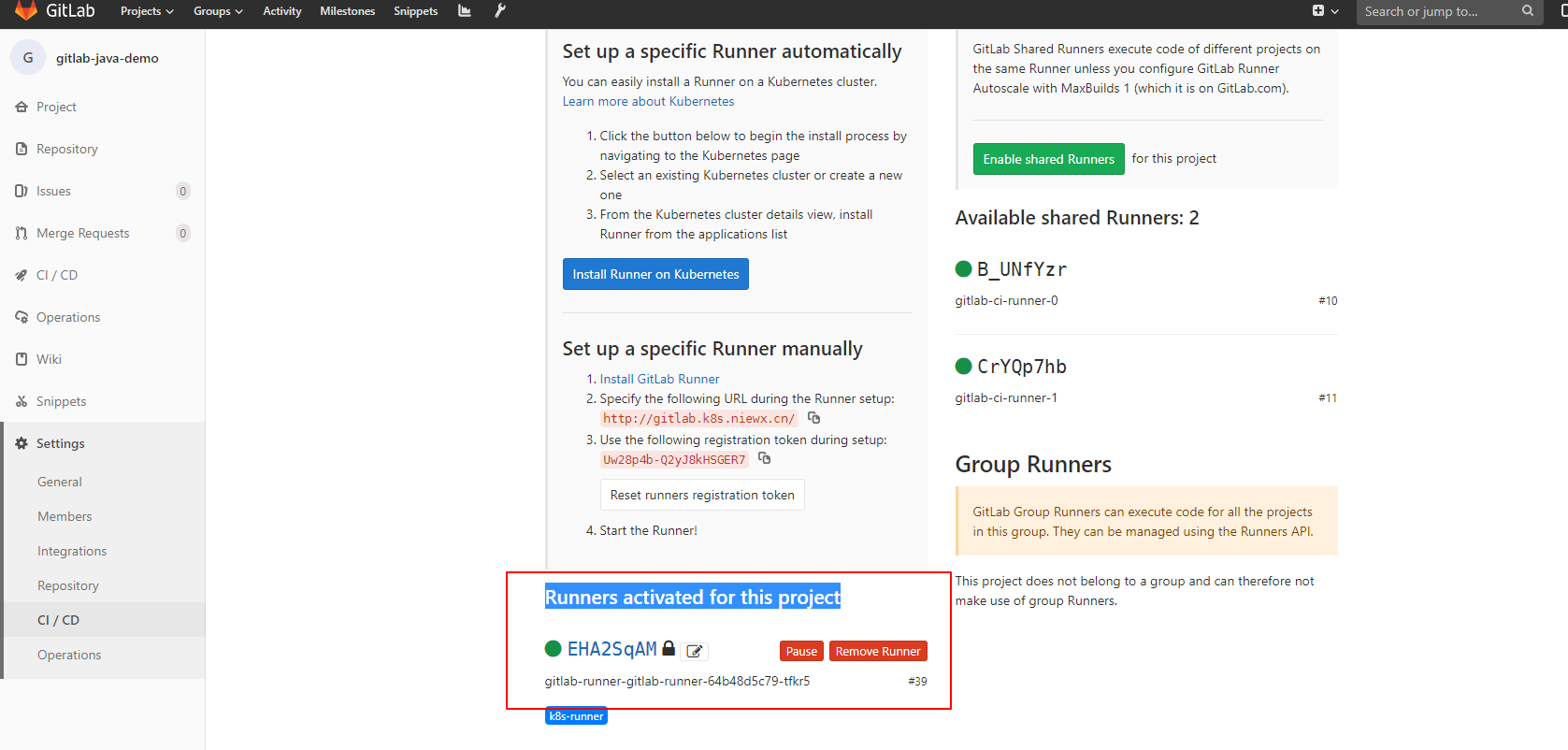
runner pod运行成功后,在项目中可以查看到Runners activated for this project,则表示连接gitlab成功
upload-image
测试项目自动化部署到k8s集群中
下面我们分别用gitlab-java-demo和gitlab-ci-k8s-demo这2个项目来测试下通过项目runner和全局runner将代码部署到k8s集群中
项目runner部署gitlab-java-demo
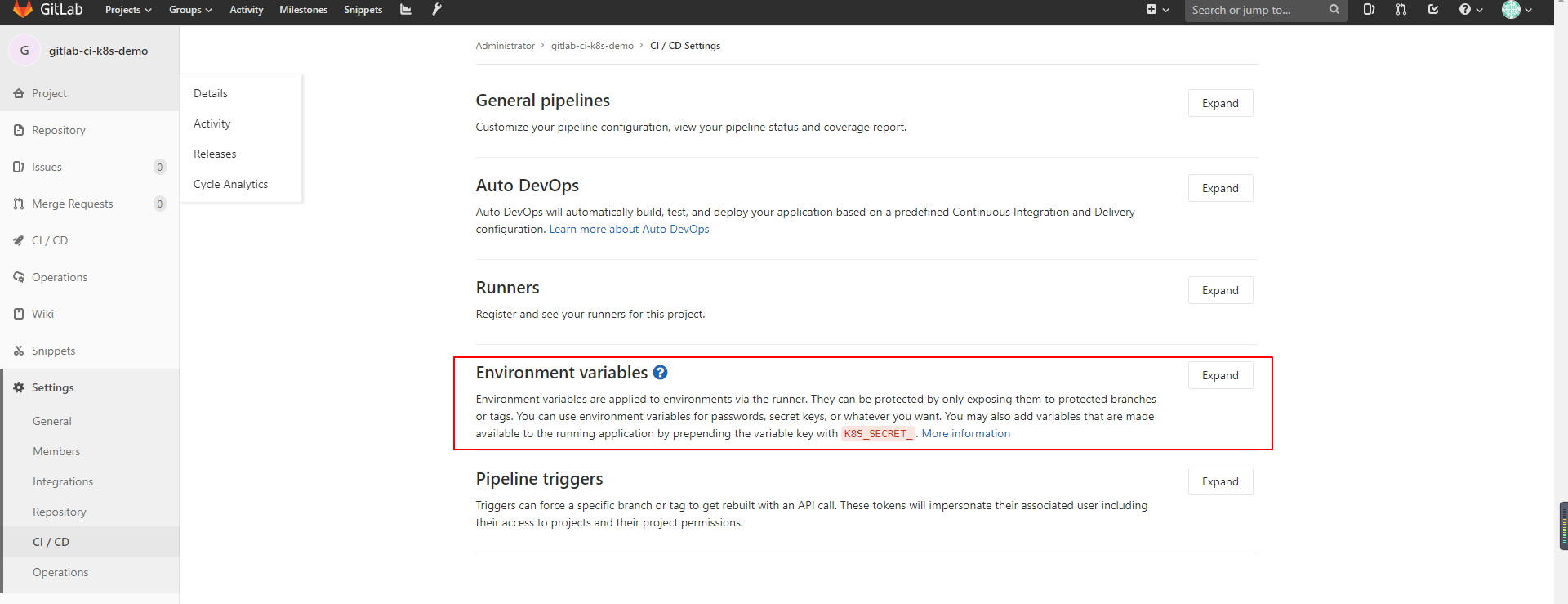
首先我们给项目配置一下全局变量,.gitlab-ci.yml构建文件可以使用
upload-image
- REGISTRY_USERNAME:镜像仓库用户名。
- REGISTRY_PASSWORD:镜像仓库密码。
- kube_config:KubeConfig的编码字符串。
执行以下命令生成KubeConfig的编码字符串:echo $(cat ~/.kube/config | base64) | tr -d “ “
.gitlab-ci.yml如下
image: docker:stable
stages:
  - package
  - docker_build
  - deploy_k8s
variables:
  KUBECONFIG: /etc/deploy/config
  MAVEN_OPTS: "-Dmaven.repo.local=/opt/cache/.m2/repository"
mvn_build_job:
  image: maven:3.3.9-jdk-8
  stage: package
  tags:
    - k8s-runner
  script:
    - mvn package -B -DskipTests
    - cp target/demo.war /opt/cache
docker_build_job:
  image: docker:latest
  stage: docker_build
  tags:
    - k8s-runner
  script:
    - docker login -u $REGISTRY_USERNAME -p $REGISTRY_PASSWORD  ccr.ccs.tencentyun.com
    - mkdir target
    - cp /opt/cache/demo.war target/demo.war
    - docker build -t ccr.ccs.tencentyun.com/v_cjweichen/nwx-reg:$CI_PIPELINE_ID .
    - docker push ccr.ccs.tencentyun.com/v_cjweichen/nwx-reg:$CI_PIPELINE_ID
deploy_k8s_job:
  image: registry.cn-hangzhou.aliyuncs.com/haoshuwei24/kubectl:1.16.6
  stage: deploy_k8s
  tags:
    - k8s-runner
  script:
    - mkdir -p /etc/deploy
    - echo $kube_config |base64 -d > $KUBECONFIG
    - sed -i "s/IMAGE_TAG/$CI_PIPELINE_ID/g" deployment.yaml
    - cat deployment.yaml
    - kubectl apply -f deployment.yaml
将代码提交后则会自动构建,构建成功会根据项目的deployment.yaml文件将pod部署k8s集群中。
全局runner部署gitlab-ci-k8s-demo
测试代码如下:https://github.com/nieweixing/gitlab-ci-k8s-demo
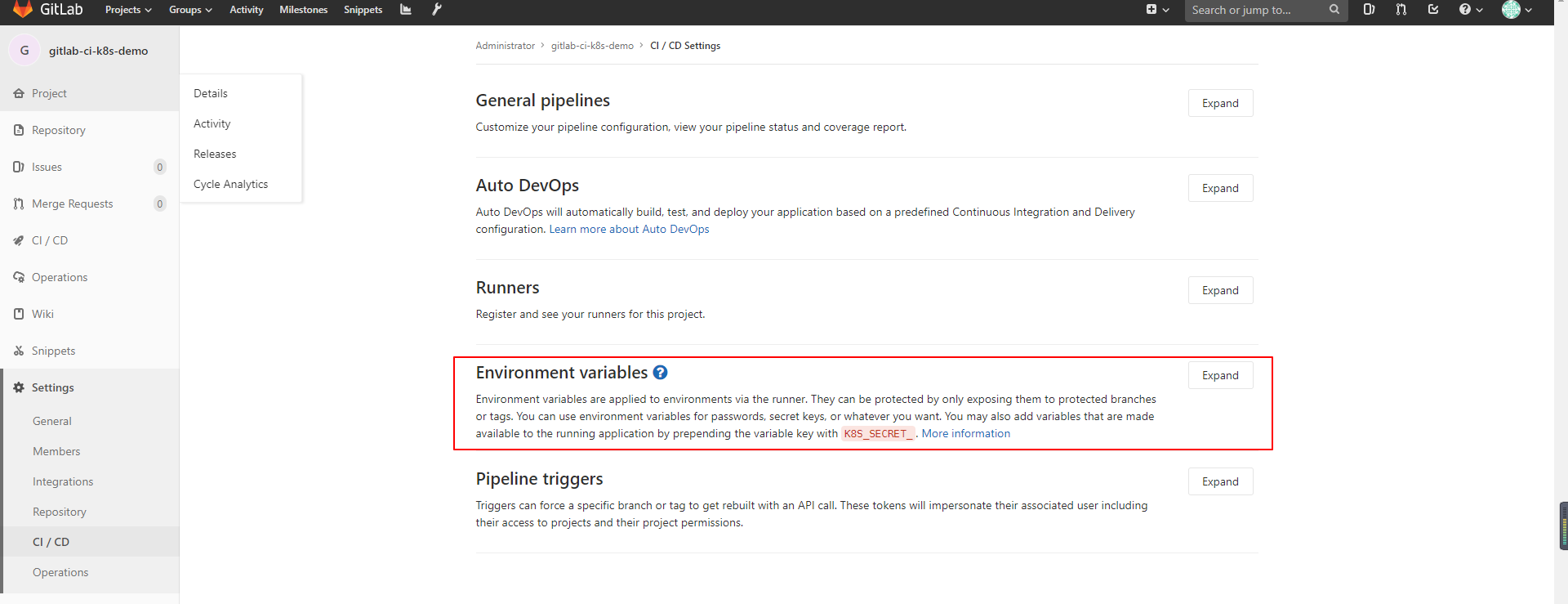
首先我们给项目配置一下全局变量,.gitlab-ci.yml构建文件可以使用
upload-image
分配配置如下几个变量
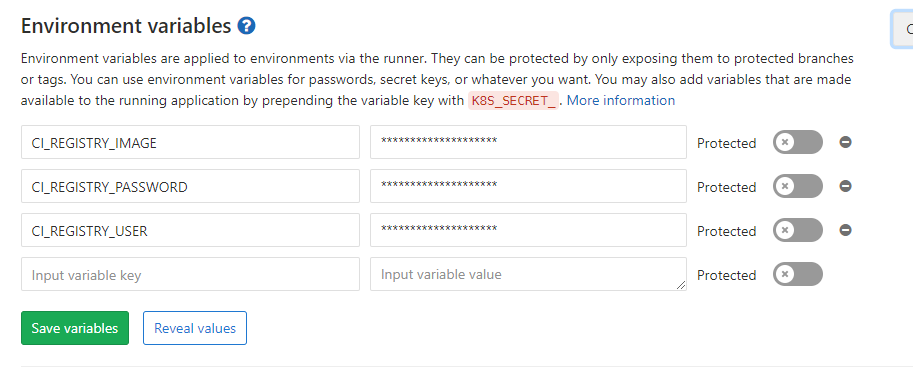
upload-image
- 镜像地址:CI_REGISTRY_IMAGE
- 镜像仓库密码:CI_REGISTRY_PASSWORD
- 镜像仓库用户名:CI_REGISTRY_USER
为了能够创建和删除一些资源,我们也需要对象的 RBAC 权限,这里为了简单,我们直接新建一个ServiceAccount,绑定上一个tke:admin的权限(gitlab-sa.yaml)
---
apiVersion: v1
kind: ServiceAccount
metadata:
  name: gitlab
  namespace: gitlab

---
apiVersion: rbac.authorization.k8s.io/v1beta1
kind: ClusterRoleBinding
metadata:
  name: gitlab
  namespace: gitlab
subjects:
  - kind: ServiceAccount
    name: gitlab
    namespace: gitlab
roleRef:
  apiGroup: rbac.authorization.k8s.io
  kind: ClusterRole
  name: tke:admin
然后我们获取一下ServiceAccount的token和集群的ca证书,已经api地址,进行k8s集群的配置
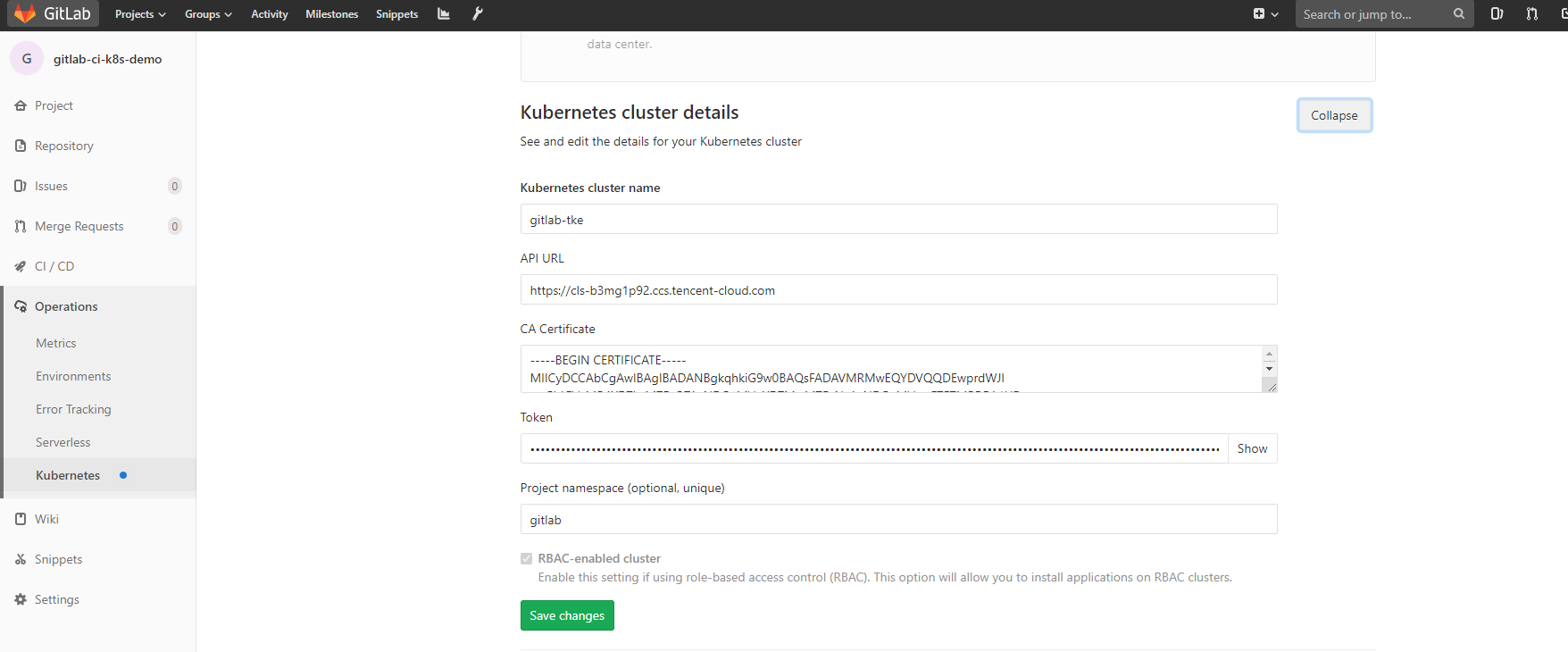
upload-image
下面我们配置一下.gitlab-ci.yml,内容如下
image:
  name: golang:1.10.3-stretch
  entrypoint: ["/bin/sh", "-c"]

# The problem is that to be able to use go get, one needs to put
# the repository in the $GOPATH. So for example if your gitlab domain
# is mydomainperso.com, and that your repository is repos/projectname, and
# the default GOPATH being /go, then you'd need to have your
# repository in /go/src/mydomainperso.com/repos/projectname
# Thus, making a symbolic link corrects this.
before_script:
  - mkdir -p "/go/src/git.qikqiak.com/${CI_PROJECT_NAMESPACE}"
  - ln -sf "${CI_PROJECT_DIR}" "/go/src/git.qikqiak.com/${CI_PROJECT_PATH}"
  - cd "/go/src/git.qikqiak.com/${CI_PROJECT_PATH}/"

stages:
  - test
  - build
  - release
  - review
  - deploy

test:
  stage: test
  script:
    - make test

test2:
  stage: test
  script:
    - sleep 3
    - echo "We did it! Something else runs in parallel!"

compile:
  stage: build
  script:
    # Add here all the dependencies, or use glide/govendor/...
    # to get them automatically.
    - make build
  artifacts:
    paths:
      - app

image_build:
  stage: release
  image: docker:latest
  variables:
    DOCKER_DRIVER: overlay
    DOCKER_HOST: tcp://localhost:2375
  services:
    - name: docker:17.03-dind
      command: ["--insecure-registry=ccr.ccs.tencentyun.com"]
  script:
    - docker info
    - docker login -u "${CI_REGISTRY_USER}" -p "${CI_REGISTRY_PASSWORD}" ccr.ccs.tencentyun.com
    - docker build -t "${CI_REGISTRY_IMAGE}:latest" .
    - docker tag "${CI_REGISTRY_IMAGE}:latest" "${CI_REGISTRY_IMAGE}:${CI_COMMIT_REF_NAME}"
    - test ! -z "${CI_COMMIT_TAG}" && docker push "${CI_REGISTRY_IMAGE}:latest"
    - docker push "${CI_REGISTRY_IMAGE}:${CI_COMMIT_REF_NAME}"

deploy_review:
  image: cnych/kubectl
  stage: review
  only:
    - branches
  except:
    - tags
  environment:
    name: dev
    url: http://dev-gitlab-k8s-demo.k8s.niewx.cn
    on_stop: stop_review
  script:
    - kubectl version
    - cd manifests/
    - sed -i "s/__CI_ENVIRONMENT_SLUG__/${CI_ENVIRONMENT_SLUG}/" deployment.yaml ingress.yaml service.yaml
    - sed -i "s/__VERSION__/${CI_COMMIT_REF_NAME}/" deployment.yaml ingress.yaml service.yaml
    - |
      if kubectl apply -f deployment.yaml | grep -q unchanged; then
          echo "=> Patching deployment to force image update."
          kubectl patch -f deployment.yaml -p "{\"spec\":{\"template\":{\"metadata\":{\"annotations\":{\"ci-last-updated\":\"$(date +'%s')\"}}}}}"
      else
          echo "=> Deployment apply has changed the object, no need to force image update."
      fi
    - kubectl apply -f service.yaml || true
    - kubectl apply -f ingress.yaml
    - kubectl rollout status -f deployment.yaml
    - kubectl get all,ing -l ref=${CI_ENVIRONMENT_SLUG}

stop_review:
  image: cnych/kubectl
  stage: review
  variables:
    GIT_STRATEGY: none
  when: manual
  only:
    - branches
  except:
    - master
    - tags
  environment:
    name: dev
    action: stop
  script:
    - kubectl version
    - kubectl delete ing -l ref=${CI_ENVIRONMENT_SLUG}
    - kubectl delete all -l ref=${CI_ENVIRONMENT_SLUG}

deploy_live:
  image: cnych/kubectl
  stage: deploy
  environment:
    name: live
    url: http://live-gitlab-k8s-demo.k8s.niewx.cn
  only:
    - tags
  when: manual
  script:
    - kubectl version
    - cd manifests/
    - sed -i "s/__CI_ENVIRONMENT_SLUG__/${CI_ENVIRONMENT_SLUG}/" deployment.yaml ingress.yaml service.yaml
    - sed -i "s/__VERSION__/${CI_COMMIT_REF_NAME}/" deployment.yaml ingress.yaml service.yaml
    - kubectl apply -f deployment.yaml
    - kubectl apply -f service.yaml
    - kubectl apply -f ingress.yaml
    - kubectl rollout status -f deployment.yaml
    - kubectl get all,ing -l ref=${CI_ENVIRONMENT_SLUG}
对应的部署yaml文件如下
部署deloyment文件
---
apiVersion: apps/v1
kind: Deployment
metadata:
  name: gitlab-k8s-demo-__CI_ENVIRONMENT_SLUG__
  namespace: gitlab
  labels:
    app: gitlab-k8s-demo
    ref: __CI_ENVIRONMENT_SLUG__
    track: stable
spec:
  replicas: 2
  selector:
    matchLabels:
      app: gitlab-k8s-demo
      ref: __CI_ENVIRONMENT_SLUG__
  template:
    metadata:
      labels:
        app: gitlab-k8s-demo
        ref: __CI_ENVIRONMENT_SLUG__
        track: stable
    spec:
      imagePullSecrets:
        - name: myregistry
      containers:
      - name: app
        image: ccr.ccs.tencentyun.com/v_cjweichen/nwx-reg:__VERSION__
        imagePullPolicy: Always
        ports:
        - name: http-metrics
          protocol: TCP
          containerPort: 8000
        livenessProbe:
          httpGet:
            path: /health
            port: 8000
          initialDelaySeconds: 3
          timeoutSeconds: 2
        readinessProbe:
          httpGet:
            path: /health
            port: 8000
          initialDelaySeconds: 3
          timeoutSeconds: 2
service yaml文件
apiVersion: v1
kind: Service
metadata:
  name: gitlab-k8s-demo-__CI_ENVIRONMENT_SLUG__
  namespace: gitlab
  labels:
    app: gitlab-k8s-demo
    ref: __CI_ENVIRONMENT_SLUG__
  annotations:
    prometheus.io/scrape: "true"
    prometheus.io/port: "8000"
    prometheus.io/scheme: "http"
    prometheus.io/path: "/metrics"
spec:
  type: ClusterIP
  ports:
    - name: http-metrics
      port: 8000
      protocol: TCP
  selector:
    app: gitlab-k8s-demo
    ref: __CI_ENVIRONMENT_SLUG__
traefik ingress暴露域名文件
apiVersion: traefik.containo.us/v1alpha1
kind: IngressRoute
metadata:
  name: gitlab-k8s-demo-__CI_ENVIRONMENT_SLUG__
  namespace: gitlab
spec:
  entryPoints:
    - web
  routes:
  - match: Host(`__CI_ENVIRONMENT_SLUG__.k8s.niewx.cn`)
    kind: Rule
    services:
    - name: gitlab-k8s-demo-__CI_ENVIRONMENT_SLUG__
      port: 8000
将上述文件提交到gitlab就会自动执行构建,构建成功会把应用自动部署到k8s上
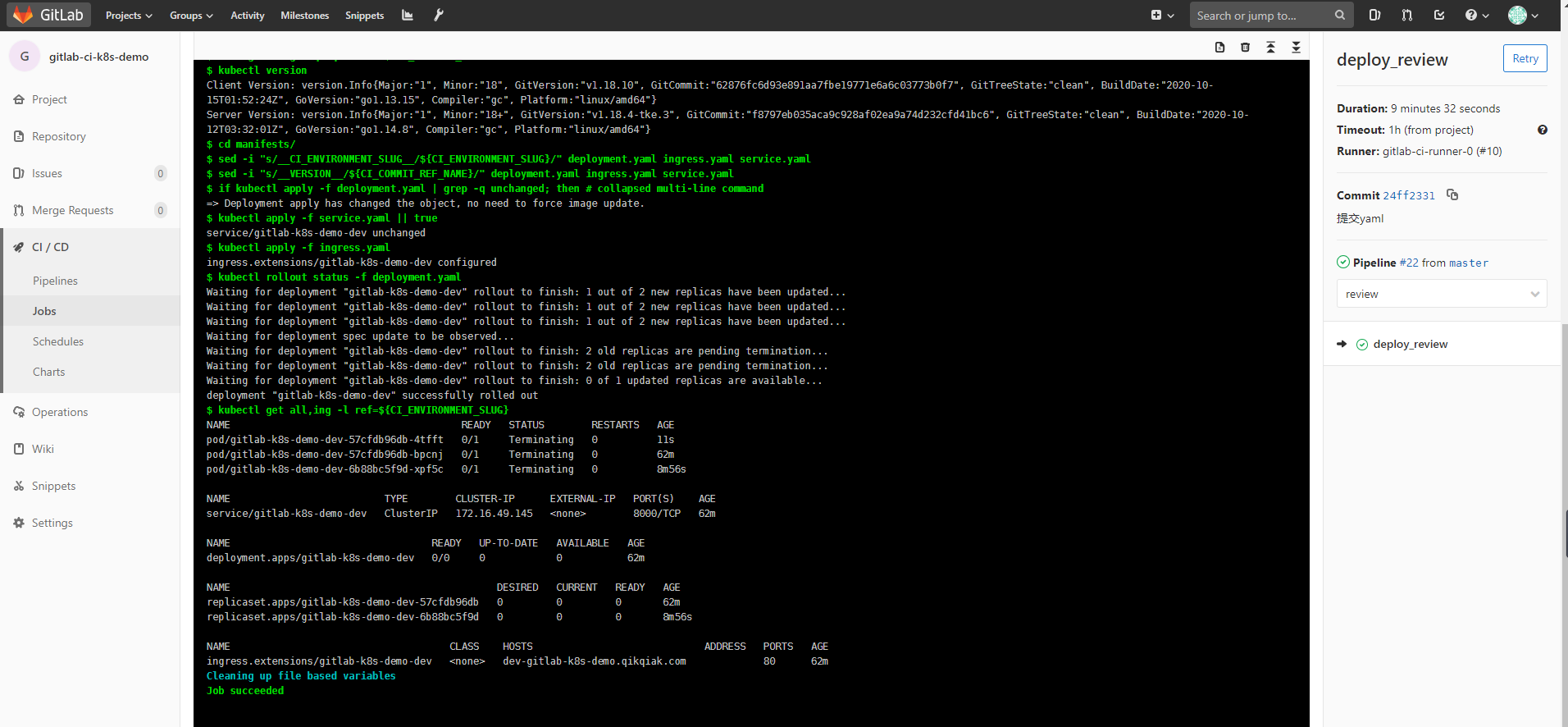
upload-image
然后我们通过http://dev-gitlab-k8s-demo.k8s.niewx.cn访问下,如果出现如下信息则部署访问成功
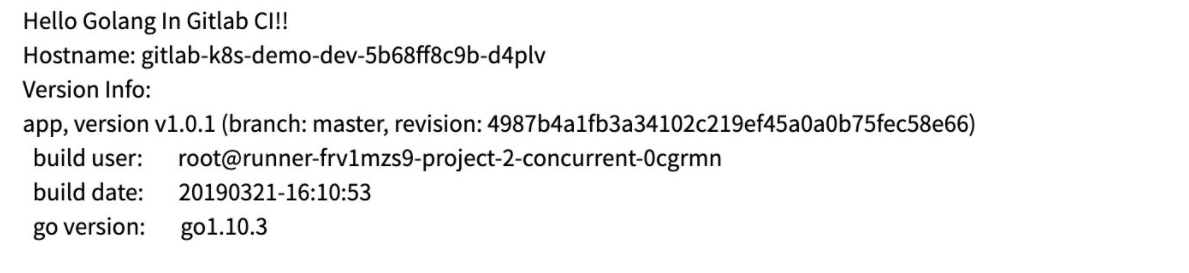
upload-image
参考文档
https://www.qikqiak.com/post/gitlab-ci-k8s-cluster-feature/
原创声明:本文系作者授权腾讯云开发者社区发表,未经许可,不得转载。
如有侵权,请联系 cloudcommunity@tencent.com 删除。
目录
腾讯云开发者

Copyright © 2013 - 2026 Tencent Cloud. All Rights Reserved. 腾讯云 版权所有
深圳市腾讯计算机系统有限公司 ICP备案/许可证号:粤B2-20090059  粤公网安备44030502008569号
腾讯云计算(北京)有限责任公司 京ICP证150476号 | 京ICP备11018762号