如何通过PrometheusAlert发生告警
原创

如何通过PrometheusAlert发生告警
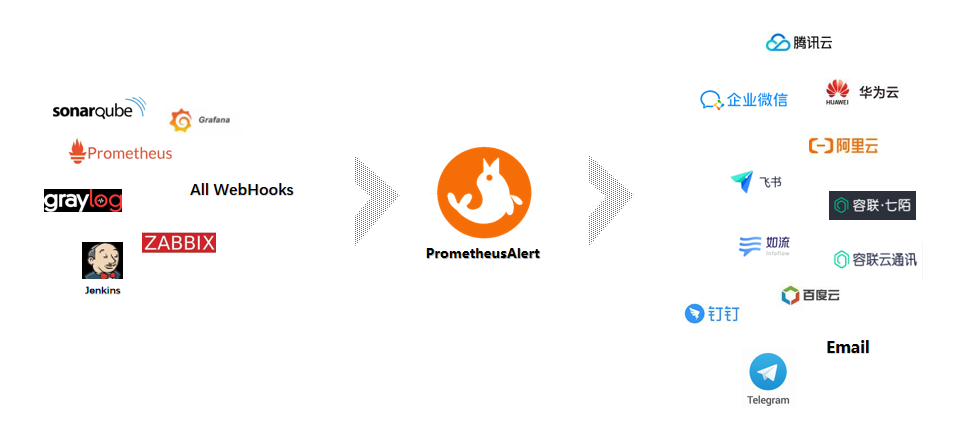
PrometheusAlert是开源的运维告警中心消息转发系统,支持主流的监控系统Prometheus、Zabbix,日志系统Graylog2,Graylog3、数据可视化系统Grafana、SonarQube。阿里云-云监控,以及所有支持WebHook接口的系统发出的预警消息,支持将收到的这些消息发送到钉钉,微信,email,飞书,腾讯短信,腾讯电话,阿里云短信,阿里云电话,华为短信,百度云短信,容联云电话,七陌短信,七陌语音,TeleGram,百度Hi(如流)等。
github地址:https://github.com/feiyu563/PrometheusAlert
upload-image
PrometheusAlert支持多种告警源配置,一般我们在prometheus配置告警发送都是通过alertmanager,下面我们来说说用alertmanager调PrometheusAlert的webhook来发生告警。我们的k8s环境是腾讯云的tke集群,prometheus监控服务用的腾讯云云原生监控服务。云原生监控服务用的自建的alertmanager来发送告警。如果云原生服务需要用自建的alertmanager,要么在创建时候配置好,还有就是提工单让后台进行配置修改。
部署PrometheusAlert
# kubectl create ns monitoring
# kubectl apply -n monitoring -f
# https://raw.githubusercontent.com/feiyu563/PrometheusAlert/master/example/kubernetes/PrometheusAlert-Deployment.yaml
参考上面命令直接部署PrometheusAlert到k8s集群中即可。
部署alertmanager配置webhook
apiVersion: apps/v1
kind: Deployment
metadata:
  labels:
    k8s-app: alertmanager
    qcloud-app: alertmanager
  name: alertmanager
  namespace: monitor
spec:
  progressDeadlineSeconds: 600
  replicas: 1
  revisionHistoryLimit: 10
  selector:
    matchLabels:
      k8s-app: alertmanager
      qcloud-app: alertmanager
  strategy:
    rollingUpdate:
      maxSurge: 1
      maxUnavailable: 0
    type: RollingUpdate
  template:
    metadata:
      creationTimestamp: null
      labels:
        k8s-app: alertmanager
        qcloud-app: alertmanager
    spec:
      containers:
      - args:
        - --config.file=/etc/alertmanager/config.yml
        - --storage.path=/alertmanager/data
        image: prom/alertmanager:v0.15.3
        imagePullPolicy: Always
        name: alertmanager
        resources:
          limits:
            cpu: 500m
            memory: 1Gi
          requests:
            cpu: 250m
            memory: 256Mi
        securityContext:
          privileged: false
        terminationMessagePath: /dev/termination-log
        terminationMessagePolicy: File
        volumeMounts:
        - mountPath: /etc/alertmanager
          name: alertcfg
      dnsPolicy: ClusterFirst
      imagePullSecrets:
      - name: qcloudregistrykey
      restartPolicy: Always
      schedulerName: default-scheduler
      securityContext: {}
      terminationGracePeriodSeconds: 30
      volumes:
      - configMap:
          defaultMode: 511
          name: alertmanager
        name: alertcfg
---
apiVersion: v1
data:
  config.yml: |
    global:
      resolve_timeout: 5m

    route:
      group_by: ['alertname']
      group_interval: 1m
      group_wait: 10s
      repeat_interval: 1m
      receiver: 'prometheusalert-all'
    receivers:
     - name: 'prometheusalert-all'
       webhook_configs:
       - url: 'http://prometheus-alert-center.monitoring:8080/prometheus/[email protected]&ddurl=https://oapi.dingtalk.com/robot/send?access_token=xxxxx'
kind: ConfigMap
metadata:
  name: alertmanager
  namespace: monitor

---
apiVersion: v1
kind: Service
metadata:
  annotations:
    service.kubernetes.io/qcloud-loadbalancer-internal-subnetid: subnet-xxxx
  name: alertmanager
  namespace: monitor
spec:
  ports:
  - name: 9093-9093-tcp
    nodePort: 32552
    port: 9093
    protocol: TCP
    targetPort: 9093
  selector:
    k8s-app: alertmanager
    qcloud-app: alertmanager
  sessionAffinity: None
  type: LoadBalancer
这里我们用一个内网的clb暴露alertmanager服务是为了给云原生监控实例调用。下面我们来讲讲不通告警渠道怎么配置。
邮件告警发送
邮件告警发送,需要在prometheus-alert-center-conf这个configmap中修改如下配置,配置服务器邮件发生地址。
#---------------------↓邮件配置-----------------------
#是否开启邮件
open-email=1
#邮件发件服务器地址
Email_host=smtp.163.com
#邮件发件服务器端口
Email_port=25
#邮件帐号
Email_user=nwx_qxxxx@163.com
#邮件密码
Email_password=xxxxxx
#邮件标题
Email_title=运维告警
#默认发送邮箱
#[email protected]
具体的webhook如下,多个邮箱用逗号分隔开
http://prometheus-alert-center.monitoring:8080/prometheus/router?email=xxxx@163.com,xxxx1@163.com钉钉告警发送
钉钉告警发送,需要在prometheus-alert-center-conf配置开启钉钉告警发送,默认配置开启的
#是否开启钉钉告警通道,可同时开始多个通道0为关闭,1为开启
   open-dingding=1
   #默认钉钉机器人地址
   ddurl=https://oapi.dingtalk.com/robot/send?access_token=xxxxx
   #是否开启 @所有人(0为关闭,1为开启)
dd_isatall=1然后参考文档https://github.com/feiyu563/PrometheusAlert/blob/master/doc/readme/dingding.md配置机器人,获取对应token。
具体的webhook如下
http://prometheus-alert-center.monitoring:8080/prometheus/router?ddurl=https://oapi.dingtalk.com/robot/send?access_token=xxxxx企业微信告警发送
企业微信告警发送,需要在prometheus-alert-center-conf配置开启企业微信告警发送,默认配置开启的
#是否开启微信告警通道,可同时开始多个通道0为关闭,1为开启
open-weixin=1
#默认企业微信机器人地址
wxurl=https://qyapi.weixin.qq.com/cgi-bin/webhook/send?key=xxxxx然后参考文档https://github.com/feiyu563/PrometheusAlert/blob/master/doc/readme/wechat.md配置企业微信机器人,并获取key。
具体的webhook如下
http://prometheus-alert-center.monitoring:8080/prometheus/router?wxurl=https://qyapi.weixin.qq.com/cgi-bin/webhook/send?key=xxxxx如果你想同时发送告警到不同渠道,可以将webhook的url拼接起来
http://prometheus-alert-center.monitoring:8080/prometheus/router?email=xxxx@163.com,xxxx1@163.com&ddurl=https://oapi.dingtalk.com/robot/send?access_token=xxxxx&wxurl=https://qyapi.weixin.qq.com/cgi-bin/webhook/send?key=xxxxx测试告警发送
upload-image
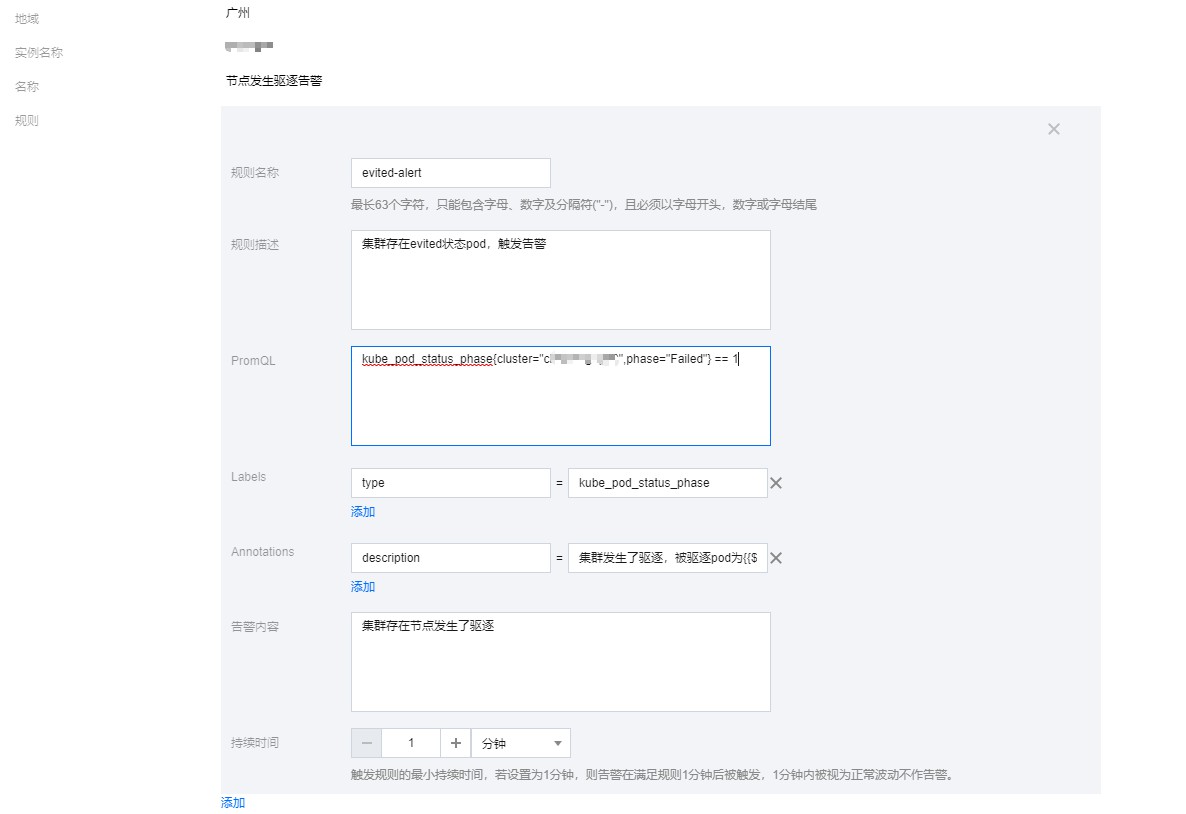
配置告警的时候需要注意一点,告警的信息需要配置在annotations的description字段中,配置在告警内容是不发送的。
groups:
- name: 节点发生驱逐告警
  rules:
  - alert: evited-alert
    expr: kube_pod_status_phase{cluster="cls-xxxxx",phase="Failed"} == 1
    labels:
      type: kube_pod_status_phase
    annotations:
      description: "集群发生了驱逐,被驱逐pod为{{$labels.namespace}}命名空间下的{{$labels.pod}}这个pod"  #告警信息
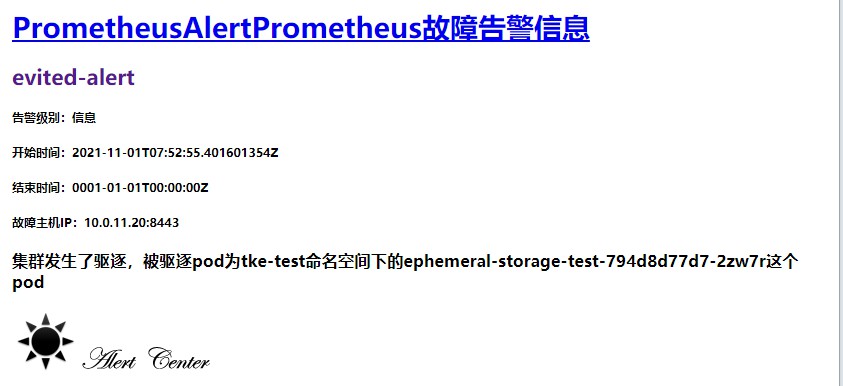
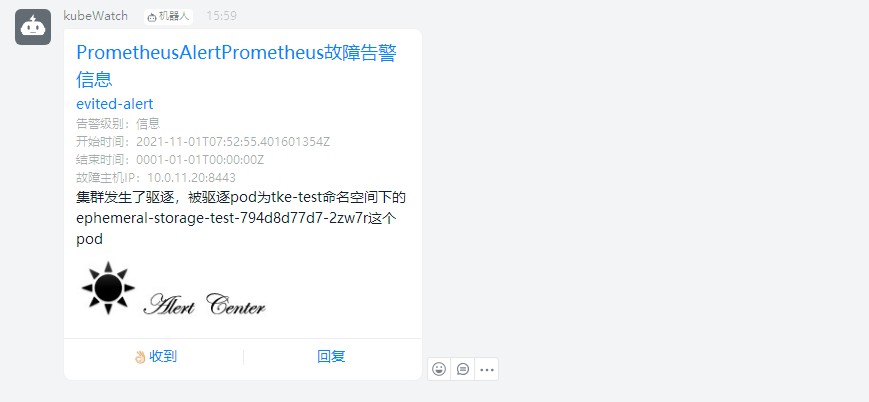
当我们的集群中存在被驱逐的pod后就可以收到告警信息,我这里配置了钉钉和邮件告警,具体效果可以看下图。
upload-image
upload-image
我这里只讲了最常用的用webhook访问发送告警,其实PrometheusAlert还有多种告警方式,具体的使用方法参考github上的文档说明。
原创声明:本文系作者授权腾讯云开发者社区发表,未经许可,不得转载。
如有侵权,请联系 cloudcommunity@tencent.com 删除。
目录
腾讯云开发者

Copyright © 2013 - 2026 Tencent Cloud. All Rights Reserved. 腾讯云 版权所有
深圳市腾讯计算机系统有限公司 ICP备案/许可证号:粤B2-20090059  粤公网安备44030502008569号
腾讯云计算(北京)有限责任公司 京ICP证150476号 | 京ICP备11018762号