弹性集群收集nginx-ingress controller访问日志
原创
弹性集群收集nginx-ingress controller访问日志
原创
聂伟星
发布于 2026-10-28 15:50:48
发布于 2026-10-28 15:50:48
弹性集群收集nginx-ingress controller访问日志
弹性集群是无需购买节点就可以部署服务的k8s服务,是现在服务部署在k8s的主流方案,相比于传统的k8s集群,弹性集群隔离性更好,成本更低,但是也存在一些限制,不能部署DaemonSet、不能使用nodeport等。
下面我们实践下在腾讯云的eks上部署nginx-ingress并采集nginx-ingress controller访问日志到es,最终通过kibana来查询。其实腾讯云也提供了日志采集服务cls,也可以用云上提供的方案。如果你想节约成本,并且习惯了es查日志,可以用文章中的方案。
部署nginx-ingress
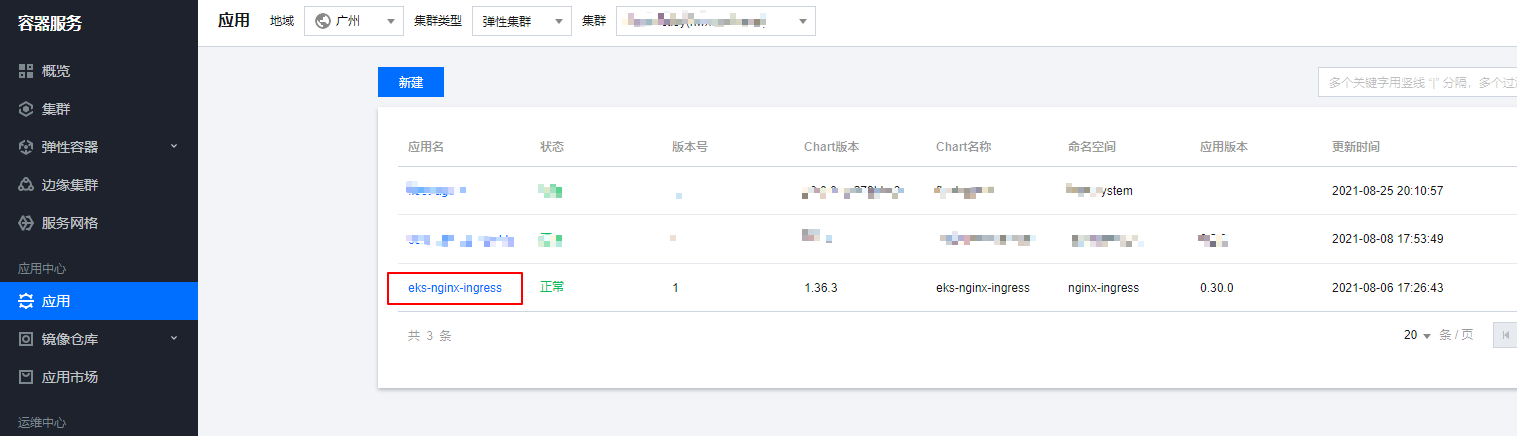
部署nginx-ingress,我们可以通过helm直接部署,腾讯云的应用市场也有helm包可以一键部署,这里我们用helm一键部署到我们的eks集群中
upload-image
这里部署的nginx-ingress没有configmap,手动创建一个configmap来全局配置nginx-ingress,将访问日志写到日志文件,日志格式为json格式,后续如果需要新增ingress全局配置也可以在这个configmap进行修改。
apiVersion: v1
data:
  access-log-path: /var/log/nginx/nginx_access.log
  error-log-path: /var/log/nginx/nginx_error.log
  log-format-upstream: '{"time": "$time_iso8601", "remote_addr": "$proxy_protocol_addr",
    "x-forward-for": "$proxy_add_x_forwarded_for", "request_id": "$req_id", "remote_user":
    "$remote_user", "bytes_sent": $bytes_sent, "request_time": $request_time, "status":$status,
    "vhost": "$host", "request_proto": "$server_protocol", "path": "$uri", "request_query":
    "$args", "request_length": $request_length, "duration": $request_time,"method":
    "$request_method", "http_referrer": "$http_referer", "http_user_agent": "$http_user_agent"}'
kind: ConfigMap
metadata:
  name: eks-nginx-ingress-controller
  namespace: nginx-ingress
修改了configmap后重建nginx-ingress controller的pod即可。nginx-ingress的具体使用可以参考文档https://cloud.tencent.com/developer/article/1768089
采用filebeat作为sidecar采集日志到es
通常的日志是在集群通过DaemonSet部署采集agent,然后采集节点的容器日志目录,由于eks集群不支持DaemonSet的部署,所以我们这里通过sidecar的方式来采集pod里面的日志。
部署elasticsearch集群
es集群的部署,这里就不详细说明了,可以通过helm快速部署,也可以参考文档https://www.niewx.cn/2021/06/12/use-operator-to-quickly-deploy-es-cluster-in-k8s/通过eck部署带有鉴权的es集群
配置filebeat采集configmap
apiVersion: v1
data:
  filebeat.yml: |-
    filebeat.inputs:
      - type: log
        paths:
          - /var/log/nginx/nginx_access.log
        # tags: ["access"]
        fields:
          app: eks-nginx-ingress
          type: nginx-access
        fields_under_root: true
        json.keys_under_root: true
        json.overwrite_keys: true
        json.add_error_key: true

    setup.ilm.enabled: false
    setup.template.name: "eks-nginx-access"
    setup.template.pattern: "eks-nginx-access-*"

    output.elasticsearch:
      hosts: ['10.0.0.185:9200']
      username: elastic
      password: 13Ixxxxxd0S1mr70sulW8
      index: "eks-nginx-access-%{+yyyy.MM.dd}"
kind: ConfigMap
metadata:
  name: filebeat-nginx-config
  namespace: nginx-ingress
filebeat的配置说明如下
- json.keys_under_root:keys_under_root可以让字段位于根节点
- json.overwrite_keys:对于同名的key,覆盖原有key值
- json.add_error_key:将解析错误的消息记录储存在error.message字段中
- hosts:es的访问地址
- index:日志写入es的索引名称
- username:es登录用户名
- password:es的登录密码
部署sidecar
apiVersion: apps/v1beta2
kind: Deployment
metadata:
  labels:
    app: eks-nginx-ingress
    app.kubernetes.io/component: controller
    chart: eks-nginx-ingress-1.36.3
    heritage: Helm
    release: eks-nginx-ingress
  name: eks-nginx-ingress-controller
  namespace: nginx-ingress
spec:
  progressDeadlineSeconds: 600
  replicas: 1
  revisionHistoryLimit: 10
  selector:
    matchLabels:
      app: eks-nginx-ingress
      release: eks-nginx-ingress
  strategy:
    rollingUpdate:
      maxSurge: 25%
      maxUnavailable: 25%
    type: RollingUpdate
  template:
    metadata:
      annotations:
        eks.tke.cloud.tencent.com/cpu-type: none
      labels:
        app: eks-nginx-ingress
        app.kubernetes.io/component: controller
        component: controller
        qcloud-redeploy-timestamp: "1631609992665"
        release: eks-nginx-ingress
    spec:
      containers:
      - args:
        - /nginx-ingress-controller
        - --default-backend-service=nginx-ingress/eks-nginx-ingress-default-backend
        - --election-id=ingress-controller-leader
        - --ingress-class=nginx
        - --configmap=nginx-ingress/eks-nginx-ingress-controller
        env:
        - name: POD_NAME
          valueFrom:
            fieldRef:
              apiVersion: v1
              fieldPath: metadata.name
        - name: POD_NAMESPACE
          valueFrom:
            fieldRef:
              apiVersion: v1
              fieldPath: metadata.namespace
        image: ccr.ccs.tencentyun.com/tke-market/nginx-ingress-controller:0.30.0
        imagePullPolicy: IfNotPresent
        livenessProbe:
          failureThreshold: 3
          httpGet:
            path: /healthz
            port: 10254
            scheme: HTTP
          initialDelaySeconds: 10
          periodSeconds: 10
          successThreshold: 1
          timeoutSeconds: 1
        name: eks-nginx-ingress-controller
        ports:
        - containerPort: 80
          name: http
          protocol: TCP
        - containerPort: 443
          name: https
          protocol: TCP
        readinessProbe:
          failureThreshold: 3
          httpGet:
            path: /healthz
            port: 10254
            scheme: HTTP
          initialDelaySeconds: 10
          periodSeconds: 10
          successThreshold: 1
          timeoutSeconds: 1
        resources: {}
        securityContext:
          runAsUser: 0
        terminationMessagePath: /dev/termination-log
        terminationMessagePolicy: File
        volumeMounts:
        - mountPath: /var/log/nginx
          name: nginx-log
      - args:
        - -c
        - /etc/filebeat.yml
        - -e
        - -strict.perms=false
        image: elastic/filebeat:7.14.1
        imagePullPolicy: IfNotPresent
        name: filebeat
        resources:
          limits:
            cpu: 500m
            memory: 1Gi
          requests:
            cpu: 250m
            memory: 256Mi
        securityContext:
          privileged: false
        terminationMessagePath: /dev/termination-log
        terminationMessagePolicy: File
        volumeMounts:
        - mountPath: /var/log/nginx
          name: nginx-log
        - mountPath: /etc/filebeat.yml
          name: filebeat-config
          subPath: filebeat.yml
      dnsPolicy: ClusterFirst
      restartPolicy: Always
      schedulerName: default-scheduler
      securityContext: {}
      serviceAccount: eks-nginx-ingress
      serviceAccountName: eks-nginx-ingress
      terminationGracePeriodSeconds: 60
      volumes:
      - emptyDir: {}
        name: nginx-log
      - configMap:
          defaultMode: 420
          name: filebeat-nginx-config
        name: filebeat-config
sidecar采集日志的实现其实就是将nginx-ingress的日志文件目录和filebeat的目录挂载到emptyDir,这样filebeat就可以直接读取nginx-ingress的日志文件进行采集了。
注意: filebeat启动的时候可能会报错Exiting: error loading config file: open filebeat.yml: permission denied,这里是因为读取配置文件的权限不足,可以加上-e -strict.perms=false参数解决。
验证日志是否成功采集到es
检索es,这里推荐一个可视化的插件elasticvue,具体介绍可以查看文档https://elasticvue.com/,浏览器扩展是运行elasticvue的最简单方法。可以立即使用elasticvue,而无需进行任何集群配置。这里我们通过elasticvue来检索下日志。
从es中能查看到索引,并且从索引中能查询到access的访问日志,说明日志已经成功采集到了es中。
通过kibana检索日志
为了能够更加访问的检索日志,这里部署一个kibana用来进行日志的检索和分析。
创建kibana配置文件
apiVersion: v1
data:
  kibana.yml: |-
    elasticsearch.hosts: http://logging-es-default:9200
    server.host: "0"
    server.name: kibana
    elasticsearch.username: "elastic"
    elasticsearch.password: "13I8Cxxx70sulW8"
    server.maxPayloadBytes: "10485760"
    i18n.locale: "zh-CN"
kind: ConfigMap
metadata:
  name: kibana-cm
  namespace: elastic-system
kibana的配置说明如下:
- elasticsearch.hosts:es的访问地址
- server.host:kibana的监听地址
- server.name:kibana启动名称
- elasticsearch.username:es鉴权的用户名
- elasticsearch.password:es鉴权的密码
- server.maxPayloadBytes:解决kibana出现Request Entity Too Large报错的问题
- i18n.locale:kibana界面汉化,需要6.7以上版本的kibana才支持
部署kibana
可以参考下面yaml部署kibana
apiVersion: apps/v1
kind: Deployment
metadata:
  labels:
    k8s-app: kibana
    qcloud-app: kibana
  name: kibana
  namespace: elastic-system
spec:
  progressDeadlineSeconds: 600
  replicas: 1
  revisionHistoryLimit: 10
  selector:
    matchLabels:
      k8s-app: kibana
      qcloud-app: kibana
  strategy:
    rollingUpdate:
      maxSurge: 1
      maxUnavailable: 0
    type: RollingUpdate
  template:
    metadata:
      annotations:
        qcloud-redeploy-timestamp: "1631608046798"
      creationTimestamp: null
      labels:
        k8s-app: kibana
        qcloud-app: kibana
    spec:
      containers:
      - image: kibana:7.10.1
        imagePullPolicy: IfNotPresent
        name: kibana
        resources:
          limits:
            cpu: 500m
            memory: 1Gi
          requests:
            cpu: 250m
            memory: 256Mi
        securityContext:
          privileged: false
        terminationMessagePath: /dev/termination-log
        terminationMessagePolicy: File
        volumeMounts:
        - mountPath: /usr/share/kibana/config/kibana.yml
          name: vol
          subPath: kibana.yml
      dnsPolicy: ClusterFirst
      restartPolicy: Always
      schedulerName: default-scheduler
      securityContext: {}
      terminationGracePeriodSeconds: 30
      volumes:
      - configMap:
          defaultMode: 420
          name: kibana-cm
        name: vol
配置ingress提供访问
apiVersion: networking.k8s.io/v1beta1
kind: Ingress
metadata:
  annotations:
    kubernetes.io/ingress.class: ingress
    nginx.ingress.kubernetes.io/proxy-body-size: 1000m
    nginx.ingress.kubernetes.io/use-regex: "true"
  name: tke-kibana-ingress
  namespace: elastic-system
spec:
  rules:
  - host: tke-kibana.tke.niewx.cn
    http:
      paths:
      - backend:
          serviceName: kibana
          servicePort: 5601
        path: /
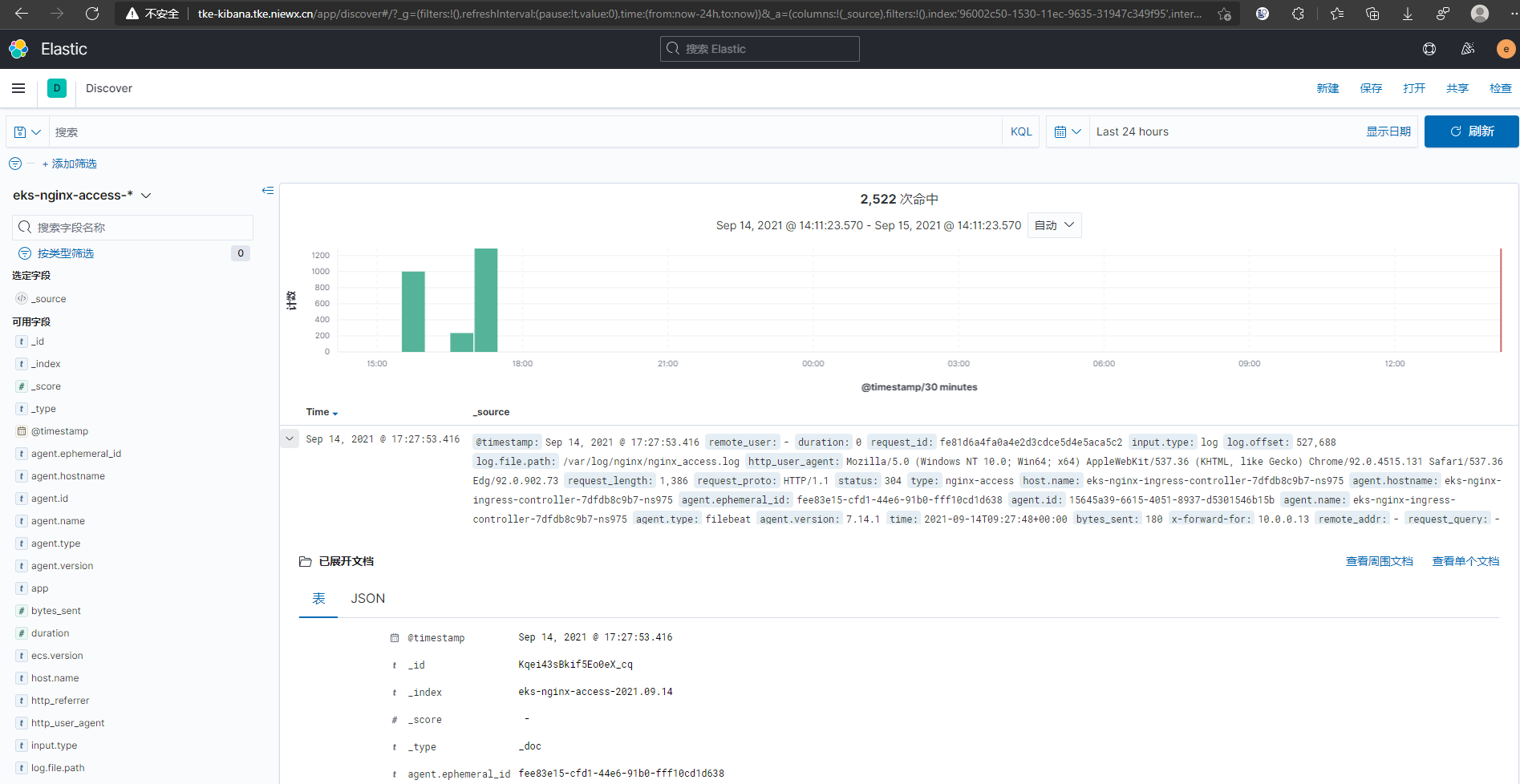
这里我们可以通过域名在浏览器访问到我们的kibana界面。
kibana检索日志
创建kibana的索引检索es的日志
索引创建好之后就可以在Discover中检索你的日志了
upload-image
原创声明:本文系作者授权腾讯云开发者社区发表,未经许可,不得转载。
如有侵权,请联系 cloudcommunity@tencent.com 删除。
目录
腾讯云开发者

Copyright © 2013 - 2026 Tencent Cloud. All Rights Reserved. 腾讯云 版权所有
深圳市腾讯计算机系统有限公司 ICP备案/许可证号:粤B2-20090059  粤公网安备44030502008569号
腾讯云计算(北京)有限责任公司 京ICP证150476号 | 京ICP备11018762号