CodeBuddy 自定义模型配置完整指南
原创
CodeBuddy 自定义模型配置完整指南
原创
肥晨
发布于 2026-07-31 14:59:54
发布于 2026-07-31 14:59:54
一、背景说明
CodeBuddy 支持用户添加自定义模型(如 MiniMax M3、智谱 GLM、天翼云等),方便在不同场景下灵活切换。本文档汇总了配置过程中遇到的所有问题及解决方案。
下载 codebuddy工具:
国际版:https://www.codebuddy.ai /ide
国内版:https://www.codebuddy.cn/ide/
二、配置方式
通过 models.json 文件配置
适用于 CodeBuddy IDE 和 CLI 版本,也适用于部分 VS Code 插件版本(经实测可行)。
文件位置
配置级别 | 路径 | 说明 |
|---|---|---|
全局配置 |
| 对所有项目生效 |
项目配置 |
| 仅对当前项目生效 |
注意:
~代表用户主目录,Windows 下为C:\Users\你的用户名。
在codebuddy文件夹下新建:models.json文件
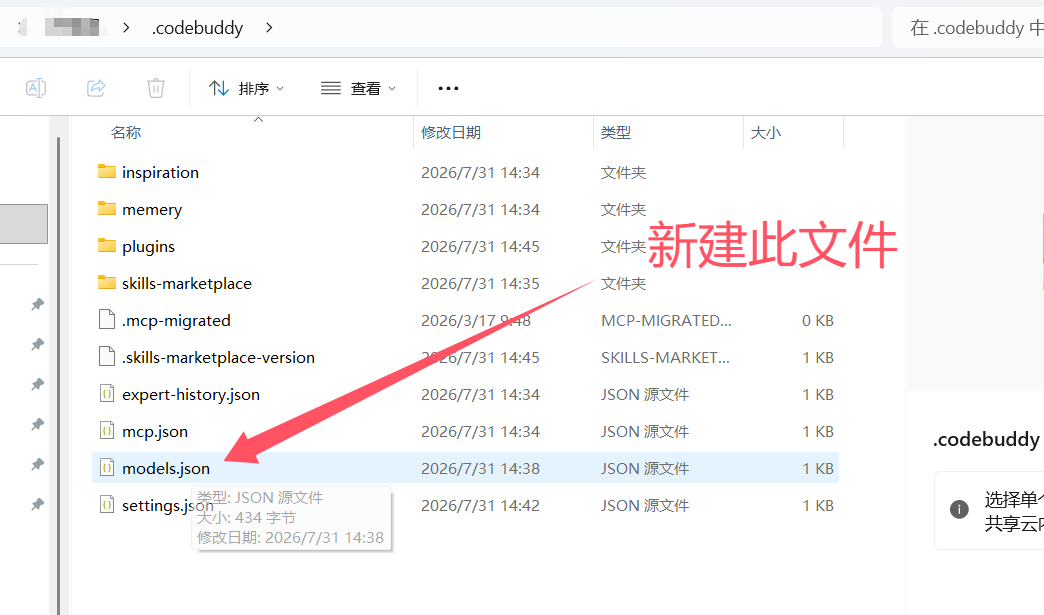
配置文件格式
{
  "models": [
    {
      "id": "minimax-m3",
      "name": "MiniMax M3",
      "vendor": "MiniMax",
      "url": "https://api.minimax.chat/v1/text/chatcompletion_v2",
      "apiKey": "sk-xxxxxxxxxxxxxxxx",
      "supportsToolCall": true,
      "supportsImages": false,
      "supportsReasoning": true
    }
  ]
}
字段说明
字段 | 类型 | 必填 | 说明 |
|---|---|---|---|
| String | ✅ | 唯一标识符,程序内部使用 |
| String | ✅ | 显示名称,在下拉菜单中展示 |
| String | ✅ | 模型提供商名称 |
| String | ✅ | API 请求完整地址 |
| String | ✅ | API 密钥(建议用环境变量) |
| Boolean | ✅ | 是否支持工具/函数调用 |
| Boolean | ✅ | 是否支持图像输入(多模态) |
| Boolean | ✅ | 是否支持推理/思维链能力 |
CodeBuddy IDE:重启即可
VS Code 插件版本:配置好后重启vscode,打开codebuddy
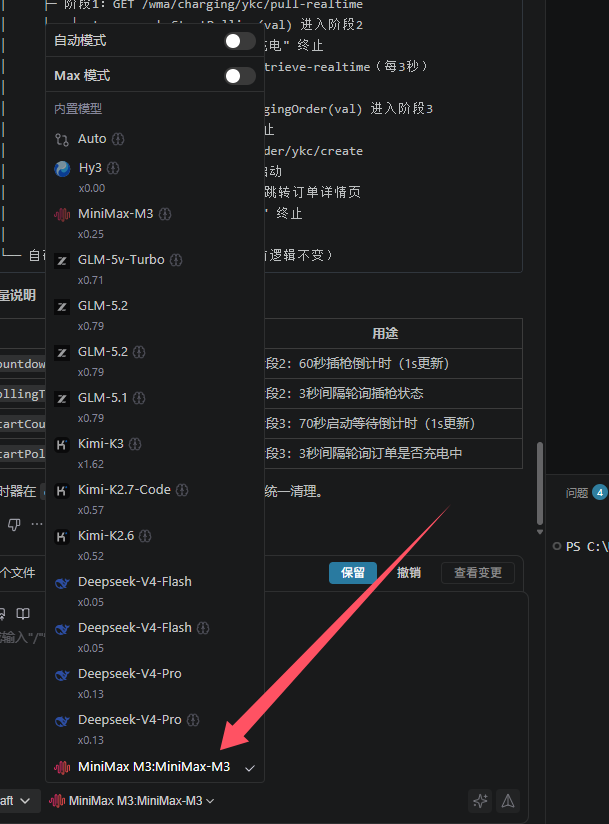
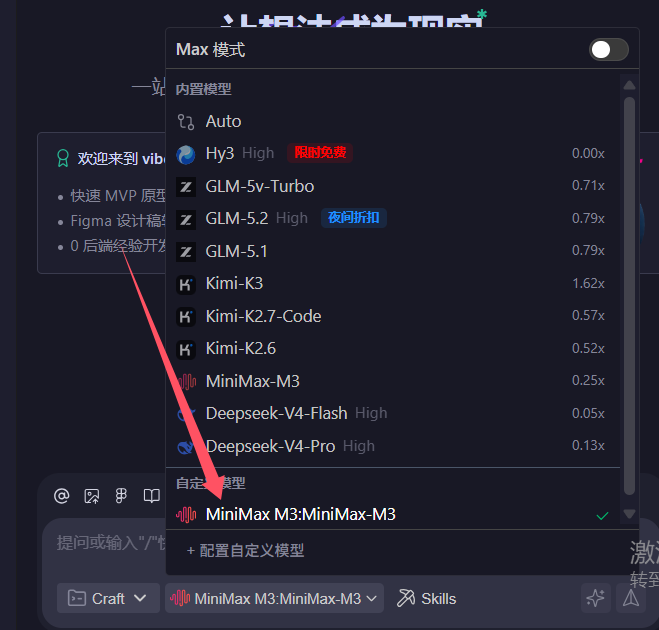

(注:多个版本位置不同,但是大致基本都是一个范围,自己寻找一下)
三、常见踩坑与解决方案
❌ 坑1:文件放错目录
症状:配置后模型列表里看不到自定义模型。
解决方案:确认文件放在了正确的路径:
- 用户级:
~/.codebuddy/models.json - 项目级:
<项目根目录>/.codebuddy/models.json
❌ 坑2:availableModels 字段导致内置模型消失
症状:自定义模型没出现,系统内置模型(如 minimax-m2.5、glm-5 等)也不见了。
原因:availableModels 是白名单模式,写了它系统就只显示列表里的模型。
解决方案:
- ❌ 不要写这个字段,或者:
- ✅ 写成空数组:
"availableModels": []
❌ 坑3:缺少 models 顶层字段
症状:配置文件完全不被识别。
原因:最外层必须是 {"models": [...]} 格式。
错误写法:
{
  "id": "minimax-m3",
  "name": "MiniMax M3",
  ...
}正确写法:
{
  "models": [
    {
      "id": "minimax-m3",
      "name": "MiniMax M3",
      ...
    }
  ]
}
❌ 坑4:API Key 未正确配置
解决方案:使用环境变量(更安全):
{
  "apiKey": "${MINIMAX_API_KEY}"
}
然后在 ~/.bashrc 或 ~/.zshrc 中设置:
export MINIMAX_API_KEY="sk-xxxxxxxxxxxxxxxx"❌ 坑5:配置文件不生效/需要重启
解决方案:
- CodeBuddy 支持热重载,修改后约 1 秒生效
- 若未生效,尝试重启 CodeBuddy 面板或整个编辑器
四、常用模型配置参考
MiniMax M3
{
  "id": "minimax-m3",
  "name": "MiniMax M3",
  "vendor": "MiniMax",
  "url": "https://api.minimax.chat/v1/text/chatcompletion_v2",
  "apiKey": "sk-xxxxxxxxxxxxxxxx",
  "supportsToolCall": true,
  "supportsImages": false,
  "supportsReasoning": true
}
智谱 GLM-5.1
{
  "id": "glm-5.1",
  "name": "智谱 GLM-5.1",
  "vendor": "Zhipu",
  "url": "https://open.bigmodel.cn/api/paas/v4/chat/completions",
  "apiKey": "sk-yyyyyyyyyyyyyyyy",
  "supportsToolCall": true,
  "supportsImages": true,
  "supportsReasoning": true
}
天翼云
{
  "id": "ctyun-glm",
  "name": "天翼云 GLM",
  "vendor": "CTyun",
  "url": "https://wishub-x6.ctyun.cn/v1/chat/completions",
  "apiKey": "your-api-key-here",
  "supportsToolCall": false,
  "supportsImages": false,
  "supportsReasoning": true
}
六、多模型完整配置示例
{
  "models": [
    {
      "id": "minimax-m3",
      "name": "MiniMax M3",
      "vendor": "MiniMax",
      "url": "https://api.minimax.chat/v1/text/chatcompletion_v2",
      "apiKey": "${MINIMAX_API_KEY}",
      "supportsToolCall": true,
      "supportsImages": false,
      "supportsReasoning": true
    },
    {
      "id": "glm-5.1",
      "name": "智谱 GLM-5.1",
      "vendor": "Zhipu",
      "url": "https://open.bigmodel.cn/api/paas/v4/chat/completions",
      "apiKey": "${ZHIPU_API_KEY}",
      "supportsToolCall": true,
      "supportsImages": true,
      "supportsReasoning": true
    },
    {
      "id": "gpt-4",
      "name": "GPT-4",
      "vendor": "OpenAI",
      "url": "https://api.openai.com/v1/chat/completions",
      "apiKey": "${OPENAI_API_KEY}",
      "supportsToolCall": true,
      "supportsImages": true,
      "supportsReasoning": true
    }
  ]
}
七、API 获取渠道汇总
模型 | 官方地址 |
|---|---|
MiniMax | |
智谱 GLM | |
OpenAI | |
天翼云 | |
Anthropic Claude | |
DeepSeek |
八、总结
核心要点
- 文件路径:
~/.codebuddy/models.json或项目下的.codebuddy/models.json - 文件格式:
{"models": [...]},最外层必须有models数组 - 不要写
availableModels:会隐藏内置模型 - API Key 用环境变量:安全且方便
原创声明:本文系作者授权腾讯云开发者社区发表,未经许可,不得转载。
如有侵权,请联系 cloudcommunity@tencent.com 删除。
目录
腾讯云开发者

Copyright © 2013 - 2026 Tencent Cloud. All Rights Reserved. 腾讯云 版权所有
深圳市腾讯计算机系统有限公司 ICP备案/许可证号:粤B2-20090059  粤公网安备44030502008569号
腾讯云计算(北京)有限责任公司 京ICP证150476号 | 京ICP备11018762号