大附件迁移优化断点续传与增量同步实现
原创
大附件迁移优化断点续传与增量同步实现
原创
用户12602052
发布于 2026-07-10 20:10:52
发布于 2026-07-10 20:10:52
一、大附件迁移挑战

图表
二、断点续传原理
2.1 断点续传流程
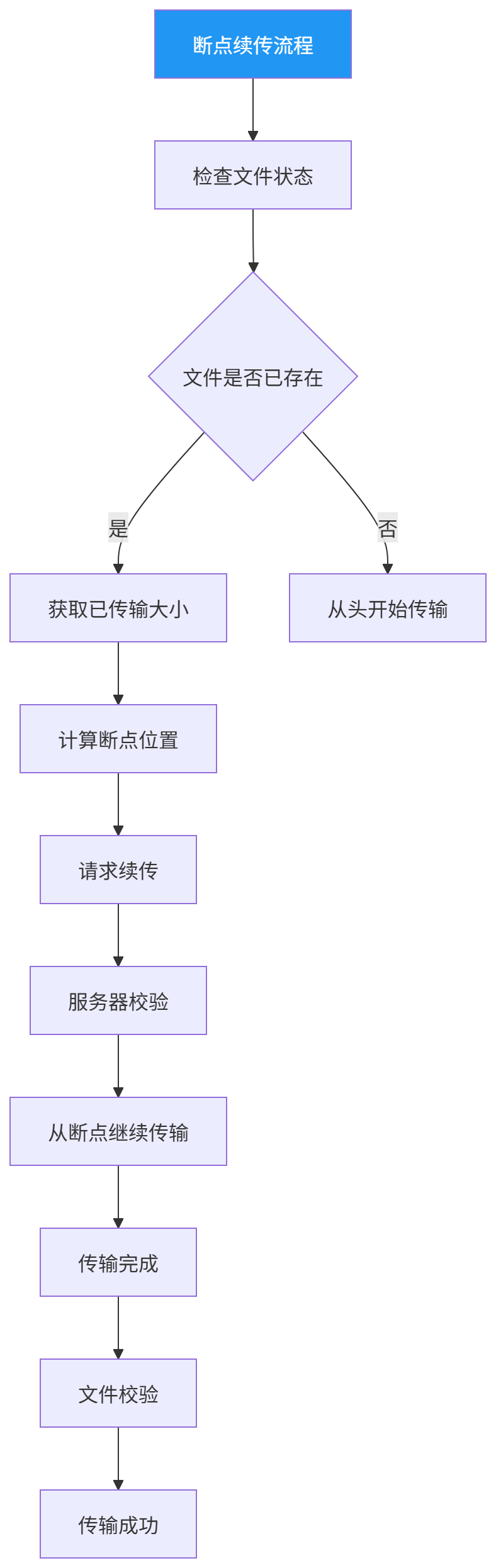
图表
2.2 断点续传机制
分片传输:
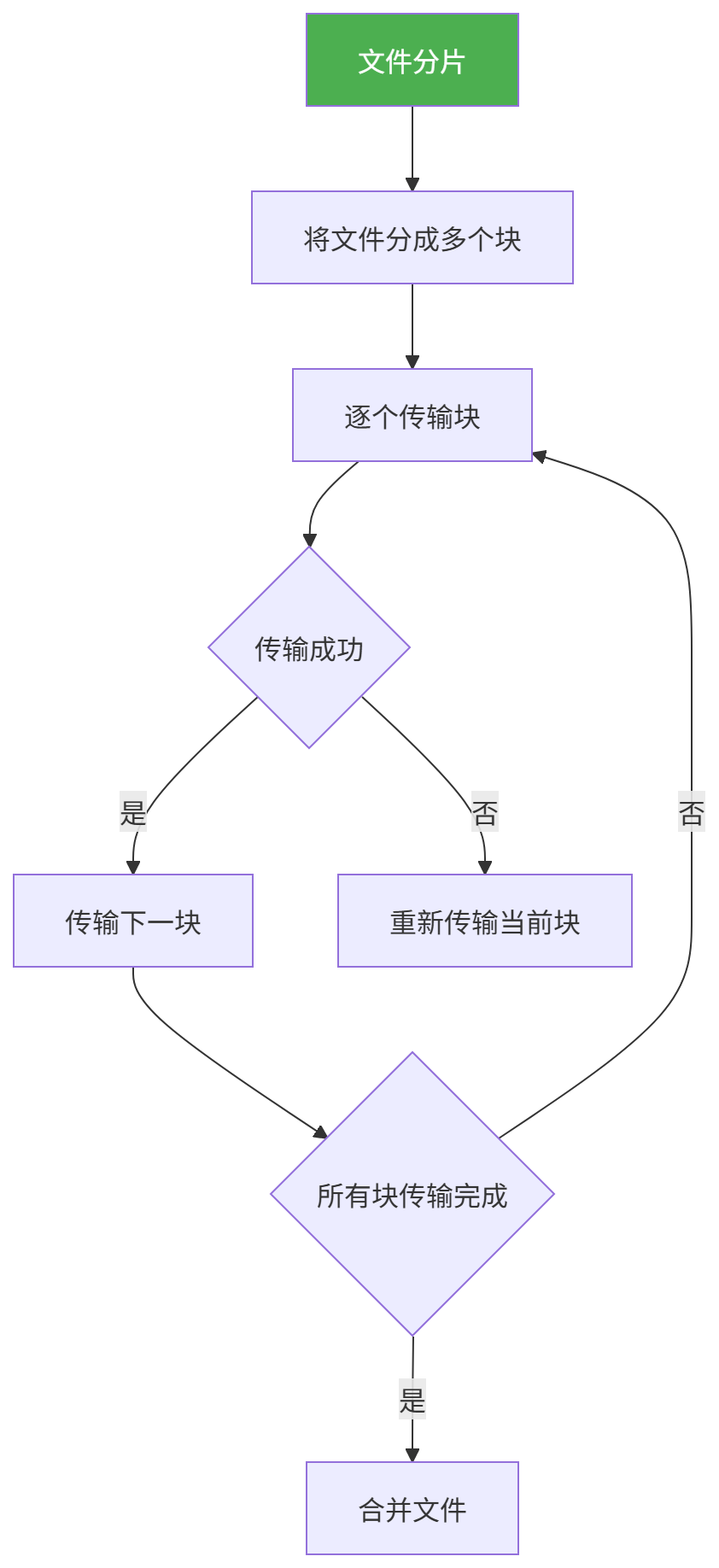
图表
分片参数:
参数 | 说明 | 建议值 |
|---|---|---|
分片大小 | 每个分片的大小 | 1MB-10MB |
并发数 | 同时传输的分片数 | 3-5 |
重试次数 | 单个分片重试次数 | 3-5 |
超时时间 | 分片传输超时时间 | 30秒 |
三、断点续传实现
3.1 文件状态检查
文件信息接口:
请求地址:/api/file/status
请求方式:GET
请求参数:
参数 | 类型 | 说明 |
|---|---|---|
fileId | string | 文件唯一标识 |
fileName | string | 文件名 |
响应参数:
参数 | 类型 | 说明 |
|---|---|---|
exists | boolean | 文件是否存在 |
size | long | 文件总大小 |
uploadedSize | long | 已上传大小 |
md5 | string | 文件MD5值 |
chunks | array | 已上传分片列表 |
3.2 分片上传
分片上传接口:
请求地址:/api/file/upload/chunk
请求方式:POST
请求参数:
参数 | 类型 | 说明 |
|---|---|---|
fileId | string | 文件唯一标识 |
chunkIndex | int | 分片索引 |
chunkTotal | int | 分片总数 |
chunkSize | int | 分片大小 |
data | binary | 分片数据 |
md5 | string | 分片MD5值 |
响应参数:
参数 | 类型 | 说明 |
|---|---|---|
success | boolean | 是否成功 |
chunkIndex | int | 分片索引 |
uploaded | int | 已上传分片数 |
3.3 文件合并
文件合并接口:
请求地址:/api/file/upload/merge
请求方式:POST
请求参数:
参数 | 类型 | 说明 |
|---|---|---|
fileId | string | 文件唯一标识 |
fileName | string | 文件名 |
chunkTotal | int | 分片总数 |
md5 | string | 文件MD5值 |
响应参数:
参数 | 类型 | 说明 |
|---|---|---|
success | boolean | 是否成功 |
fileUrl | string | 文件访问地址 |
size | long | 文件大小 |
3.4 断点续传代码示例
class ResumableUploader {
    constructor(options) {
        this.fileId = options.fileId;
        this.file = options.file;
        this.chunkSize = options.chunkSize || 1024 * 1024;
        this.concurrency = options.concurrency || 3;
        this.retryCount = options.retryCount || 3;

        this.chunks = [];
        this.uploadedChunks = new Set();
    }

    async init() {
        const status = await this.checkStatus();
        if (status.exists) {
            this.uploadedChunks = new Set(status.chunks);
        }
        this.splitFile();
    }

    splitFile() {
        const totalChunks = Math.ceil(this.file.size / this.chunkSize);
        for (let i = 0; i < totalChunks; i++) {
            const start = i * this.chunkSize;
            const end = Math.min(start + this.chunkSize, this.file.size);
            this.chunks.push({
                index: i,
                start,
                end,
                data: this.file.slice(start, end)
            });
        }
    }

    async checkStatus() {
        const response = await fetch(`/api/file/status?fileId=${this.fileId}`);
        return response.json();
    }

    async upload() {
        const pendingChunks = this.chunks.filter(c => !this.uploadedChunks.has(c.index));
        const batches = this.chunkArray(pendingChunks, this.concurrency);

        for (const batch of batches) {
            await Promise.all(batch.map(chunk => this.uploadChunk(chunk)));
        }

        await this.mergeFile();
    }

    async uploadChunk(chunk) {
        for (let attempt = 0; attempt < this.retryCount; attempt++) {
            try {
                const formData = new FormData();
                formData.append('fileId', this.fileId);
                formData.append('chunkIndex', chunk.index);
                formData.append('chunkTotal', this.chunks.length);
                formData.append('chunkSize', chunk.data.size);
                formData.append('data', chunk.data);

                const response = await fetch('/api/file/upload/chunk', {
                    method: 'POST',
                    body: formData
                });

                const result = await response.json();
                if (result.success) {
                    this.uploadedChunks.add(chunk.index);
                    return;
                }
            } catch (error) {
                console.error(`Chunk ${chunk.index} upload failed:`, error);
            }
        }

        throw new Error(`Chunk ${chunk.index} upload failed after ${this.retryCount} attempts`);
    }

    async mergeFile() {
        const response = await fetch('/api/file/upload/merge', {
            method: 'POST',
            headers: { 'Content-Type': 'application/json' },
            body: JSON.stringify({
                fileId: this.fileId,
                fileName: this.file.name,
                chunkTotal: this.chunks.length
            })
        });

        return response.json();
    }

    chunkArray(array, size) {
        const chunks = [];
        for (let i = 0; i < array.length; i += size) {
            chunks.push(array.slice(i, i + size));
        }
        return chunks;
    }
}
四、增量同步原理
4.1 增量同步流程
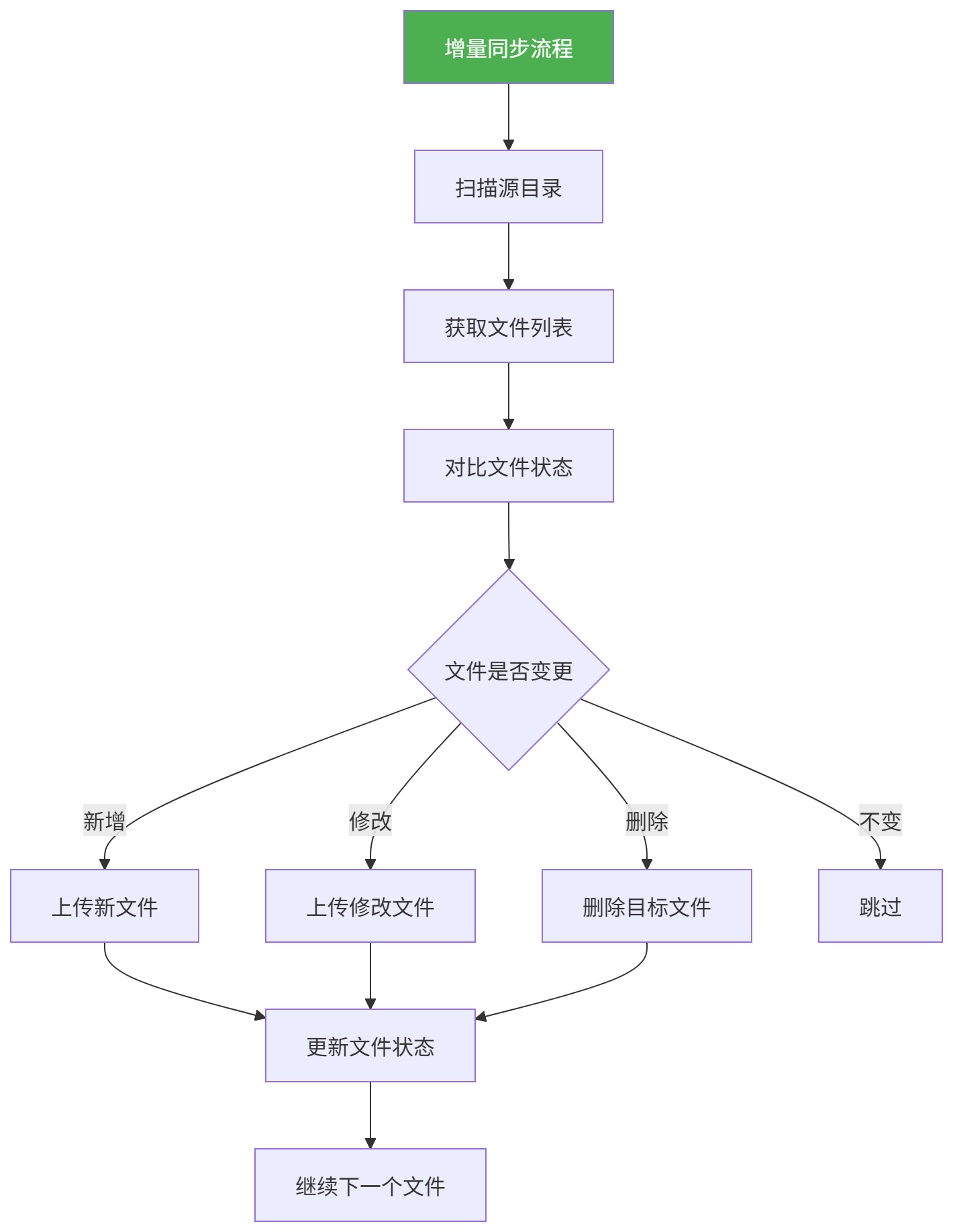
图表
4.2 文件状态对比
文件状态对比机制:
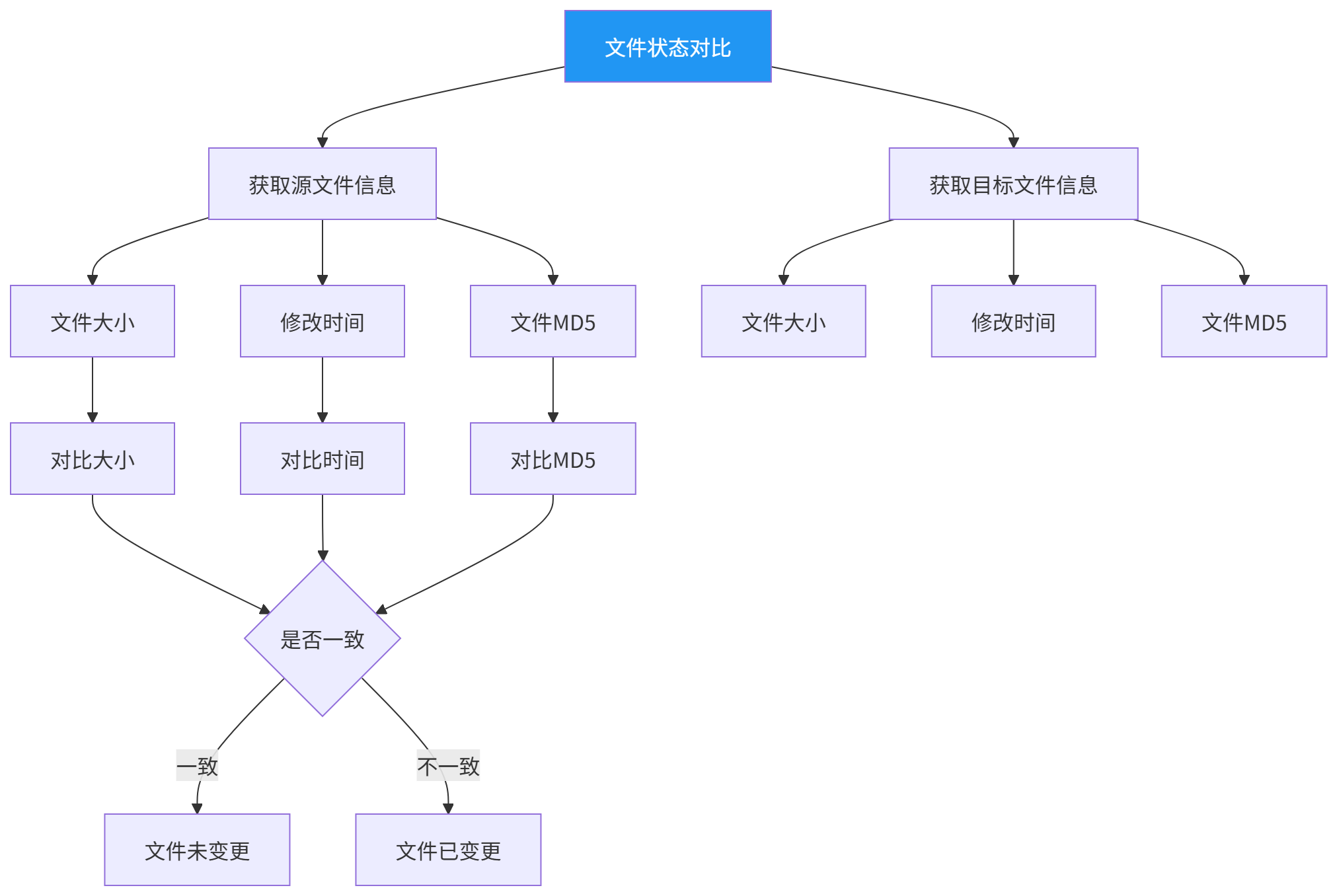
图表
对比策略:
对比项 | 说明 | 优先级 |
|---|---|---|
文件大小 | 快速判断文件是否变更 | 高 |
修改时间 | 判断文件是否被修改 | 中 |
文件MD5 | 精确判断文件内容 | 低(耗时) |
五、增量同步实现
5.1 文件扫描
文件扫描接口:
请求地址:/api/files/scan
请求方式:POST
请求参数:
参数 | 类型 | 说明 |
|---|---|---|
directory | string | 扫描目录 |
recursive | boolean | 是否递归扫描 |
includePattern | string | 包含文件模式 |
excludePattern | string | 排除文件模式 |
响应参数:
参数 | 类型 | 说明 |
|---|---|---|
success | boolean | 是否成功 |
files | array | 文件列表 |
文件列表结构:
字段 | 类型 | 说明 |
|---|---|---|
filePath | string | 文件路径 |
fileName | string | 文件名 |
size | long | 文件大小 |
modifiedTime | datetime | 修改时间 |
md5 | string | 文件MD5值 |
5.2 文件对比
文件对比接口:
请求地址:/api/files/compare
请求方式:POST
请求参数:
参数 | 类型 | 说明 |
|---|---|---|
sourceFiles | array | 源文件列表 |
targetFiles | array | 目标文件列表 |
响应参数:
参数 | 类型 | 说明 |
|---|---|---|
added | array | 新增文件列表 |
modified | array | 修改文件列表 |
deleted | array | 删除文件列表 |
unchanged | array | 未变更文件列表 |
5.3 增量同步执行
增量同步接口:
请求地址:/api/files/sync
请求方式:POST
请求参数:
参数 | 类型 | 说明 |
|---|---|---|
syncType | string | 同步类型(add/modify/delete/all) |
files | array | 需要同步的文件列表 |
deleteMissing | boolean | 是否删除目标不存在的文件 |
响应参数:
参数 | 类型 | 说明 |
|---|---|---|
success | boolean | 是否成功 |
total | int | 总文件数 |
successCount | int | 成功数量 |
failCount | int | 失败数量 |
details | array | 同步详情 |
5.4 增量同步代码示例
import os
import hashlib
import requests

class IncrementalSync:
    def __init__(self, source_dir, target_api):
        self.source_dir = source_dir
        self.target_api = target_api

    def calculate_md5(self, file_path):
        md5_hash = hashlib.md5()
        with open(file_path, 'rb') as f:
            for chunk in iter(lambda: f.read(8192), b''):
                md5_hash.update(chunk)
        return md5_hash.hexdigest()

    def scan_files(self, directory, recursive=True):
        files = []
        for root, dirs, filenames in os.walk(directory):
            for filename in filenames:
                file_path = os.path.join(root, filename)
                relative_path = os.path.relpath(file_path, directory)

                files.append({
                    'filePath': relative_path,
                    'fileName': filename,
                    'size': os.path.getsize(file_path),
                    'modifiedTime': os.path.getmtime(file_path),
                    'md5': self.calculate_md5(file_path)
                })

            if not recursive:
                break

        return files

    def get_target_files(self):
        response = requests.post(
            f'{self.target_api}/api/files/scan',
            json={'directory': '/data', 'recursive': True}
        )
        return response.json().get('files', [])

    def compare_files(self, source_files, target_files):
        source_map = {f['filePath']: f for f in source_files}
        target_map = {f['filePath']: f for f in target_files}

        added = [f for path, f in source_map.items() if path not in target_map]
        deleted = [f for path, f in target_map.items() if path not in source_map]

        modified = []
        unchanged = []

        for path, source in source_map.items():
            if path in target_map:
                target = target_map[path]
                if source['md5'] != target['md5']:
                    modified.append(source)
                else:
                    unchanged.append(source)

        return {
            'added': added,
            'modified': modified,
            'deleted': deleted,
            'unchanged': unchanged
        }

    def sync_files(self, comparison):
        all_files = comparison['added'] + comparison['modified']

        if not all_files:
            return {'success': True, 'message': 'No files to sync'}

        response = requests.post(
            f'{self.target_api}/api/files/sync',
            json={
                'syncType': 'all',
                'files': all_files,
                'deleteMissing': True
            }
        )

        return response.json()

    def run(self):
        print(f"Scanning source directory: {self.source_dir}")
        source_files = self.scan_files(self.source_dir)
        print(f"Found {len(source_files)} files")

        print("Getting target files...")
        target_files = self.get_target_files()
        print(f"Target has {len(target_files)} files")

        print("Comparing files...")
        comparison = self.compare_files(source_files, target_files)

        print(f"Added: {len(comparison['added'])}")
        print(f"Modified: {len(comparison['modified'])}")
        print(f"Deleted: {len(comparison['deleted'])}")
        print(f"Unchanged: {len(comparison['unchanged'])}")

        print("Starting sync...")
        result = self.sync_files(comparison)
        print(f"Sync result: {result}")

        return result
六、优化策略
6.1 传输优化
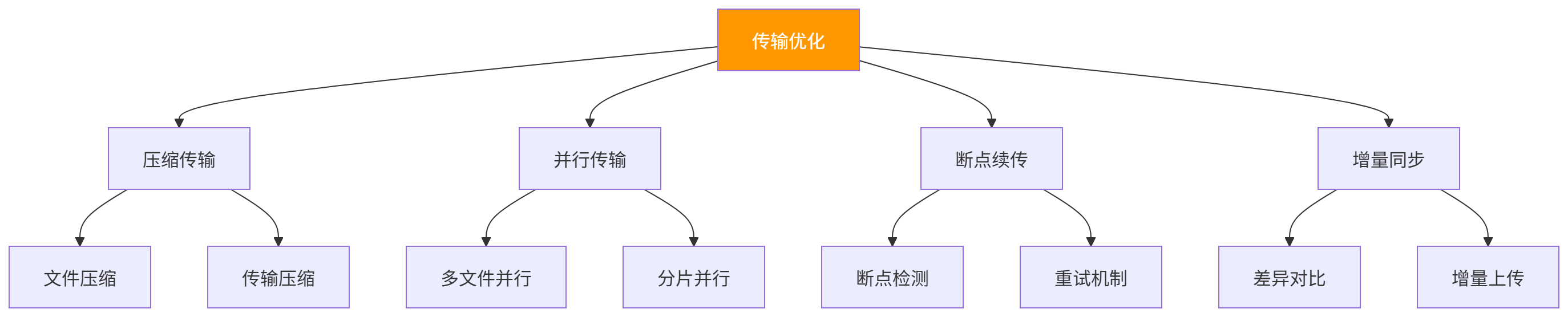
图表
6.2 存储优化
存储优化策略:
策略 | 说明 | 适用场景 |
|---|---|---|
压缩存储 | 压缩后存储 | 文本文件 |
去重存储 | 相同文件只存储一份 | 重复文件多 |
分块存储 | 分块存储大文件 | 超大文件 |
云存储 | 使用云存储服务 | 需要弹性扩展 |
6.3 并发优化
并发配置:
参数 | 建议值 | 说明 |
|---|---|---|
并发连接数 | 5-10 | 同时上传的文件数 |
分片并发数 | 3-5 | 单个文件的分片并发数 |
线程池大小 | CPU核心数*2 | 处理线程数 |
队列大小 | 100-500 | 任务队列大小 |
七、监控与告警
7.1 监控指标
指标 | 说明 |
|---|---|
上传速度 | 文件上传速度 |
传输进度 | 当前传输进度 |
成功数量 | 成功传输的文件数 |
失败数量 | 传输失败的文件数 |
平均耗时 | 平均传输耗时 |
错误率 | 传输错误率 |
7.2 告警配置
告警规则:
告警项 | 阈值 | 告警方式 |
|---|---|---|
传输失败 | >3次 | 邮件+短信 |
传输超时 | >30分钟 | 邮件 |
错误率 | >10% | 邮件+短信 |
存储空间 | >90% | 邮件 |
八、常见问题
8.1 文件传输中断
现象:文件传输过程中网络中断
解决方案:
方案 | 说明 |
|---|---|
断点续传 | 使用断点续传功能 |
自动重试 | 配置自动重试机制 |
分片传输 | 使用分片传输 |
8.2 大文件传输慢
现象:单个大文件传输速度慢
解决方案:
方案 | 说明 |
|---|---|
分片传输 | 将文件分成小分片 |
并行传输 | 同时传输多个分片 |
压缩传输 | 压缩后传输 |
8.3 文件完整性问题
现象:传输后文件损坏
解决方案:
方案 | 说明 |
|---|---|
MD5校验 | 传输前后校验MD5 |
分片校验 | 每个分片单独校验 |
完整性检测 | 文件合并后检测 |
8.4 增量同步遗漏
现象:部分文件未被同步
解决方案:
方案 | 说明 |
|---|---|
增加扫描频率 | 缩短扫描间隔 |
增加对比精度 | 使用MD5精确对比 |
日志记录 | 记录同步日志 |
原创声明:本文系作者授权腾讯云开发者社区发表,未经许可,不得转载。
如有侵权,请联系 cloudcommunity@tencent.com 删除。
目录
腾讯云开发者

Copyright © 2013 - 2026 Tencent Cloud. All Rights Reserved. 腾讯云 版权所有
深圳市腾讯计算机系统有限公司 ICP备案/许可证号:粤B2-20090059  粤公网安备44030502008569号
腾讯云计算(北京)有限责任公司 京ICP证150476号 | 京ICP备11018762号