使用CDP自动化操作浏览器

使用CDP自动化操作浏览器

YaoQi
发布于 2026-07-10 19:05:25
发布于 2026-07-10 19:05:25
CDP(Chrome DevTools Protocol )允许对 Chromium、Chrome 浏览器和其他基于 Blink 渲染引擎 的浏览器进行检测、检查、调试和配置。Chrome 浏览器的调试工具 Chrome DevTools 使用的也是这套协议
区别于 Selenium + Webdriver 的方式,客户端直接使用HTTP或WebSocket 对开启了远程调试接口的浏览器进行操作控制。
官方文档:
https://chromedevtools.github.io/devtools-protocol/
用于测试的 Chrome 浏览器
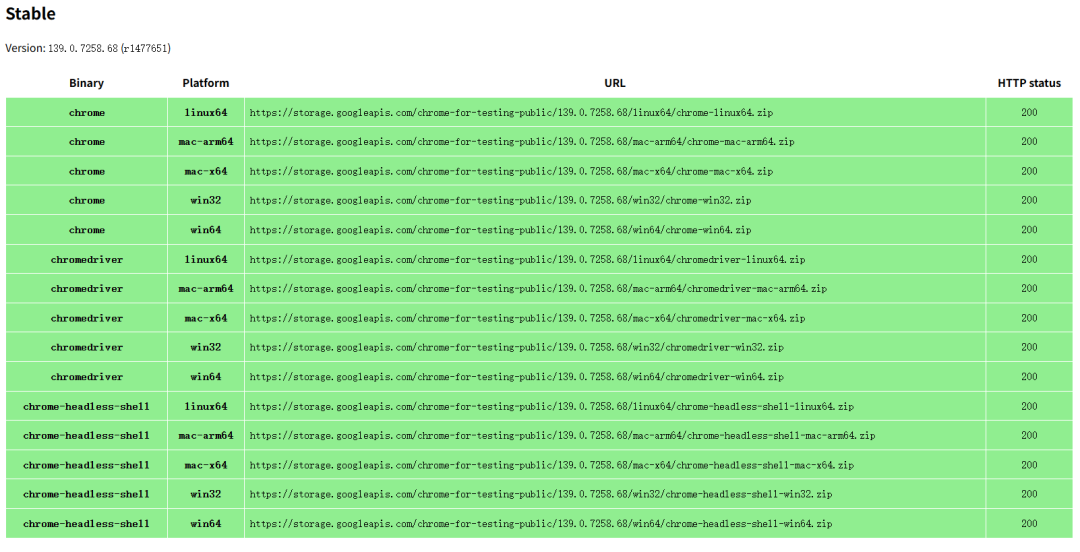
搭建测试环境时,可以下载专用的Chrome浏览器,chromedriver,和headless版浏览器:
https://googlechromelabs.github.io/chrome-for-testing/
启动浏览器,打开远程调试
使用如下参数启动即可,需要其他参数自行添加。
可以在命令行启动:
chrome.exe --enable-logging --remote-debugging-port=9000注:如不加 --enable-logging ,命令行会退出,不显示相关日志。
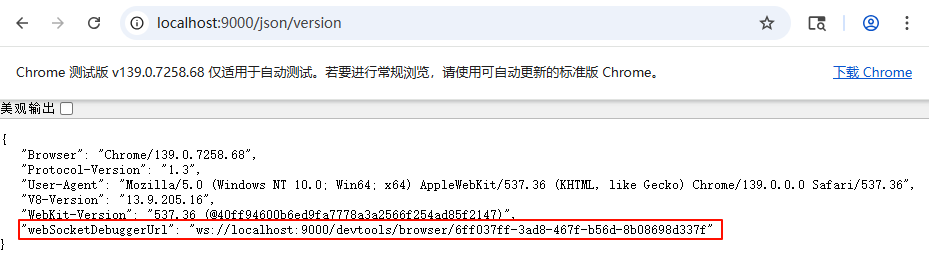
获取CDP的ws地址可以访问http://localhost:9000/json/version,
方便自动化软件,通过端口自主获得。
注:若使用自动化工具访问HTTP地址获取链接,可能需要添加参数--remote-allow-origins=* 启动(*可以配置成具体站点--remote-allow-origins=http://127.0.0.1:9000)
Windows 系统也可以创建快捷方式:
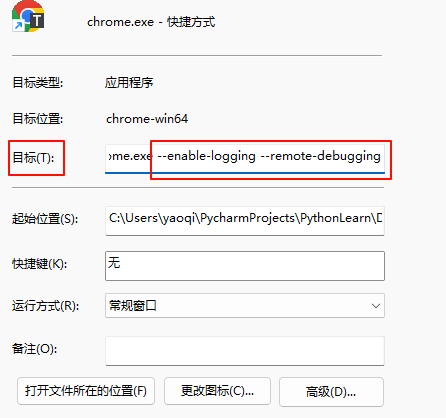
注:Chrome一般是单实例模式,如果你启动时,已经有打开的浏览器了,参数会不起作用。解决方法:
1.关掉所有已经打开的浏览器,重新启动。
2.使用参数在独立的用户路径启动。
chrome.exe --user-data-dir="%TEMP%\chrome-test" --remote-debugging-port=9000(我一边开浏览器查资料,一边用它测试,结果死活命令行参数不生效😓)
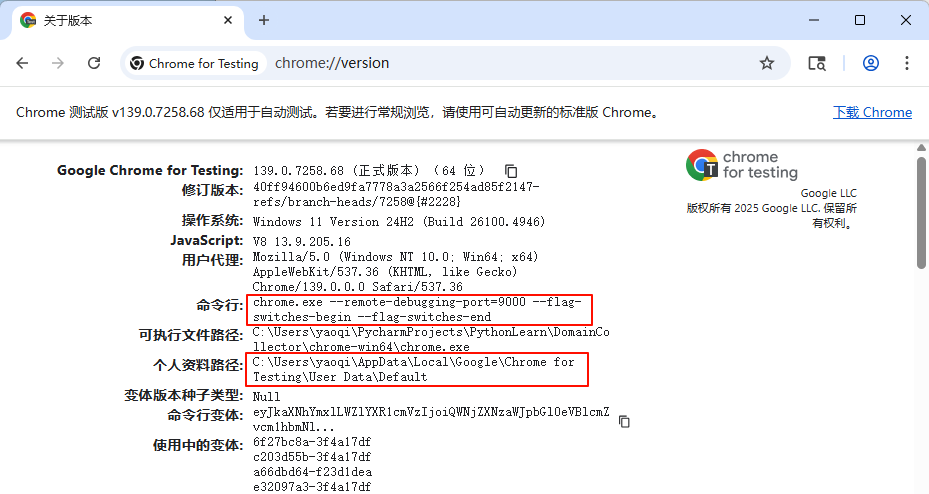
注:可以打开chrome://version/ 查看实际的命令行参数:
使用WS链接和浏览器交互
交互过程就是通过上文获得的ws://链接,通过 websocket 发送 json 格式的命令。
例:打开网站主页
(代码由gpt-5-high生成,微调了一点,提示词:帮我用python3写一个使用websock通过CDP打开网页的例子)
import json
import time
import requests
import websocket

def get_browser_ws_url(host="127.0.0.1", port=9000):
    # 获取浏览器级 WebSocket 入口
    info = requests.get(f"http://{host}:{port}/json/version", timeout=3).json()
    return info["webSocketDebuggerUrl"]
class CDPClient:
    def __init__(self, ws_url):
        self.ws = websocket.create_connection(ws_url)
        self._id = 0
    def _next_id(self):
        self._id += 1
        return self._id
    def call(self, method, params=None, session_id=None):
        """发送 CDP 命令并等待同 id 的响应;期间会打印遇到的事件。"""
        msg_id = self._next_id()
        payload = {"id": msg_id, "method": method}
        if params:
            payload["params"] = params
        if session_id:
            payload["sessionId"] = session_id
        self.ws.send(json.dumps(payload))
        while True:
            resp = json.loads(self.ws.recv())
            # 命令响应
            if resp.get("id") == msg_id:
                if "error" in resp:
                    raise RuntimeError(resp["error"])
                return resp
            # 事件(可能在响应前到达)
            if "method" in resp:
                print("event:", resp.get("method"))
    def wait_event(self, expect_method, session_id=None, timeout=10):
        """等待指定事件"""
        old_to = self.ws.gettimeout()
        self.ws.settimeout(timeout)
        try:
            while True:
                msg = json.loads(self.ws.recv())
                if msg.get("method") == expect_method:
                    if session_id is None or msg.get("sessionId") == session_id:
                        return msg
        finally:
            self.ws.settimeout(old_to)
    def close(self):
        self.ws.close()
def open_page_via_cdp(url, host="127.0.0.1", port=9000):
    # 1) 连接到浏览器级 WebSocket
    ws_url = get_browser_ws_url(host, port)
    cdp = CDPClient(ws_url)
    # 2) 创建一个新目标页签
    r = cdp.call("Target.createTarget", {"url": "about:blank"})
    target_id = r["result"]["targetId"]
    # 3) 附加到该目标,拿到会话 sessionId(flatten=true 更简单)
    r = cdp.call("Target.attachToTarget", {"targetId": target_id, "flatten": True})
    session_id = r["result"]["sessionId"]
    # 4) 开启需要的域
    cdp.call("Page.enable", session_id=session_id)
    cdp.call("Runtime.enable", session_id=session_id)
    # 5) 导航到目标 URL
    cdp.call("Page.navigate", {"url": url}, session_id=session_id)
    # 6) 等待页面加载完成事件(也可等待 Page.frameStoppedLoading 或 lifecycleEvent)
    try:
        cdp.wait_event("Page.loadEventFired", session_id=session_id, timeout=15)
    except Exception:
        print("loadEventFired 等待超时,继续后续步骤(页面可能已基本可用)")
    # 7) 读取页面标题作为验证
    eval_res = cdp.call(
        "Runtime.evaluate",
        {"expression": "document.title", "returnByValue": True},
        session_id=session_id,
    )
    title = eval_res["result"]["result"].get("value")
    print(f"Title: {title!r}")
    # 8) 可选:关闭该标签页
    # cdp.call("Target.closeTarget", {"targetId": target_id})
    # cdp.close()
if __name__ == "__main__":
    open_page_via_cdp("https://www.baidu.com")
    open_page_via_cdp("https://www.mi.com")
封装好的库
CDP有那么多命令和事件,每次自己拼 json 并不友好,可以选择使用开源的CDP库,或者某些基于CDP的自动化软件库。
比如微软出品的 Playwright 和非常有名的 Selenium 4(内置 CDP 接口)。
本文参与 腾讯云自媒体同步曝光计划,分享自微信公众号。
原始发表:2025-09-19,如有侵权请联系 cloudcommunity@tencent.com 删除
腾讯云开发者

Copyright © 2013 - 2026 Tencent Cloud. All Rights Reserved. 腾讯云 版权所有
深圳市腾讯计算机系统有限公司 ICP备案/许可证号:粤B2-20090059  粤公网安备44030502008569号
腾讯云计算(北京)有限责任公司 京ICP证150476号 | 京ICP备11018762号