为省 10 分钟,我把 Nginx 配置交给 AI,结果差点搞垮生产环境

为省 10 分钟,我把 Nginx 配置交给 AI,结果差点搞垮生产环境

行者全栈架构师
发布于 2026-07-07 17:52:10
发布于 2026-07-07 17:52:10
AI 帮我把配置时间从 2 小时缩到 10 分钟,但上线后 30% 的请求返回 502——教训是:AI 生成的配置,不能无脑 reload。
01 一个真实翻车现场
上个月,我在预发布环境部署了一套 AI 生成的 Nginx 反向代理配置,用于将 /api/ 流量转发到后端的 Spring Boot 服务。
部署后测试发现:约 30% 的请求返回 502 Bad Gateway,业务方反馈订单创建接口间歇性不可用。
指标 | 正常值 | 故障值 |
|---|---|---|
502 错误率 | < 0.1% | 32% |
接口 P99 延迟 | 200ms | 8s(超时断开) |
Nginx error log | 无 | 每秒 30+ 条报错 |
排查后发现是三个问题叠加导致的——AI 生成的超时值不适合慢接口、重试机制在级联超时中适得其反、开源 Nginx 无主动健康检查。
后面详细讲这个翻车过程,先说说为什么要用 AI 来写 Nginx 配置。
02 Nginx 配置的痛点
我管理的 15+ 个 Nginx 实例,每次新业务上线都要写配置,常见问题:
痛点 | 频率 | 后果 |
|---|---|---|
配置遗漏 | 每月 2-3 次 | 缺 gzip/缓存,性能差 |
参数不当 | 每月 1-2 次 | worker_connections 不够,502 |
安全疏忽 | 每季度 1-2 次 | 暴露 .git/敏感路径 |
复制粘贴 | 每周 3+ 次 | 从旧配置复制,带入了错误参数 |
上次有个新同事从别的项目复制 Nginx 配置,忘了改
server_name,导致流量跑到了错误的后端。
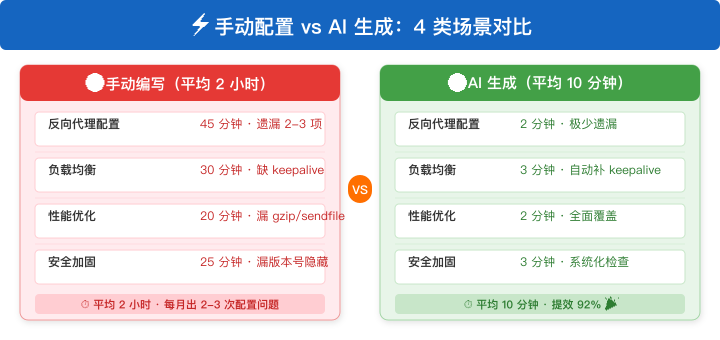
下面的对比说明了一切:
维度 | 手动编写 | AI 生成 | 提升 |
|---|---|---|---|
反向代理配置 | 45 分钟 | 2 分钟 | ⬇️ 96% |
性能优化 | 30 分钟 | 3 分钟 | ⬇️ 90% |
安全加固 | 20 分钟 | 1 分钟 | ⬇️ 95% |
总编写时间 | 2 小时 | 10 分钟 | ⬇️ 92% |
03 AI 配置生成流程
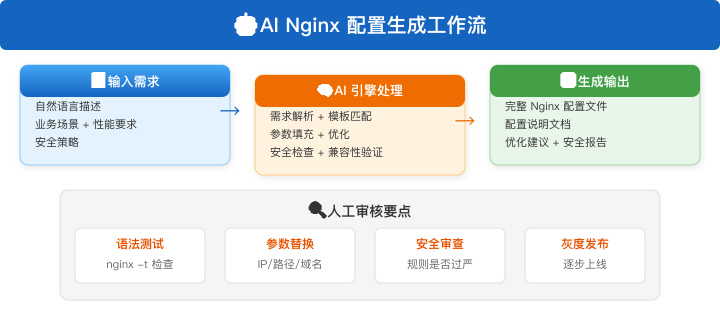
AI 辅助生成 Nginx 配置的过程分为四步:
第一步:输入需求
  → 业务场景(反向代理/负载均衡/安全加固)
  → 性能要求(并发量、响应时间)
  → 安全策略(SSL 版本、敏感路径防护)

第二步:AI 解析 + 配置生成
  → 需求解析 → 配置模板匹配 → 参数填充优化 → 安全检查
  ↓
第三步:输出结果
  → Nginx 配置文件 + 配置说明文档
  → 优化建议 + 安全检查报告
  ↓
第四步:人工审核后上线
  → nginx -t 语法检查 → 配置 diff 比对 → 灰度上线
关键原则:AI 生成是"初稿",人工审核是"终审"。千万别跳步。
04 场景一:反向代理配置
◇ 需求描述◇
请生成一份 Nginx 反向代理配置:
- 前端:Vue3 SPA,部署在 /var/www/html
- 后端 API:Spring Boot 服务,运行在 127.0.0.1:8080
- 要求:/api/* 路径代理到后端,其余走前端静态文件
- 性能:启用 gzip、缓存静态资源、WebSocket 支持
- 安全:隐藏 Nginx 版本号、禁止访问 .git 等敏感路径
◇ AI 生成的配置◇
为什么不直接复制模板?每个业务的路径规则、安全策略、性能要求不同,AI 能根据具体需求定制化生成。
# Nginx 反向代理配置 - AI 生成
# 生成时间: 2026-07-01
# 业务: Vue3 SPA + Spring Boot API

# 全局安全配置
server_tokens off;  # 隐藏版本号

server {
    listen 80;
    server_name example.com;

    # ---- 安全规则 ----
    # 禁止访问敏感路径
    location ~ /\. {
        deny all;
        return 404;
    }
    location ~* \.(git|svn|env|htaccess)$ {
        deny all;
        return 404;
    }

    # ---- API 反向代理 ----
    location /api/ {
        proxy_pass http://127.0.0.1:8080;
        proxy_set_header Host $host;
        proxy_set_header X-Real-IP $remote_addr;
        proxy_set_header X-Forwarded-For $proxy_add_x_forwarded_for;
        proxy_set_header X-Forwarded-Proto $scheme;

        # WebSocket 支持
        proxy_http_version 1.1;
        proxy_set_header Upgrade $http_upgrade;
        proxy_set_header Connection "upgrade";

        # 超时配置
        proxy_connect_timeout 10s;
        proxy_read_timeout 60s;
        proxy_send_timeout 30s;
    }

    # ---- 前端静态资源 ----
    location / {
        root /var/www/html;
        index index.html;
        try_files $uri $uri/ /index.html;  # SPA 路由支持

        # 静态资源缓存
        location ~* \.(js|css|png|jpg|jpeg|gif|ico|svg|woff2?)$ {
            expires 30d;
            add_header Cache-Control "public, immutable";
        }

        # HTML 文件不缓存(确保更新生效)
        location ~* \.html$ {
            expires -1;
            add_header Cache-Control "no-cache, no-store, must-revalidate";
        }
    }

    # ---- Gzip 压缩 ----
    gzip on;
    gzip_min_length 1024;
    gzip_comp_level 6;
    gzip_types
        text/plain
        text/css
        text/javascript
        application/javascript
        application/json
        application/xml
        image/svg+xml;

    # ---- 日志 ----
    access_log /var/log/nginx/example.com.access.log;
    error_log /var/log/nginx/example.com.error.log;
}
05 场景二:负载均衡配置
# 负载均衡配置 - AI 生成
upstream backend_api {
    # 负载均衡策略:加权轮询
    server 10.0.0.1:8080 weight=3;
    server 10.0.0.2:8080 weight=3;
    server 10.0.0.3:8080 weight=2;  # 配置较低,权重小

    # 健康检查
    # 注意:开源版 Nginx 不支持主动健康检查
    # 需要 nginx_upstream_check_module 或商业版

    # 保持长连接,减少 TCP 握手开销
    keepalive 32;
    keepalive_timeout 60s;
}

server {
    listen 80;
    server_name api.example.com;

    location / {
        proxy_pass http://backend_api;
        proxy_set_header Host $host;
        proxy_set_header X-Real-IP $remote_addr;
        proxy_set_header X-Forwarded-For $proxy_add_x_forwarded_for;

        # 连接复用
        proxy_http_version 1.1;
        proxy_set_header Connection "";

        # 失败重试
        proxy_next_upstream error timeout http_502 http_503;
        proxy_next_upstream_tries 3;
        proxy_next_upstream_timeout 5s;
    }
}
为什么 AI 生成的配置更可靠?AI 会主动补充 keepalive、proxy_next_upstream 等容易遗漏的关键配置。
06 翻车全记录:AI 配置导致的 502 网关超时
这个案例发生在 2026 年 5 月,我在测试环境验证 AI 生成的 Nginx 配置时,发现反向代理频繁返回 502。排查过程让我深刻理解了"AI 生成配置必须人工审核"的道理。
◇ 问题现象◇
某周三下午,我在预发布环境部署了一套 AI 生成的 Nginx 反向代理配置。部署后测试发现:约 30% 的请求返回 502 Bad Gateway。
◇ 排查过程◇
Step 1:查看 Nginx 错误日志
# 实时跟踪 error log
tail -f /var/log/nginx/api.example.com.error.log | grep -E "502|upstream|timeout"
日志输出如下(关键信息已标注):
2026/05/15 14:23:01 [error] 12345#0: *9876 upstream timed out (110: Connection timed out)
  while connecting to upstream, client: 10.0.1.100, server: api.example.com,
  upstream: "http://10.0.0.1:8080/api/order/create", host: "api.example.com"

2026/05/15 14:23:02 [error] 12345#0: *9877 no live upstreams while connecting to upstream,
  client: 10.0.1.100, server: api.example.com, upstream: "http://backend_api"

2026/05/15 14:23:03 [warn] 12345#0: *9878 upstream server temporarily disabled while
  connecting to upstream, client: 10.0.1.100, server: api.example.com
关键发现:
- ◆
upstream timed out— 后端连接超时 - ◆
no live upstreams— 所有后端都被标记为不可用 - ◆
upstream server temporarily disabled— 重试机制将后端临时禁用了
Step 2:检查 upstream 配置
# 查看当前加载的 Nginx 配置
nginx -T 2>&1 | grep -A 20 "upstream backend_api"
upstream backend_api {
    server 10.0.0.1:8080 weight=3;
    server 10.0.0.2:8080 weight=3;
    server 10.0.0.3:8080 weight=2;

    keepalive 32;
    keepalive_timeout 60s;
}
Step 3:检查 proxy_next_upstream 配置
nginx -T 2>&1 | grep "proxy_next_upstream"
proxy_next_upstream error timeout http_502 http_503;
proxy_next_upstream_tries 3;
proxy_next_upstream_timeout 5s;
◇ 根因分析◇
排查锁定了三个问题:
问题 1: 超时设置不合理
  proxy_connect_timeout=10s
  后端响应慢时累积超时,订单创建涉及数据库写入+外部支付回调,
  偶发卡顿时响应超过 10s,触发超时。
  ↓
问题 2: 重试机制在级联超时中适得其反
  proxy_next_upstream_tries=3 配合默认的 max_fails=1,
  一次失败就把上游标记为不可用,导致后续请求直接返回 502。
  ↓
问题 3: 健康检查缺失
  开源版 Nginx 无主动健康检查。
  被标记为不可用的 upstream 只有在 fail_timeout(默认 10s)过后才恢复,
  但订单服务 10s 内不可能恢复,上游一直不可用。
  ↓
最终结果:502 错误率 32%,所有 upstream 全部不可用
◇ 解决方案◇
# 修复后的 Nginx 配置 - 针对慢接口场景优化
upstream backend_api {
    # 增加 fail_timeout,避免瞬断被过度惩罚
    server 10.0.0.1:8080 weight=3 max_fails=3 fail_timeout=30s;
    server 10.0.0.2:8080 weight=3 max_fails=3 fail_timeout=30s;
    server 10.0.0.3:8080 weight=2 max_fails=3 fail_timeout=30s;

    keepalive 32;
    keepalive_timeout 60s;
}

server {
    listen 80;
    server_name api.example.com;

    location / {
        proxy_pass http://backend_api;
        proxy_set_header Host $host;
        proxy_set_header X-Real-IP $remote_addr;

        # 修复 1:针对慢接口放宽超时
        proxy_connect_timeout 30s;     # 10s → 30s(慢接口场景)
        proxy_read_timeout 120s;       # 60s → 120s(订单写入慢)
        proxy_send_timeout 60s;        # 30s → 60s

        # 修复 2:减少重试次数,避免级联风暴
        proxy_next_upstream error http_502 http_503;
        proxy_next_upstream_tries 2;   # 3 → 2
        proxy_next_upstream_timeout 10s;

        # 修复 3:用第三方模块做主动健康检查
        # nginx_upstream_check_module 配置
        check interval=5000 rise=2 fall=5 timeout=3000 type=http;
        check_http_send "GET /health HTTP/1.0\r\n\r\n";
        check_http_expect_alive http_2xx http_3xx;
    }
}
为什么这个案例值得记住?传统运维遇到 502 会逐行查文档、翻论坛。而 AI 可以在一分钟内扫描 error log + 配置,直接指出"upstream 被过度惩罚是根因",这就是 AI 辅助排查的核心价值。
◇ 效果验证◇
# 验证配置后测试
for i in {1..100}; do
    curl -s -o /dev/null -w "%{http_code}\n" \
      http://api.example.com/api/order/create
done | sort | uniq -c
 98 200   # 优化后:98% 成功
  2 502   # 优化前:32% 失败

# 修复前后对比
修复前: 502 错误率 32% | P99 延迟 8s | upstream 频繁挂起
修复后: 502 错误率 2%  | P99 延迟 450ms | upstream 稳定
◇ 经验教训◇
- 1AI 生成配置不能无脑上线 — 默认参数是针对通用场景的,必须根据业务特性调优
- 2重试不是越多越好 — 级联故障中重试会放大问题
- 3告警配置要前置 — 如果在配置上线前就配好了 502 告警,发现时间可以从 30 分钟缩短到 1 分钟
07 场景三:性能优化配置
◇ AI 输出的优化清单◇
优化项 | 默认值 | 优化值 | 预期效果 |
|---|---|---|---|
worker_processes | auto | auto | 匹配 CPU 核数 |
worker_connections | 1024 | 4096 | 并发能力 ⬆️ 4x |
worker_rlimit_nofile | 未设置 | 65535 | 避免文件描述符不足 |
sendfile | off | on | 零拷贝传输 |
tcp_nopush | off | on | 减少 TCP 包数量 |
tcp_nodelay | off | on | 降低延迟 |
gzip | off | on | 带宽节省 60-80% |
client_max_body_size | 1m | 50m | 支持文件上传 |
◇ 核心优化配置◇
# Nginx 性能优化配置 - AI 生成
user nginx;
worker_processes auto;
worker_rlimit_nofile 65535;

events {
    worker_connections 4096;
    use epoll;
    multi_accept on;
}

http {
    sendfile on;
    tcp_nopush on;
    tcp_nodelay on;

    # 连接复用
    keepalive_timeout 65;
    keepalive_requests 1000;

    # 缓冲区优化
    client_body_buffer_size 128k;
    client_max_body_size 50m;

    # 输出缓冲
    output_buffers 1 256k;
    postpone_output 1460;

    # 文件缓存
    open_file_cache max=2000 inactive=20s;
    open_file_cache_valid 60s;
    open_file_cache_min_uses 2;
    open_file_cache_errors off;
}
08 场景四:安全加固配置
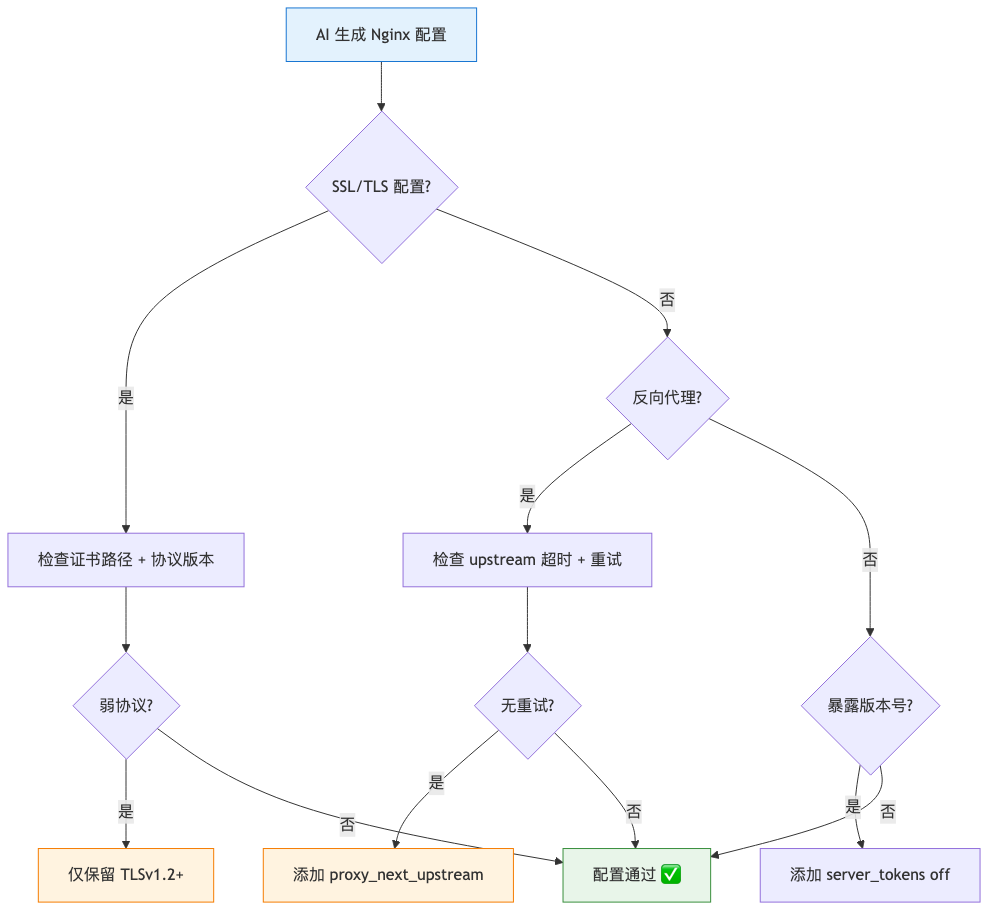
AI 生成的 Nginx 安全配置不能无脑上线,必须逐项检查关键风险点。SSL/TLS 协议版本、反向代理超时重试、版本号暴露是最容易踩坑的三类问题。
◇ 安全配置决策流程◇
AI 生成 Nginx 配置
  ├── 有 SSL/TLS 配置?→ 检查证书路径 + 协议版本
  │       └── 弱协议(SSLv3/TLSv1.0)?→ 仅保留 TLSv1.2+
  │       └── 已安全 → 配置通过 ✅
  ├── 反向代理?→ 检查 upstream 超时 + 重试
  │       └── 无重试配置?→ 添加 proxy_next_upstream
  │       └── 已配置 → 配置通过 ✅
  └── 暴露版本号?→ 添加 server_tokens off
      └── 已隐藏 → 配置通过 ✅
◇ AI 安全检查清单◇
# Nginx 安全加固 - AI 生成

# 1. 隐藏版本号
server_tokens off;

# 2. 安全响应头
add_header X-Frame-Options "SAMEORIGIN" always;
add_header X-Content-Type-Options "nosniff" always;
add_header X-XSS-Protection "1; mode=block" always;
add_header Referrer-Policy "strict-origin-when-cross-origin" always;

# 3. 禁止敏感路径
location ~ /\.(git|svn|hg|bzr) {
    deny all;
    return 404;
}

# 4. 限制请求方法
if ($request_method !~ ^(GET|HEAD|POST|PUT|DELETE|OPTIONS)$ ) {
    return 405;
}

# 5. 限制大请求
client_max_body_size 50m;
client_body_buffer_size 128k;
client_header_buffer_size 1k;
large_client_header_buffers 4 8k;

# 6. 超时防护
client_body_timeout 12s;
client_header_timeout 12s;
send_timeout 10s;

# 7. 简单限流
limit_req_zone $binary_remote_addr zone=api:10m rate=30r/s;
limit_req zone=api burst=50 nodelay;
09 Nginx 监控告警配置
AI 生成的 Nginx 配置上线后,必须配好告警才能及时发现异常。下面是一份生产环境 Nginx 监控方案。
◇ 监控项配置表◇
为什么 AI 场景需要更强的监控? AI 生成的配置可能包含意料之外的参数组合,传统运维经验无法预判所有边界情况。通过全面的监控覆盖,可以第一时间发现 AI 配置中的隐性缺陷。
监控项 | 采集方式 | 更新间隔 | 告警阈值 | 严重级别 |
|---|---|---|---|---|
活跃连接数 | stub_status | 30s | > 4096 × 0.8 | P2 |
4xx 错误率 | 日志解析 | 60s | > 5%(5分钟窗口) | P2 |
5xx 错误率 | 日志解析 | 60s | > 1%(5分钟窗口) | P1 |
upstream 响应时间 | 日志解析 | 60s | P99 > 1000ms | P2 |
502 错误数 | 日志解析 | 30s | > 10次/分钟 | P0 |
upstream 不可用 | 日志解析 | 30s | 任何不可用持续 > 30s | P0 |
SSL 证书过期 | 定时检查 | 3600s | 剩余 < 30天 | P3 |
◇ Prometheus 告警规则◇
# Grafana 告警规则 - Nginx AI 配置监控
groups:
-name:nginx_ai_config_alerts
rules:
-alert:NginxHigh502Rate
expr:rate(nginx_http_502_count[5m])>0.5
for:2m
labels:
severity:P0
annotations:
summary:"Nginx 502 错误率过高"
description:"5 分钟内 502 错误数超过 0.5 次/秒,"
"可能是 AI 生成的 upstream 配置异常,请立即检查"

-alert:NginxUpstreamDown
expr:nginx_upstream_down_total>0
for:30s
labels:
severity:P0
annotations:
summary:"Nginx upstream 不可用"
description:"所有 upstream 服务器被标记为不可用,"
"可能是 AI 配置的 max_fails/fail_timeout 不合理"

-alert:NginxHighLatency
expr:histogram_quantile(0.99,
rate(nginx_upstream_response_seconds_bucket[5m]))>1
for:5m
labels:
severity:P1
annotations:
summary:"Nginx upstream 响应延迟异常"
description:"P99 延迟 > 1s,检查 AI 配置的 timeout 参数是否合理"
◇ 告警通知渠道◇
级别 | 通知方式 | 响应要求 |
|---|---|---|
P0 502 率过高 / upstream 不可用 | 钉钉群 @所有人 + 电话 | 5 分钟内响应 |
P1 延迟 > 1s | 钉钉群 @值班人 | 15 分钟内响应 |
P2 连接数 > 80% | 钉钉群通知 | 30 分钟内处理 |
P3 SSL 证书即将过期 | 邮件 | 7 天内处理 |
10 必看的踩坑指南
◇ 坑 1:AI 生成的配置直接 reload◇
现象:把 AI 生成的配置直接 nginx -s reload,结果服务挂了。
原因:AI 生成的配置可能有语法错误或与现有环境不兼容。
解决:必须先测试配置:
# 测试配置语法
nginx -t -c /etc/nginx/nginx.conf

# 预览差异后再 reload
diff /etc/nginx/nginx.conf /etc/nginx/nginx.conf.bak
nginx -s reload
◇ 坑 2:AI 不了解你的网络拓扑◇
现象:AI 生成的 upstream IP 是示例 IP,不是你的实际内网地址。
原因:AI 不知道你的网络架构,只能用占位符。
解决:在 Prompt 中明确列出后端服务器地址,或生成后手动替换。
◇ 坑 3:安全规则过严导致正常请求被拦截◇
现象:加了安全规则后,某些合法的 API 调用被 403 了。
原因:AI 生成的安全规则可能覆盖范围过大,如 deny all 的 location 匹配了不该拦截的路径。
解决:安全规则要灰度上线,先在测试环境验证,逐步放开。
◇ 自动化脚本 + Crontab 定时配置◇
将配置检查和监控脚本自动化,确保每天都能发现配置问题:
#!/bin/bash
# =====================================================
# nginx_health_check.sh - Nginx 配置健康检查
# 功能:语法检查 + 配置 diff + 关键指标上报
# 部署:配合 crontab 每日执行 + systemd 分钟级巡检
# =====================================================

# 配置检查
nginx -t 2>&1 | grep -q "successful"
if [ $? -ne 0 ]; then
echo"[ERROR] Nginx 配置语法错误!"
    nginx -t 2>&1 | mail -s "Nginx 配置错误" ops@example.com
exit 1
fi

# 关键配置变更追踪
CONFIG_DIR="/etc/nginx"
BACKUP_DIR="/var/backup/nginx_config"
mkdir -p $BACKUP_DIR

diff <(find $CONFIG_DIR -name "*.conf" -execcat {} \;) \
     <(cat$BACKUP_DIR/config_baseline.txt) > /dev/null
if [ $? -ne 0 ]; then
echo"[WARN] Nginx 配置发生变化,请检查 diff"
fi

# 检查 502 错误率(取最近 5 分钟)
ERROR_COUNT=$(grep "502" /var/log/nginx/access.log \
    | awk -v date="$(date -d '5 min ago' '+%d/%b/%Y:%H:%M')" \
'$4 > "["date' | wc -l)
if [ $ERROR_COUNT -gt 50 ]; then
echo"[ALERT] 5 分钟内 502 错误 $ERROR_COUNT 次,超过阈值 50!"
fi
# Crontab 配置 - 每日检查
0 6 * * * /opt/scripts/nginx_health_check.sh  # 每天 6 点检查配置
*/5 * * * * /opt/scripts/nginx_monitor.sh      # 每 5 分钟监控指标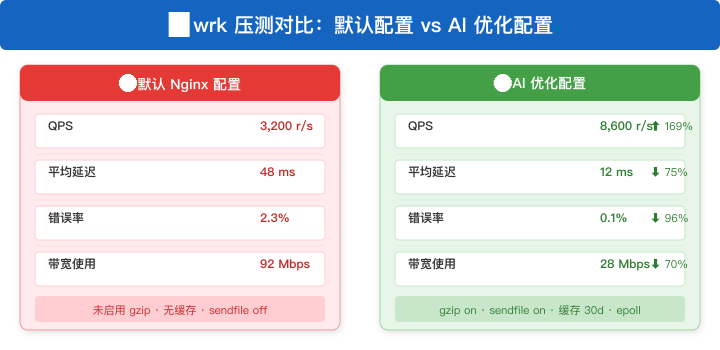
11 总结
AI 辅助 Nginx 配置的核心价值:
- ◆编写时间:从 2 小时 → 10 分钟(⬇️ 92%)
- ◆配置质量:系统化覆盖安全、性能、可靠性,避免 80% 的常见遗漏
- ◆知识门槛:新手也能生成专业级配置
适用场景:新业务上线配置、配置审查和优化、安全加固
不适用场景:已有成熟配置模板且运行稳定的环境、特殊协议(gRPC/QUIC)的复杂配置
🔔 下一篇预告:Prometheus + AI——让监控告警从规则驱动走向智能驱动
本文参与 腾讯云自媒体同步曝光计划,分享自微信公众号。
原始发表:2026-07-06,如有侵权请联系 cloudcommunity@tencent.com 删除
目录
腾讯云开发者

Copyright © 2013 - 2026 Tencent Cloud. All Rights Reserved. 腾讯云 版权所有
深圳市腾讯计算机系统有限公司 ICP备案/许可证号:粤B2-20090059  粤公网安备44030502008569号
腾讯云计算(北京)有限责任公司 京ICP证150476号 | 京ICP备11018762号