集成补丁打包ISO遇到的7个问题
原创
集成补丁打包ISO遇到的7个问题
原创
Windows技术交流
修改于 2026-07-01 14:22:04
修改于 2026-07-01 14:22:04
问题一:对25H2,kb5043080兼容install.wim,不兼容boot.wim,所以boot.wim不集成kb5043080
dism.exe /Add-Package failed with exit code -2146498529 for windows11.0-kb5043080-x64.msu
[2026-06-30 12:14:50] Add LCU checkpoint (KB5043080): directory has 1 package(s), injecting one by one -> E:\IsoPatch\packages\Win11LTSC2024EN\lcu\kb5043080
[2026-06-30 12:14:50]   -> LCU checkpoint (KB5043080): windows11.0-kb5043080-x64.msu
dism.exe /Add-Package failed with exit code -2146498529 for E:\IsoPatch\packages\Win11LTSC2024EN\lcu\kb5043080\windows11.0-kb5043080-x64.msu
所在位置 C:\Users\Administrator\.workbuddy\skills\windows-server-iso-patch-integration\scripts\Invoke-BootWimOnlyIso_withpercentprogress.ps1:296 字符: 13
+             throw "dism.exe /Add-Package failed with exit code $LASTE ...
+             ~~~~~~~~~~~~~~~~~~~~~~~~~~~~~~~~~~~~~~~~~~~~~~~~~~~~~~~~~
    + CategoryInfo          : OperationStopped: (dism.exe /Add-P...5043080-x64.msu:String) [], RuntimeException
    + FullyQualifiedErrorId : dism.exe /Add-Package failed with exit code -2146498529 for E:\IsoPatch\packages\Win11LTSC2024EN\lcu\kb5043080\windows11.0-kb5043080-x64.msu
根因与修复
报错:-2146498529 = 0x800F081F (CBS_E_SOURCE_MISSING),在 boot.wim 注 kb5043080\windows11.0-kb5043080-x64.msu 时触发。
根因(配置 + 逻辑共同导致,非脚本崩溃):
25H2Win11iotAmd64EN_idx2.json的Build=26200,触发了之前加的「≥26200 → 先注 KB5043080 checkpoint」分支。- 但该配置的 LCU 共用
Win11LTSC2024EN\lcu(24H2/26100 包),里面的kb5043080是 2024-09 的 24H2 checkpoint。 - 按实测定论:KB5043080 兼容 24H2/25H2 的 install.wim,但只兼容 24H2 的 boot.wim。注进 26200 的 boot.wim 时,checkpoint 声明的 source baseline 不匹配 26200 PE → 0x800F081F。
问题二:x64 iso,搞错补丁类型,报错dism.exe /Add-Package failed with exit code 193 for xxx-arm64.msu
问题三:install.wim、boot.wim集成补丁收尾时意外退出,退出码 -1073740791 = 0xC0000409 (STATUS_STACK_BUFFER_OVERRUN),是 dism.exe 进程级崩(安全软件hook导致异常)
[2026-06-30 14:48:12] Add LCU: directory has 1 package(s), injecting one by one -> E:\IsoPatch\packages\Win11LTSC2024EN\lcu
[2026-06-30 14:48:12]   -> LCU: windows11.0-kb5094126-x64.msu
dism.exe /Add-Package failed with exit code -1073740791 for E:\IsoPatch\packages\Win11LTSC2024EN\lcu\windows11.0-kb5094126-x64.msu
所在位置 C:\Users\Administrator\.workbuddy\skills\windows-server-iso-patch-integration\scripts\Invoke-BootWimOnlyIso_withpercentprogress.ps1:296 字符: 13
+             throw "dism.exe /Add-Package failed with exit code $LASTE ...
+             ~~~~~~~~~~~~~~~~~~~~~~~~~~~~~~~~~~~~~~~~~~~~~~~~~~~~~~~~~
    + CategoryInfo          : OperationStopped: (dism.exe /Add-P...5094126-x64.msu:String) [], RuntimeException
    + FullyQualifiedErrorId : dism.exe /Add-Package failed with exit code -1073740791 for E:\IsoPatch\packages\Win11LTSC2024EN\lcu\windows11.0-kb5094126-x64.msu


dism.exe /Add-Package failed with exit code -1073740791 for E:\IsoPatch\packages\24H2Arm64EN\lcu\windows11.0-kb5094126-arm64.msu
所在位置 C:\Users\Administrator\.workbuddy\skills\windows-server-iso-patch-integration\scripts\Invoke-BootWimOnlyIso_withpercentprogress.ps1:318 字符: 13
+             throw "dism.exe /Add-Package failed with exit code $LASTE ...
+             ~~~~~~~~~~~~~~~~~~~~~~~~~~~~~~~~~~~~~~~~~~~~~~~~~~~~~~~~~
    + CategoryInfo          : OperationStopped: (dism.exe /Add-P...94126-arm64.msu:String) [], RuntimeException
    + FullyQualifiedErrorId : dism.exe /Add-Package failed with exit code -1073740791 for E:\IsoPatch\packages\24H2Arm64EN\lcu\windows11.0-kb5094126-arm64.msu
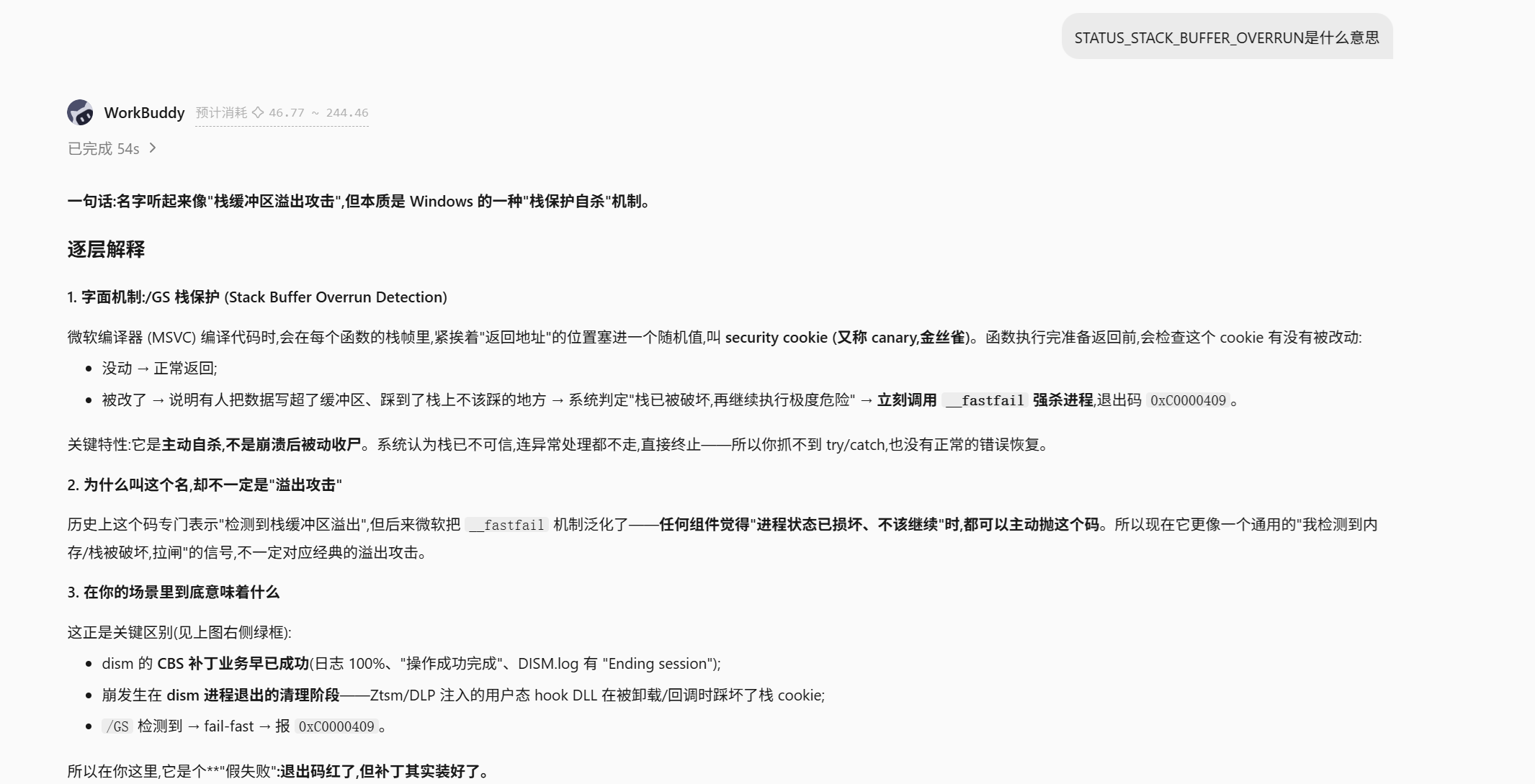
问题的本质是:dism 业务成功了,但因退出阶段被外部 hook 搞崩,返回了非零退出码,脚本的 if ($LASTEXITCODE -ne 0) { throw } 把它当成了失败。
如果遇到0xC0000409,校验RollupFix 是否真的 Installed,确认装上就吞掉这个崩溃码当成功。
问题四:boot.wim挂载路径太长,boot.wim挂载到E:\b解决
[2026-06-30 17:30:43] Add LCU: directory has 1 package(s), injecting one by one -> E:\IsoPatch\packages\24H2Arm64EN\lcu
[2026-06-30 17:30:43]   -> LCU: windows11.0-kb5094126-arm64.msu
dism.exe /Add-Package failed with exit code 3 for E:\IsoPatch\packages\24H2Arm64EN\lcu\windows11.0-kb5094126-arm64.msu
所在位置 C:\Users\Administrator\.workbuddy\skills\windows-server-iso-patch-integration\scripts\Invoke-BootWimOnlyIso_withpercentprogress.ps1:296 字符: 13
+             throw "dism.exe /Add-Package failed with exit code $LASTE ...
+             ~~~~~~~~~~~~~~~~~~~~~~~~~~~~~~~~~~~~~~~~~~~~~~~~~~~~~~~~~
    + CategoryInfo          : OperationStopped: (dism.exe /Add-P...94126-arm64.msu:String) [], RuntimeException
    + FullyQualifiedErrorId : dism.exe /Add-Package failed with exit code 3 for E:\IsoPatch\packages\24H2Arm64EN\lcu\windows11.0-kb5094126-arm64.msu
退出码 3 = 0x80070003 = ERROR_PATH_NOT_FOUND
退出码 3 是 MAX_PATH 越界导致的ERROR_PATH_NOT_FOUND,不是脚本 bug、不是包损坏
问题五: ISO损坏(下载后未校验md5值)导致集成补丁耗时非常长且最终失败报错Error 1392 = ERROR_FILE_CORRUPT
WIMMountExtractFileToHandle → wimmount 驱动尝试从 .wim 按需回填 ServicingStack...mum
UncompressFileBase: file corrupted in block at offset 000002B3CCEB7040 → 解压这个文件的某个数据块时发现 WIM 内的压缩块损坏(Error 1392 = ERROR_FILE_CORRUPT)
核实下载的ISO有问题,md5值不对,重新下载校验md值没问题后,重新操作,解决
问题六:集成kb5094126时,为何会经历2个从1%到100%的过程
组合包= SSU 服务栈子包 + LCU 主体,dism 把它当成两个 CBS 安装阶段分别跑,每阶段各打一条独立进度条:
第 1 段:解析展开 + 装 SSU + 逐组件登记规划
第 2 段:RollupFix 内容真正写进离线 boot.wim 并提交
[2026-06-30 20:36:48] Add LCU: directory has 1 package(s), injecting one by one -> E:\IsoPatch\packages\Win11LTSC2024EN\lcu
[2026-06-30 20:36:48] -> LCU: windows11.0-kb5094126-x64.msu
部署映像服务和管理工具
版本: 10.0.28000.1
映像版本: 10.0.26100.6584
Processing 1 of 1 -
[ 1.0% ]
[= 2.0% ]
[======= 13.0% ]
[======== 14.0% ]
[======== 15.0% ]
[========= 16.0% ]
[========= 17.0% ]
[========== 18.0% ]
[=========== 19.0% ]
[=========== 20.0% ]
[============ 21.0% ]
[============ 22.0% ]
[============= 23.0% ]
[============= 24.0% ]
[============== 25.0% ]
[=============== 26.0% ]
[=============== 27.0% ]
[================ 28.0% ]
[================= 30.0% ]
[================= 31.0% ]
[================== 32.0% ]
[================== 32.0% ]
[================== 32.0% ]
[================== 32.0% ]
[================== 32.0% ]
[================== 32.0% ]
[================== 32.0% ]
[================== 32.0% ]
[================== 32.0% ]
[================== 32.0% ]
[================== 32.0% ]
[================== 32.0% ]
[================== 32.0% ]
[================== 32.0% ]
[================== 32.0% ]
[================== 32.0% ]
[================== 32.0% ]
[================== 32.0% ]
[================== 32.0% ]
[================== 32.0% ]
[================== 32.0% ]
[================== 32.0% ]
[================== 32.0% ]
[================== 32.0% ]
[================== 32.0% ]
[================== 32.0% ]
[================== 32.0% ]
[================== 32.0% ]
[================== 32.0% ]
[================== 32.0% ]
[================== 32.0% ]
[================== 32.0% ]
[================== 32.0% ]
[================== 32.0% ]
[================== 32.0% ]
[================== 32.0% ]
[================== 32.0% ]
[================== 32.0% ]
[================== 32.0% ]
[================== 32.0% ]
[================== 32.0% ]
[================== 32.0% ]
[================== 32.0% ]
[================== 32.0% ]
[================== 32.0% ]
[================== 32.0% ]
[================== 32.0% ]
[================== 32.0% ]
[================== 32.0% ]
[================== 32.0% ]
[================== 32.0% ]
[================== 32.0% ]
[================== 32.0% ]
[================== 32.0% ]
[================== 32.0% ]
[================== 32.0% ]
[================== 32.0% ]
[================== 32.0% ]
[================== 32.0% ]
[================== 32.0% ]
[================== 32.0% ]
[================== 32.0% ]
[================== 32.0% ]
[================== 32.0% ]
[================== 32.0% ]
[================== 32.0% ]
[================== 32.0% ]
[================== 32.0% ]
[================== 32.0% ]
[================== 32.0% ]
[================== 32.0% ]
[================== 32.0% ]
[================== 32.0% ]
[================== 32.0% ]
[================== 32.0% ]
[================== 32.0% ]
[================== 32.0% ]
[================== 32.0% ]
[================== 32.0% ]
[================== 32.0% ]
[================== 32.0% ]
[================== 32.0% ]
[================== 32.0% ]
[================== 32.0% ]
[================== 32.0% ]
[================== 32.0% ]
[================== 32.0% ]
[================== 32.0% ]
[================== 32.0% ]
[================== 32.0% ]
[================== 32.0% ]
[================== 32.0% ]
[================== 32.0% ]
[================== 32.0% ]
[================== 32.0% ]
[================== 32.0% ]
[================== 32.0% ]
[================== 32.0% ]
[================== 32.0% ]
[=================== 33.0% ]
[=================== 33.0% ]
[=================== 33.0% ]
[=================== 33.0% ]
[=================== 33.0% ]
[=================== 33.0% ]
[=================== 33.0% ]
[=================== 33.0% ]
[=================== 33.0% ]
[=================== 33.0% ]
[=================== 33.0% ]
[=================== 33.0% ]
[=================== 33.0% ]
[=================== 33.0% ]
[=================== 33.0% ]
[==================== 35.0% ]
[==========================100.0%==========================]
[==========================100.0%==========================]
[==========================100.0%==========================]
[==========================100.0%==========================]
[==========================100.0%==========================]
[==========================100.0%==========================]
[==========================100.0%==========================]
[==========================100.0%==========================]
[==========================100.0%==========================]
[==========================100.0%==========================]
[==========================100.0%==========================]
[==========================100.0%==========================]
[==========================100.0%==========================]
[==========================100.0%==========================]
[==========================100.0%==========================]
[==========================100.0%==========================]
[==========================100.0%==========================]
[==========================100.0%==========================]
[==========================100.0%==========================]
[==========================100.0%==========================]
[ 1.0% ]
[ 1.0% ]
[ 1.0% ]
[ 1.0% ]
[===========================72.0%========= ]
[===========================72.0%========= ]
[===========================72.0%========= ]
[==========================100.0%==========================]
[==========================100.0%==========================]
操作成功完成。
[2026-06-30 20:41:40] Cleanup image: E:\b (live progress bar)
部署映像服务和管理工具
版本: 10.0.28000.1
映像版本: 10.0.26100.8655
[== 5.0% ]
[== 5.0% ]
[===========================65.0%===== ]
[===========================70.0%======== ]
[===========================70.0%======== ]
[===========================94.6%====================== ]
[==========================100.0%==========================]
操作成功完成。
问题七:报错0xc1420117需要regedit打开UI卸载注册表
报下面msg的时候,运行regedit打开注册表编辑器,选中没自动卸载完的挂载点,卸载配置单元。
正在卸载映像
[==========================100.0%==========================]

错误: 0xc1420117

不能完全卸载目录。这通常是由于应用程序仍在装载目录中打开文件。请关闭这些文件并重新卸载来完成卸载过程。

可以在 C:\WINDOWS\Logs\DISM\dism.log 上找到 DISM 日志文件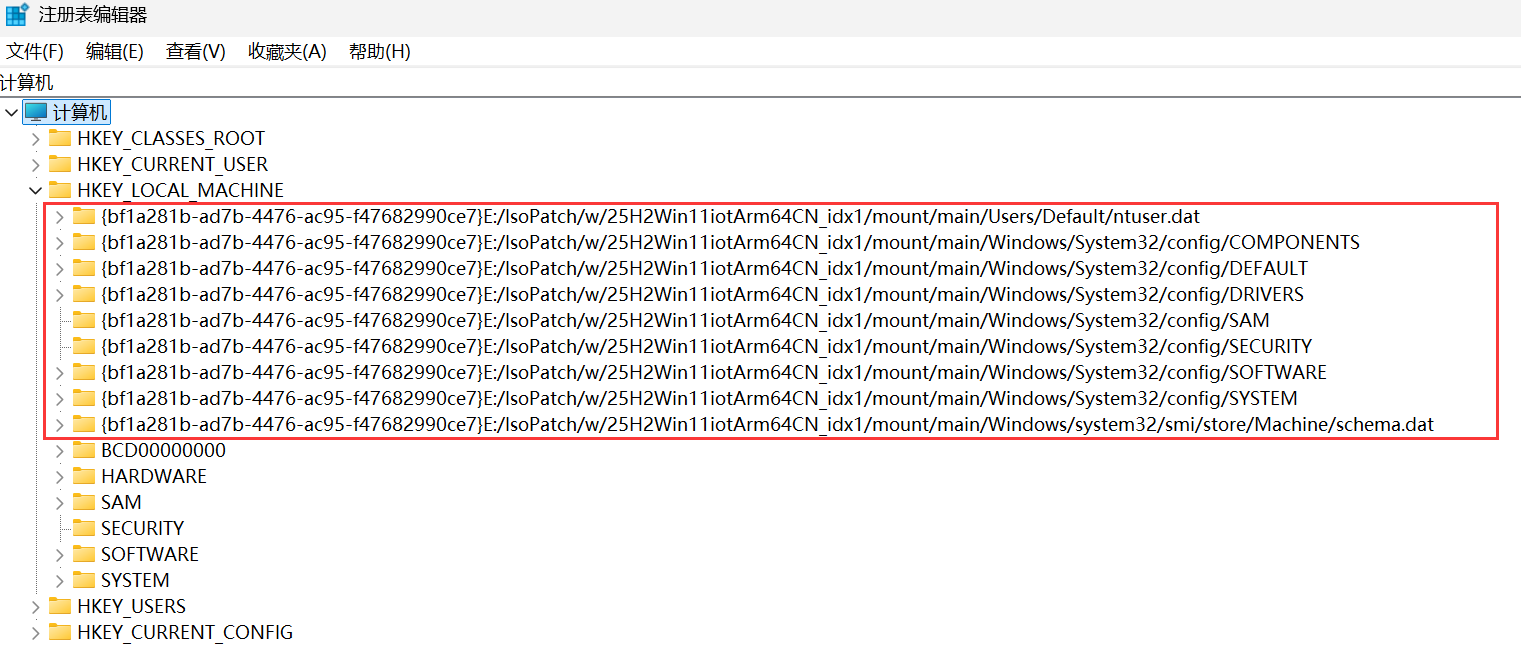
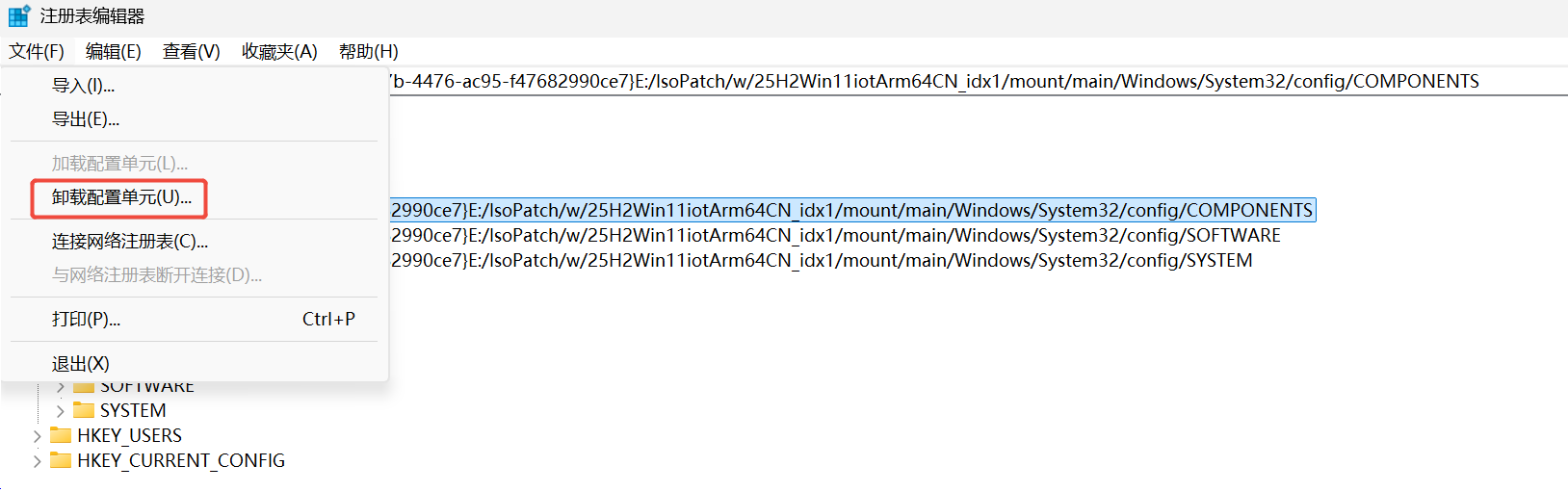
卸载配置单元后,执行这段powershell
Get-WindowsImage -Mounted

dism /Cleanup-Mountpoints

dism /Cleanup-Wim

# 定义注册表路径
$regPath = "HKLM:\SOFTWARE\Microsoft\WIMMount\Mounted Images"

# 使用Get-ChildItem递归遍历注册表项
Get-ChildItem -Path $regPath -Recurse | ForEach-Object {
    # 获取当前项的所有子项
    $subKeys = Get-ItemProperty -Path $_.PSPath -Name * -ErrorAction SilentlyContinue

    # 检查是否存在名为"Mount Path"的子项
    if ($subKeys.PSObject.Properties.Name -contains "Mount Path") {
        # 输出找到的"Mount Path"值
        $mountPathValue = $subKeys."Mount Path"
        Write-Output "Found 'Mount Path' with value '$mountPathValue' at key '$($_.PSPath)'"
        $mountPathValue
        Write-Output ""
    }
}

#Dism /Unmount-Image /MountDir:"E:\MountUUP" /Discard
原创声明:本文系作者授权腾讯云开发者社区发表,未经许可,不得转载。
如有侵权,请联系 cloudcommunity@tencent.com 删除。
原创声明:本文系作者授权腾讯云开发者社区发表,未经许可,不得转载。
如有侵权,请联系 cloudcommunity@tencent.com 删除。
评论
登录后参与评论
推荐阅读
目录
腾讯云开发者

Copyright © 2013 - 2026 Tencent Cloud. All Rights Reserved. 腾讯云 版权所有
深圳市腾讯计算机系统有限公司 ICP备案/许可证号:粤B2-20090059  粤公网安备44030502008569号
腾讯云计算(北京)有限责任公司 京ICP证150476号 | 京ICP备11018762号