python: Treeview Control binding data using tkinter and ttkbootstrap GUI

python: Treeview Control binding data using tkinter and ttkbootstrap GUI

geovindu
发布于 2026-06-18 21:43:13
发布于 2026-06-18 21:43:13
"""
StudentUI.py
读文件类
date 2023-06-24
edit: Geovin Du,geovindu, 涂聚文
ide:  PyCharm 2023.1 python 11

"""

import datetime
import sys
import os
from tkinter import ttk
from tkinter import *
from tkinter.ttk import *
from ttkbootstrap import Style  # pip install ttkbootstrap
import random
import Model.StudentListInfo
import BLL.StudentListBLL

class StudentUi(object):

    global tree
    #stubll = BLL.StudentListBLL.StudentBll()

    def __del__(self):
        self.name="geovindu"

    def delete():
        global tree
        tree.delete(tree.selection())
        stubll = BLL.StudentListBLL.StudentBll()
        #cls.stubll.delSql()

    def main():
        """
        窗体绑定数据
        :return:
        """
        stubll = BLL.StudentListBLL.StudentBll()
        geovindu =stubll.selectSqlOrder("StudentNO asc") # list()

        style=Style(theme='darkly') #定义窗口样式
        window=style.master
        window.title("学生管理")
        # win = Tk()
        screenWidth = window.winfo_screenwidth()
        screenHeight = window.winfo_screenheight()
        width=100
        height=600
        x=int((screenWidth-width)/2)
        y=int((screenHeight-height)/2)
        window.geometry('{}x{}+{}+{}'.format(width,height,x,y))
        #Treeview 控件
        tree=ttk.Treeview(master=window,style='success.Treeview',height=25,show='headings')
        tree.pack()
        #定义列
        tree['columns']=("StudentId","StudentName","StudentNO","StudentBirthday","Age")
        #设置列属性,列不显示
        tree.column("StudentId",width=150,minwidth=100,anchor=S)
        tree.column("StudentName", width=150, minwidth=100, anchor=S)
        tree.column("StudentNO", width=150, minwidth=100, anchor=S)
        tree.column("StudentBirthday", width=150, minwidth=100, anchor=S)
        tree.column("Age", width=150, minwidth=100, anchor=S)
        #设置表头
        tree.heading("StudentId",text="序号")
        tree.heading("StudentName", text="姓名")
        tree.heading("StudentNO", text="学号")
        tree.heading("StudentBirthday", text="出生日期")
        tree.heading("Age", text="年龄")
        #treeView控件绑定数据
        i=1
        for Model.StudentListInfo.StudentList in geovindu:
            tree.insert("",i,text="2",values=(Model.StudentListInfo.StudentList.getStudentId(),Model.StudentListInfo.StudentList.getStudentName(),Model.StudentListInfo.StudentList.getStudentNO(),Model.StudentListInfo.StudentList.getStudentBirthday(),Model.StudentListInfo.StudentList.getAge()))
            i+=1
        #删除按钮
        ttk.Button(window,text="删除",style='success,TButton',command=StudentUi.delete).pack(side='left',padx=5,pady=10)
        window.mainloop()
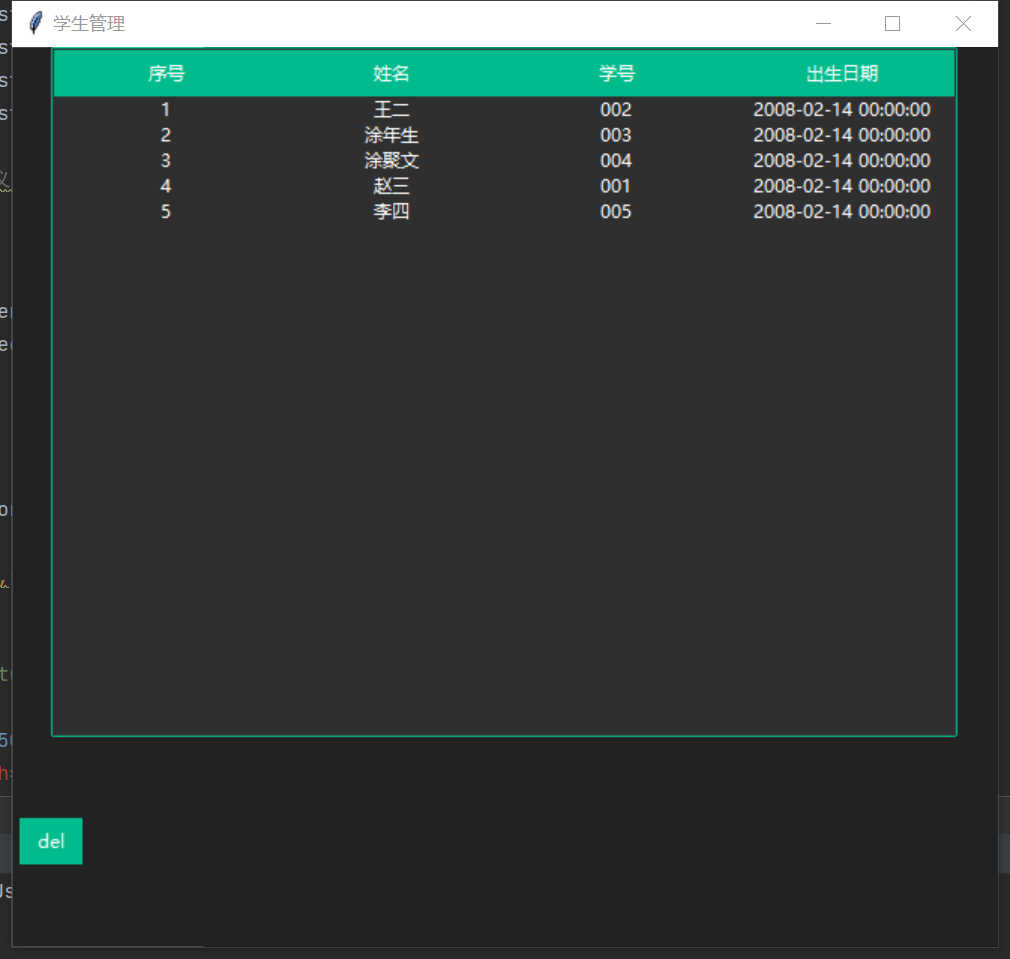
输出:
本文参与 腾讯云自媒体同步曝光计划,分享自作者个人站点/博客。
原始发表:2026-06-17,如有侵权请联系 cloudcommunity@tencent.com 删除
腾讯云开发者

Copyright © 2013 - 2026 Tencent Cloud. All Rights Reserved. 腾讯云 版权所有
深圳市腾讯计算机系统有限公司 ICP备案/许可证号:粤B2-20090059  粤公网安备44030502008569号
腾讯云计算(北京)有限责任公司 京ICP证150476号 | 京ICP备11018762号