CentOS下rar解压工具安装

CentOS下rar解压工具安装

master336
发布于 2026-06-15 18:57:23
发布于 2026-06-15 18:57:23
这里写自定义目录标题- 基础环境
- 下载安装文件
- 安装
- 使用
- 附录-常用参数:
基础环境
CentOS:7.5 rar官网:www.rarlab.com
下载安装文件
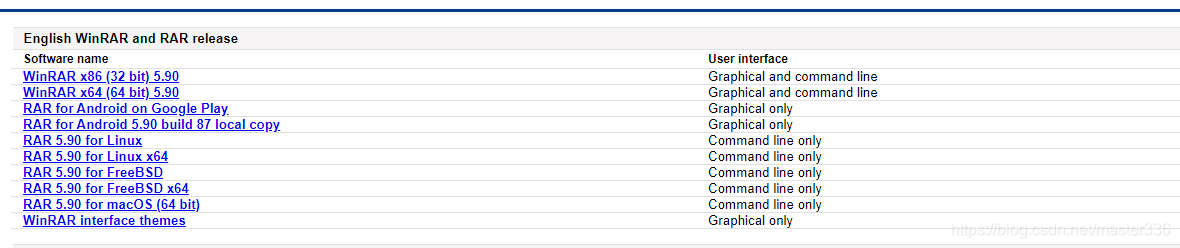
下载地址:https://www.rarlab.com/download.htm 下载合适的版本(附件提供免费的5.9.0版本):
在这里插入图片描述
安装
eg:以附件rarlinux-x64-5.9.0.tar.gz安装包为例
#解压
 tar -xvf rarlinux-x64-5.9.0.tar.gz
#进入目录
cd rar/
#安装
make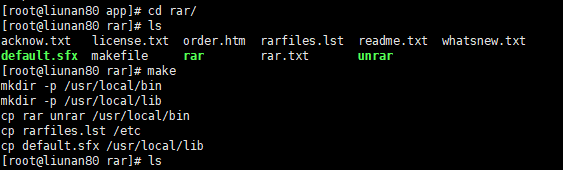
在这里插入图片描述
使用
#解压
rar x filename.rar
#压缩 [rarname.rar:要生成的压缩包名称,rarpath:压缩文件夹]
rar a rarname.rar /rarpath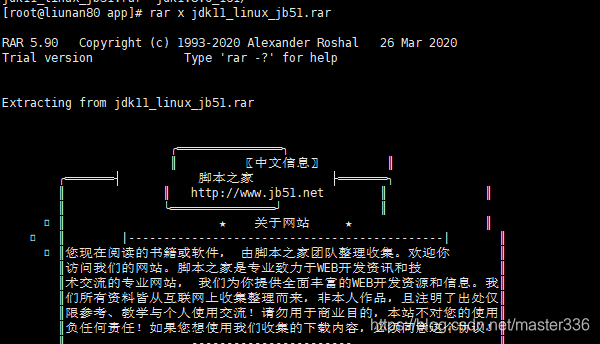
在这里插入图片描述
附录-常用参数:
rar help
rar help

RAR 5.90   Copyright (c) 1993-2020 Alexander Roshal   26 Mar 2020
Trial version             Type 'rar -?' for help

Usage:     rar <command> -<switch 1> -<switch N> <archive> <files...>
               <@listfiles...> <path_to_extract\>

<Commands>
  a             Add files to archive
  c             Add archive comment
  ch            Change archive parameters
  cw            Write archive comment to file
  d             Delete files from archive
  e             Extract files without archived paths
  f             Freshen files in archive
  i[par]=<str>  Find string in archives
  k             Lock archive
  l[t[a],b]     List archive contents [technical[all], bare]
  m[f]          Move to archive [files only]
  p             Print file to stdout
  r             Repair archive
  rc            Reconstruct missing volumes
  rn            Rename archived files
  rr[N]         Add data recovery record
  rv[N]         Create recovery volumes
  s[name|-]     Convert archive to or from SFX
  t             Test archive files
  u             Update files in archive
  v[t[a],b]     Verbosely list archive contents [technical[all],bare]
  x             Extract files with full path

<Switches>
  -             Stop switches scanning
  @[+]          Disable [enable] file lists
  ad            Append archive name to destination path
  ag[format]    Generate archive name using the current date
  ai            Ignore file attributes
  ap<path>      Set path inside archive
  as            Synchronize archive contents
  c-            Disable comments show
  cfg-          Disable read configuration
  cl            Convert names to lower case
  cu            Convert names to upper case
  df            Delete files after archiving
  dh            Open shared files
  ds            Disable name sort for solid archive
  dw            Wipe files after archiving
  e[+]<attr>    Set file exclude and include attributes
  ed            Do not add empty directories
  en            Do not put 'end of archive' block
  ep            Exclude paths from names
  ep1           Exclude base directory from names
  ep3           Expand paths to full including the drive letter
  f             Freshen files
  hp[password]  Encrypt both file data and headers
  ht[b|c]       Select hash type [BLAKE2,CRC32] for file checksum
  id[c,d,p,q]   Disable messages
  ierr          Send all messages to stderr
  ilog[name]    Log errors to file
  inul          Disable all messages
  isnd[-]       Control notification sounds
  iver          Display the version number
  k             Lock archive
  kb            Keep broken extracted files
  log[f][=name] Write names to log file
  m<0..5>       Set compression level (0-store...3-default...5-maximal)
  ma[4|5]       Specify a version of archiving format
  mc<par>       Set advanced compression parameters
  md<n>[k,m,g]  Dictionary size in KB, MB or GB
  ms[ext;ext]   Specify file types to store
  mt<threads>   Set the number of threads
  n<file>       Additionally filter included files
  n@            Read additional filter masks from stdin
  n@<list>      Read additional filter masks from list file
  o[+|-]        Set the overwrite mode
  oh            Save hard links as the link instead of the file
  oi[0-4][:min] Save identical files as references
  ol[a]         Process symbolic links as the link [absolute paths]
  or            Rename files automatically
  ow            Save or restore file owner and group
  p[password]   Set password
  p-            Do not query password
  qo[-|+]       Add quick open information [none|force]
  r             Recurse subdirectories
  r-            Disable recursion
  r0            Recurse subdirectories for wildcard names only
  rr[N]         Add data recovery record
  rv[N]         Create recovery volumes
  s[<N>,v[-],e] Create solid archive
  s-            Disable solid archiving
  sc<chr>[obj]  Specify the character set
  sfx[name]     Create SFX archive
  si[name]      Read data from standard input (stdin)
  sl<size>      Process files with size less than specified
  sm<size>      Process files with size more than specified
  t             Test files after archiving
  ta[mcao]<d>   Process files modified after <d> YYYYMMDDHHMMSS date
  tb[mcao]<d>   Process files modified before <d> YYYYMMDDHHMMSS date
  tk            Keep original archive time
  tl            Set archive time to latest file
  tn[mcao]<t>   Process files newer than <t> time
  to[mcao]<t>   Process files older than <t> time
  ts[m,c,a,p]   Save or restore time (modification, creation, access, preserve)
  u             Update files
  v<size>[k,b]  Create volumes with size=<size>*1000 [*1024, *1]
  ver[n]        File version control
  vn            Use the old style volume naming scheme
  vp            Pause before each volume
  w<path>       Assign work directory
  x<file>       Exclude specified file
  x@            Read file names to exclude from stdin
  x@<list>      Exclude files listed in specified list file
  y             Assume Yes on all queries
  z[file]       Read archive comment from file
本文参与 腾讯云自媒体同步曝光计划,分享自作者个人站点/博客。
原始发表:2026-06-15,如有侵权请联系 cloudcommunity@tencent.com 删除
目录
腾讯云开发者

Copyright © 2013 - 2026 Tencent Cloud. All Rights Reserved. 腾讯云 版权所有
深圳市腾讯计算机系统有限公司 ICP备案/许可证号:粤B2-20090059  粤公网安备44030502008569号
腾讯云计算(北京)有限责任公司 京ICP证150476号 | 京ICP备11018762号